Remote Assistance and linksys router

JustWatching

New member
Member
Local time
4:56 PM
Messages
71
I seem to be having trouble using remote assistance to connect other peoples computers. I get them to send me the invitation but then i can never connect. Diagnosing says there is a problem with my router. I have tried searching for the correct setup my routers needs to have to allow me to connect to other people but i can't seem to find the correct steps. I have a linksys wrt54g router. I have already gone into advanced firewall settings and enabled everything having to do with remote assistance (out) Thanks for any help
 

My Computer My Computer

Computer type
PC/Desktop
Computer Manufacturer/Model Number
Custom
OS
Windows 7 Ultimate x64
CPU
Intel Core i5-3350P Ivy Bridge Quad-Core 3.1GHzz
Motherboard
Asus P8H77-v
Memory
HyperX XMP 10th Anniversary Series 16GB
Graphics Card(s)
EVGA GeForce GTX 970 4GB
Sound Card
Onboard
Monitor(s) Displays
Acer S241HL 24", ASUS V238h 23"
Screen Resolution
1920x1080
Hard Drives
Kingston SSD 240GB
Samsung 2TB
PSU
XION AXP-700K14XE 700W ATX
Case
HEC 6C28BBX585 Black Steel ATX Mid Tower
Cooling
ZALMAN CNPS9500 AT 2 Ball CPU Cooling Fan/Heatsink
Keyboard
Logitech G710+
Mouse
Anker Wireless Vertical Mouse
Internet Speed
220/20
Antivirus
Webroot
Browser
Chrome

My Computer My Computer

Computer type
PC/Desktop
Computer Manufacturer/Model Number
Home built
OS
Windows 7 Ult, Windows 8.1 Pro,
CPU
Q9650-4.275GHz, E8600 4.5GHz, E6750-3.8GHz
Motherboard
Evga 780i FTW
Memory
G.Skill PC2 9600 1200Mhz 5 5 5 15 2T
Graphics Card(s)
GTX480
Sound Card
Asus Xonar D2
Monitor(s) Displays
HannsG
Screen Resolution
1680X1050
Hard Drives
GSkill Phoenix Pro 120GB SSD
PSU
ThermalTake Toughpower 1000Watt modular
Case
ThermalTake XaserV
Cooling
Xigmatek S1283
Keyboard
Logitech G15
Mouse
Logitech G9
Internet Speed
T1
Try TeamViewer instead

Good luck to you in solving this issue. You can see my post about the same problem somewhat below. No resolution. Well, actually no has bothered to offer help, either here or in the General Discussion forum, and I still haven't been able discover the solution on my own outside of using third-party software (TeamViewer FTW). I suspect that Windows RA is simply a semi-functional piece of crap.

I seem to be having trouble using remote assistance to connect other peoples computers. I get them to send me the invitation but then i can never connect. Diagnosing says there is a problem with my router. I have tried searching for the correct setup my routers needs to have to allow me to connect to other people but i can't seem to find the correct steps. I have a linksys wrt54g router. I have already gone into advanced firewall settings and enabled everything having to do with remote assistance (out) Thanks for any help
 

My Computer My Computer

OS
Win7 Pro
You checked in the router's firewall that port 3389 isn't blocked (also the same port used by Remote Desktop),

Configuring Port 3389 to Enable Remote Assistance

Remote Assistance runs over the top of Terminal Services technology, which means it needs to use the same port already used by Terminal Services: port 3389. For more information about using and configuring ports, see this Microsoft Knowledge Base article.
Note: If the person who is being helped is behind a firewall, NAT, or ICS, Remote Assistance will still function as long as the person being helped initiates the session via Windows Messenger. However, as stated above, Remote Assistance will not work in cases when the outbound traffic from port 3389 is blocked.

Step-by-Step Guide to Remote Assistance
 

My Computer My Computer

Computer type
PC/Desktop
Computer Manufacturer/Model Number
Me
OS
Win 7 Ultimate x64
CPU
FX-8350 @ 4.6 GHz so far
Motherboard
Asus M5A97 EVO
Memory
ADATA XPG V1 Series Black 8GB DDR3 1600
Graphics Card(s)
Sapphire R9 270x Dual-X
Sound Card
Xonar DGX w/ Corsair Vengence 1300
Monitor(s) Displays
Acer S232HL Abid
Screen Resolution
1920x1080
Hard Drives
120 GB OCZ Vertex 3
500 GB Seagate 7200.12
PSU
Antec Earthwatts 650W Green
Case
Antec Three Hundred
Cooling
Cooler Master 212 EVO
Keyboard
Logitech G510
Mouse
Logitech G500s
Internet Speed
35000/3000

My Computer My Computer

Computer type
PC/Desktop
Computer Manufacturer/Model Number
Home built
OS
Windows 7 Ult, Windows 8.1 Pro,
CPU
Q9650-4.275GHz, E8600 4.5GHz, E6750-3.8GHz
Motherboard
Evga 780i FTW
Memory
G.Skill PC2 9600 1200Mhz 5 5 5 15 2T
Graphics Card(s)
GTX480
Sound Card
Asus Xonar D2
Monitor(s) Displays
HannsG
Screen Resolution
1680X1050
Hard Drives
GSkill Phoenix Pro 120GB SSD
PSU
ThermalTake Toughpower 1000Watt modular
Case
ThermalTake XaserV
Cooling
Xigmatek S1283
Keyboard
Logitech G15
Mouse
Logitech G9
Internet Speed
T1

My Computer My Computer

Computer type
PC/Desktop
Computer Manufacturer/Model Number
Me
OS
Win 7 Ultimate x64
CPU
FX-8350 @ 4.6 GHz so far
Motherboard
Asus M5A97 EVO
Memory
ADATA XPG V1 Series Black 8GB DDR3 1600
Graphics Card(s)
Sapphire R9 270x Dual-X
Sound Card
Xonar DGX w/ Corsair Vengence 1300
Monitor(s) Displays
Acer S232HL Abid
Screen Resolution
1920x1080
Hard Drives
120 GB OCZ Vertex 3
500 GB Seagate 7200.12
PSU
Antec Earthwatts 650W Green
Case
Antec Three Hundred
Cooling
Cooler Master 212 EVO
Keyboard
Logitech G510
Mouse
Logitech G500s
Internet Speed
35000/3000
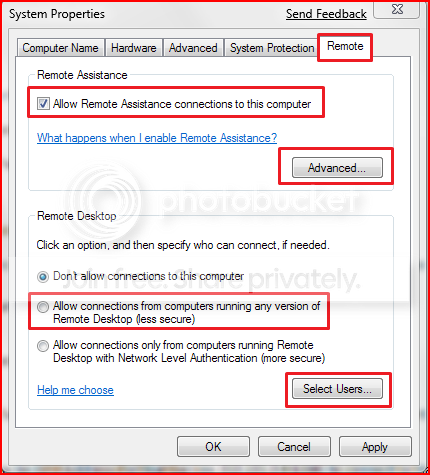
With Windows 7 the settings seem to overlap a bit, notice the remote assitance setting there at the top. The settings seem to overlap at a certain point but I think the remote assistance allows more freedom and the person is supposed to be able to see what your doing and chat during the process. This setting wasn't shown in that turorial for some reason.

Either way this setting will need to be enabled for remote assistance to work. Read down below for the Windows 7 approved method for using remote assistance. Apparently it will not work unless you are using the "Home" network setting which is only used for Homegroup networking.

SystemProperties.png


For Windows 7 there are a couple ways to use Remote Assistance, you can use "easy connect" or you can use an invitation file.

There are also a couple of things that need to occur before Remote assistance will work correctly. Read below in bold, I believe that is the problem most are having.

Ensure that your network location is set to 'Home' in Network and Sharing Center'.

That means if you are using either Workgroup or public file sharing that Remote Assistance won't work. Kind of an important detail if you ask me.

Microsoft provides a tool for testing your router for Peer to Peer technologies such as:
- Universal Plug and Play
- Teredo (Network Address Translator)

You can listen to this tutorial and choose which ever method works best in the link below.
The link that Stormy posted shows this pretty well.
http://windows.microsoft.com/en-us/...puter-problem-using-Windows-Remote-Assistance

Your routers must support the Peer Name Resolution Protocol in order to use Remote Assistance Easy Connect over the internet.

http://windows.microsoft.com/en-US/windows7/Why-cant-I-use-Easy-Connect-with-Windows-Remote-Assistance

Run the Internet Connect Evaluation Tool to see if your routers provide the needed PNRP support.

If your routers don't support PNRP work arounds might include...

Upgrading the router firmware. < first thing I mentioned
Purchasing a new router.
Using a different method for the Remote Assistance invitation, ie. the Invitaion File method for example.
Use a third-party program like TeamViewer, free for personal use.
 
Last edited:

My Computer My Computer

Computer type
PC/Desktop
Computer Manufacturer/Model Number
Home built
OS
Windows 7 Ult, Windows 8.1 Pro,
CPU
Q9650-4.275GHz, E8600 4.5GHz, E6750-3.8GHz
Motherboard
Evga 780i FTW
Memory
G.Skill PC2 9600 1200Mhz 5 5 5 15 2T
Graphics Card(s)
GTX480
Sound Card
Asus Xonar D2
Monitor(s) Displays
HannsG
Screen Resolution
1680X1050
Hard Drives
GSkill Phoenix Pro 120GB SSD
PSU
ThermalTake Toughpower 1000Watt modular
Case
ThermalTake XaserV
Cooling
Xigmatek S1283
Keyboard
Logitech G15
Mouse
Logitech G9
Internet Speed
T1
With remote assitance they should be able to see what your doing which might come in handy.
They can and do. Fun when you're the one controlling and they won't let go of their mouse.

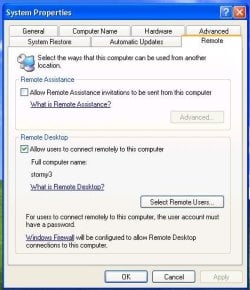
That Remote tab hasn't changed too much since XP,

remote.JPG

I have a feeling in JustWatching's case the router's firewall is blocking port 3389, and has UPnP disabled in the router. If it is UPnP disabled he needs to either enable it or add a firewall rule to allow that port.
 

My Computer My Computer

Computer type
PC/Desktop
Computer Manufacturer/Model Number
Me
OS
Win 7 Ultimate x64
CPU
FX-8350 @ 4.6 GHz so far
Motherboard
Asus M5A97 EVO
Memory
ADATA XPG V1 Series Black 8GB DDR3 1600
Graphics Card(s)
Sapphire R9 270x Dual-X
Sound Card
Xonar DGX w/ Corsair Vengence 1300
Monitor(s) Displays
Acer S232HL Abid
Screen Resolution
1920x1080
Hard Drives
120 GB OCZ Vertex 3
500 GB Seagate 7200.12
PSU
Antec Earthwatts 650W Green
Case
Antec Three Hundred
Cooling
Cooler Master 212 EVO
Keyboard
Logitech G510
Mouse
Logitech G500s
Internet Speed
35000/3000
With remote assitance they should be able to see what your doing which might come in handy.
They can and do. Fun when you're the one controlling and they won't let go of their mouse.

That Remote tab hasn't changed too much since XP,

View attachment 42820

I have a feeling in JustWatching's case the router's firewall is blocking port 3389, and has UPnP disabled in the router. If it is UPnP disabled he needs to either enable it or add a firewall rule to allow that port.

I want to try this just to have a mouse control fight with someone LOL.

The firewall port should be open with that one setting according to the tutorial. Of course if he is using an AV software all bets are off on that port still being open so you could be right.

I think that because this will only work with the "Home" network setting, that pretty much anyone using Workgroup or public sharing won't be able to get Remote Assistance to work for them. Unless of course they re-setup the network using the Home network setting.

Kind of a pain because in order to share with different Op systems you need to use Workgroup or public file sharing.
 

My Computer My Computer

Computer type
PC/Desktop
Computer Manufacturer/Model Number
Home built
OS
Windows 7 Ult, Windows 8.1 Pro,
CPU
Q9650-4.275GHz, E8600 4.5GHz, E6750-3.8GHz
Motherboard
Evga 780i FTW
Memory
G.Skill PC2 9600 1200Mhz 5 5 5 15 2T
Graphics Card(s)
GTX480
Sound Card
Asus Xonar D2
Monitor(s) Displays
HannsG
Screen Resolution
1680X1050
Hard Drives
GSkill Phoenix Pro 120GB SSD
PSU
ThermalTake Toughpower 1000Watt modular
Case
ThermalTake XaserV
Cooling
Xigmatek S1283
Keyboard
Logitech G15
Mouse
Logitech G9
Internet Speed
T1
Ok found the UpnP on my router and enabled it, still does not work when i receive an invitation.


ran the microsoft internet connectivity evaluation tool and everything was supported except for Network Address Translator Type.--Not Supported

I have the most recent firmware i can have for my router.

Is there anything i can do to fix this or do i need a new router?

and my network is set as a HOME network, not WORK or PUBLIC


and the firewall on my router is disabled..
TIA
 

My Computer My Computer

Computer type
PC/Desktop
Computer Manufacturer/Model Number
Custom
OS
Windows 7 Ultimate x64
CPU
Intel Core i5-3350P Ivy Bridge Quad-Core 3.1GHzz
Motherboard
Asus P8H77-v
Memory
HyperX XMP 10th Anniversary Series 16GB
Graphics Card(s)
EVGA GeForce GTX 970 4GB
Sound Card
Onboard
Monitor(s) Displays
Acer S241HL 24", ASUS V238h 23"
Screen Resolution
1920x1080
Hard Drives
Kingston SSD 240GB
Samsung 2TB
PSU
XION AXP-700K14XE 700W ATX
Case
HEC 6C28BBX585 Black Steel ATX Mid Tower
Cooling
ZALMAN CNPS9500 AT 2 Ball CPU Cooling Fan/Heatsink
Keyboard
Logitech G710+
Mouse
Anker Wireless Vertical Mouse
Internet Speed
220/20
Antivirus
Webroot
Browser
Chrome
A new router should do it according to the technet advisor. Not many options left at this point.

I figured the router might be the problem right from the start but the firmware for your particular Linksys model is outdated and there doesn't look to be any recent updates for it.
 

My Computer My Computer

Computer type
PC/Desktop
Computer Manufacturer/Model Number
Home built
OS
Windows 7 Ult, Windows 8.1 Pro,
CPU
Q9650-4.275GHz, E8600 4.5GHz, E6750-3.8GHz
Motherboard
Evga 780i FTW
Memory
G.Skill PC2 9600 1200Mhz 5 5 5 15 2T
Graphics Card(s)
GTX480
Sound Card
Asus Xonar D2
Monitor(s) Displays
HannsG
Screen Resolution
1680X1050
Hard Drives
GSkill Phoenix Pro 120GB SSD
PSU
ThermalTake Toughpower 1000Watt modular
Case
ThermalTake XaserV
Cooling
Xigmatek S1283
Keyboard
Logitech G15
Mouse
Logitech G9
Internet Speed
T1
Ok found the UpnP on my router and enabled it, still does not work when i receive an invitation.


ran the Microsoft internet connectivity evaluation tool and everything was supported except for Network Address Translator Type.--Not Supported

I have the most recent firmware i can have for my router.

Is there anything i can do to fix this or do i need a new router?

and my network is set as a HOME network, not WORK or PUBLIC


and the firewall on my router is disabled..
TIA


So if you ran the Internet Connectivity Evaluation tool, and it Says NAT (Network Address Translation) is not supported it means that you might have a moderate to strict NAT (That's my guess), You can change this usually, by just forwarding the ports on your router. In this case you will need to forward ports 3389 TCP, and 3389 UDP..(Same ports but different protocols)

I have found your router and a step by step guide to help you forward the ports HERE..

Hope this Helps..and Happy Holidays.

EDIT: If this does not work, then I would go for chev65's idea...Also I noticed in the step by step guide They are using an older firmware version. Meaning that it may look different and things might be changed around...
 
Last edited:

My Computer My Computer

Computer Manufacturer/Model Number
HP Pavilion dv5 Notebook PC
OS
Windows Seven x64
CPU
2.2 GHz Dual Core
Motherboard
Quanta 3600
Memory
4GB
Graphics Card(s)
ATI Mobility RADEON HD 3470
Sound Card
ATI
Monitor(s) Displays
Laptop
Hard Drives
ATA Hitachi HTS543215 (5400RPM)
Case
Laptop
Cooling
Fan
Internet Speed
Basic DSL 1.5 up and Down
Would it help if someone could post a brand and model # of router that actually allows RA to work? It would be great if detailed router configuration arcana is included so that those of us who aren't network professionals could follow along.

I have tried the MS connectivity tool on three routers, and all fail at something.

Linksys WRT54GS v6 (several years old): UPnP test "not run", although it is certainly enabled in the router's config.

D-Link DIR615 (new, "Compatible with Win7"): NAT test "not supported" and UPnP test "not run".

D-Link DIR628 (new, compat. w/Vista and 7): same as above. Also, port 3389 forwarded.

At a complete loss about this. Thought I read somewhere that the MS connectivity tool for Vista doesn't work reliably in 7, but cannot remember for sure. This should be much easier than it is.

Maybe RA is only for IT pros, not normal home users. Sorry for the pessimism, but I'm getting increasingly frustrated.
 

My Computer My Computer

OS
Win7 Pro
Ok found the UpnP on my router and enabled it, still does not work when i receive an invitation.


ran the Microsoft internet connectivity evaluation tool and everything was supported except for Network Address Translator Type.--Not Supported

I have the most recent firmware i can have for my router.

Is there anything i can do to fix this or do i need a new router?

and my network is set as a HOME network, not WORK or PUBLIC


and the firewall on my router is disabled..
TIA


So if you ran the Internet Connectivity Evaluation tool, and it Says NAT (Network Address Translation) is not supported it means that you might have a moderate to strict NAT (That's my guess), You can change this usually, by just forwarding the ports on your router. In this case you will need to forward ports 3389 TCP, and 3389 UDP..(Same ports but different protocols)

I have found your router and a step by step guide to help you forward the ports HERE..

Hope this Helps..and Happy Holidays.

EDIT: If this does not work, then I would go for chev65's idea...Also I noticed in the step by step guide They are using an older firmware version. Meaning that it may look different and things might be changed around...

Well followed the step by step, fwd 3389 on BOTH tcp and udp. ran their port fwd checker tool and it says they are not open.


went into windows firewal advanced security and created two new rules one for tcp 3389 and one for udp 3389. port fwd checker still says it is not open.


i wil try a ra tomorrow if i can if not i will check chev's idea, wil hve to go back and see which post you were referring to.


i dunno tiger direct as a new netgeat N router for 25 bucks if all else fails...

thanks agin
 

My Computer My Computer

Computer type
PC/Desktop
Computer Manufacturer/Model Number
Custom
OS
Windows 7 Ultimate x64
CPU
Intel Core i5-3350P Ivy Bridge Quad-Core 3.1GHzz
Motherboard
Asus P8H77-v
Memory
HyperX XMP 10th Anniversary Series 16GB
Graphics Card(s)
EVGA GeForce GTX 970 4GB
Sound Card
Onboard
Monitor(s) Displays
Acer S241HL 24", ASUS V238h 23"
Screen Resolution
1920x1080
Hard Drives
Kingston SSD 240GB
Samsung 2TB
PSU
XION AXP-700K14XE 700W ATX
Case
HEC 6C28BBX585 Black Steel ATX Mid Tower
Cooling
ZALMAN CNPS9500 AT 2 Ball CPU Cooling Fan/Heatsink
Keyboard
Logitech G710+
Mouse
Anker Wireless Vertical Mouse
Internet Speed
220/20
Antivirus
Webroot
Browser
Chrome
Maybe RA is only for IT pros, not normal home users. Sorry for the pessimism, but I'm getting increasingly frustrated.


I dont buy that, i used it all the time with xp..granted the other user had to be xp as well but it worked flawlessly... with W7 i am supposed to be able to RA with any other version of windows.... i shall not rest till i get this damn thing to work LOL
 

My Computer My Computer

Computer type
PC/Desktop
Computer Manufacturer/Model Number
Custom
OS
Windows 7 Ultimate x64
CPU
Intel Core i5-3350P Ivy Bridge Quad-Core 3.1GHzz
Motherboard
Asus P8H77-v
Memory
HyperX XMP 10th Anniversary Series 16GB
Graphics Card(s)
EVGA GeForce GTX 970 4GB
Sound Card
Onboard
Monitor(s) Displays
Acer S241HL 24", ASUS V238h 23"
Screen Resolution
1920x1080
Hard Drives
Kingston SSD 240GB
Samsung 2TB
PSU
XION AXP-700K14XE 700W ATX
Case
HEC 6C28BBX585 Black Steel ATX Mid Tower
Cooling
ZALMAN CNPS9500 AT 2 Ball CPU Cooling Fan/Heatsink
Keyboard
Logitech G710+
Mouse
Anker Wireless Vertical Mouse
Internet Speed
220/20
Antivirus
Webroot
Browser
Chrome
Hi JustWatching,

Just out of curiosity do you use any other Third party Firewall or Anti-virus ?? If you have it's worth try in Selective Startup
 

My Computer My Computer

Computer Manufacturer/Model Number
Samsung NP550P5C-S02IN
OS
Windows 7 Ultimate - 64-bit | Windows 8 Pro - 64-bit
CPU
Intel® Core™ i7 Processor 3,610QM (2.30Hz, 6MB L3 Cach
Memory
8 GB
Graphics Card(s)
NVIDIA® GeForce® GT 650M 2GB Graphics, Optimus™ techno
Sound Card
SoundAlive™ JBL 3 Speakers (With sub-Woofer)
Monitor(s) Displays
39.62cm (15.6) SuperBright 300nit HD+ LED Display
Screen Resolution
1,600 x 900, Anti-Reflective
Hard Drives
1TB S-ATA II Hard Drive (5,400RPM)
Got Easy Connect working on my system

Justwatching,

Have been struggling with RA on my desktop. Discovered that it is working on my laptop (also Win7 Pro). Rooting around within networking settings, and after making sure my network type was set as "Home", I found one setting which differed between my laptop and desktop.

Network and Sharing Center > Change advanced sharing options (on left pane) > Public > Public folder sharing --on the lappy Turn on sharing so anyone...... was checked. On my desktop Turn off Public folder sharing was checked instead. After changing that one setting on the desktop, magically Easy Connect began working--my desktop will now find the "peer-to-peer network" when trying the Easy Connect option.:D I was easily able to use my laptop to "request" RA help from my desktop via Easy Connect, and vice versa. Would not work before. I have not been able to try a RA session to another computer across the net and behind its own router yet, but I suspect it will work now provided the other computer and router have appropriate settings.
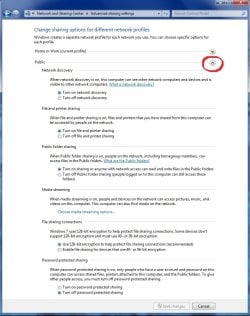
Hope this helps you.
 

My Computer My Computer

OS
Win7 Pro
I'm glad it's working for you kokopelli. That is the reason I posted all the info, because small things are usually what keeps this from working and I was covering all the basics start to finish for that very reason.

I wouldn't think that the public folder settings would affect RA when RA needs to have homegroup enabled in order to function correctly. That is very stange indeed and there is no reason it should be working like that. I'm glad you got it working none the less.

I have posted this page about a million times. Maybe that was a good idea after all.
 

Attachments

  • public sharing enabled all found.jpg
    public sharing enabled all found.jpg
    91.5 KB · Views: 270
Last edited:

My Computer My Computer

Computer type
PC/Desktop
Computer Manufacturer/Model Number
Home built
OS
Windows 7 Ult, Windows 8.1 Pro,
CPU
Q9650-4.275GHz, E8600 4.5GHz, E6750-3.8GHz
Motherboard
Evga 780i FTW
Memory
G.Skill PC2 9600 1200Mhz 5 5 5 15 2T
Graphics Card(s)
GTX480
Sound Card
Asus Xonar D2
Monitor(s) Displays
HannsG
Screen Resolution
1680X1050
Hard Drives
GSkill Phoenix Pro 120GB SSD
PSU
ThermalTake Toughpower 1000Watt modular
Case
ThermalTake XaserV
Cooling
Xigmatek S1283
Keyboard
Logitech G15
Mouse
Logitech G9
Internet Speed
T1
I'm glad it's working for you kokopelli. That is the reason I posted all the info, because small things are usually what keeps this from working and I was covering all the basics start to finish for that very reason.

I wouldn't think that the public folder settings would affect RA when RA needs to have homegroup enabled in order to function correctly. That is very stange indeed and there is no reason it should be working like that. I'm glad you got it working none the less.

Without understanding the nuances of networking, it seems to me to be a small detail, but it apparently was the one factor preventing my desktop from connecting to the Easy Connect network "out there". It was also preventing the Microsoft tool from properly surveying my router for the necessary supported features.
 

My Computer My Computer

OS
Win7 Pro
I'm glad it's working for you kokopelli. That is the reason I posted all the info, because small things are usually what keeps this from working and I was covering all the basics start to finish for that very reason.

I wouldn't think that the public folder settings would affect RA when RA needs to have homegroup enabled in order to function correctly. That is very stange indeed and there is no reason it should be working like that. I'm glad you got it working none the less.

Without understanding the nuances of networking, it seems to me to be a small detail, but it apparently was the one factor preventing my desktop from connecting to the Easy Connect network "out there". It was also preventing the Microsoft tool from properly surveying my router for the necessary supported features.

I'm glad you reported back in. The public file sharing settings page seems to be responsible for more than meets the eye. Apparently RA and Remote Desktop are controlled by the settings on that page.

I think we can officially mark this as solved.
 

My Computer My Computer

Computer type
PC/Desktop
Computer Manufacturer/Model Number
Home built
OS
Windows 7 Ult, Windows 8.1 Pro,
CPU
Q9650-4.275GHz, E8600 4.5GHz, E6750-3.8GHz
Motherboard
Evga 780i FTW
Memory
G.Skill PC2 9600 1200Mhz 5 5 5 15 2T
Graphics Card(s)
GTX480
Sound Card
Asus Xonar D2
Monitor(s) Displays
HannsG
Screen Resolution
1680X1050
Hard Drives
GSkill Phoenix Pro 120GB SSD
PSU
ThermalTake Toughpower 1000Watt modular
Case
ThermalTake XaserV
Cooling
Xigmatek S1283
Keyboard
Logitech G15
Mouse
Logitech G9
Internet Speed
T1
Back
Top