remote control of windows media center?

soureel

New member
Local time
12:48 AM
Messages
6
I'm researching what I need to use my desktop computer with my TV to watch and record OTA TV. I have everything figured out but the control of WMC. The computer on which WMC is located is in a different room that the TV. They are separated by two walls and approximately 20 feet. So an IR remote won't work. I want to be able to sit in the room with my TV and control WMC on my computer. What are my options- Iphone or Android apps? what else?
 

My Computer My Computer

At a glance

Windows 7 64bit
Computer type
PC/Desktop
OS
Windows 7 64bit
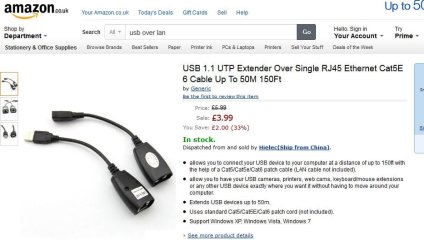
USB over LAN for the remote IR sensor ? I found a kit for £7 on Amazon.
 

My Computer My Computer

At a glance

Windows 7 pro x64 SP1Intel i7-2600k o/c to 4.6GHz8GB Mushkin 1866MHzNvidia GTX 750 Ti 2GB
Computer type
PC/Desktop
Computer Manufacturer/Model Number
self build
OS
Windows 7 pro x64 SP1
CPU
Intel i7-2600k o/c to 4.6GHz
Motherboard
MSI Z68-GD80
Memory
8GB Mushkin 1866MHz
Graphics Card(s)
Nvidia GTX 750 Ti 2GB
Sound Card
integrated
Monitor(s) Displays
Liyama ProLite 27"
Screen Resolution
1920*1080 px
Hard Drives
Seagate 2TB
PSU
Coolermaster GX 750W
Case
Antec 300 case + 5 fans
Cooling
Dark Rock Pro
Internet Speed
62Mbit down 18Mbit up
Antivirus
MSE
Browser
Firefox
Other Info
Blackgold BGT3650 Quad HD TV card. Also have various 3770 + 4770K render boxes.
The USB dongle will need to be about 20 feet from the computer. Will using a 20ft usb cable affect the signal?
 

My Computer My Computer

At a glance

Windows 7 64bit
Computer type
PC/Desktop
OS
Windows 7 64bit
I've never used one - I just did a search on Amazon. Apparently they knock the USB down to 1.1. I have a 25m Cat5e that works fine for regular network stuff at that distance, so read customer reviews . For a few quid its gotta be worth a dabble. Just depends if the IR sensor needs USB2. The sensor will need a few mA going down the CAT5, so there could be a slight voltage drop which may affect things.

usb_lan_amazon.JPG

also double check the male/female socket details
 

My Computer My Computer

At a glance

Windows 7 pro x64 SP1Intel i7-2600k o/c to 4.6GHz8GB Mushkin 1866MHzNvidia GTX 750 Ti 2GB
Computer type
PC/Desktop
Computer Manufacturer/Model Number
self build
OS
Windows 7 pro x64 SP1
CPU
Intel i7-2600k o/c to 4.6GHz
Motherboard
MSI Z68-GD80
Memory
8GB Mushkin 1866MHz
Graphics Card(s)
Nvidia GTX 750 Ti 2GB
Sound Card
integrated
Monitor(s) Displays
Liyama ProLite 27"
Screen Resolution
1920*1080 px
Hard Drives
Seagate 2TB
PSU
Coolermaster GX 750W
Case
Antec 300 case + 5 fans
Cooling
Dark Rock Pro
Internet Speed
62Mbit down 18Mbit up
Antivirus
MSE
Browser
Firefox
Other Info
Blackgold BGT3650 Quad HD TV card. Also have various 3770 + 4770K render boxes.
The budget models (as above) appear to be just balins that extend the USB. These require a dedicated CAT5 cable and can not be connected to a household LAN. The better models are actual network devices that transmit, up to USB-3, data over a LAN.

If your IR sensor is external to your PC, this may work. It won't work if the IR sensor is part of the PC like mine. You will also have to consider how the output from your PC gets to the TV. There's limits on HDMI cable length too.
 

My Computer My Computer

At a glance

Windows 7 Pro-x64i7-2600 3.4GHz - 3.8GHz Turbo8Gb - 2x4GB, Muskin 991770 PC3-1333Integrated Intel HD 2000
Computer type
PC/Desktop
Computer Manufacturer/Model Number
Built 2/11/2011
OS
Windows 7 Pro-x64
CPU
i7-2600 3.4GHz - 3.8GHz Turbo
Motherboard
Intel DH67BL-B3
Memory
8Gb - 2x4GB, Muskin 991770 PC3-1333
Graphics Card(s)
Integrated Intel HD 2000
Sound Card
Integrated Intel 10.1 HD, RealTek ALC892
Monitor(s) Displays
Asus LCD VH222H, Haier HL24XSL2a
Screen Resolution
1920x1080, 1920x1080
Hard Drives
Crucial SSD C300-128Gb,
Western Digital WD5002AALX - 500Gb,
Western Digital WD7501AALS - 750Gb
PSU
Seasonic 650W 80+ Gold Modular
Case
Rosewill Defender
Cooling
Stock CPU, Four 120mm case fans, PCH fan added
Keyboard
Logitech EX100 Y-RBH94 Wireless
Mouse
Logitech EX100 M-RCE95 Wireless
Internet Speed
3.0/1.5 Mbs
Antivirus
Microsoft Security Essentials
Browser
Microsoft Internet Explorer 11
Other Info
Antec Veris Premier-Multimedia IR Station,
Cyber Accoustics-3602 Speakers,
AFT XM-5U Card Reader,
Hauppauge TV-HVR-2250,
Sony LX300 USB Turntable
These require a dedicated CAT5 cable and can not be connected to a household LAN.

I wasn't suggesting plugging it into the home network. It does say extender over single cable in the ad.

Actually my suggestion was just to try the gadget, and if it don't work - its only cost a few quid. Apparently you can get active USB extenders for a bit more cash. I guess they work like other repeaters ie send some DC down the wire to a boost amp midway. A bit like using 2 cables and a powered hub.

The spec for USB is 5m - I have a 5m USB cable for my printer which works fine. AFAIK printers need a bit of handshaking down the wire, and a longer cable having signal delay could affect this. Whether a remote's IR sensor would be similarly affected I cannot say.

Maybe I just like buying cheap tatt that's made in China 'to see if it works' - I've often been pleasantly surprised eg my £5 spy camera disguised as a pen (eBay/China). Loads of fun !
 

My Computer My Computer

At a glance

Windows 7 pro x64 SP1Intel i7-2600k o/c to 4.6GHz8GB Mushkin 1866MHzNvidia GTX 750 Ti 2GB
Computer type
PC/Desktop
Computer Manufacturer/Model Number
self build
OS
Windows 7 pro x64 SP1
CPU
Intel i7-2600k o/c to 4.6GHz
Motherboard
MSI Z68-GD80
Memory
8GB Mushkin 1866MHz
Graphics Card(s)
Nvidia GTX 750 Ti 2GB
Sound Card
integrated
Monitor(s) Displays
Liyama ProLite 27"
Screen Resolution
1920*1080 px
Hard Drives
Seagate 2TB
PSU
Coolermaster GX 750W
Case
Antec 300 case + 5 fans
Cooling
Dark Rock Pro
Internet Speed
62Mbit down 18Mbit up
Antivirus
MSE
Browser
Firefox
Other Info
Blackgold BGT3650 Quad HD TV card. Also have various 3770 + 4770K render boxes.
One approach is to install a Windows Media Center Extender at the remote HDTV location, which is the standard configuration to deliver WMC content around the house to up to five extenders simultaneously active. This is essentially the "whole home" MOCA setup your cable/satellite company provides but running over your home LAN ethernet cable infrastructure instead. Then the extender connects to the HDTV via HDMI, just like a standard cable/satellite DVR/STB box would. This method supports completely independent HDTV watching at all five nodes simultaneously, and also is what is required to deliver copy-protected content from WMC to a remote HDTV.

So assuming you have an ethernet connection from the HTPC to the remote HDTV locations around the house, you can use XBox as an extender, or you can still find Linksys DMA2100 units (100% silent), and you can also buy Ceton Echo extenders which are currently available.


Alternatively, Ceton sells a piece of software ($5) named "My Media Center" that has an HTPC component as well as a smart phone app component. It allows you to use your smart phone as a WMC remote control, either from within your home WiFi network or from any remote location away from home. So you can "check in" on your recordings, set/delete recordings, etc. It's not for viewing TV... it's for remote control of WMC, either just to manage scheduled recordings or actually to be a realtime remote control... either for a specific extender (if active) or for the main WMC HTPC itself.

Works fantastic.
 

My Computer My Computer

At a glance

Windows 7 Pro x64 (1), Win7 Pro X64 (2)i5-3350p 3.1Ghz/6MB-cache (1); E8400 3.0Ghz/6...8GB PC3-12800 DDR3 (1); 4GB PC3-10600 DDR3 (2)ATI HD7750 (1), (see TV cards); ATI R7 250 (2)
Computer type
PC/Desktop
Computer Manufacturer/Model Number
Home-built, two systems (1) and (2)
OS
Windows 7 Pro x64 (1), Win7 Pro X64 (2)
CPU
i5-3350p 3.1Ghz/6MB-cache (1); E8400 3.0Ghz/6MB-cache (2)
Motherboard
ASUS P8Z77-V Pro (1); ASUS P5Q3 (2)
Memory
8GB PC3-12800 DDR3 (1); 4GB PC3-10600 DDR3 (2)
Graphics Card(s)
ATI HD7750 (1), (see TV cards); ATI R7 250 (2)
Sound Card
Realtek ALC892 HD Audio (1); Realtek ALC1200 HD Audio (2)
Monitor(s) Displays
Eizo HD2441W LCD, Eizo S2433W (1); Eizo 24" S2433W (2)
Screen Resolution
1920x1200, 1920x1200 (1); 1920x1200 (2)
Hard Drives
(1) 1TB SATA-II (7200RPM), 2x2TB SATA-III (7200RPM), 250GB SATA-III (10000RPM) for OS; 2x2TB external USB 3.0

(2) 320GB SATA-II (7200RPM), 750GB SATA-II (7200RPM), 150GB SATA-II (10000RPM) for OS; 2TB external USB 3.0
PSU
Nesteq ECS-6001 600W (1); Nesteq ECS-5001 500W (2)
Case
Acousti-Case 360 (1) and (2)
Cooling
Noctua NH-U12P SE2 for CPU, 2x120mm case fans (1) and (2)
Keyboard
IBM PS/2 (1) and (2)
Mouse
Logitech MX Revolution wireless (1); Microsoft wired (2)
Internet Speed
100mbps down / 10mbps up
Antivirus
Microsoft Security Essentials; Malwarebyte Anti-Malware Pro
Browser
Firefox
Other Info
Ceton InfiniTV 4-tuner cablecard-enabled TV card as well as Hauppauge HVR-2250 OTA/ATSC 2-tuner TV card in (1), running under Win7 WMC
This method supports completely independent HDTV watching at all five nodes simultaneously, and also is what is required to deliver copy-protected content from WMC to a remote HDTV.
@dsperber Very interesting, but how does a set up like you described cope with live TV for multiple clients ? I just watch/record free to air TV on my main pc, but I'm interested in how all this extender stuff works.
 

My Computer My Computer

At a glance

Windows 7 pro x64 SP1Intel i7-2600k o/c to 4.6GHz8GB Mushkin 1866MHzNvidia GTX 750 Ti 2GB
Computer type
PC/Desktop
Computer Manufacturer/Model Number
self build
OS
Windows 7 pro x64 SP1
CPU
Intel i7-2600k o/c to 4.6GHz
Motherboard
MSI Z68-GD80
Memory
8GB Mushkin 1866MHz
Graphics Card(s)
Nvidia GTX 750 Ti 2GB
Sound Card
integrated
Monitor(s) Displays
Liyama ProLite 27"
Screen Resolution
1920*1080 px
Hard Drives
Seagate 2TB
PSU
Coolermaster GX 750W
Case
Antec 300 case + 5 fans
Cooling
Dark Rock Pro
Internet Speed
62Mbit down 18Mbit up
Antivirus
MSE
Browser
Firefox
Other Info
Blackgold BGT3650 Quad HD TV card. Also have various 3770 + 4770K render boxes.
@dsperber Very interesting, but how does a set up like you described cope with live TV for multiple clients ? I just watch/record free to air TV on my main pc, but I'm interested in how all this extender stuff works.
Each extender is a LAN-based box connected using Ethernet cable or wireless (but wired is preferable) to your HTPC. And each extender is connected HDMI to the associated HDTV.

Then, each extender is really the functional equivalent of its own Windows Media Center! In fact it shows up in Windows as a "remote desktop connection", but it's conceptually a standalone WMC. In that way it has complete independent access to whatever WMC on the HTPC itself could do... watch live TV if an available TV tuner can be found, watch recorded TV (which does not require any TV tuner), watch videos or movies or any other WMC-available content, etc. It is a completely self-contained standalone mini-WMC, independent of every other extender you might also have and independent of what's going on at the HTPC itself. That's what "remote desktop" provides, and that's how extenders function.

Now if you're not using a Ceton cablecard-enabled TV tuner card (which would provide either 4 or 6 independent cable tuners) in your WMC HTPC, I would assume you have some other type of "free OTA" TV tuner card connected to your roof antenna. In my own setup I have both: (1) Ceton 4-tuner InfiniTV4 to support my Time Warner Cable channels, and (2) Hauppauge HVR-2250 2-tuner OTA/ATSC fed from my own roof antenna. So my WMC has 6 tuners available at any time, for combined simultaneous use for either (a) recording shows, or (b) viewing "live" TV. Again, watching previously recorded programs does not use any tuner.

With respect to a cablecard-enabled WMC setup, an extender (connected to HTPC via Ethernet cable) is the ONLY way to deliver "copy-protected" content (e.g. premium channels or any other basic cable channels which your cable system marks as "copy-once") to an external HDTV which is not connected directly to your HTPC via HDMI cable. Those are the DRM rules that Microsoft agreed to with CableLabs in order to be able to have WMC and Ceton (or Silicon Dust) deliver copy-protected encrypted content to a PC that uses a cablecard-enabled TV tuner for decryption.
 

My Computer My Computer

At a glance

Windows 7 Pro x64 (1), Win7 Pro X64 (2)i5-3350p 3.1Ghz/6MB-cache (1); E8400 3.0Ghz/6...8GB PC3-12800 DDR3 (1); 4GB PC3-10600 DDR3 (2)ATI HD7750 (1), (see TV cards); ATI R7 250 (2)
Computer type
PC/Desktop
Computer Manufacturer/Model Number
Home-built, two systems (1) and (2)
OS
Windows 7 Pro x64 (1), Win7 Pro X64 (2)
CPU
i5-3350p 3.1Ghz/6MB-cache (1); E8400 3.0Ghz/6MB-cache (2)
Motherboard
ASUS P8Z77-V Pro (1); ASUS P5Q3 (2)
Memory
8GB PC3-12800 DDR3 (1); 4GB PC3-10600 DDR3 (2)
Graphics Card(s)
ATI HD7750 (1), (see TV cards); ATI R7 250 (2)
Sound Card
Realtek ALC892 HD Audio (1); Realtek ALC1200 HD Audio (2)
Monitor(s) Displays
Eizo HD2441W LCD, Eizo S2433W (1); Eizo 24" S2433W (2)
Screen Resolution
1920x1200, 1920x1200 (1); 1920x1200 (2)
Hard Drives
(1) 1TB SATA-II (7200RPM), 2x2TB SATA-III (7200RPM), 250GB SATA-III (10000RPM) for OS; 2x2TB external USB 3.0

(2) 320GB SATA-II (7200RPM), 750GB SATA-II (7200RPM), 150GB SATA-II (10000RPM) for OS; 2TB external USB 3.0
PSU
Nesteq ECS-6001 600W (1); Nesteq ECS-5001 500W (2)
Case
Acousti-Case 360 (1) and (2)
Cooling
Noctua NH-U12P SE2 for CPU, 2x120mm case fans (1) and (2)
Keyboard
IBM PS/2 (1) and (2)
Mouse
Logitech MX Revolution wireless (1); Microsoft wired (2)
Internet Speed
100mbps down / 10mbps up
Antivirus
Microsoft Security Essentials; Malwarebyte Anti-Malware Pro
Browser
Firefox
Other Info
Ceton InfiniTV 4-tuner cablecard-enabled TV card as well as Hauppauge HVR-2250 OTA/ATSC 2-tuner TV card in (1), running under Win7 WMC
@dsperber thanks for info. One last stupid noob question - can the viewer watching TV on an extender press 'record' ?
 

My Computer My Computer

At a glance

Windows 7 pro x64 SP1Intel i7-2600k o/c to 4.6GHz8GB Mushkin 1866MHzNvidia GTX 750 Ti 2GB
Computer type
PC/Desktop
Computer Manufacturer/Model Number
self build
OS
Windows 7 pro x64 SP1
CPU
Intel i7-2600k o/c to 4.6GHz
Motherboard
MSI Z68-GD80
Memory
8GB Mushkin 1866MHz
Graphics Card(s)
Nvidia GTX 750 Ti 2GB
Sound Card
integrated
Monitor(s) Displays
Liyama ProLite 27"
Screen Resolution
1920*1080 px
Hard Drives
Seagate 2TB
PSU
Coolermaster GX 750W
Case
Antec 300 case + 5 fans
Cooling
Dark Rock Pro
Internet Speed
62Mbit down 18Mbit up
Antivirus
MSE
Browser
Firefox
Other Info
Blackgold BGT3650 Quad HD TV card. Also have various 3770 + 4770K render boxes.
@dsperber thanks for info. One last stupid noob question - can the viewer watching TV on an extender press 'record' ?
Absolutely.

And if you had up to five family members in up to five separate rooms watching "live" TV or recordings through up to five separate extenders and HDTV's, and you had sufficient tuners in your HTPC to support them all if they wanted to watch "live TV" (subtracting any tuners currently being used in the background to perform scheduled recordings) then they could each be doing whatever they wanted independently of anybody else.

And just like with your cable/satellite DVR, WMC provides a 30-minute accumulated buffer of whatever has been played so far in the current program on the current channel you're watching. So pushing the REC button will instantly start recording everything for the current program (up to the end-time as shown in the GUIDE), not only from right this instant but going back as far as the current program exists in this 30-minute buffer (but going back no further than the start of the current program).

In other words, WMC treats your push of the REC button as an in-flight command to instantly start to record the current program being watched, defined by its start/end time in the GUIDE, going back as far as possible in the currently active buffer and including that as well on the recording and ending when the GUIDE says it ends. This is exactly how the recording would have been made had you previously scheduled it, except that you're "coming in part way through the program" so it can start right now and will also pick up as much buffer for the current program as has accumulated before you decided to push that REC button.

This is the same as would happen if you were sitting at your HTPC and watching TV in a window on your monitor (or possibly on a second monitor), while you were working on something else in another window. Then you decided to push REC (using your WMC remote, pointed at a standard WMC IR receiver on your desk). Again, an extender is truly a mini-WMC in a box located somewhere else in your house. So whatever you can do on the HTPC itself, you can also do on any extender... including pushing the REC button while watching "live" TV.

And of course you can PAUSE while watching "live" TV (or watching while simultaneously making a recording, either scheduled or via REC), rewind, start over, skip forward again, etc., all of which has ZERO EFFECT on the ongoing recording which proceeds normally and uninterrupted in the background by whatever you happen to be doing in the foreground. You can even then decide to change channels and watch another program "live", with the previously triggered recording (from your push of the REC button while watching a different program) continues unbothered in the background. You can even power the extender off and go to bed, and the recording you triggered via REC will continue (being performed by the HTPC "server", of course) in the background, having nothing to do with the availability of the extender.

And you can stop (i.e. "abort") any recording currently in progress (either previously scheduled or via REC) just as easily, if you change your mind about it. Whatever portion has been made so far will end up in your list of recordings, and you can certainly watch that piece. Or, you can just delete it and never watch any of it. Again, this can be done from anywhere... on the HTPC (i.e. "server") itself or from any of the extenders (i.e. "clients") which are just mini-WMC boxes remotely placed around your house.

The one thing you can only do on the HTPC itself is to use the mouse or keyboard of your HTPC to control WMC, in addition to being able to control WMC using a standard WMC remote and standard WMC IR (USB) receiver. From an extender, which has no mouse or keyboard, you obviously can only use the remote which came with it (or, actually, any other WMC remote will also work). These are actually all using the same "standard WMC" IR codes defined by Microsoft, so you can find many manufacturers had at one time produced WMC remotes which are physically different but universally interchangeable. They obviously have different ergonomic designs, but they are all usable with all extenders or with the IR/USB receiver up at your HTPC. All WMC remotes can be used everywhere, no matter who made the remotes. They ALL have the same minimum set of WMC-related buttons, though some remotes may have additional buttons for multi-device control or extender-specific functions (e.g. powering on the extender and related TV), etc.

Most importantly, you can allocate however much disk storage space you want to your "\Recorded TV" folder, which is used to make new recordings. And then if you want to make more room for new recordings, you can move old recordings to any number of other additional folders on the disk drives of the HTPC (or on a network server!) which are defined as part of the "Recorded TV Library", used for playback and for the list of recordings available for playback.

So really you can have an infinite amount of storage for recordings to be played back, but are limited to one physical drive (ie. one folder) for storage of newly made recordings. But once the recordings have been made you can move them elsewhere, with them still being available for playback while making room for still more recordings.

 
Last edited:

My Computer My Computer

At a glance

Windows 7 Pro x64 (1), Win7 Pro X64 (2)i5-3350p 3.1Ghz/6MB-cache (1); E8400 3.0Ghz/6...8GB PC3-12800 DDR3 (1); 4GB PC3-10600 DDR3 (2)ATI HD7750 (1), (see TV cards); ATI R7 250 (2)
Computer type
PC/Desktop
Computer Manufacturer/Model Number
Home-built, two systems (1) and (2)
OS
Windows 7 Pro x64 (1), Win7 Pro X64 (2)
CPU
i5-3350p 3.1Ghz/6MB-cache (1); E8400 3.0Ghz/6MB-cache (2)
Motherboard
ASUS P8Z77-V Pro (1); ASUS P5Q3 (2)
Memory
8GB PC3-12800 DDR3 (1); 4GB PC3-10600 DDR3 (2)
Graphics Card(s)
ATI HD7750 (1), (see TV cards); ATI R7 250 (2)
Sound Card
Realtek ALC892 HD Audio (1); Realtek ALC1200 HD Audio (2)
Monitor(s) Displays
Eizo HD2441W LCD, Eizo S2433W (1); Eizo 24" S2433W (2)
Screen Resolution
1920x1200, 1920x1200 (1); 1920x1200 (2)
Hard Drives
(1) 1TB SATA-II (7200RPM), 2x2TB SATA-III (7200RPM), 250GB SATA-III (10000RPM) for OS; 2x2TB external USB 3.0

(2) 320GB SATA-II (7200RPM), 750GB SATA-II (7200RPM), 150GB SATA-II (10000RPM) for OS; 2TB external USB 3.0
PSU
Nesteq ECS-6001 600W (1); Nesteq ECS-5001 500W (2)
Case
Acousti-Case 360 (1) and (2)
Cooling
Noctua NH-U12P SE2 for CPU, 2x120mm case fans (1) and (2)
Keyboard
IBM PS/2 (1) and (2)
Mouse
Logitech MX Revolution wireless (1); Microsoft wired (2)
Internet Speed
100mbps down / 10mbps up
Antivirus
Microsoft Security Essentials; Malwarebyte Anti-Malware Pro
Browser
Firefox
Other Info
Ceton InfiniTV 4-tuner cablecard-enabled TV card as well as Hauppauge HVR-2250 OTA/ATSC 2-tuner TV card in (1), running under Win7 WMC
hey dsperber #1 WMC dude

just one (unimportant) thing - I'm pretty sure pressing rec on my remote doesn't record from the start of the buffer. It don't matter, but could that be because I have a 3rd party remote (actually Speed-Link from the days of Vista) not MS. And have you noticed how KB shortcuts work different to the WMC remote. FF-PLAY on remote winds back a few secs, but via KB just goes straight to play.

anyhows thanks for all your time

Jed, Manchester UK
 

My Computer My Computer

At a glance

Windows 7 pro x64 SP1Intel i7-2600k o/c to 4.6GHz8GB Mushkin 1866MHzNvidia GTX 750 Ti 2GB
Computer type
PC/Desktop
Computer Manufacturer/Model Number
self build
OS
Windows 7 pro x64 SP1
CPU
Intel i7-2600k o/c to 4.6GHz
Motherboard
MSI Z68-GD80
Memory
8GB Mushkin 1866MHz
Graphics Card(s)
Nvidia GTX 750 Ti 2GB
Sound Card
integrated
Monitor(s) Displays
Liyama ProLite 27"
Screen Resolution
1920*1080 px
Hard Drives
Seagate 2TB
PSU
Coolermaster GX 750W
Case
Antec 300 case + 5 fans
Cooling
Dark Rock Pro
Internet Speed
62Mbit down 18Mbit up
Antivirus
MSE
Browser
Firefox
Other Info
Blackgold BGT3650 Quad HD TV card. Also have various 3770 + 4770K render boxes.
just one (unimportant) thing - I'm pretty sure pressing rec on my remote doesn't record from the start of the buffer.
Hmmm... perhaps I should have double-checked myself to confirm that, before putting it in writing. Maybe I'm thinking about real cable DVR's (e.g. from Motorola) which I know DO work that way. That's why I simply assumed it worked the same with WMC.

But, I could be wrong, as you say. I will try it myself later.


It don't matter
True... not really a big deal either way.


but could that be because I have a 3rd party remote (actually Speed-Link from the days of Vista) not MS.
Unlikely. The REC button works with your remote, right? It's not the remote that is determining whether or not there's a buffer accumulation which should also be recorded... it's WMC itself.

So if WMC is not written to record any buffer, then that's the reason... not what remote ou're using.


And have you noticed how KB shortcuts work different to the WMC remote. FF-PLAY on remote winds back a few secs, but via KB just goes straight to play.
These little anomalies are like "bloopers".

I wasn't actually aware of this as I always use the remote. So however far it goes (even if it "bounces back a few seconds" after skipping forward 29 seconds, which is the default forward-skip interval) I just know it went forward about 30 seconds or so, and that's "good enough".

I've changed the "skip back" interval (referred officially to as "instant replay interval") from the default 7 seconds to 12 seconds. 7 seconds is just too small for a back-skip to be useful.


anyhows thanks for all your time
Glad to get an opportunity to share the wonders of WMC with anyone interested. Believe me, my HTPC will be running Win7 for a very long time to come. I've got a 1.2TB primary "\Recorded TV" folder for new recordings (on an internal 7200rpm 2TB SATA6 drive with 64MB cache), and then additional folders on other storage drives where I sometimes copy recording for playback-only. For example there's no way all that's shown during the Olympics could possibly be recorded and then watched during the 16 days, and HUGE amounts of storage is required just to record everything. It then takes MONTHS to play it back.

Couldn't possibly do this with ordinary cable/satellite DVR's. Only WMC with "unlimited" disk storage can handle this task.
 

My Computer My Computer

At a glance

Windows 7 Pro x64 (1), Win7 Pro X64 (2)i5-3350p 3.1Ghz/6MB-cache (1); E8400 3.0Ghz/6...8GB PC3-12800 DDR3 (1); 4GB PC3-10600 DDR3 (2)ATI HD7750 (1), (see TV cards); ATI R7 250 (2)
Computer type
PC/Desktop
Computer Manufacturer/Model Number
Home-built, two systems (1) and (2)
OS
Windows 7 Pro x64 (1), Win7 Pro X64 (2)
CPU
i5-3350p 3.1Ghz/6MB-cache (1); E8400 3.0Ghz/6MB-cache (2)
Motherboard
ASUS P8Z77-V Pro (1); ASUS P5Q3 (2)
Memory
8GB PC3-12800 DDR3 (1); 4GB PC3-10600 DDR3 (2)
Graphics Card(s)
ATI HD7750 (1), (see TV cards); ATI R7 250 (2)
Sound Card
Realtek ALC892 HD Audio (1); Realtek ALC1200 HD Audio (2)
Monitor(s) Displays
Eizo HD2441W LCD, Eizo S2433W (1); Eizo 24" S2433W (2)
Screen Resolution
1920x1200, 1920x1200 (1); 1920x1200 (2)
Hard Drives
(1) 1TB SATA-II (7200RPM), 2x2TB SATA-III (7200RPM), 250GB SATA-III (10000RPM) for OS; 2x2TB external USB 3.0

(2) 320GB SATA-II (7200RPM), 750GB SATA-II (7200RPM), 150GB SATA-II (10000RPM) for OS; 2TB external USB 3.0
PSU
Nesteq ECS-6001 600W (1); Nesteq ECS-5001 500W (2)
Case
Acousti-Case 360 (1) and (2)
Cooling
Noctua NH-U12P SE2 for CPU, 2x120mm case fans (1) and (2)
Keyboard
IBM PS/2 (1) and (2)
Mouse
Logitech MX Revolution wireless (1); Microsoft wired (2)
Internet Speed
100mbps down / 10mbps up
Antivirus
Microsoft Security Essentials; Malwarebyte Anti-Malware Pro
Browser
Firefox
Other Info
Ceton InfiniTV 4-tuner cablecard-enabled TV card as well as Hauppauge HVR-2250 OTA/ATSC 2-tuner TV card in (1), running under Win7 WMC
My experience is the live tv buffer is tossed when record button pressed.
Why?
It is a feature, not a bug.
I suppose the designers think you want to start from when you hit the record button.
 

My Computer My Computer

At a glance

Windows 7 Ultimate x64
OS
Windows 7 Ultimate x64
Ditto. WMC starts recording when you press Record. Which, when you think about it, is correct. What's been shown up to that point is not. Makes sense but I've been irritated by it before. :)

What would really be nice is if it worked like security camera systems. These record a buffer 24/7. When an alarm (motion) is triggered, the "pre-record" buffer for that camera is saved for up to a specified time (usually up to 10 minutes). So not only do you get the live recording but also up to 10 minutes before the event occurred. In WMC, the buffer exists already. You can see it moved to the Recycle Bin after you close it. If I'm watching a program then decide to record it, it would be easy to just include the entire program for the time slot. There's been a number of times I was watching a program and got called away or had numerous interruptions and wanted to see it from the start. But...not to be. :(
 

My Computer My Computer

At a glance

Windows 7 Pro-x64i7-2600 3.4GHz - 3.8GHz Turbo8Gb - 2x4GB, Muskin 991770 PC3-1333Integrated Intel HD 2000
Computer type
PC/Desktop
Computer Manufacturer/Model Number
Built 2/11/2011
OS
Windows 7 Pro-x64
CPU
i7-2600 3.4GHz - 3.8GHz Turbo
Motherboard
Intel DH67BL-B3
Memory
8Gb - 2x4GB, Muskin 991770 PC3-1333
Graphics Card(s)
Integrated Intel HD 2000
Sound Card
Integrated Intel 10.1 HD, RealTek ALC892
Monitor(s) Displays
Asus LCD VH222H, Haier HL24XSL2a
Screen Resolution
1920x1080, 1920x1080
Hard Drives
Crucial SSD C300-128Gb,
Western Digital WD5002AALX - 500Gb,
Western Digital WD7501AALS - 750Gb
PSU
Seasonic 650W 80+ Gold Modular
Case
Rosewill Defender
Cooling
Stock CPU, Four 120mm case fans, PCH fan added
Keyboard
Logitech EX100 Y-RBH94 Wireless
Mouse
Logitech EX100 M-RCE95 Wireless
Internet Speed
3.0/1.5 Mbs
Antivirus
Microsoft Security Essentials
Browser
Microsoft Internet Explorer 11
Other Info
Antec Veris Premier-Multimedia IR Station,
Cyber Accoustics-3602 Speakers,
AFT XM-5U Card Reader,
Hauppauge TV-HVR-2250,
Sony LX300 USB Turntable
Back
Top