Remote control software ?

murphybro

New member
Local time
12:06 AM
Messages
20
Hi. Can anyone recommend any free remote control software to use across the web on a windows 7 pro machine ? I have used gotoassist in the past but its not fee.

Thanks in advance
 

My Computer

Computer type
PC/Desktop
OS
Microsoft Windows 7 Home Premium 64-bit 7600 Multiprocessor Free
CPU
Pentium(R) Dual-Core CPU T4400 @ 2.20GHz
Motherboard
Packard Bell SJV50MV
Memory
4.00 GB
Graphics Card(s)
(1) Mobile Intel(R) 4 Series Express Chipset Family (2) Mo
Sound Card
(1) Conexant High Definition Audio (2) Intel(R) High Defin
Screen Resolution
1366 x 768 x 32 bits (4294967296 colors) @ 59 Hz
Hard Drives
WDC WD5000BEVT-22A0RT0

My Computer

Computer type
PC/Desktop
Computer Manufacturer/Model Number
Golden Mk. I.4
OS
Windows 10 Pro x64 ; Xubuntu x64
CPU
Intel i7 860 @ 2.80 GHz O/C'ed to 4.0GHz
Motherboard
Gigabyte P55A-UD3R Rev.1. Award BIOS F13
Memory
16GB Corsair Vengance DDR3 @ 661 MHz Dual Channel (9-9-9-24)
Graphics Card(s)
EVGA NVidia GTX 560 1024MB
Sound Card
Realtek Integrated
Monitor(s) Displays
Dual Samsung SyncMaster 2494HS
Screen Resolution
1920*1080 and 1920*1080
Hard Drives
1*Samsung 840 EVO 120GB SSD;
1*OCZ Vertex 2 60GB SSD;
2*Samsung F3 SpinPoint 1TB in RAID0;
1*Samsung F1 SpinPoint 1TB;
2*Western Digital 1TB External USB 3.0
1*Western Digital 500GB External USB 3.0
1*Seagate 500GB External USB 2.0
PSU
Thermaltake ToughPower QFan 750W
Case
Thermaltake Element S VK60001W2Z
Cooling
Corsair H60 Water Cooling, 2*230mm and 2*80mm case fans
Keyboard
Logitech G110
Mouse
Logitech MX518
Thanks golden will give it a go
 

My Computer

Computer type
PC/Desktop
OS
Microsoft Windows 7 Home Premium 64-bit 7600 Multiprocessor Free
CPU
Pentium(R) Dual-Core CPU T4400 @ 2.20GHz
Motherboard
Packard Bell SJV50MV
Memory
4.00 GB
Graphics Card(s)
(1) Mobile Intel(R) 4 Series Express Chipset Family (2) Mo
Sound Card
(1) Conexant High Definition Audio (2) Intel(R) High Defin
Screen Resolution
1366 x 768 x 32 bits (4294967296 colors) @ 59 Hz
Hard Drives
WDC WD5000BEVT-22A0RT0
Hi. Can anyone recommend any free remote control software to use across the web on a windows 7 pro machine ? I have used gotoassist in the past but its not fee.

Thanks in advance

You can easily get your computer infected with a trojan with TeamViewer.

Consider other software, like Remote Utilities or Radmin.

Nonsense! Assuming the computer you are connected to has malware in the first place (as was the case you linked to), TeamViewer is no more susceptible than any other remote connection software.

TeamViewer is FREE, unlike the trial software you recommend, and is highly recommended here.
 

My Computer

Computer type
PC/Desktop
Computer Manufacturer/Model Number
Golden Mk. I.4
OS
Windows 10 Pro x64 ; Xubuntu x64
CPU
Intel i7 860 @ 2.80 GHz O/C'ed to 4.0GHz
Motherboard
Gigabyte P55A-UD3R Rev.1. Award BIOS F13
Memory
16GB Corsair Vengance DDR3 @ 661 MHz Dual Channel (9-9-9-24)
Graphics Card(s)
EVGA NVidia GTX 560 1024MB
Sound Card
Realtek Integrated
Monitor(s) Displays
Dual Samsung SyncMaster 2494HS
Screen Resolution
1920*1080 and 1920*1080
Hard Drives
1*Samsung 840 EVO 120GB SSD;
1*OCZ Vertex 2 60GB SSD;
2*Samsung F3 SpinPoint 1TB in RAID0;
1*Samsung F1 SpinPoint 1TB;
2*Western Digital 1TB External USB 3.0
1*Western Digital 500GB External USB 3.0
1*Seagate 500GB External USB 2.0
PSU
Thermaltake ToughPower QFan 750W
Case
Thermaltake Element S VK60001W2Z
Cooling
Corsair H60 Water Cooling, 2*230mm and 2*80mm case fans
Keyboard
Logitech G110
Mouse
Logitech MX518
Nonsense! Assuming the computer you are connected to has malware in the first place (as was the case you linked to), TeamViewer is no more susceptible than any other remote connection software.

Because of it's popularity it is more susceptible to be attacked/used by malware.

TeamViewer is FREE, unlike the trial software you recommend, and is highly recommended here.

Remote Utilities is also free for personal use and doesn't show any annoying "Buy me" banners like TeamViewer does. As for Radmin, it's indeed only available as a trial.

Finally, there is also another great FREE alternative like LogMeIn Free.
 

My Computer

OS
Windows 7
If you have the ability to open ports at the controlled computer, maybe the built-in remote desktop is a valid alterntive (not exactly "free" really, but comes include into the cost of Windows).

Another choice can be to use Hamachi (https://secure.logmein.com/products/hamachi/download.aspx) to setup a VPN between the machines, then use just remote desktop or direct file sharing as if yuo were on the network. That doesn't require a forwarded port, and the extra encryption is always nice over internet.
 

My Computer

Computer type
Laptop
Computer Manufacturer/Model Number
Toshiba Sattelite A665-S6092
OS
Windows 7 Ultimate x64
CPU
Intel Core i7-740QM
Memory
8 GB DDR3
Graphics Card(s)
NVIDIA GeForce 330GT
Screen Resolution
1366x768
Hard Drives
Samsung 840 SSD 500GB
1TB USB3 external HD
Cooling
Coolermaster Notepal U3 notebook cooling pad
Internet Speed
3mbps ASDL
Antivirus
ClamWin 0.98.7
Browser
Opera 12.17 x86 (main), Firefox 38 (sec), IE11 (last resort)

My Computer

Computer type
PC/Desktop
Computer Manufacturer/Model Number
Built them myself, Science Experiments !
OS
Win7 Enterprise, Win7 x86 (Ult 7600), Win7 x64 Ult 7600, TechNet RTM on AMD x64 (2.8Ghz)
CPU
AMD fx8350 4ghz, AMD-32 2400mhz, AMD-64 3200mhz, AMDx64 2.8G
Motherboard
SIS 755, ECS-K8M890M-M (Ult 7600), GigaByte & others
Memory
2gb, 4gb on the Ult 7600, 4gb on Technet RTM, 32gb on FX8350
Graphics Card(s)
Draw my own Graphics, several nVidia cards
Sound Card
on motherboard
Monitor(s) Displays
19" flat scr, 28" I-Inc widescr,22" Emprex Widescr, 23" Acer
Screen Resolution
1280 x 1024, 1440 x 900, 1920 x 1080
Hard Drives
6 pata Ide HD's & 2 Sata HD's
added 80gb external on Ult 7600 computer,
numerous extra 1tb, 2TB, 3Tb SATA HD's
A collection of ext HD Docks w/ HDs
PSU
430w, 550w, 600w, 700, 800, etc
Case
All Generic Full Towers
Cooling
Open Air & a few fans, some w/ colored LEDs
Keyboard
Compaq & Dell recycled from GoodWill
Mouse
Made in China Optical Wired Mouse
Internet Speed
Fast Cable InterNet
Antivirus
AVG Free on 24 different Desktops, NO Problems!
Browser
IE 8 is preferred, but use FireFox sometimes
Other Info
Linksys Routers, switches, & Hubs
Too Many USB Flash Drives to count, Biggest is 64GB !
Eight computers in my home network.
Sixteen computers at my business network.
Linked via TeamViewer !
Lots of old used spare computer parts everywhere!

My Computer

Computer type
PC/Desktop
OS
Windows 10 Home x64
CPU
INTEL Core i5-750 Quad-Core 3.37GHz
Motherboard
ASUS P7P55D
Memory
HyperX Fury Black Series 8GB (2 x 4GB) 1866Mhz
Graphics Card(s)
EVGA GeForce GTX 750 Superclocked 1GB 128-Bit GDDR5
Monitor(s) Displays
LG 32MA68HY 32" IPS
Screen Resolution
1920 x 1080
Hard Drives
Samsung 840 Evo 120GB, SEAGATE 500GB Barracuda® 7200.12, SATA 3 Gb/s, 7200 RPM, 16MB cache
PSU
ANTEC TruePower New TP-550, 80 PLUS, 550W
Case
ANTEC Three Hundred Illusion
Cooling
COOLER MASTER Hyper 212 Plus, 4 x 120mm 1 x 140mm Noctua's
Internet Speed
85 + Mbps
Antivirus
Avast
Browser
Vivaldi
~~~
Nonsense! Assuming the computer you are connected to has malware in the first place (as was the case you linked to), TeamViewer is no more susceptible than any other remote connection software.

TeamViewer is FREE, unlike the trial software you recommend, and is highly recommended here.
Maybe I'm just reading the article wrong, but that is not the infection method that Kaspersky labs mentions. You must visit an infected website and have a vulnerability that allows the drive by installation of a modified version of TeamViewer 6.


~~~
Because of it's popularity it is more susceptible to be attacked/used by malware.
~~~
Again, if I'm understanding the infection method correctly, then it has nothing to do with TeamViewer's popularity. A computer did not need to have TeamViewer installed in order for the TeamSpy group to infect it. They were installing an old version of TeamViewer onto computers and then adding their malware to allow for stealth connections. Let me repeat: the computers did not need to have TeamViewer installed in order to become infected. And nothing that I've read indicates that an infected TeamViewer computer can infect a clean TeamViewer computer during a remote control session.

While this was not an attack from a website to infect an existing installation of TeamViewer, that does seem possible. If you were to visit these infected websites, then you are just as likely to get infected with the installation of a full version of TeamViewer as any other computer user.

Sadly, the folks a TeamViewer have seen fit to allow one computer to run multiple version of the TeamViewer app at the same time. So you could have TeamViewer 8 installed and still get infected with this malware laden version of TeamViewer 6. And, until recently, the installation of a new version did not offer to uninstall the old versions. But TeamViewer is a mature product with a good team of programmers behind it; let's hope that they have already taken steps to prevent their products from being controlled by a malicious DLL.

I do like TeamViewer's method of "brute force" protection. [Exponentially longer waits before accepting another password guess. Although TeamViewer does not detail how they prevent that from being turned into a Denial of Service attack.] Remote Utilities claims to have protection against brute force and Denial of Service attacks, I just could not find any details about how they prevent such attacks so that I can decide if I think it is sufficient.

Remote Utilities is doing the same thing that TeamViewer. LogMeIn and other companies are doing: using the free labor of free users to perfect its product. Having a massive install base of free users gives these companies invaluable feedback on software conflicts, usage scenarios, configuration problems.... The free version of Remote Utilities is too limited for what I need, but it may work well for others. Unless I'm reading the feature set wrong, it appears that you cannot have multiple people connected to the same remote computer at the same time. Not many people need this, but I do.


~~~
Finally, there is also another great FREE alternative like LogMeIn Free.
I mainly use LogMeIn Free to restart a remote computer when TeamViewer has stopped responding. (Gasp, TeamViewer is not perfect, yet :-) In fact, it is locked up right now on this laptop; I'll have to "end task" it. This is the first time I've ever seen it do that locally. But I have seen remote computers lose a TeamViewer connection and then refuse to accept a new one. Hence my suggestion to have more than one way to connect.

LogMeIn Free has some nice security features to prevent the wrong people from connecting, but it adds a video driver to the remote computer and this can cause problems. Also, the free version does not let you transfer files or boot into the safe mode and still connect. Remotely connecting to a computer that is in the safe mode is a nice feature of TeamViewer.


If you have the ability to open ports at the controlled computer, maybe the built-in remote desktop is a valid alterntive (not exactly "free" really, but comes include into the cost of Windows).

Another choice can be to use Hamachi (https://secure.logmein.com/products/hamachi/download.aspx) to setup a VPN between the machines, then use just remote desktop or direct file sharing as if yuo were on the network. That doesn't require a forwarded port, and the extra encryption is always nice over internet.
Yes, the OP has W7 pro, but I'll go ahead and mention that only certain version of the Windows operating system allow for Remote Desktop Connections and the free version of Hamachi's VPN tool will not work well with Remote Desktop Connection unless the remote computer has a password AND is set to automatically log on using that password. The free version of Hamachi will not establish a connection to its servers unless a user is logged on.

It has been a while since I tested, but I think that disconnecting from a Remote Desktop Connection locks the computer in such a way as to cause the free version of Hamachi to disconnect the VPN session... so you cannot get back in.

Add to those problems the fact that the Hamachi VPN app has a tendency to turn itself off (especially on a computer that has come out of standby - but this can happen in other situations too). The support staff seems unwilling to work with me on this issue. And given the recent reduction in features for free users, I'm unwilling to give LogMeIn/Hamachi any more of my free time.

Version 1 did not do this; but version 2 does. I've seen this issue myself as well as in posts in their rather useless support forums. I've been using a script that I wrote to monitor Hamachi's status and to turn it back on and/or re-install the Hamachi service since that dies too. I have Hamachi installed on more than 40 computers and it has been a problem on each one of them at one time or another. I've been using Hamachi since before it was sold to LogMeIn (who ruined it).
/rant


I am a big user of TeamViewer. I have never had any problems with banner ads.

http://www.sevenforums.com/software/101318-teamviewer.html
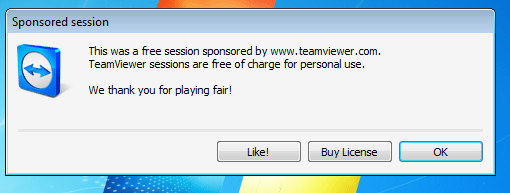
I would not call it a banner (as conradsallian did), I would call it a popup and it causes me problems.
TV-popup.png
If I forget to use the work around to prevent this from showing on a remote computer, I can expect a call asking why it is there. Keep in mind that I'm working on friends' computers while they sleep. They contact me with a problem and I remote in and work on it when I can. These users just cannot seem to remember that this popup is normal... that it is not a problem.

The work around is to disconnect, reconnect, dismiss the popup, disconnect. As long as the connection is brief enough, the popup will not appear.


As popular as TeamViewer is on this forum, I've still not gotten a simple:
Yes, I see this too
or
No, TeamViewer works as expected
In this thread...
http://www.sevenforums.com/software...ssword-during-auto-reconnect.html#post2348530
I've been too lazy to contact TeamViewer about it.
And it does not bother me that much, yet.
They woke me up the last time that they called me back :-(


@OP,
If you need unattended remote access (e.g. no one is present at the remote computer), then I would suggest TeamViewer and at least one other Remote Administration Tool - LogMeIn Free is a good second method of connecting. TeamViewer also has a free app for a smartphone... which will let you control the remote computer, but it is more useful to just be able to see what the remote user is seeing while talking them thru the clicks that they need to make. You might want a 7" phablet with a connection that allows for voice and data at the same time for that :-)

If your goal is to help a remote user, then TeamViewer and LogMeIn are still good choices, but if you are controlling a remote computer where you might not want others to see what you are doing (e.g. working on a spreadsheet with personal financial data in it), then I'm not sure how to do that with these tools. Other forum members might know.

One final note: The folks at TeamViewer do monitor the connections to their servers. If they see several (maybe 6) computers connecting from the same IP address AND you use a TeamViewer account to connect to those computer - then your TeamViewer account is in danger of being flagged as being used for commercial usage. I've been thru this with charities that I support. The folks at TeamViewer have a narrow view of what non-profit usage is. I do not charge any of the organizations that I support. Anyway, LogMeIn is more charitable towards charities in their free version user agreements :-)

You do not need a free TeamViewer account in order to use TeamViewer for free; but having one adds some nice things.

 
Last edited:

My Computer

Computer type
Laptop
Computer Manufacturer/Model Number
Employer provided Dell Latitude
OS
W7 Pro SP1 64bit
CPU
i7
Memory
8GB
Graphics Card(s)
Intel HD Graphics
Hard Drives
crappy SSD
Antivirus
Employer mandated Symantec Endpoint Protection
Browser
Pale Moon 64bit, IE11 64bit & Chrome 64bit
Unless I'm reading the feature set wrong, it appears that you cannot have multiple people connected to the same remote computer at the same time. Not many people need this, but I do.

Actually you can. An unlimited number of remote viewers can connect to the same remote PC.

It's only that in the free edition the ability to set different permissions for all those users is turned off. So if you only use the free edition all the remote viewers will have the same set of rights/permissions.

but if you are controlling a remote computer where you might not want others to see what you are doing (e.g. working on a spreadsheet with personal financial data in it), then I'm not sure how to do that with these tools. Other forum members might know.

Blank remote screen is the answer. However, TeamViewer should have that feature, it's pretty basic.
 

My Computer

OS
Windows 7
Thanks for the reply, it is nice to have feedback from someone that uses an app instead of having to test everything out. As I installed Remote Utilities, I noticed that the EULA prevents free usage for non-profits :-(

TeamViewer does have a "show blank screen" option, when I tested it - it suggested that I install a video driver on the remote computer. I opted not to install same and the remote computer did not blank out. Opting to install it also failed to blank the remote monitor... but there is no feedback to me that the remote computer did not blank out as desired.
:-(

You might want to test screen blanking within Remote Utilities on any computer where it is important before relying on it. Like I mentioned, free users provide free labor for free testing.
 

My Computer

Computer type
Laptop
Computer Manufacturer/Model Number
Employer provided Dell Latitude
OS
W7 Pro SP1 64bit
CPU
i7
Memory
8GB
Graphics Card(s)
Intel HD Graphics
Hard Drives
crappy SSD
Antivirus
Employer mandated Symantec Endpoint Protection
Browser
Pale Moon 64bit, IE11 64bit & Chrome 64bit
Thanks for the reply, it is nice to have feedback from someone that uses an app instead of having to test everything out. As I installed Remote Utilities, I noticed that the EULA prevents free usage for non-profits :-(

That's because non-profits are normally funded anyway, even though they don't earn profits. If they pay for their rented office, computers or salary to their workforce, why shouldn't they pay for software? :)

Like I mentioned, free users provide free labor for free testing.

Yes, but most importantly they provide free publicity. Although if a tool is great for personal use does not necessarily mean it is great for commercial use, because the price and ongoing costs need to be factored in.
 

My Computer

OS
Windows 7
Many companies donate their free versions to non-profits, libraries, schools.... (It is good PR.) It is a relatively recent change that EULAs started explicitly excluding such usage. (That is bad PR.) I would have to buy the software and/or somehow split the cost across several charities that I donate time to. That won't be happening as log as there are still free options.
 

My Computer

Computer type
Laptop
Computer Manufacturer/Model Number
Employer provided Dell Latitude
OS
W7 Pro SP1 64bit
CPU
i7
Memory
8GB
Graphics Card(s)
Intel HD Graphics
Hard Drives
crappy SSD
Antivirus
Employer mandated Symantec Endpoint Protection
Browser
Pale Moon 64bit, IE11 64bit & Chrome 64bit
Many companies donate their free versions to non-profits, libraries, schools.... (It is good PR.) It is a relatively recent change that EULAs started explicitly excluding such usage. (That is bad PR.) I would have to buy the software and/or somehow split the cost across several charities that I donate time to. That won't be happening as log as there are still free options.

Have you ever asked TeamViewer or Remote Utilities to donate a commercial license to your charity? As the saying goes, you don't ask - you don't get. :)
 

My Computer

OS
Windows 7
TeamViewer said no. I've not asked Remote Utilities. I'm not sure why they would, since they changed the EULA for version 5.2 to prohibit such usage. The EULA for version 5.0 was not so explicit.

The TeamViewer folks raised a good point: they would not be giving the license to the charity to be installed on a computer owned or even controlled by that charity, they would be giving it to me to be installed on a computer that I do not own. I would need to get my employer to agree to any such license since they audit what is installed on the laptop that I use. I have permission for the free stuff that I install.
 

My Computer

Computer type
Laptop
Computer Manufacturer/Model Number
Employer provided Dell Latitude
OS
W7 Pro SP1 64bit
CPU
i7
Memory
8GB
Graphics Card(s)
Intel HD Graphics
Hard Drives
crappy SSD
Antivirus
Employer mandated Symantec Endpoint Protection
Browser
Pale Moon 64bit, IE11 64bit & Chrome 64bit
Back
Top