Remote Desktop Conection

kallib85

New member
Local time
1:01 PM
Messages
39
Location
Iceland
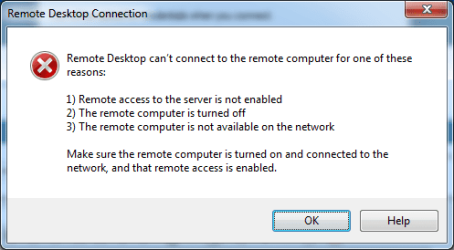
Hello, I'm trying to conect with RDC to other computer, and I allways get the error
RDC.png

Can someone help me.

And other thing, is it possible to connect to a Apple computer and send file to it,
 

My Computer

OS
Windows 7 Build 7201 X64 bit
CPU
Intel(R) Core(TM)2 Duo CPU Y7500 @ 2.20GHZ 2.20 GHz
Memory
3.00 GB
Graphics Card(s)
NVIDIA Quadro NVS 140M (Prerelease - WDDM 1.1)
Monitor(s) Displays
ThinkPad Display 1440x900
Keyboard
Standard PS/2 Keybord
Is Remote connections enable on both PC's, and are there passwords on both PC's?
And other thing, is it possible to connect to a Apple computer and send file to it,
Sorry I'm not a MAC guy, but you could try.
 
Last edited:

My Computer

Computer type
PC/Desktop
Computer Manufacturer/Model Number
twah
OS
Windows 7 Ultimate x64
CPU
AMD FX-8120
Motherboard
Biostar TA990FXE
Memory
8gb (4x2gb) DDR3 1600mHz
Graphics Card(s)
AMD 7850 2gb
Monitor(s) Displays
27"
Screen Resolution
1920x1080
Hard Drives
1TB HDD + 128GB SSD
Check a firewall is not blocking it and that internet connections not just network connections are allowed
 

My Computer

OS
7
rdc2.png
I have turened off firewall, and enabled to remote conect, but still I get the same error :(
 

My Computer

OS
Windows 7 Build 7201 X64 bit
CPU
Intel(R) Core(TM)2 Duo CPU Y7500 @ 2.20GHZ 2.20 GHz
Memory
3.00 GB
Graphics Card(s)
NVIDIA Quadro NVS 140M (Prerelease - WDDM 1.1)
Monitor(s) Displays
ThinkPad Display 1440x900
Keyboard
Standard PS/2 Keybord
you'll need tightvnc for the mac.
 

My Computer

OS
Windows 7077
you'll need tightvnc for the mac.

I'm going to put some data on the mac though the network at home, can I still use this tightvnc????
 

My Computer

OS
Windows 7 Build 7201 X64 bit
CPU
Intel(R) Core(TM)2 Duo CPU Y7500 @ 2.20GHZ 2.20 GHz
Memory
3.00 GB
Graphics Card(s)
NVIDIA Quadro NVS 140M (Prerelease - WDDM 1.1)
Monitor(s) Displays
ThinkPad Display 1440x900
Keyboard
Standard PS/2 Keybord
Do you know of a good way to do that, I have a file which is about 8GB and it is to big for a DVD and also to small for my smal usm wich is 4 gb, so if you know of any whay to transfer it, it would be lovely :)
 

My Computer

OS
Windows 7 Build 7201 X64 bit
CPU
Intel(R) Core(TM)2 Duo CPU Y7500 @ 2.20GHZ 2.20 GHz
Memory
3.00 GB
Graphics Card(s)
NVIDIA Quadro NVS 140M (Prerelease - WDDM 1.1)
Monitor(s) Displays
ThinkPad Display 1440x900
Keyboard
Standard PS/2 Keybord

My Computer

OS
Windows 7 Build 7201 X64 bit
CPU
Intel(R) Core(TM)2 Duo CPU Y7500 @ 2.20GHZ 2.20 GHz
Memory
3.00 GB
Graphics Card(s)
NVIDIA Quadro NVS 140M (Prerelease - WDDM 1.1)
Monitor(s) Displays
ThinkPad Display 1440x900
Keyboard
Standard PS/2 Keybord
Sæll Kalib85, sé að þú ert á Íslandi :D

Anyway we have to go on in English (Forum Rules)

For RDP have you

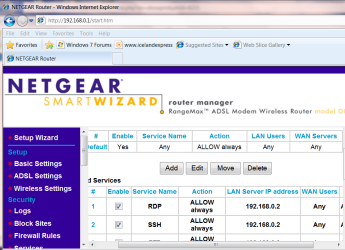
1) Opened the RDP Ports on your Router
2) Port Forwarded to the LOCAL machine on your LAN (the one you want to logon to)


Try also pinging your remote machine -- you might need to set the router to allow pinging from a remote machine.

Enc diagram.

BTW you can also if your remote machine has a dynamic IP use something like this

No-IP - Dynamic DNS, Static DNS for Your Dynamic IP

For Apple / W7 connectivity try SAMBA and FTP -- whould work fine. Post again if you still have probs with that

kv ;)
jimbo
 

Attachments

  • router.png
    router.png
    53.4 KB · Views: 23

My Computer

Computer type
PC/Desktop
Computer Manufacturer/Model Number
Custom built, several laptops HP/ASUS
OS
Linux CENTOS 7 / various Windows OS'es and servers
CPU
Intel i7 Intel i5
Memory
8GB, 16GB
Graphics Card(s)
On Motherboard
Sound Card
Realtek HD audio
Monitor(s) Displays
Apple Cinema display, Samsung LCD
Screen Resolution
1920 X 1080
Hard Drives
4 X 1TB SATA
Mouse
Toshiba wireless laser
Internet Speed
> 20MB up
Sæll Kalib85, sé að þú ert á Íslandi :D

Anyway we have to go on in English (Forum Rules)

For RDP have you

1) Opened the RDP Ports on your Router
2) Port Forwarded to the LOCAL machine on your LAN (the one you want to logon to)


Try also pinging your remote machine -- you might need to set the router to allow pinging from a remote machine.

Enc diagram.

BTW you can also if your remote machine has a dynamic IP use something like this

No-IP - Dynamic DNS, Static DNS for Your Dynamic IP

For Apple / W7 connectivity try SAMBA and FTP -- whould work fine. Post again if you still have probs with that

kv ;)
jimbo


Hmmmm, have this problem every where I try to conect with RDC, tried to use WinXP, and worked fine, but not in Win7

Yes, will try the apple thing, when I get apple again :D
 

My Computer

OS
Windows 7 Build 7201 X64 bit
CPU
Intel(R) Core(TM)2 Duo CPU Y7500 @ 2.20GHZ 2.20 GHz
Memory
3.00 GB
Graphics Card(s)
NVIDIA Quadro NVS 140M (Prerelease - WDDM 1.1)
Monitor(s) Displays
ThinkPad Display 1440x900
Keyboard
Standard PS/2 Keybord
Well, I haven't got any were near að solution on the RDC problem, is there anyone who can help me on that, or come with some suggtestions???
 

My Computer

OS
Windows 7 Build 7201 X64 bit
CPU
Intel(R) Core(TM)2 Duo CPU Y7500 @ 2.20GHZ 2.20 GHz
Memory
3.00 GB
Graphics Card(s)
NVIDIA Quadro NVS 140M (Prerelease - WDDM 1.1)
Monitor(s) Displays
ThinkPad Display 1440x900
Keyboard
Standard PS/2 Keybord
Have you given the local user a password?
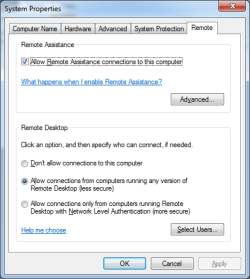
Have you selected the user in the posted screen with the button in the lower right ... (Select Users)?
 

My Computer

OS
W7RC
I've been able to connect to a Win7 box via a Powerbook G4 running RDC v2 wirelessly through a router. Don't forget to open port 3899 on your router. Check the setup on the Win7 side (see this post):
http://www.sevenforums.com/tutorials/3922-remote-desktop-connection-rdc-network.html

Make sure you enter some allowed users for RDC in Win7. Also, check the username/password - I hit this problem myself because I changed the username/pass when I set up Win7 and forgot to change it from my old RDC setup on the Mac.

-Frank
 

My Computer

OS
Windows 7 RC
Not sure if this your fix but I had problems with RDC as well. Turns out recent Nvidia graphics drivers were the issue. My fix required editing the registry, as always do at your own risk.

  1. Start, Run, type regedit and press OK
  2. Navigate to the Key: [HKEY_LOCAL_MACHINESYSTEMCurrentControlSetControlSession ManagerMemory Management]
  3. Right click in the Details pane and Select New –> DWORD Value
  4. Name it: SessionImageSize
  5. After it is created, double click on it and change its value to: 20
  6. Exit the Registry Editor and Reboot.

Read more: Nvidia Drivers Break Remote Desktop | Computing on Demand

I assume you have port forwarding setup in your router to forward to your machine.
 

My Computer

OS
Dual boot Windows 7 RC and Windows XP Pro SP3
CPU
AMD Phenom II X4 920
Motherboard
Gigabyte GA-MA770-UD3
Memory
G Skill 6gb PC2 6400
Graphics Card(s)
NVIDIA Geforce 9800 GT 512mb PCI-e2
Sound Card
MB Realtek HD
Monitor(s) Displays
LG W2600H and Syncmaster 205BW
Screen Resolution
1920 X 1200
Dameware NT Utilities (which includes the Mini Remote Control you could also download separately) is a great third party app for remote desktop.

Definitely worth looking into, whether Remote Desktop works well or not.

http://www.dameware.com/
 

My Computer

Computer Manufacturer/Model Number
self built
OS
7600.20510 x86
CPU
P4 550 3.4 GHz HT running at 3.5 GHz
Motherboard
MSI PM8M3-V (MS-7211 v1.x) Micro-ATX mainboard
Memory
OCZ 2 GB(2x1GB) DDR400mHz running @ 414 mHz
Graphics Card(s)
HIS Radeon HD 3850 IceQ 3 Turbo HDMI Dual DL-DVI AGP
Sound Card
MOTU Traveler firewire studio interface 192 kHz 24 bit
Monitor(s) Displays
22" widescreen Acer X223W LCD, 17" Compaq P75 CRT
Screen Resolution
1680x1050 and 1280x1024
Hard Drives
SATA I x2 WD, 400 GB and 120 GB, SATA 2 WD Caviar Black 1 TB
PSU
350W generic
Case
Cybertronpc, it glows blue
Cooling
stock cpu fan, Ice-Q 3 gpu and system, many case fans
Keyboard
Logitch Classical Keyboard 200
Mouse
Logitech Mediaplay cordless
Internet Speed
1792/448 kbits/sec
Other Info
SATA II PCI fake RAID adapter, 1 GB Readyboost, original ATI Remote Wonder (even works with WMC perfectly), Logitech Rumblepad 2 game controller x2
Back
Top