Solved Remote Desktop Connection works via WiFi, but not via ethernet

MetroBOS

New member
Local time
9:07 PM
Messages
23
I have a desktop and a laptop.

The desktop is connected to the internet using an ethernet cable.

When the laptop is connected using WiFi, I am able to make an RDC connection to it from my desktop.

When the laptop is connected using an ethernet cable, I am NOT able to make an RDC connection to it from my desktop. It gives the following error:

"Remote Desktop can’t connect to the remote computer for one of these reasons:

1) Remote access to the server is not enabled
2) The remote computer is turned off
3) The remote computer is not available on the network

Make sure the remote computer is turned on and connected to the network, and that remote access is enabled.
"

I know the laptop is on the network because it appears under my network list in Windows Explorer, on my desktop and on my laptop.

What can I do to make an RDC connection to the laptop when it's connected via ethernet?
 

My Computer My Computer

At a glance

Windows 7
Computer type
PC/Desktop
OS
Windows 7
There are two different network profiles on your laptop, one for wifi and one for Ethernet. Check the differences between the two. There has to be a setting that is wrong in your Ethernet protocol.
 

My Computer My Computer

At a glance

Linux Mint 18.2 xfce 64-bit (VMWare host) / W...Haswell4 GB
Computer type
PC/Desktop
Computer Manufacturer/Model Number
Dell
OS
Linux Mint 18.2 xfce 64-bit (VMWare host) / Windows 8.1 Pro 32-bit (VMWare guest)
CPU
Haswell
Memory
4 GB
Monitor(s) Displays
Acer 23"
Screen Resolution
1920 x 1080
Hard Drives
Two hard drives, 1TB each: One for Linux, one for my data.
Keyboard
IBM Model M
Antivirus
Sophos (Linux), Trend Micro (Windows)
Browser
Firefox, Opera
Other Info
I use Samba to share my data drive with the other computers at my house and with my guest session in VMWare Workstation Player.
Thanks. Do you know where I would go to check that?

I looked under Network & Sharing Center, then under Advanced Sharing Settings, and it lists 3 different network profiles - Home/Work, Public, and Domain. But I can't find anything that applies to wifi versus ethernet.
 

My Computer My Computer

At a glance

Windows 7
Computer type
PC/Desktop
OS
Windows 7
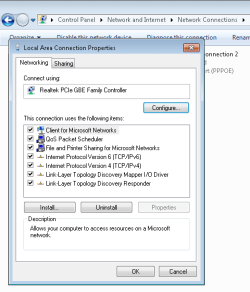
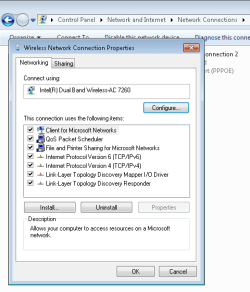
Network & Sharing Center / Change Adapter Settings. Your two adapters will be listed here. Right-click and choose Properties on each one to see the settings.
 

My Computer My Computer

At a glance

Linux Mint 18.2 xfce 64-bit (VMWare host) / W...Haswell4 GB
Computer type
PC/Desktop
Computer Manufacturer/Model Number
Dell
OS
Linux Mint 18.2 xfce 64-bit (VMWare host) / Windows 8.1 Pro 32-bit (VMWare guest)
CPU
Haswell
Memory
4 GB
Monitor(s) Displays
Acer 23"
Screen Resolution
1920 x 1080
Hard Drives
Two hard drives, 1TB each: One for Linux, one for my data.
Keyboard
IBM Model M
Antivirus
Sophos (Linux), Trend Micro (Windows)
Browser
Firefox, Opera
Other Info
I use Samba to share my data drive with the other computers at my house and with my guest session in VMWare Workstation Player.
I appreciate your help. I'm still stuck on this though so you'll have to excuse my ignorance.

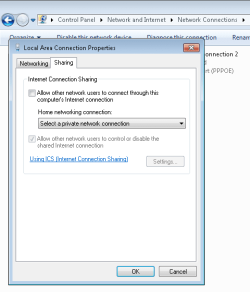
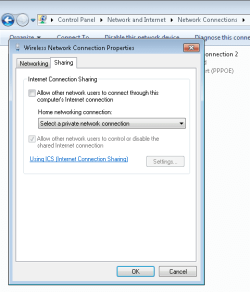
As far as I can tell, all settings are the same. I've attached screenshots.

I also tried going into the Sharing tab and changing the option in the Home Networking Connection box, but it doesn't seem to save. I press OK after changing it, but when I go back in again, it's back on "Select a private network connection".
 

Attachments

  • Local Networking.png
    Local Networking.png
    9.6 KB · Views: 12
  • Wireless Networking.png
    Wireless Networking.png
    9.7 KB · Views: 12
  • Local Sharing.png
    Local Sharing.png
    8.6 KB · Views: 12
  • Wireless Sharing.png
    Wireless Sharing.png
    11.9 KB · Views: 12

My Computer My Computer

At a glance

Windows 7
Computer type
PC/Desktop
OS
Windows 7
Sorry, I don't have an answer for this one.
 

My Computer My Computer

At a glance

Linux Mint 18.2 xfce 64-bit (VMWare host) / W...Haswell4 GB
Computer type
PC/Desktop
Computer Manufacturer/Model Number
Dell
OS
Linux Mint 18.2 xfce 64-bit (VMWare host) / Windows 8.1 Pro 32-bit (VMWare guest)
CPU
Haswell
Memory
4 GB
Monitor(s) Displays
Acer 23"
Screen Resolution
1920 x 1080
Hard Drives
Two hard drives, 1TB each: One for Linux, one for my data.
Keyboard
IBM Model M
Antivirus
Sophos (Linux), Trend Micro (Windows)
Browser
Firefox, Opera
Other Info
I use Samba to share my data drive with the other computers at my house and with my guest session in VMWare Workstation Player.
I was able to get it to work by using the machine's IP address instead of its name. Any idea what that means? Is that an indication that something is not set up properly?
 

My Computer My Computer

At a glance

Windows 7
Computer type
PC/Desktop
OS
Windows 7
The IP address is one way to specifically identify a computer. The name is another. I'm not sure why one works and the other doesn't; my guess is that, for RDC, the IP address is a better way than the computer name.
 

My Computer My Computer

At a glance

Linux Mint 18.2 xfce 64-bit (VMWare host) / W...Haswell4 GB
Computer type
PC/Desktop
Computer Manufacturer/Model Number
Dell
OS
Linux Mint 18.2 xfce 64-bit (VMWare host) / Windows 8.1 Pro 32-bit (VMWare guest)
CPU
Haswell
Memory
4 GB
Monitor(s) Displays
Acer 23"
Screen Resolution
1920 x 1080
Hard Drives
Two hard drives, 1TB each: One for Linux, one for my data.
Keyboard
IBM Model M
Antivirus
Sophos (Linux), Trend Micro (Windows)
Browser
Firefox, Opera
Other Info
I use Samba to share my data drive with the other computers at my house and with my guest session in VMWare Workstation Player.
Back
Top