
kerplunk17
New member
- Local time
- 10:41 AM
- Messages
- 4
So I am having an issue with Remote Desktop Connection. First, here is what I am running.
I am using my laptop to connect to my desktop upstairs.
The laptop is a Dell Inspiron E1505 Centrino Duo with 2 Gb of Ram. The laptop is running Windows 7 RC1 32 bit. I am connected wireless to my home network with a Linksys WRT54G router. IP is assigned using DHCP. This computer name is "Lappy"
The desktop is a Core 2 Quad with 8 Gb of ram running Windows 7 RC1 64 bit. This computer is connected to the WRT54G via ethernet. This computer name is "Dustin". I have enabled remote desktop connections to this computer, using the "more secure" option as both computers are running windows 7.
So, the first time I opened RDC on the Lappy, I connected to "Dustin" using my user name. It worked! Nice.
So When I am done I close the RDC window, and go about my business.
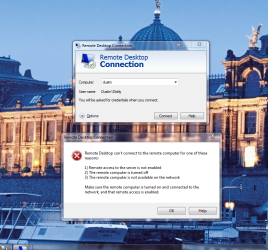
20 minutes later I decide I want to connect again, so I open RDC, and try and connect to "Dustin" again, however this time I get an error saying it can not connect to "Dustin" because the computer is off or not connected to the network.(see my attached screen shot). I did not change any settings.
So I run upstairs, and make sure RDC is still enabled on my box upstairs. It is. Nothing has changed. However I keep getting this error. Ok, an hour later I try again, note I still have not changed any settings, and it worked! Ok, awesome.
I go to sleep last night, get up today, try again, and I get the "can't connect" error again!
What is going on?
Please help.
-Dustin
I am using my laptop to connect to my desktop upstairs.
The laptop is a Dell Inspiron E1505 Centrino Duo with 2 Gb of Ram. The laptop is running Windows 7 RC1 32 bit. I am connected wireless to my home network with a Linksys WRT54G router. IP is assigned using DHCP. This computer name is "Lappy"
The desktop is a Core 2 Quad with 8 Gb of ram running Windows 7 RC1 64 bit. This computer is connected to the WRT54G via ethernet. This computer name is "Dustin". I have enabled remote desktop connections to this computer, using the "more secure" option as both computers are running windows 7.
So, the first time I opened RDC on the Lappy, I connected to "Dustin" using my user name. It worked! Nice.
So When I am done I close the RDC window, and go about my business.
20 minutes later I decide I want to connect again, so I open RDC, and try and connect to "Dustin" again, however this time I get an error saying it can not connect to "Dustin" because the computer is off or not connected to the network.(see my attached screen shot). I did not change any settings.
So I run upstairs, and make sure RDC is still enabled on my box upstairs. It is. Nothing has changed. However I keep getting this error. Ok, an hour later I try again, note I still have not changed any settings, and it worked! Ok, awesome.
I go to sleep last night, get up today, try again, and I get the "can't connect" error again!
What is going on?
Please help.
-Dustin
Attachments
My Computer
- OS
- Windows 7 RC1
- CPU
- Intel Core 2 Quad 9550
- Motherboard
- Gigabyte
- Memory
- 8 GB crucial DDR 2 1066
- Graphics Card(s)
- Geforce 9800 GTx
- Sound Card
- Onboard
- Monitor(s) Displays
- Samsung BW900
- Hard Drives
- WD 320 GB SATA 7200 (x1)
Segate Baracuda 7200.11 1 TB (x2)
- PSU
- 800 Watt
- Cooling
- Cooler Master V8

