Remote Desktop Connections

determined

Good Lookin'
Member
Local time
10:59 PM
Messages
47
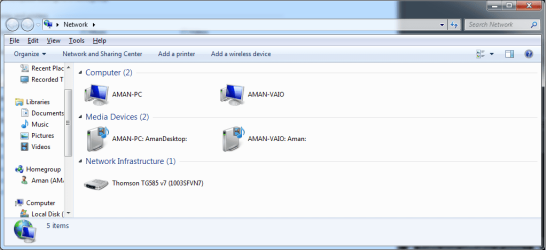
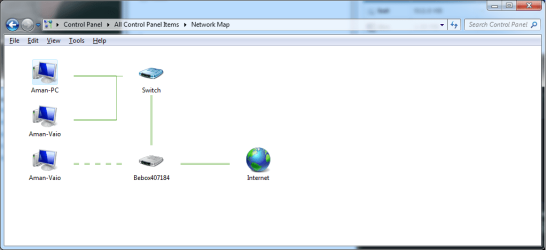
I can't find the computers of which I want to control when setting up the users.

The Locations doesn't show up the computers. Is there some step I have missed?:cry:
 

My Computer

OS
windows 7
CPU
Q6600
Motherboard
ASROCK GLAN 1333
Memory
4 GIG
Graphics Card(s)
9800 GT
Sound Card
CREATIVE SOUND BLASTER 24BIT
Monitor(s) Displays
X2
Hard Drives
500 SATA
250 IDE
PSU
650W SUPPLY
Case
CRAPPY
Cooling
TWO FANS ONE ON SIDE AND ONE AT REAR
What program are you using to connect to these computers?

Also what OS do the computers you are trying to connect to have?

Josh
 

My Computer

Computer type
PC/Desktop
Computer Manufacturer/Model Number
Custom Built
OS
Windows 7 Professional x64 SP1 ; Windows Server 2012 R2 Standard
CPU
Intel Core i5 2400 @ 3.10GHz
Motherboard
Foxconn H67MP-S/-V/H67MP
Memory
8.0GB DDR3 @ 665MHz (2GBx4)
Graphics Card(s)
AMD Radeon HD 6870
Sound Card
Realtek High Definition Audio
Monitor(s) Displays
AOC 2243W & SMB1930NW
Screen Resolution
1440x900 & 1920x1080
Hard Drives
977GB Seagate ST31000524AS ATA Drive (SATA)
250GB WD iSCSI attached Drive
PSU
750W Gaming PSU
Case
Novatech Night
Cooling
Fan
Keyboard
Dell Standard PS/2 Keyboard
Mouse
R.A.T 07 Gaming Mouse
Internet Speed
Download: 10 Mbps Ping: 30ms Upload: 0.81 Mbps
Browser
Google Chrome
Other Info
Optiarc DVD RW AD-5260S ATA Device
Both have Windows Ultimate.

I am trying to use the RDC connection settings on Windows.
 

My Computer

OS
windows 7
CPU
Q6600
Motherboard
ASROCK GLAN 1333
Memory
4 GIG
Graphics Card(s)
9800 GT
Sound Card
CREATIVE SOUND BLASTER 24BIT
Monitor(s) Displays
X2
Hard Drives
500 SATA
250 IDE
PSU
650W SUPPLY
Case
CRAPPY
Cooling
TWO FANS ONE ON SIDE AND ONE AT REAR
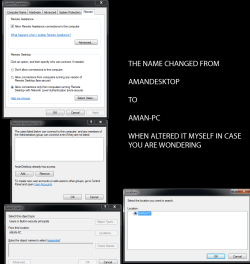
image may clear up what i am talking about in particular
 

Attachments

  • Untitled-1.png
    Untitled-1.png
    40.6 KB · Views: 22

My Computer

OS
windows 7
CPU
Q6600
Motherboard
ASROCK GLAN 1333
Memory
4 GIG
Graphics Card(s)
9800 GT
Sound Card
CREATIVE SOUND BLASTER 24BIT
Monitor(s) Displays
X2
Hard Drives
500 SATA
250 IDE
PSU
650W SUPPLY
Case
CRAPPY
Cooling
TWO FANS ONE ON SIDE AND ONE AT REAR
That is much better - I never did find out what the problem is with that - Are the computers on the same Workgroup?

If you can manually set the Desktop connection Users on each computer

Josh
 

My Computer

Computer type
PC/Desktop
Computer Manufacturer/Model Number
Custom Built
OS
Windows 7 Professional x64 SP1 ; Windows Server 2012 R2 Standard
CPU
Intel Core i5 2400 @ 3.10GHz
Motherboard
Foxconn H67MP-S/-V/H67MP
Memory
8.0GB DDR3 @ 665MHz (2GBx4)
Graphics Card(s)
AMD Radeon HD 6870
Sound Card
Realtek High Definition Audio
Monitor(s) Displays
AOC 2243W & SMB1930NW
Screen Resolution
1440x900 & 1920x1080
Hard Drives
977GB Seagate ST31000524AS ATA Drive (SATA)
250GB WD iSCSI attached Drive
PSU
750W Gaming PSU
Case
Novatech Night
Cooling
Fan
Keyboard
Dell Standard PS/2 Keyboard
Mouse
R.A.T 07 Gaming Mouse
Internet Speed
Download: 10 Mbps Ping: 30ms Upload: 0.81 Mbps
Browser
Google Chrome
Other Info
Optiarc DVD RW AD-5260S ATA Device
Hi there
quick question

are these computers all on the same LAN or are some connecting remotely.


For REMOTE connections two scenarios

1) You are trying to connect to a remote computer say from home

In this case you either need the remote computers host name or IP address and the REMOTE computer must have enabled Remote access allowed in the control panel.

2) You are trying to reach a computer say at home from work / Uni etc. You need also to allow remote access on your home computer. You will need also to have it at a FIXED IP address on your LAN say 192.168.0.8 or 192.168.2.8 .

You can do this via the network settings -- you can still leave DHCP enabled on the router but you need a fixed IP address on your LAN since you have to allow "Port forwarding" to this machine.

On the Router set port forwarding 3389 I think is the port for RDP - to be forwarded to the computer you want to access and enable the firewall to allow RDP.

We aren't quite done yet as you need to know the INTERNET IP address that your computer is seen at. This is the IP address that the service privider gives you when you use the internet -- and it's usually dynamic.

So you use a FREE service like no-ip at No-IP - Dynamic DNS, Static DNS for Your Dynamic IP.

What happens here is that you get assigned a FREE domain name like donkeys.net (for example) and every 30 mins a program on your PC checks your IP address and updates the IP address if needed so you can always access your PC via the domain name donkeys.net

So when you connect to donkeys.net you will actually be connected to YOUR ROUTER which port forwards 3389 to your local PC at home and you can get logged on.

Note there are mechanisms for connecting to more than one machine - but you have to change the default RDP ports on each machine and if you are in a place that blocks PORT 3389 (some work places block almost every port apart from SSH and HTTP / HTTPS) you can get round this by using a process known as "Tunnelling" by using a nice free program called PUTty.

However that's beyond the scope of this post -- once you've set up one machine to work you should be knowlegeable enough to figure the rest via google etc.

(Note the REMOTE computer must also be enabled for remote access and have a known domain / IP address\and IT must also have PORT 3389 forwarded to it by IT's ROUTER).

If you are using a work VPN then that's a different issue --simply logon with the userid / password you were assigned.

Cheers
jimbo

 

My Computer

Computer type
PC/Desktop
Computer Manufacturer/Model Number
Custom built, several laptops HP/ASUS
OS
Linux CENTOS 7 / various Windows OS'es and servers
CPU
Intel i7 Intel i5
Memory
8GB, 16GB
Graphics Card(s)
On Motherboard
Sound Card
Realtek HD audio
Monitor(s) Displays
Apple Cinema display, Samsung LCD
Screen Resolution
1920 X 1080
Hard Drives
4 X 1TB SATA
Mouse
Toshiba wireless laser
Internet Speed
> 20MB up

Attachments

  • network.png
    network.png
    27.6 KB · Views: 9
  • network2.png
    network2.png
    22.8 KB · Views: 8

My Computer

OS
windows 7
CPU
Q6600
Motherboard
ASROCK GLAN 1333
Memory
4 GIG
Graphics Card(s)
9800 GT
Sound Card
CREATIVE SOUND BLASTER 24BIT
Monitor(s) Displays
X2
Hard Drives
500 SATA
250 IDE
PSU
650W SUPPLY
Case
CRAPPY
Cooling
TWO FANS ONE ON SIDE AND ONE AT REAR
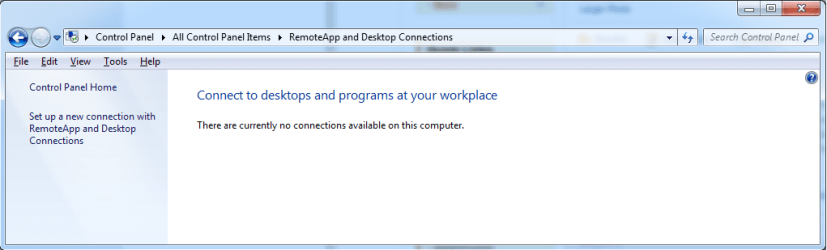
am i missing a step here?
 

Attachments

  • isthistheprobmaybe.png
    isthistheprobmaybe.png
    27.8 KB · Views: 6

My Computer

OS
windows 7
CPU
Q6600
Motherboard
ASROCK GLAN 1333
Memory
4 GIG
Graphics Card(s)
9800 GT
Sound Card
CREATIVE SOUND BLASTER 24BIT
Monitor(s) Displays
X2
Hard Drives
500 SATA
250 IDE
PSU
650W SUPPLY
Case
CRAPPY
Cooling
TWO FANS ONE ON SIDE AND ONE AT REAR
I'm only trying this at home... no need to do it at work.
 

My Computer

OS
windows 7
CPU
Q6600
Motherboard
ASROCK GLAN 1333
Memory
4 GIG
Graphics Card(s)
9800 GT
Sound Card
CREATIVE SOUND BLASTER 24BIT
Monitor(s) Displays
X2
Hard Drives
500 SATA
250 IDE
PSU
650W SUPPLY
Case
CRAPPY
Cooling
TWO FANS ONE ON SIDE AND ONE AT REAR
I still am having no luck doing this through a secured network, the other way works no problem.

I have a question, how do I stop the computer I am connecting to from going into hibernation or sleeping mode as I want to watch a movie on the connected, and edit stuff using the connecting computer.
 

My Computer

OS
windows 7
CPU
Q6600
Motherboard
ASROCK GLAN 1333
Memory
4 GIG
Graphics Card(s)
9800 GT
Sound Card
CREATIVE SOUND BLASTER 24BIT
Monitor(s) Displays
X2
Hard Drives
500 SATA
250 IDE
PSU
650W SUPPLY
Case
CRAPPY
Cooling
TWO FANS ONE ON SIDE AND ONE AT REAR
Set the power plan to "high performance", or edit the current power plan to disable all sleep/hibernate options in the "sleep" section.
 

My Computer

Computer type
PC/Desktop
Computer Manufacturer/Model Number
Custom
OS
Windows 10 Pro x64
CPU
Intel Core i7 4790K @ 4.5GHz
Motherboard
Asus Maximus Hero VII
Memory
32GB DDR3
Graphics Card(s)
Nvidia GeForce GTX970
Sound Card
Realtek HD Audio
Screen Resolution
1920x1200
Hard Drives
1x Samsung 250GB SSD
4x WD RE 2TB (RAIDZ)
PSU
Corsair AX760i
Case
Fractal Design Define R4
Cooling
Noctua NH-D15
Back
Top