
jyn84
New member
Hi,
I've searched the internet and I can't find a solution. I've long been using Windows 7 and never had any problems with Remote Desktop from outside my network however I don't use it frequently so it is several months since I last used it.
When I right click on Computer -> Properties and Remote Settings
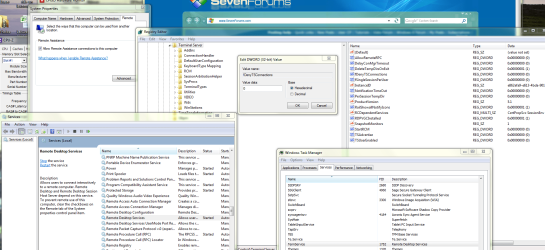
The lower part of the screen where you specify your remote desktop settings is missing. The issues that I've seen regarding this have two solutions typically.
1) The TermService is not running. It is my case.
2) That the DWord value should be set to 0 in the registry for tfDenyTSConnections
I have attached a screenshot confirming all this.
Anybody any advice as to what to try next?
I've searched the internet and I can't find a solution. I've long been using Windows 7 and never had any problems with Remote Desktop from outside my network however I don't use it frequently so it is several months since I last used it.
When I right click on Computer -> Properties and Remote Settings
The lower part of the screen where you specify your remote desktop settings is missing. The issues that I've seen regarding this have two solutions typically.
1) The TermService is not running. It is my case.
2) That the DWord value should be set to 0 in the registry for tfDenyTSConnections
I have attached a screenshot confirming all this.
Anybody any advice as to what to try next?
Attachments
My Computer
- Computer type
- PC/Desktop
- Computer Manufacturer/Model Number
- Custom Build
- OS
- Windows 7 Ultimate x64
- CPU
- AMD Athlon II x4 640
- Motherboard
- Gigabyte 8800GA-UDH3H Rev 2.1
- Memory
- 4x4GB DDR3 PC3-10666C9 1333MHz Low-Volt Dual Channel A-Data
- Graphics Card(s)
- MSI HD 6850 OC 1024MB GDDR5 PCI-Express
- Sound Card
- Onboard
- Monitor(s) Displays
- Samsung 32" TV connected via HDMI
- Screen Resolution
- 1920 x 1080
- Hard Drives
- Intel 120GB SSD
Samsung 1TB SATA
Samsung 2TB SATA3
Maxtor 160GB SATA
WD Caviar Green 2TB Internal Hard Drive SATA3
- PSU
- Antec TruePower New 650W Modular PSU
- Case
- Coolermaster Elite
- Cooling
- Stock with 5 fans
- Keyboard
- Logitech s510
- Mouse
- Logitech
- Internet Speed
- 56MBPS DOWN / 16MBPS UP
- Antivirus
- MSE
- Browser
- Chrome & Firefox