Remote Desktop Not Working with Local Printer

divrdrew

New member
Local time
6:49 PM
Messages
11
I am having trouble using a locally networked printer when I use Remote Desktop to connect to a Vista machine. Under the local resources tab for RD, I have checked printers. The only thing I can figure is that my printer is networked locally, not connected directly to my machine. Every time I try to print during my remote desktop session, I can't access my locally networked printer.

I installed the printer drivers on the remote computer and when I try to locate the printer, I get the following error: "Windows cannot connect to the printer. Server print spooler service is not running..." but the spooler service IS runing.

I also tried to plug in my printer to a local USB port this morning. Still would not work. I keep getting the same spooling error. The drivers are not corrupt, as others have indicated may be the cause. They work fine on my system locally with 7.

I also found a post elsewhere that discussed setting 'share permissions' and 'network permissons' to resovle the spooler error. Still no go.

Any advice would be greatly appreciated. I've spent a few hours on this one and am at a loss at this point.

Please help. I really need to print locally.
 

My Computer

OS
Windows 7
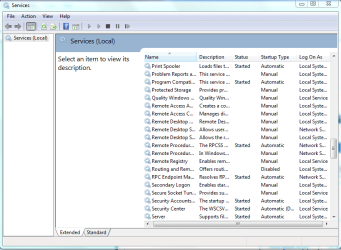
You might want to try and enable some of the remote services in the services window. Just type services in the command prompt and hit enter then scroll down to enable them.

I'm not sure which one would effect remote print spooling but changing them from manual to automatic might help.
 

Attachments

  • remote services control.PNG
    remote services control.PNG
    26.4 KB · Views: 3,750

My Computer

Computer type
PC/Desktop
Computer Manufacturer/Model Number
Home built
OS
Windows 7 Ult, Windows 8.1 Pro,
CPU
Q9650-4.275GHz, E8600 4.5GHz, E6750-3.8GHz
Motherboard
Evga 780i FTW
Memory
G.Skill PC2 9600 1200Mhz 5 5 5 15 2T
Graphics Card(s)
GTX480
Sound Card
Asus Xonar D2
Monitor(s) Displays
HannsG
Screen Resolution
1680X1050
Hard Drives
GSkill Phoenix Pro 120GB SSD
PSU
ThermalTake Toughpower 1000Watt modular
Case
ThermalTake XaserV
Cooling
Xigmatek S1283
Keyboard
Logitech G15
Mouse
Logitech G9
Internet Speed
T1
Thanks for the idea. Looked there for printer spooler but not other stuff. Found something called 'Remote Deskop Services UseMode Port Redirector' that appears to be responsible for my local ports showing on the remote machine when I'm using a RD connection. Can't connect to the remote system right now, but enabled the service and will see if that makes it work. Will post a follow up when I can.

UPDATE: Didn' work. Still got error messages when trying to locate the printer.
 
Last edited:

My Computer

OS
Windows 7
Solved

My problem was that the Vista remote system never saw local port that my printer was using for some reason. This was with it both networked and plugged in via USB port.

I finally figued it out after four days and many hours on the phone with Microsoft. Microsoft support claimed that it was related to my router settings, but I didn't believe it since the remote computer saw my iPhone just fine when it was connected locally. After simply playing around, here's what I found...it was actually quite basic!

On the remote system, when you try to add a 'local' printer, there's a drop down menu with a list of local ports that your remote system sees. Some of those will be on the remote system, but others will be on your local system. Make a note of the ones that are seen on your local system. In my case, LPT1 was not visible, but COM3 was.

Next, on your local system, in the settings for your functioning printer (Printer Properties, Ports Tab), there's a tick box that says "Enable Printer Pooling." Once you check that box, you can select multiple ports on your local machine. Here, you need to tick the box that your remote system is seeing (in my case, it's COM3), but make sure that your exisitng port remains checked as well (in my case, an IP port for my wireless router). Basically what you're doing is on your local system, you are pooling your exising printer setup with a port that can be seen by your remote system.

Then, on the remote system, install the printer drivers but don't select a port. Then go into Printers and add a printer. Select 'local' setup for that and when asked for the port, use the port you checked in the previous step on your local system (in my case, I selected COM3 on my local system). Select your printer from the list. It will ask if you want to use the exisiting drivers...say yes. Then print a test page to be sure that it works. Worked fine for me.

I simply can't believe how obvsious that solution was! If the remote system can't see the port you currently use, pool your printer setup with a port that it can see!
 

My Computer

OS
Windows 7
I need help

Hi,

I've tried your solution! But it didn't work.
My RD server is on Windows Seven and client on XP.
I can copy/paste from one to the other, but i can't print! On my remote system (7)
when I add a 'local' printer, there's a drop down menu with a list of local ports. I can see LPT1,2&3 and COM1,2,3,4 and 2 local ports XPS... & FILE.
On my local system, I check "Enable Printer Pooling." and I tick the box that my remote system is seeing (LPT1,2,3 and COM1,2,3,4).

Then, on the remote system, I install the printer drivers. Then I go into Printers and add a printer. I select 'local' setup for that and when asked for the port, I use the port I checked, like you said! But didn' work!

What can i do more?

Thanks.

Michel
 

My Computer

OS
XP
Okay the main thing for the printers is that it is installed on the network.

can you do us a favor...

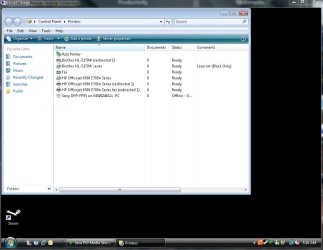
When you connect to the Vista computer. Can you pull up your printer's folder..

All the printers that are connected and if the RD is doing what it is suppose to be doing should add "redirect 1" to all your printers.... Umm wait a sec, i will do i to mines and show a picture.

What kind of printer are you using and are you using COM, LPT, USB or is it networked (tcp/ip)?
 

Attachments

  • Printers.JPG
    Printers.JPG
    68.3 KB · Views: 3,642

My Computer

Computer Manufacturer/Model Number
HP Pavilion Elite HPE-410f
OS
Windows 7 Ultimate x64
CPU
AMD Phenom x6 1045t
Motherboard
N/A
Memory
8 GB
Graphics Card(s)
ATI Radeon HD 5570
Sound Card
Realtek Highdefinition Audio / 5.1 Dolby Setup
Monitor(s) Displays
HP w2207h Widescreen
Screen Resolution
1680*1050
Hard Drives
1 TB (fixed), 320 Portable maxtor, Server Hard drives
PSU
350 Watt
Case
HP CASE
Cooling
Bass
Keyboard
Logitech MX 5500
Mouse
Logitech MX 5500
Internet Speed
ROAD RUNNER 16MB D/512 U
Thanks, i'm using with this printer USB(DOT4) and i've tried on network (tcp/ip).
I'm using Windows 7 (for RD server) and XP (for client) I can't see nothing. I've tried to access on my drive by checking local ressources... but don't appear! Only copy/paste work...
 

My Computer

OS
XP
Lets try something. May i ask... are you using a defined user name to connect to the remote or are you actually using a built in account like "administrator"


Try logging into the remote computer using the Administrator account if your not and since that is a main accoun. Lets see if its not just a security issue your running into.
 

My Computer

Computer Manufacturer/Model Number
HP Pavilion Elite HPE-410f
OS
Windows 7 Ultimate x64
CPU
AMD Phenom x6 1045t
Motherboard
N/A
Memory
8 GB
Graphics Card(s)
ATI Radeon HD 5570
Sound Card
Realtek Highdefinition Audio / 5.1 Dolby Setup
Monitor(s) Displays
HP w2207h Widescreen
Screen Resolution
1680*1050
Hard Drives
1 TB (fixed), 320 Portable maxtor, Server Hard drives
PSU
350 Watt
Case
HP CASE
Cooling
Bass
Keyboard
Logitech MX 5500
Mouse
Logitech MX 5500
Internet Speed
ROAD RUNNER 16MB D/512 U
Ok, i was already using Administrator account.

I try to stop Firewall on XP but don't work...
 

My Computer

OS
XP

My Computer

Computer Manufacturer/Model Number
HP Pavilion Elite HPE-410f
OS
Windows 7 Ultimate x64
CPU
AMD Phenom x6 1045t
Motherboard
N/A
Memory
8 GB
Graphics Card(s)
ATI Radeon HD 5570
Sound Card
Realtek Highdefinition Audio / 5.1 Dolby Setup
Monitor(s) Displays
HP w2207h Widescreen
Screen Resolution
1680*1050
Hard Drives
1 TB (fixed), 320 Portable maxtor, Server Hard drives
PSU
350 Watt
Case
HP CASE
Cooling
Bass
Keyboard
Logitech MX 5500
Mouse
Logitech MX 5500
Internet Speed
ROAD RUNNER 16MB D/512 U
My printer was networked locally and it took me a while to figure it out. on your local system, if it's a USB printer, try to unplug the printer, then connect to your remote desktop and then plug it in. Windows 7 is supposed to recognize it at that point. When you do printer pooling, you need to be sure to bring up the printer properties to pool it. You can always try a different port to pool with as well.

Also, on your local machine, be sure to select the printer that says "redirected" at the end of the name...that's the one that is using the pooling.

Good luck. Took me four days to get my solution. There's probably something there, it may just take some time to get to it.
 

My Computer

OS
Windows 7
I've installed IIS on my host XP. I didn't find on remote 7 where to configure IIS. On my router I've checked every things...
And I've tried again! But I've the same problem.
 

My Computer

OS
XP
I've installed IIS on my host XP. I didn't find on remote 7 where to configure IIS. On my router I've checked every things...
And I've tried again! But I've the same problem.
What?
 

My Computer

Computer Manufacturer/Model Number
HP Pavilion Elite HPE-410f
OS
Windows 7 Ultimate x64
CPU
AMD Phenom x6 1045t
Motherboard
N/A
Memory
8 GB
Graphics Card(s)
ATI Radeon HD 5570
Sound Card
Realtek Highdefinition Audio / 5.1 Dolby Setup
Monitor(s) Displays
HP w2207h Widescreen
Screen Resolution
1680*1050
Hard Drives
1 TB (fixed), 320 Portable maxtor, Server Hard drives
PSU
350 Watt
Case
HP CASE
Cooling
Bass
Keyboard
Logitech MX 5500
Mouse
Logitech MX 5500
Internet Speed
ROAD RUNNER 16MB D/512 U
When i try to connect on RD I can't see my printer or my drives.
I can't connect with RD Web because I don't find on Seven how to turn on Web remote.
What can I do for that?
 

My Computer

OS
XP

My Computer

Computer Manufacturer/Model Number
HP Pavilion Elite HPE-410f
OS
Windows 7 Ultimate x64
CPU
AMD Phenom x6 1045t
Motherboard
N/A
Memory
8 GB
Graphics Card(s)
ATI Radeon HD 5570
Sound Card
Realtek Highdefinition Audio / 5.1 Dolby Setup
Monitor(s) Displays
HP w2207h Widescreen
Screen Resolution
1680*1050
Hard Drives
1 TB (fixed), 320 Portable maxtor, Server Hard drives
PSU
350 Watt
Case
HP CASE
Cooling
Bass
Keyboard
Logitech MX 5500
Mouse
Logitech MX 5500
Internet Speed
ROAD RUNNER 16MB D/512 U
I wonder if on my remote system, in the settings of printer (Printer Properties, Ports Tab), I need to see in the list TS01, TS02 or TS0x...?
 

My Computer

OS
XP
Remote server printer driver is not working

Here is the best solution for universal driver system remote desktop printer that is TSPrint software. This have some extra feture..

1.Print documents to your local printer
2.Send files to your local computer
3.Open files on your local computer

http://terminalworks.com/tsprint.php ----------- Orthohin
 

My Computer

OS
Windows 7
Back
Top