Solved Remote Desktop Settings Missing For Win 7 Ultimate

rocstar

New member
Local time
6:16 AM
Messages
5
Hi All,

New user and my first question to the forum, 1 of PC's at work is having
an issue with RDC, normally I'm able to to log into this computer
from other computers from my work site but I noticed yesterday
I was not able to do this anymore.
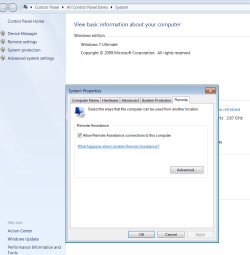
After having a look I noticed when you right click on computer
than click on remote settings, under advanced tab there
should be
Remote Desktop
Click an option, and than specify who can connect, if needed.
and than follow by the options, but now it's blank with nothing there.
(see photo) Nothing has been changed to the PC and I'm puzzled to
why this has happened.
Need to get this sorted ASAP so if anyone could help that would be great.

Thanks. :D
 

Attachments

  • RDC PROBLEM.png
    RDC PROBLEM.png
    95.2 KB · Views: 0

My Computer

Computer type
PC/Desktop
OS
Windows 7 Ultimate x32
Hi All,

New user and my first question to the forum, 1 of PC's at work is having
an issue with RDC,....
Welcome to the Seven Forums.

We try to stay away from making changes to work related computers because we could be countering the wishes/settings of IT staff. Do you have an IT help desk or IT staff at work?
 

My Computer

Computer type
Laptop
Computer Manufacturer/Model Number
Employer provided Dell Latitude
OS
W7 Pro SP1 64bit
CPU
i7
Memory
8GB
Graphics Card(s)
Intel HD Graphics
Hard Drives
crappy SSD
Antivirus
Employer mandated Symantec Endpoint Protection
Browser
Pale Moon 64bit, IE11 64bit & Chrome 64bit
thanks for the reply, unfortunately I'm the only person that looks after
the computers at work, so before I call an IT specialist to come out
and cost my boss money I wanted to see if I could solve it myself.
Has anyone come across this problem before??
 

My Computer

Computer type
PC/Desktop
OS
Windows 7 Ultimate x32
What version of W7 is this work computer?
Professional, Enterprise, ....
 

My Computer

Computer type
Laptop
Computer Manufacturer/Model Number
Employer provided Dell Latitude
OS
W7 Pro SP1 64bit
CPU
i7
Memory
8GB
Graphics Card(s)
Intel HD Graphics
Hard Drives
crappy SSD
Antivirus
Employer mandated Symantec Endpoint Protection
Browser
Pale Moon 64bit, IE11 64bit & Chrome 64bit
Win 7 Ultimate 32bit
 

My Computer

Computer type
PC/Desktop
OS
Windows 7 Ultimate x32
Hmmm, I don't see any GPO that can cause the option to go away from the Remote tab shown in your screenshot.

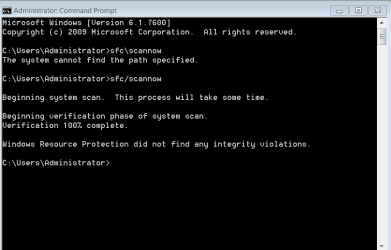
Have you tried sfc/scannow?
 

My Computer

Computer type
Laptop
Computer Manufacturer/Model Number
Employer provided Dell Latitude
OS
W7 Pro SP1 64bit
CPU
i7
Memory
8GB
Graphics Card(s)
Intel HD Graphics
Hard Drives
crappy SSD
Antivirus
Employer mandated Symantec Endpoint Protection
Browser
Pale Moon 64bit, IE11 64bit & Chrome 64bit
Did it yesterday but just tried it again now, said it did not find any integrity violations.
CMD SFC.png
 

My Computer

Computer type
PC/Desktop
OS
Windows 7 Ultimate x32
I'm not a big fan of system restores - but you might try that.
 

My Computer

Computer type
Laptop
Computer Manufacturer/Model Number
Employer provided Dell Latitude
OS
W7 Pro SP1 64bit
CPU
i7
Memory
8GB
Graphics Card(s)
Intel HD Graphics
Hard Drives
crappy SSD
Antivirus
Employer mandated Symantec Endpoint Protection
Browser
Pale Moon 64bit, IE11 64bit & Chrome 64bit

My Computer

Computer type
Laptop
Computer Manufacturer/Model Number
Employer provided Dell Latitude
OS
W7 Pro SP1 64bit
CPU
i7
Memory
8GB
Graphics Card(s)
Intel HD Graphics
Hard Drives
crappy SSD
Antivirus
Employer mandated Symantec Endpoint Protection
Browser
Pale Moon 64bit, IE11 64bit & Chrome 64bit
Hi All,

New user and my first question to the forum, 1 of PC's at work is having
an issue with RDC, normally I'm able to to log into this computer
from other computers from my work site but I noticed yesterday
I was not able to do this anymore.
After having a look I noticed when you right click on computer
than click on remote settings, under advanced tab there
should be
Remote Desktop
Click an option, and than specify who can connect, if needed.
and than follow by the options, but now it's blank with nothing there.
(see photo) Nothing has been changed to the PC and I'm puzzled to
why this has happened.
Need to get this sorted ASAP so if anyone could help that would be great.

Thanks. :D

This is actually a bug with Windows 7 SP1 where the settings for remote desktop vanish "on certain machines" from under the remote assistance setting which is where they are supposed to be.

You can access the remote client directly by typing mstsc into the run box. :)
 

My Computer

Computer type
PC/Desktop
Computer Manufacturer/Model Number
Home built
OS
Windows 7 Ult, Windows 8.1 Pro,
CPU
Q9650-4.275GHz, E8600 4.5GHz, E6750-3.8GHz
Motherboard
Evga 780i FTW
Memory
G.Skill PC2 9600 1200Mhz 5 5 5 15 2T
Graphics Card(s)
GTX480
Sound Card
Asus Xonar D2
Monitor(s) Displays
HannsG
Screen Resolution
1680X1050
Hard Drives
GSkill Phoenix Pro 120GB SSD
PSU
ThermalTake Toughpower 1000Watt modular
Case
ThermalTake XaserV
Cooling
Xigmatek S1283
Keyboard
Logitech G15
Mouse
Logitech G9
Internet Speed
T1
Sorry for the late response guys....Usernameissues your last reply did the trick, I downloaded
the update, did a restart and the settings for RDC were back where they were supposed
to be. Everything is running smoothly again.
Thanks for your help guys.
 

My Computer

Computer type
PC/Desktop
OS
Windows 7 Ultimate x32
Glad that you got it working again :-)
 

My Computer

Computer type
Laptop
Computer Manufacturer/Model Number
Employer provided Dell Latitude
OS
W7 Pro SP1 64bit
CPU
i7
Memory
8GB
Graphics Card(s)
Intel HD Graphics
Hard Drives
crappy SSD
Antivirus
Employer mandated Symantec Endpoint Protection
Browser
Pale Moon 64bit, IE11 64bit & Chrome 64bit
Back
Top