Remote Desktop 'Start program on connection'

n8sl8er

New member
Local time
2:17 PM
Messages
4
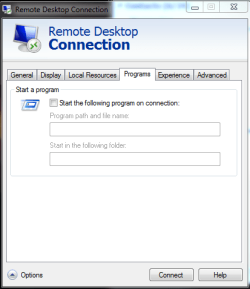
In the Remote Desktop Connection app (in Accessories) that comes with Windows 7, there is a tab called "Programs". Under that tab are two fields, "Program path and file name:", and "Start in the following folder". I'd like to use this option to start an initial program when I connect to a Windows 7 Enterprise RDP host.

* Windows XP RDP hosts support the option to start an initial program
* Windows Server 2003 terminal server hosts support the option to start an initial program
* Windows Server 2008 terminal server hosts support the option to start an initial program if you authorize the program (I can't remember which tool you use, but it had something to do with RemoteApp)
* I can't find a way to make Windows 7 Enterprise hosts support this option. Obviously, there's no RemoteApp host configuration since that's only on 2008 Server.

Has anyone else been able to start an initial program on a Windows 7 RDP host?

The reason I'm trying to do this is so that I can use SeamlessRDP (Cendio AB - SeamlessRDP) with rdesktop from a RHEL4 machine. I've tried this combination and it works under: Windows XP, Windows Server 2003, and Windows Server 2008.

Thanks,

Peter
 

My Computer

OS
Windows 7, RHEL4
Welcome to SF!

Are either of these two things what you are looking for?

Capture.PNG

Capture1.PNG
 

My Computer

Computer Manufacturer/Model Number
Custom
OS
Windows 7 Professional x64
CPU
Intel i7 2600K OC'd @ 4620 MHz
Motherboard
Asus P8Z68-V Pro
Memory
16GB GSkill Sniper 2133 Mhz (4x4GB)
Graphics Card(s)
EVGA GeForce GTX 480 SuperClocked+
Sound Card
Realtek High Definition Audio
Monitor(s) Displays
2x Acer S273HLbmii 27"
Screen Resolution
2 x 1920x1080
Hard Drives
64GB Crucial M4 SSD

Storage: Hitachi 1TB 5400RPM, Samsung 1.5TB 5400RPM
PSU
Corsair HW Series 750w (modular)
Case
Cooler Master HAF 932 Advanced Blue Edition
Cooling
CM Hyper 212+ CPU cooler, 3x 230mm + 1x 140mm case fans
Keyboard
Logitech MK320 (wireless)
Mouse
Logitech MK320 (wireless)
Internet Speed
30 Mb/s : 2 Mb/s
Hi Jonathan,

Thanks for the reply. Yes. The first picture is what I'm using on the client machine. The host (RDP server) machine is running Windows 7 Enterprise. The problem I'm running into is that the host machine won't let me start an initial program when I specify one in the "Program path and filename" field.

If you connect to a Windows 7 RDP server and specify a program in the "Program path and file name field", does the program start for you?

The behavior I've observed under older Windows RDP hosts is that the program I specified will start, and the rest of the OS won't show in the background. This is what I'm looking for.

Thanks,

Peter
 

My Computer

OS
Windows 7, RHEL4
are you connecting with the /admin option?
 

My Computer

OS
Windows 7
CPU
i5-750
Motherboard
Asus
Memory
4GB DDR3 1600
Graphics Card(s)
GT220
No, I'm not using the /admin option.

I tried using the /admin option from the command line, but this doesn't help me since you can't also specify an option to run an initial program (as far as I can tell, this is only available from the GUI, not the command line), which is what I'm trying to do in the first place.

What purpose does the /admin option serve? On Windows XP, 2003 Server, and 2008 Server, I never had to specify the /admin option on the client to get initial apps working.

If the /admin option is required, I might be able to save a *.rdp file from the GUI (that includes the initial application option) and then specify /admin and the *.rdp file I created on the command line.
 

My Computer

OS
Windows 7, RHEL4
So, everybody knows: it’s a bug of Win7, You can use RemoteApp instead, but it works on Ultimate/Enterprise editions and so on, and so on, bla-bla-bla, right?
WRONG
You can use this simple registry tweak and start enjoy that wonderful option easily
 

Attachments

My Computer

Computer type
Laptop
OS
Windows 7 Professional
Just two words about editions of host machine: definitely it works on Enterprise, Ultimate & Professional editions and You don’t need nothing else
I think it can be used in Home Premium edition too with a little tweak of system, but I didn’t check it , so somebody with Home Premium have to make some experiments:
1.It’s rdclip.exe file which is absent in that edition. Please keep on mind, there isn’t any tweak or something else strange with it: it’s simple standard file of Windows 7. You should to unpack and copy it into Windows\System32 folder.
 

Attachments

My Computer

Computer type
Laptop
OS
Windows 7 Professional
2. After copying rdclip.exe, run cmd.exe as Administrator and start commands one by one (second command should be inputted in one line with only once ENTER pressing in the very end)

NETSH advfirewall firewall delete rule name="Remote Desktop (TCP-In)"

NETSH advfirewall firewall add rule name="Remote Desktop (TCP-In)" program=System profile=public,private,domain dir=in localport=3389 protocol=tcp action=allow description="Inbound rule for the Remote Desktop service to allow RDP traffic."

It should force Windows firewall to open RDP port which one is closed by default.

P.S. Registry tweak supports tweaked termsrv.dll or RDP Wrapper with 10 sessions at once, but one can use original termsrv as well (but it will be possible one session of RDP, of course)
 

My Computer

Computer type
Laptop
OS
Windows 7 Professional
So, everybody knows: it’s a bug of Win7, You can use RemoteApp instead, but it works on Ultimate/Enterprise editions and so on, and so on, bla-bla-bla, right?
WRONG
You can use this simple registry tweak and start enjoy that wonderful option easily

Thank you very much! Works fine on Windows 8.1 Pro!
 

My Computer

Computer type
Laptop
Computer Manufacturer/Model Number
Apple
OS
Windows 7 Ultimate x64
Back
Top