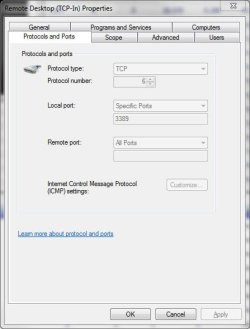
Solved Remote Desktop (TCP-In) Properties Protocols and Ports tab grayed out

kmfraley

New member
Local time
1:43 AM
Messages
22
I want to change the Remote Desktop port (RDP) from the default (3389) to something else. Unfortunately, the entire Protocol and Ports tab is grayed out (see attachment) so I can't change it from there. Searching the web I found a registry entry, HKEY_LOCAL_MACHINE\System\CurrentControlSet\Control\TerminalServer\WinStations\RDP-Tcp\PortNumber, that can be used to change the port. When I use the registry entry, I see that my Windows 7 Pro SP1 (and also Windows Embedded Standard 7 SP1) begin listening on the new port, but the remote desktop client cannot connect using <ip address>:<new port> syntax. Is there a way to change the RDP port from the default 3389 to something else that really works? Thanks for your help.
-Kris
 

Attachments

  • RDP Protocols and Ports tab.jpg
    RDP Protocols and Ports tab.jpg
    27 KB · Views: 210

My Computer My Computer

At a glance

Windows Embedded Standard 7
OS
Windows Embedded Standard 7
Hi Kris,

Predefined rules are always greyed out you could delete the rule and create a custom rule set I would imagine. You could also use remote desktop software like teamviewer or logmein which are free and are much easier to use and more versatile.

Hope this helps,

Seth
 

My Computer My Computer

At a glance

Windows 7 Ultimate x64I76 x 1.5V DDR3 DIMM sockets supporting up to 2...GeForce GTX 580
Computer Manufacturer/Model Number
Alienware
OS
Windows 7 Ultimate x64
CPU
I7
Motherboard
GA-X58-USB3
Memory
6 x 1.5V DDR3 DIMM sockets supporting up to 24 GB of system
Graphics Card(s)
GeForce GTX 580
Sound Card
Realtek ALC892 codec 2/4/5.1/7.1-channel
Monitor(s) Displays
NEC Display Solutions E321 Black 32"
Screen Resolution
1366 x 768
Hard Drives
OCZ Colossus LT Series OCZSSD2-1CLSLT1T 3.5" 1TB SATA II MLC Internal Solid State Drive
PSU
XFX Black Edition XPS-850W-BES 850W ATX12V
Case
Antec
Cooling
Zalman
Keyboard
Microsoft
Mouse
Microsoft
How might one go about creating a "custom rule set" for RDP?
 

My Computer My Computer

At a glance

Windows Embedded Standard 7
OS
Windows Embedded Standard 7
Okay, I found my own answer. I created a custom rule for RDP using a different port. One cannot simply copy the existing rule and change it because the copy of the built-in rule cannot be edited just like the original built-in rule. So, I created a brand new rule that looked identical to the built-in rule except it just uses a different port. Then, and this was the key for me, I changed the RDP port number in the registry at ...

HKEY_LOCAL_MACHINE\System\CurrentControlSet\Control\TerminalServer\WinStations\RDP-Tcp\PortNumber

Finally, I rebooted the machine. Now, I can Remote Desktop to <IP-address>:<new-port-number>.
 

My Computer My Computer

At a glance

Windows Embedded Standard 7
OS
Windows Embedded Standard 7
Back
Top