Remote Desktop VERY SLOW!!

adamzeit

New member
Local time
6:59 PM
Messages
1
Hi guys - new to the Forum...what a GREAT place! I'm enjoying Windows 7 on my home PC and my laptop....but I'm having a problem with a VERY slow Remote Desktop connection to work! I connect fine using my SonicWall 64-bit VPN Connection...I logged in successfully and pick up an IP address immediately. Then, when I connect with RDP - the screen refreshs and pages EXTREMEYTL SLOWLY....like a 28.8 modem! I finally get to my login screen and login to my work deskop - but them it just goes SO SLOW after that - that I can't do anything.

I read somewhere about "scaling" and disabling it - but that option is grayed out on the "Compatibility" tab under my VPN client. There was another article about a Command Line execution, but that didn't seem to work either. Non of the compatibility options are available under the Win 7 RDP client either.

This is driving me nuts! I'm sure that I am just missing something simple - as my VPN and RDP connection is just fine (100% functional) on all my XP machines.

Any suggestions? i would GREATLY appreciate everyone's help!

Adam
 

My Computer

OS
Windows 7 RC
I have the same problem, it's driving me nuts. Does anybody solved this problem. I've tried the disabling the scaling but that didn't helped me either. My XP working like a charm
 

My Computer

Computer Manufacturer/Model Number
DELL
OS
Windows 7 Ultimate
CPU
Intel Dual Core
Welcome!

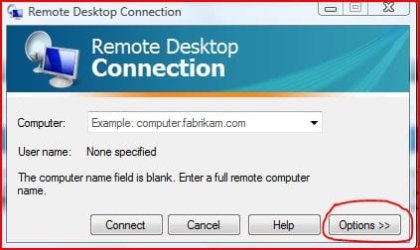
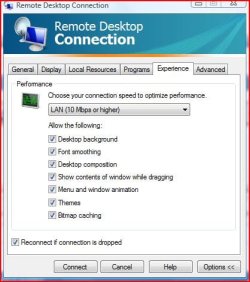
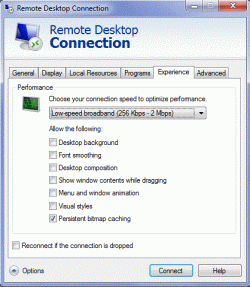
Try cutting back on some graphics.
rd1.JPGrd2.JPG
 

My Computer

Computer Manufacturer/Model Number
Custom
OS
Windows 7 Professional x64
CPU
Intel i7 2600K OC'd @ 4620 MHz
Motherboard
Asus P8Z68-V Pro
Memory
16GB GSkill Sniper 2133 Mhz (4x4GB)
Graphics Card(s)
EVGA GeForce GTX 480 SuperClocked+
Sound Card
Realtek High Definition Audio
Monitor(s) Displays
2x Acer S273HLbmii 27"
Screen Resolution
2 x 1920x1080
Hard Drives
64GB Crucial M4 SSD

Storage: Hitachi 1TB 5400RPM, Samsung 1.5TB 5400RPM
PSU
Corsair HW Series 750w (modular)
Case
Cooler Master HAF 932 Advanced Blue Edition
Cooling
CM Hyper 212+ CPU cooler, 3x 230mm + 1x 140mm case fans
Keyboard
Logitech MK320 (wireless)
Mouse
Logitech MK320 (wireless)
Internet Speed
30 Mb/s : 2 Mb/s
Hi Jonathan

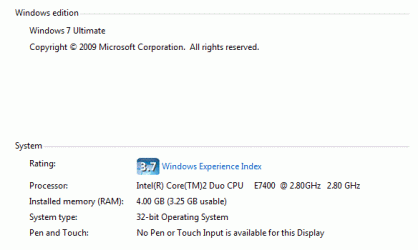
Here are some screen shots. I can rdp from a citrix site as well, that renders very well like working on the real box. But when I use Windows 7 RDP over VPN rendering is very very very slow you can't even think of working. It takes like 10 minutes to register a one mouse click. I'm not sure what they have done to improve it now it sucks.

Then I thought of using XP mode, but that even not working b'cos my hardware is not supporting vertualization that also a hole on the design I guess, b'cos I reckon VPC should use HW assisted vertualization if it's supported by the HW and if it is not still users should be able to use VPC and XP mode, b'cps most of the home PC's don't have Intel (V) processors on them :( :( :(

Thanks
 

Attachments

  • System Details.gif
    System Details.gif
    8.8 KB · Views: 131
  • rdp image 1.gif
    rdp image 1.gif
    44.7 KB · Views: 169
  • rdp image 2.gif
    rdp image 2.gif
    43.6 KB · Views: 161

My Computer

Computer Manufacturer/Model Number
DELL
OS
Windows 7 Ultimate
CPU
Intel Dual Core

My Computer

Computer Manufacturer/Model Number
Custom Built
OS
Windows 7 Ultimate 64bit
CPU
Phenom II 1055T @ 3.1 Ghz (+.3 Ghz OC)
Motherboard
Asus
Memory
8GB
Graphics Card(s)
2x Nvidia GTX 260 core 216
Sound Card
Intergrated 7.1
Monitor(s) Displays
dual 23"
Screen Resolution
3840x1080
Hard Drives
C: 30GB intel ssd
D: 2x 500GB WD black raid 0
NAS: 6TB WB green raid 5
PSU
750w
Case
Black
Cooling
Oxygen, Nitrogen, other various gases.
Keyboard
QWERTY and clicky
Mouse
logitech wireless
Internet Speed
12Mbit down; 4Mbit up | 6Mbit down; 1Mbit up (Both DSL)
Other Info
blue led fans look nice
Back
Top