Remote desktop with no password?

hkBattousai

New member
Member
Local time
6:01 PM
Messages
64
I have a home network with only two PCs at home; a PC and a laptop.

I want to connect to the laptop via the PC, but also I don't want to put a login password to the laptop. I'm leaving alone and am the only user, why write password every time I login?

How can I do that?


PC: Windows 7 Ultimate x64
Laptop: Windows XP Home SP3
 

My Computer

OS
Windows 7 Ultimate x64
CPU
Intel i5 750
Motherboard
Gigabyte P55A U3DR
Memory
2x2GB DDR3 Dual-kit
Graphics Card(s)
ATI Radeon HD4670
Sound Card
Onboard
Monitor(s) Displays
Samsung SyncMaster P2350
Hard Drives
Western Digital 1TB, 64MB cache, internal
Samsung Story 1.5TB, external
PSU
400W rated, 460W max
Case
CoolerMaster
Cooling
Air
I have a home network with only two PCs at home; a PC and a laptop.

I want to connect to the laptop via the PC, but also I don't want to put a login password to the laptop. I'm leaving alone and am the only user, why write password every time I login?

How can I do that?


PC: Windows 7 Ultimate x64
Laptop: Windows XP Home SP3

I don't think you can get the built in software in Windows to do this, however Dameware Remote will.

www.dameware.com
 

My Computer

Computer type
PC/Desktop
Computer Manufacturer/Model Number
Dell OP7010
OS
Windows 7 Enterprise (x64); Windows Server 2008 R2 (x64)
Memory
16GB
Monitor(s) Displays
4 Dell 24" LCD
Screen Resolution
1280x1024
Keyboard
Dell
Mouse
Dell Optical
Internet Speed
40meg
^ Thanks for the advice.
However, I have already started using TeamViewer and it look like to be OK.
 

My Computer

OS
Windows 7 Ultimate x64
CPU
Intel i5 750
Motherboard
Gigabyte P55A U3DR
Memory
2x2GB DDR3 Dual-kit
Graphics Card(s)
ATI Radeon HD4670
Sound Card
Onboard
Monitor(s) Displays
Samsung SyncMaster P2350
Hard Drives
Western Digital 1TB, 64MB cache, internal
Samsung Story 1.5TB, external
PSU
400W rated, 460W max
Case
CoolerMaster
Cooling
Air
+1 for Teamviewer
 

My Computer

Computer Manufacturer/Model Number
tw33k
OS
Windows 7 Ultimate (x64) SP1
CPU
Intel 3770k 4.6GHz
Motherboard
ASUS Maximus V Formula
Memory
8GB (2x 4GB) Crucial Ballistix
Graphics Card(s)
Sapphire 7950 (1060/1600)
Sound Card
On Board Realtek HD Audio
Monitor(s) Displays
27" Acer B273HU (via HDMI)
Screen Resolution
2048 x 1152
Hard Drives
Crucial M4 128GB
2TB WD Black
1TB Samsung F3 SATA
1TB WD Elite External
2TB WD USB 3.0
PSU
Corsair AX750 Gold
Case
Corsair Obsidian 800DW
Cooling
Corsair H100 (2x AP-121/2x UK-3000 push/pull)
Keyboard
Microsoft Wireless 5000
Mouse
Microsoft Wireless 5000
Internet Speed
5mb/s
Other Info
Logitech z-2300 2.1 speakers
Lamptron FC-5 v2
I have a question about remote connection.

How much connection bandwidth is required for remote connection?
1) High color, high quality connection
2) 256 color, low quality connection

I have 1Mbits/s connection with a 54Mbits/sec wireless modem. I don't have any bandwidth problem at home network, but in a few days I'm going to use TeamViewer over internet. I want to make sure that it would work.
 

My Computer

OS
Windows 7 Ultimate x64
CPU
Intel i5 750
Motherboard
Gigabyte P55A U3DR
Memory
2x2GB DDR3 Dual-kit
Graphics Card(s)
ATI Radeon HD4670
Sound Card
Onboard
Monitor(s) Displays
Samsung SyncMaster P2350
Hard Drives
Western Digital 1TB, 64MB cache, internal
Samsung Story 1.5TB, external
PSU
400W rated, 460W max
Case
CoolerMaster
Cooling
Air
It will fine. I don't know the exact bandwidth needed but it works fine for me and I'm only on ADSL 2+
 

My Computer

Computer Manufacturer/Model Number
tw33k
OS
Windows 7 Ultimate (x64) SP1
CPU
Intel 3770k 4.6GHz
Motherboard
ASUS Maximus V Formula
Memory
8GB (2x 4GB) Crucial Ballistix
Graphics Card(s)
Sapphire 7950 (1060/1600)
Sound Card
On Board Realtek HD Audio
Monitor(s) Displays
27" Acer B273HU (via HDMI)
Screen Resolution
2048 x 1152
Hard Drives
Crucial M4 128GB
2TB WD Black
1TB Samsung F3 SATA
1TB WD Elite External
2TB WD USB 3.0
PSU
Corsair AX750 Gold
Case
Corsair Obsidian 800DW
Cooling
Corsair H100 (2x AP-121/2x UK-3000 push/pull)
Keyboard
Microsoft Wireless 5000
Mouse
Microsoft Wireless 5000
Internet Speed
5mb/s
Other Info
Logitech z-2300 2.1 speakers
Lamptron FC-5 v2
I have almost the same setup - 2 laptops, Win7 Home Pemium (x64) and XP Pro SP3 (x86) and I can confirm - when I started using remote desktop (always from Win 7 to XP) it asked me for a login + password the first few times, but now it has stopped doing it - it just connects without authentication. Unfortunately, I don't know what I did to do this, so can't advise but it's possible with no 3rd party software.
 

My Computer

Computer Manufacturer/Model Number
Toshiba Satellite L500
OS
Windows 7 Home Premium x64 OEM --> RTM clean install
CPU
Intel T4400
Motherboard
? - laptop inbuilt ?
Memory
4Gb
Graphics Card(s)
? - Mobile Intel(R) 4 Series Express Chipset Family ?
Sound Card
Realtek
Monitor(s) Displays
? + extended to a 42" LG55PC plasma tele!
Screen Resolution
1366 * 768
Hard Drives
320Gb 5500rpm
PSU
?
Case
?
Cooling
?
Internet Speed
3Meg, when it works.
Other Info
A LOWLY LAPTOP!
I have almost the same setup - 2 laptops, Win7 Home Pemium (x64) and XP Pro SP3 (x86) and I can confirm - when I started using remote desktop (always from Win 7 to XP) it asked me for a login + password the first few times, but now it has stopped doing it - it just connects without authentication. Unfortunately, I don't know what I did to do this, so can't advise but it's possible with no 3rd party software.
But you had to set a password for Windows logon, didn't you.
What I want to do is establishing remote connection without setting password to Windows.
 

My Computer

OS
Windows 7 Ultimate x64
CPU
Intel i5 750
Motherboard
Gigabyte P55A U3DR
Memory
2x2GB DDR3 Dual-kit
Graphics Card(s)
ATI Radeon HD4670
Sound Card
Onboard
Monitor(s) Displays
Samsung SyncMaster P2350
Hard Drives
Western Digital 1TB, 64MB cache, internal
Samsung Story 1.5TB, external
PSU
400W rated, 460W max
Case
CoolerMaster
Cooling
Air
But you had to set a password for Windows logon, didn't you.
What I want to do is establishing remote connection without setting password to Windows.

Do you mean for 2nd PC normal Windows logon or log on via remote desktop?

My 2 laptops have password logon to Windows when they boot normally, but not password to connect via remote.
 

My Computer

Computer Manufacturer/Model Number
Toshiba Satellite L500
OS
Windows 7 Home Premium x64 OEM --> RTM clean install
CPU
Intel T4400
Motherboard
? - laptop inbuilt ?
Memory
4Gb
Graphics Card(s)
? - Mobile Intel(R) 4 Series Express Chipset Family ?
Sound Card
Realtek
Monitor(s) Displays
? + extended to a 42" LG55PC plasma tele!
Screen Resolution
1366 * 768
Hard Drives
320Gb 5500rpm
PSU
?
Case
?
Cooling
?
Internet Speed
3Meg, when it works.
Other Info
A LOWLY LAPTOP!
^ Bot my PC and laptop has no Windows logon password. But remote desktop connection only connects to a PC with a Windows logon password. And I don't want to set a password to my Windows, because I'm the only one using my both PCs, and I don't want to enter logon password every time I start my PCs, I just want to see desktop after pressing the power button. I'm looking for a way to establish remote connection without setting any Wndows logon password.
 

My Computer

OS
Windows 7 Ultimate x64
CPU
Intel i5 750
Motherboard
Gigabyte P55A U3DR
Memory
2x2GB DDR3 Dual-kit
Graphics Card(s)
ATI Radeon HD4670
Sound Card
Onboard
Monitor(s) Displays
Samsung SyncMaster P2350
Hard Drives
Western Digital 1TB, 64MB cache, internal
Samsung Story 1.5TB, external
PSU
400W rated, 460W max
Case
CoolerMaster
Cooling
Air
Hmm, then I can't help you. But I still maintain that if my rig, with password logon on both computers, has stopped asking for password to connect remotely, then you should be able to do it if you have 2 computers without any logon password.

Sorry, I don't know what I did (if anything) to stop it asking me for my log on password via RDC. Good luck!
 

My Computer

Computer Manufacturer/Model Number
Toshiba Satellite L500
OS
Windows 7 Home Premium x64 OEM --> RTM clean install
CPU
Intel T4400
Motherboard
? - laptop inbuilt ?
Memory
4Gb
Graphics Card(s)
? - Mobile Intel(R) 4 Series Express Chipset Family ?
Sound Card
Realtek
Monitor(s) Displays
? + extended to a 42" LG55PC plasma tele!
Screen Resolution
1366 * 768
Hard Drives
320Gb 5500rpm
PSU
?
Case
?
Cooling
?
Internet Speed
3Meg, when it works.
Other Info
A LOWLY LAPTOP!
Stumbled upon this looking for a fix to my "play audio remotely" problem.

If you're like me then you have a desktop shortcut for your remote connection, but you need to go to Start --> search "remote" --> open Remote Desktop Connection and there you will find options for the connection. Uncheck the "use credentials" on connect - this will remove the logon screen.

Now I just need to figure how to play audio on the remote machine and not have it wified to my local machine....
 

My Computer

Computer Manufacturer/Model Number
Toshiba Satellite L500
OS
Windows 7 Home Premium x64 OEM --> RTM clean install
CPU
Intel T4400
Motherboard
? - laptop inbuilt ?
Memory
4Gb
Graphics Card(s)
? - Mobile Intel(R) 4 Series Express Chipset Family ?
Sound Card
Realtek
Monitor(s) Displays
? + extended to a 42" LG55PC plasma tele!
Screen Resolution
1366 * 768
Hard Drives
320Gb 5500rpm
PSU
?
Case
?
Cooling
?
Internet Speed
3Meg, when it works.
Other Info
A LOWLY LAPTOP!
dont know if you guys found an answer yet since this is an old thread, but here's a solution:

You can disable blank password restrictions by using a policy. To locate and change this policy:

  1. Click Start, point to Run, type gpedit.msc, and then click OK to start the Group Policy Editor.
  2. Open Computer Configuration\Windows Settings\Security Settings\Local Policies\Security Options\Accounts: Limit local account use of blank passwords to console logon only.
  3. Double-click Limit local account use of blank passwords to console logon only.
  4. Click Disabled, and then click OK.
  5. Quit Group Policy Editor.
NOTE: By default, this policy is on (enabled).
After you have enabled this, you will be allowed to log on using a blank password.
 

My Computer

Computer Manufacturer/Model Number
Gateway NV53 laptop
OS
W7 Ultimate x64
CPU
athlon II X4 635
Memory
8GB Kingston hyper blue
lrod, thank you SO much for being kind enough to post the solution here. I've been going NUTS about this for way too long. Windows 7 ultimate connecting to other passwordless Windows 7 ultimate and not being able to connect was killing me!

Thanks a million!
Admins of Seven Forums, please promote this behavior of allowing post solutions so people like me who clickthru from Google feel the need to register!
 

My Computer

OS
Windows 7 32Bit Ultimate
I want to add thanks as well. I've been struggling with this issue - requiring a password for remote desktop since I control my htpc 90% a remote so I hate seeing the stupid login after I use remote desktop.

The above fix worked great.
 

My Computer

OS
New York
dont know if you guys found an answer yet since this is an old thread, but here's a solution:

You can disable blank password restrictions by using a policy. To locate and change this policy:

  1. Click Start, point to Run, type gpedit.msc, and then click OK to start the Group Policy Editor.
  2. Open Computer Configuration\Windows Settings\Security Settings\Local Policies\Security Options\Accounts: Limit local account use of blank passwords to console logon only.
  3. Double-click Limit local account use of blank passwords to console logon only.
  4. Click Disabled, and then click OK.
  5. Quit Group Policy Editor.
NOTE: By default, this policy is on (enabled).
After you have enabled this, you will be allowed to log on using a blank password.

If I do this, does it mean that anyone could log in to my PC over the internet if they have my IP address? Or would the NAT firewall stop them?
 

My Computer

Computer Manufacturer/Model Number
Self-built
OS
Win7 Pro; Linux Mint 7
CPU
E8500 @ 3.8GHz
Motherboard
Asus P5QL PRO
Memory
Corsair XMS2 2GB @800MHz
Graphics Card(s)
Nvidia 9800GT
Sound Card
onboard
Hard Drives
Western Digital Caviar 500GB x2
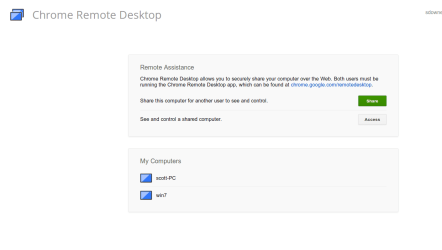
I have been using Chrome Remote Desktop.
I can connect without a windows password.
I do have to enter a pin number after I exchanged keys.
This will stream good quality video and sound like Netflix.
 

Attachments

  • Screenshot from 2012-12-18 08:25:52.png
    Screenshot from 2012-12-18 08:25:52.png
    16.4 KB · Views: 51

My Computer

OS
Windows 7 Ultimate x64
Back
Top