Solved Remote Desktop within home network restriced by Internet connection

john265

New member
Local time
12:21 PM
Messages
16
At some stage, Remote Desktop Connection (within my home network) from my Toshiba laptop running Win 7 Pro 32 bit to my Custom desktop running Win 7 Pro 64 bit stopped working using the desktop's computer name. At the time I was too busy to track down the reason. After some checking I have found that if I disconnect my router from the phone line, it works!
Here is the detail:
When I RDC using the computer name I get an error "Remote Desktop can't connect to the remote computer..." [When I check the current IP address of the desktop and use it in RDC, I get a login prompt; as soon as I login I get an error message about the validity of the desktop's security certificate. I can bypass this and connect ok. However, I don't want to have to keep checking for the current IP address of the desktop....]
By elimination, I found that if I disconnected my router from the Internet by unplugging the phone line, I could easily connect (but with the same security certificate error).
I then suspected some software must be the culprit. I turned off my Windows firewall, Avast antivirus and Spybot and tried again, but this did not solve it.

I am not sure what to do next. I have discounted the security certificate error. It says that it is not from a trusted certifying authority.
Any help appreciated.

John
 

My Computer My Computer

At a glance

Windows 7 Professional 64 bit and 32 bitAMD and Intel8
Computer type
PC/Desktop
Computer Manufacturer/Model Number
custom build desktop and Toshiba laptop
OS
Windows 7 Professional 64 bit and 32 bit
CPU
AMD and Intel
Memory
8
Hi there
You need to enable PORT forwarding on your router -- Can't remember but I think the port is something like 3389 - also allow it through any firewalls.

One of the problems with RDP is that if you want to access SEVERAL machines remotely on the same network then you need to fiddle the port numbers and route the correct port to the relevant machine - you can't route the SAME port to different machines - however accessing a specific SINGLE machine is easy enough).

Also to other users reading this post-- the emote computer can only be accessed if it's a Windows PRO version or higher (Ultimate / Enterprise). Home premium won't work - Home premium only allows your computer to work as a CLIENT.

I think also your networking setup needs to set DHCP as well on the router otherwise you will have to remember the actual LOCAL IP addresses of your machine (the IP addresses on your LAN). Windows Networking should remember the computer names on your LAN.

To access from OUTSIDE your LAN the port forwarding is required since to the OUTSIDE your service providers IP assigned address is what you see on the Internet and the RDP needs to be routed to the correct computer -- this gets a bit messy when your provider gives you dynamic IP addresses - but there are solutions for that like DynDNS.

(Note TCP port for port forwarding if your router requests PORT TYPE)

Cheers
jimbo
 

My Computer My Computer

At a glance

Linux CENTOS 7 / various Windows OS'es and se...Intel i7 Intel i58GB, 16GBOn Motherboard
Computer type
PC/Desktop
Computer Manufacturer/Model Number
Custom built, several laptops HP/ASUS
OS
Linux CENTOS 7 / various Windows OS'es and servers
CPU
Intel i7 Intel i5
Memory
8GB, 16GB
Graphics Card(s)
On Motherboard
Sound Card
Realtek HD audio
Monitor(s) Displays
Apple Cinema display, Samsung LCD
Screen Resolution
1920 X 1080
Hard Drives
4 X 1TB SATA
Mouse
Toshiba wireless laser
Internet Speed
> 20MB up
At some stage, Remote Desktop Connection (within my home network) from my Toshiba laptop running Win 7 Pro 32 bit to my Custom desktop running Win 7 Pro 64 bit stopped working using the desktop's computer name. At the time I was too busy to track down the reason. After some checking I have found that if I disconnect my router from the phone line, it works!
Here is the detail:
When I RDC using the computer name I get an error "Remote Desktop can't connect to the remote computer..." [When I check the current IP address of the desktop and use it in RDC, I get a login prompt; as soon as I login I get an error message about the validity of the desktop's security certificate. I can bypass this and connect ok. However, I don't want to have to keep checking for the current IP address of the desktop....]
By elimination, I found that if I disconnected my router from the Internet by unplugging the phone line, I could easily connect (but with the same security certificate error).
I then suspected some software must be the culprit. I turned off my Windows firewall, Avast antivirus and Spybot and tried again, but this did not solve it.

I am not sure what to do next. I have discounted the security certificate error. It says that it is not from a trusted certifying authority.
Any help appreciated.

John

What are your current DNS servers set as? In order to resolve local computer names to IP addresses you need to ensure that your DNS server is set as the same address as the default gateway since routers will carry their own DNS table which will have local computer names. If it is set to a public DNS sever such as 8.8.8.8 (Google DNS) then your local computer won't be stored on the public DNS server table.

Hope this helps,
Josh! :)
 

My Computer My Computer

At a glance

Windows 7 Professional x64 SP1 ; Windows Serv...Intel Core i5 2400 @ 3.10GHz8.0GB DDR3 @ 665MHz (2GBx4)AMD Radeon HD 6870
Computer type
PC/Desktop
Computer Manufacturer/Model Number
Custom Built
OS
Windows 7 Professional x64 SP1 ; Windows Server 2012 R2 Standard
CPU
Intel Core i5 2400 @ 3.10GHz
Motherboard
Foxconn H67MP-S/-V/H67MP
Memory
8.0GB DDR3 @ 665MHz (2GBx4)
Graphics Card(s)
AMD Radeon HD 6870
Sound Card
Realtek High Definition Audio
Monitor(s) Displays
AOC 2243W & SMB1930NW
Screen Resolution
1440x900 & 1920x1080
Hard Drives
977GB Seagate ST31000524AS ATA Drive (SATA)
250GB WD iSCSI attached Drive
PSU
750W Gaming PSU
Case
Novatech Night
Cooling
Fan
Keyboard
Dell Standard PS/2 Keyboard
Mouse
R.A.T 07 Gaming Mouse
Internet Speed
Download: 10 Mbps Ping: 30ms Upload: 0.81 Mbps
Browser
Google Chrome
Other Info
Optiarc DVD RW AD-5260S ATA Device
Hi there
You need to enable PORT forwarding on your router -- Can't remember but I think the port is something like 3389 - also allow it through any firewalls.

One of the problems with RDP is that if you want to access SEVERAL machines remotely on the same network then you need to fiddle the port numbers and route the correct port to the relevant machine - you can't route the SAME port to different machines - however accessing a specific SINGLE machine is easy enough).

Also to other users reading this post-- the emote computer can only be accessed if it's a Windows PRO version or higher (Ultimate / Enterprise). Home premium won't work - Home premium only allows your computer to work as a CLIENT.

I think also your networking setup needs to set DHCP as well on the router otherwise you will have to remember the actual LOCAL IP addresses of your machine (the IP addresses on your LAN). Windows Networking should remember the computer names on your LAN.

To access from OUTSIDE your LAN the port forwarding is required since to the OUTSIDE your service providers IP assigned address is what you see on the Internet and the RDP needs to be routed to the correct computer -- this gets a bit messy when your provider gives you dynamic IP addresses - but there are solutions for that like DynDNS.

(Note TCP port for port forwarding if your router requests PORT TYPE)

Cheers
jimbo

If the goal is to forward ports to connect to a machine behind a NAT, wouldn't we suggest a static IP? If he is getting DHCP to the target machine and you have ports forwarded to an old address, there goes your connection. Also, the certificate error isn't anything to worry about. It just means it isn't signed by a certificate authority. If you want to be sure you are connecting to the right computer, you can write down the thumbprint for the certificate so you can verify that it's correct later if you are concerned about it. As for the advice given on DNS servers, I don't think windows machines query external DNS servers to resolve hostnames to IP's if you are just typing something like "BILL-PC".
 

My Computer My Computer

At a glance

Windows 7 Profession x64Intel Core i516 GB DDR3Intel HD Graphics
Computer type
PC/Desktop
Computer Manufacturer/Model Number
Build
OS
Windows 7 Profession x64
CPU
Intel Core i5
Motherboard
Intel DB75EN
Memory
16 GB DDR3
Graphics Card(s)
Intel HD Graphics
Sound Card
Realtek High Definition Audio
Monitor(s) Displays
Dual Viewsonic TD2220 touchscreen displays
Hard Drives
Seagate 500GB 7200 RPM
Case
Slimline
Cooling
Standard Intel heat sink / fan.
Keyboard
Microsoft boring keyboard - it works!
There is no need for NAT port translation or any port forwarding since the remote desktop connection will be made within the internal LAN and will not be needed to pass through a router as listed in the OPs post:

john265 said:
At some stage, Remote Desktop Connection (within my home network) from my Toshiba laptop running Win 7 Pro 32 bit to my Custom desktop running Win 7 Pro 64 bit stopped working using the desktop's computer name.

The machine will query the DNS servers it is listed for the computer name. If the DNS servers are configured with public DNS servers then local computer names will not be resolved since there is no 'AAA' DNS entry with a local computers name and IP address. That being said if the machine is to receive an IP address stack via DHCP it is most likely set the DNS server as the default gateway in which case the router will have an entry for the local computer names.

Josh
 

My Computer My Computer

At a glance

Windows 7 Professional x64 SP1 ; Windows Serv...Intel Core i5 2400 @ 3.10GHz8.0GB DDR3 @ 665MHz (2GBx4)AMD Radeon HD 6870
Computer type
PC/Desktop
Computer Manufacturer/Model Number
Custom Built
OS
Windows 7 Professional x64 SP1 ; Windows Server 2012 R2 Standard
CPU
Intel Core i5 2400 @ 3.10GHz
Motherboard
Foxconn H67MP-S/-V/H67MP
Memory
8.0GB DDR3 @ 665MHz (2GBx4)
Graphics Card(s)
AMD Radeon HD 6870
Sound Card
Realtek High Definition Audio
Monitor(s) Displays
AOC 2243W & SMB1930NW
Screen Resolution
1440x900 & 1920x1080
Hard Drives
977GB Seagate ST31000524AS ATA Drive (SATA)
250GB WD iSCSI attached Drive
PSU
750W Gaming PSU
Case
Novatech Night
Cooling
Fan
Keyboard
Dell Standard PS/2 Keyboard
Mouse
R.A.T 07 Gaming Mouse
Internet Speed
Download: 10 Mbps Ping: 30ms Upload: 0.81 Mbps
Browser
Google Chrome
Other Info
Optiarc DVD RW AD-5260S ATA Device
Guys,

Thanks for your responses. I understand more now. Some observations:
1) It used to work with the same router and Win 7on each. Of course there have been updates to Win 7, but not to the router firmware.
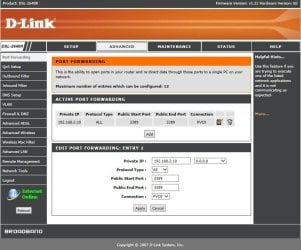
2) The D-Link router has an unexpected port forwarding screen which has no capability to enter a computer name (see screen grab). It doesn't match the D-Link support info.
3) The router was supplied by my ISP and has hardware version B2 which does not show on the D-Link support site (but has the same firmware version number). I need to follow that up.
4) I don't think I mentioned that the RDC client laptop is connecting to the router by wireless and the desktop is connected to the router via Ethernet.
5) DHCP server has always been enabled on the router.
6) DNS server config is set to obtain DNS server address automatically and DDNS not set.
7) UPnP and Multicast are not enabled.

John
 

Attachments

  • 17-07-2013 12-23-54.jpg
    17-07-2013 12-23-54.jpg
    64.9 KB · Views: 7
Last edited:

My Computer My Computer

At a glance

Windows 7 Professional 64 bit and 32 bitAMD and Intel8
Computer type
PC/Desktop
Computer Manufacturer/Model Number
custom build desktop and Toshiba laptop
OS
Windows 7 Professional 64 bit and 32 bit
CPU
AMD and Intel
Memory
8
As a test, can you open a command prompt on the client machine that wishes to connect to the remote PC (desktop) and then type the following:

Code:
ping [I][B][COLOR="Red"]{computer name}[/COLOR][/B][/I]

Please replace the computer name variable with the name of the computer that you want to remotely connect to.

Please check the computer name of the remote computer by clicking start> Right click on Computer > Properties

Post upload a screenshot of the ping results if you can and we can go from there

Many Thanks,
Josh! :)
 

My Computer My Computer

At a glance

Windows 7 Professional x64 SP1 ; Windows Serv...Intel Core i5 2400 @ 3.10GHz8.0GB DDR3 @ 665MHz (2GBx4)AMD Radeon HD 6870
Computer type
PC/Desktop
Computer Manufacturer/Model Number
Custom Built
OS
Windows 7 Professional x64 SP1 ; Windows Server 2012 R2 Standard
CPU
Intel Core i5 2400 @ 3.10GHz
Motherboard
Foxconn H67MP-S/-V/H67MP
Memory
8.0GB DDR3 @ 665MHz (2GBx4)
Graphics Card(s)
AMD Radeon HD 6870
Sound Card
Realtek High Definition Audio
Monitor(s) Displays
AOC 2243W & SMB1930NW
Screen Resolution
1440x900 & 1920x1080
Hard Drives
977GB Seagate ST31000524AS ATA Drive (SATA)
250GB WD iSCSI attached Drive
PSU
750W Gaming PSU
Case
Novatech Night
Cooling
Fan
Keyboard
Dell Standard PS/2 Keyboard
Mouse
R.A.T 07 Gaming Mouse
Internet Speed
Download: 10 Mbps Ping: 30ms Upload: 0.81 Mbps
Browser
Google Chrome
Other Info
Optiarc DVD RW AD-5260S ATA Device
There is no need for NAT port translation or any port forwarding since the remote desktop connection will be made within the internal LAN and will not be needed to pass through a router as listed in the OPs post:

john265 said:
At some stage, Remote Desktop Connection (within my home network) from my Toshiba laptop running Win 7 Pro 32 bit to my Custom desktop running Win 7 Pro 64 bit stopped working using the desktop's computer name.

The machine will query the DNS servers it is listed for the computer name. If the DNS servers are configured with public DNS servers then local computer names will not be resolved since there is no 'AAA' DNS entry with a local computers name and IP address. That being said if the machine is to receive an IP address stack via DHCP it is most likely set the DNS server as the default gateway in which case the router will have an entry for the local computer names.

Josh

Hi there
It will still have to pass through a Router if it's on a network -- whether connected via LAN cable or Wifi -- a Router doesn't even have to be connected to the Internet at all to function but your machines DO need to be connected to this type of device for NETWORK connectivity. So the RDP connection (LAN) will need to know either the IP address or the DNS name of the target computer - the router should resolve the host names. Usually they do on LAN's so why you have to type in a specific IP address has got me confused !!!.

I agree Port forwarding is only necessary from OUTSIDE the LAN - I mis-understood the OP.

Cheers
jimbo
 

My Computer My Computer

At a glance

Linux CENTOS 7 / various Windows OS'es and se...Intel i7 Intel i58GB, 16GBOn Motherboard
Computer type
PC/Desktop
Computer Manufacturer/Model Number
Custom built, several laptops HP/ASUS
OS
Linux CENTOS 7 / various Windows OS'es and servers
CPU
Intel i7 Intel i5
Memory
8GB, 16GB
Graphics Card(s)
On Motherboard
Sound Card
Realtek HD audio
Monitor(s) Displays
Apple Cinema display, Samsung LCD
Screen Resolution
1920 X 1080
Hard Drives
4 X 1TB SATA
Mouse
Toshiba wireless laser
Internet Speed
> 20MB up
No worries :) A proper router isn't needed for LAN but rather a switch or a hub however today for home users you have those hybrid boxes that seem to do it all!!

My feeling is the computer name being spelt wrong which is why I asked to ping the computer name as it can tell if the name is being resolved by the DNS server or if the computer name was spelt wrong

Josh :)
 

My Computer My Computer

At a glance

Windows 7 Professional x64 SP1 ; Windows Serv...Intel Core i5 2400 @ 3.10GHz8.0GB DDR3 @ 665MHz (2GBx4)AMD Radeon HD 6870
Computer type
PC/Desktop
Computer Manufacturer/Model Number
Custom Built
OS
Windows 7 Professional x64 SP1 ; Windows Server 2012 R2 Standard
CPU
Intel Core i5 2400 @ 3.10GHz
Motherboard
Foxconn H67MP-S/-V/H67MP
Memory
8.0GB DDR3 @ 665MHz (2GBx4)
Graphics Card(s)
AMD Radeon HD 6870
Sound Card
Realtek High Definition Audio
Monitor(s) Displays
AOC 2243W & SMB1930NW
Screen Resolution
1440x900 & 1920x1080
Hard Drives
977GB Seagate ST31000524AS ATA Drive (SATA)
250GB WD iSCSI attached Drive
PSU
750W Gaming PSU
Case
Novatech Night
Cooling
Fan
Keyboard
Dell Standard PS/2 Keyboard
Mouse
R.A.T 07 Gaming Mouse
Internet Speed
Download: 10 Mbps Ping: 30ms Upload: 0.81 Mbps
Browser
Google Chrome
Other Info
Optiarc DVD RW AD-5260S ATA Device
Thanks for the suggestion. I can see a problem already with it trying to ping the name (OldBoy) at OldBoy.dlink.com! Where does it pick that up? Actually, looking for info on the IP address [92.242.132.16], I found this article on DNS highjacking.
DNS Hijacking via Barefruit Talktalk and Others | manurevah
My ISP is TalkTalk, one of the ISPs mentioned. Is this for real? What should I do?

Pinging OldBoy.dlink.com [92.242.132.16] with 32 bytes of data:
Request timed out.
Request timed out.
Request timed out.
Request timed out.
Ping statistics for 92.242.132.16:
Packets: Sent = 4, Received = 0, Lost = 4 (100% loss),

As well, here is an edited version of ipconfig /all results for the client PC. dlink.com is mentioned in several places.
Windows IP Configuration
Host Name . . . . . . . . . . . . : Coal
Primary Dns Suffix . . . . . . . :
Node Type . . . . . . . . . . . . : Broadcast
IP Routing Enabled. . . . . . . . : No
WINS Proxy Enabled. . . . . . . . : No
DNS Suffix Search List. . . . . . : dlink.com
Ethernet adapter Local Area Connection:
Media State . . . . . . . . . . . : Media disconnected
Connection-specific DNS Suffix . : Belkin
Description . . . . . . . . . . . : Marvell Yukon 88E8072 PCI-E Gigabit Ethernet Controller
Physical Address. . . . . . . . . : 00-25-8B-35-60-B5
DHCP Enabled. . . . . . . . . . . : Yes
Autoconfiguration Enabled . . . . : Yes
Wireless LAN adapter Wireless Network Connection:
Connection-specific DNS Suffix . : dlink.com
Description . . . . . . . . . . . : Intel(R) WiFi Link 5100 AGN
Physical Address. . . . . . . . . : 00-21-6B-88-35-60
DHCP Enabled. . . . . . . . . . . : Yes
Autoconfiguration Enabled . . . . : Yes
Link-local IPv6 Address . . . . . : fe80:...................(Preferred)
IPv4 Address. . . . . . . . . . . : 192.168.2.5(Preferred)
Subnet Mask . . . . . . . . . . . : 255.255.255.0
Lease Obtained. . . . . . . . . . : 18 July 2013 09:32:58
Lease Expires . . . . . . . . . . : 19 July 2013 10:46:53
Default Gateway . . . . . . . . . : 192.168.2.1
DHCP Server . . . . . . . . . . . : 192.168.2.1
DHCPv6 IAID . . . . . . . . . . . : 184547831
DHCPv6 Client DUID. . . . . . . . : 00-01-00-01-................
DNS Servers . . . . . . . . . . . : 192.168.2.1
NetBIOS over Tcpip. . . . . . . . : Enabled
Tunnel adapter 6TO4 Adapter:
Media State . . . . . . . . . . . : Media disconnected
Connection-specific DNS Suffix . :
Description . . . . . . . . . . . : Microsoft 6to4 Adapter
Physical Address. . . . . . . . . : 00-00-00-00-00-00-00-E0
DHCP Enabled. . . . . . . . . . . : No
Autoconfiguration Enabled . . . . : Yes
Tunnel adapter Teredo Tunneling Pseudo-Interface:
Connection-specific DNS Suffix . :
Description . . . . . . . . . . . : Teredo Tunneling Pseudo-Interface
Physical Address. . . . . . . . . : 00-00-00-00-00-00-00-E0
DHCP Enabled. . . . . . . . . . . : No
Autoconfiguration Enabled . . . . : Yes
IPv6 Address. . . . . . . . . . . : 2001:..............................(Preferred)
Link-local IPv6 Address . . . . . : fe80:....................(Preferred)
Default Gateway . . . . . . . . . : ::
NetBIOS over Tcpip. . . . . . . . : Disabled
Tunnel adapter isatap.dlink.com:
Media State . . . . . . . . . . . : Media disconnected
Connection-specific DNS Suffix . : dlink.com
Description . . . . . . . . . . . : Microsoft ISATAP Adapter
Physical Address. . . . . . . . . : 00-00-00-00-00-00-00-E0
DHCP Enabled. . . . . . . . . . . : No
Autoconfiguration Enabled . . . . : Yes
 

My Computer My Computer

At a glance

Windows 7 Professional 64 bit and 32 bitAMD and Intel8
Computer type
PC/Desktop
Computer Manufacturer/Model Number
custom build desktop and Toshiba laptop
OS
Windows 7 Professional 64 bit and 32 bit
CPU
AMD and Intel
Memory
8
Based on your IP configuration it would appear that your router is giving out a DNS suffix which essentially attaches a domain name at the end of any hostname request:

For example: DNS Suffix = 'dlink.com' then josh-pc would become 'josh-pc.dlink.com'

Unless you have a public domain name any domains with .com at the end typically are sent straight to the routers DNS servers that it has (ISPs one) to get resolved. This will then fail because there is no record of OldBoy.dlink.com.

There are two ways around this that I can think of. Firstly, We can try to find how your machines are receiving a DNS suffix and then remove them to see if that resolves the issue. Or we can create a manual DNS entry if you will on your computers hosts file so that any information sent to the hostname 'OldBoy' won't go to the router but straight to the ip address you specify.

Please understand that if you chose to add a manual entry then you will need to ensure that the computer 'OldBoy' has a static IP address that will never change otherwise the mapping will not work.

What option would you like? ;)

Many Thanks,
Josh! :)
 

My Computer My Computer

At a glance

Windows 7 Professional x64 SP1 ; Windows Serv...Intel Core i5 2400 @ 3.10GHz8.0GB DDR3 @ 665MHz (2GBx4)AMD Radeon HD 6870
Computer type
PC/Desktop
Computer Manufacturer/Model Number
Custom Built
OS
Windows 7 Professional x64 SP1 ; Windows Server 2012 R2 Standard
CPU
Intel Core i5 2400 @ 3.10GHz
Motherboard
Foxconn H67MP-S/-V/H67MP
Memory
8.0GB DDR3 @ 665MHz (2GBx4)
Graphics Card(s)
AMD Radeon HD 6870
Sound Card
Realtek High Definition Audio
Monitor(s) Displays
AOC 2243W & SMB1930NW
Screen Resolution
1440x900 & 1920x1080
Hard Drives
977GB Seagate ST31000524AS ATA Drive (SATA)
250GB WD iSCSI attached Drive
PSU
750W Gaming PSU
Case
Novatech Night
Cooling
Fan
Keyboard
Dell Standard PS/2 Keyboard
Mouse
R.A.T 07 Gaming Mouse
Internet Speed
Download: 10 Mbps Ping: 30ms Upload: 0.81 Mbps
Browser
Google Chrome
Other Info
Optiarc DVD RW AD-5260S ATA Device
Thanks Josh,
I prefer not to use manual. I have checked the machine I am trying to RDC to, and it has the dlink.com suffix as well.

John
 

My Computer My Computer

At a glance

Windows 7 Professional 64 bit and 32 bitAMD and Intel8
Computer type
PC/Desktop
Computer Manufacturer/Model Number
custom build desktop and Toshiba laptop
OS
Windows 7 Professional 64 bit and 32 bit
CPU
AMD and Intel
Memory
8
In that case, what is the make/model of your router? You are going to have to change a few settings to see if it removes the suffix.

Just a quick question, have you tried to RDC using the hostname and DNS suffix (dlink.com) to see if it connects? If not then can you tell me the results

Josh :)
 

My Computer My Computer

At a glance

Windows 7 Professional x64 SP1 ; Windows Serv...Intel Core i5 2400 @ 3.10GHz8.0GB DDR3 @ 665MHz (2GBx4)AMD Radeon HD 6870
Computer type
PC/Desktop
Computer Manufacturer/Model Number
Custom Built
OS
Windows 7 Professional x64 SP1 ; Windows Server 2012 R2 Standard
CPU
Intel Core i5 2400 @ 3.10GHz
Motherboard
Foxconn H67MP-S/-V/H67MP
Memory
8.0GB DDR3 @ 665MHz (2GBx4)
Graphics Card(s)
AMD Radeon HD 6870
Sound Card
Realtek High Definition Audio
Monitor(s) Displays
AOC 2243W & SMB1930NW
Screen Resolution
1440x900 & 1920x1080
Hard Drives
977GB Seagate ST31000524AS ATA Drive (SATA)
250GB WD iSCSI attached Drive
PSU
750W Gaming PSU
Case
Novatech Night
Cooling
Fan
Keyboard
Dell Standard PS/2 Keyboard
Mouse
R.A.T 07 Gaming Mouse
Internet Speed
Download: 10 Mbps Ping: 30ms Upload: 0.81 Mbps
Browser
Google Chrome
Other Info
Optiarc DVD RW AD-5260S ATA Device
It's a D-Link DSL-2640R firmware v1.22 and Hardware rev B2.
Tried RDCing hostname.dlink.com but same error.

Before we go any further, I have been through every menu on the router and there is no mention of dlink.com. As I mentioned in an earlier post, this router was supplied by TalkTalk and I believe that they have modified it.

John
 

My Computer My Computer

At a glance

Windows 7 Professional 64 bit and 32 bitAMD and Intel8
Computer type
PC/Desktop
Computer Manufacturer/Model Number
custom build desktop and Toshiba laptop
OS
Windows 7 Professional 64 bit and 32 bit
CPU
AMD and Intel
Memory
8

My Computer My Computer

At a glance

Windows 7 Professional x64 SP1 ; Windows Serv...Intel Core i5 2400 @ 3.10GHz8.0GB DDR3 @ 665MHz (2GBx4)AMD Radeon HD 6870
Computer type
PC/Desktop
Computer Manufacturer/Model Number
Custom Built
OS
Windows 7 Professional x64 SP1 ; Windows Server 2012 R2 Standard
CPU
Intel Core i5 2400 @ 3.10GHz
Motherboard
Foxconn H67MP-S/-V/H67MP
Memory
8.0GB DDR3 @ 665MHz (2GBx4)
Graphics Card(s)
AMD Radeon HD 6870
Sound Card
Realtek High Definition Audio
Monitor(s) Displays
AOC 2243W & SMB1930NW
Screen Resolution
1440x900 & 1920x1080
Hard Drives
977GB Seagate ST31000524AS ATA Drive (SATA)
250GB WD iSCSI attached Drive
PSU
750W Gaming PSU
Case
Novatech Night
Cooling
Fan
Keyboard
Dell Standard PS/2 Keyboard
Mouse
R.A.T 07 Gaming Mouse
Internet Speed
Download: 10 Mbps Ping: 30ms Upload: 0.81 Mbps
Browser
Google Chrome
Other Info
Optiarc DVD RW AD-5260S ATA Device
Thanks for this Josh, however DDNS is not enabled on this router. Also note that the manual is for Hardware Rev B1 and the ISP has provided the router with hardware Rev B2 (not mentioned on the D-Link site).
 

My Computer My Computer

At a glance

Windows 7 Professional 64 bit and 32 bitAMD and Intel8
Computer type
PC/Desktop
Computer Manufacturer/Model Number
custom build desktop and Toshiba laptop
OS
Windows 7 Professional 64 bit and 32 bit
CPU
AMD and Intel
Memory
8

My Computer My Computer

At a glance

W10 Pro desktop, W11 laptop, W11 Pro tablet (...3.7Ghz 8700K i7, i7-11800H, i7-1065G716G desktop, 16G laptop, 4G tabletAMD Radeon RX580, RTX 3060, Intel Iris Plus
Computer type
PC/Desktop
Computer Manufacturer/Model Number
Home Built desktop, Dell G15 5511 Gaming laptop,MS Surface Pro 7 tablet
OS
W10 Pro desktop, W11 laptop, W11 Pro tablet (all 64-bit)
CPU
3.7Ghz 8700K i7, i7-11800H, i7-1065G7
Motherboard
ASUS TUF Z370-Pro Gaming in desktop
Memory
16G desktop, 16G laptop, 4G tablet
Graphics Card(s)
AMD Radeon RX580, RTX 3060, Intel Iris Plus
Sound Card
High Definition Audio (Built-in to mobo)
Monitor(s) Displays
Samsung U32J59 32" (2x), 15.6", 12"
Screen Resolution
3840x2160, 3840x2160, 1920x1080, 2160x1440
Hard Drives
500G SSD for OS; 2T, 10T & 15T HDDs for Data on Desktop, 1TB SSD laptop, 128G SSD tablet.
PSU
Corsair CX 750M
Case
Antec 100
Cooling
CM 212+
Keyboard
IBM Model M - used continuously since 1986
Mouse
Microsoft Pro IntelliMouse
Internet Speed
400M down 8M up
Antivirus
Windows Defender
Browser
FireFox
Other Info
Built my first computer (8Mhz 8088cpu, 640K RAM, 20MB HDD, 2 360K floppy drives) in 1985 and have been building them for myself, relatives and friends ever since.
Thanks for this Josh, however DDNS is not enabled on this router. Also note that the manual is for Hardware Rev B1 and the ISP has provided the router with hardware Rev B2 (not mentioned on the D-Link site).

I cannot seem to find a manual to your router so I cannot offer any precise steps :(

Could you ensure that your Local Domain Name set on the router is blank. Also you can change your DNS servers in the router to the following:

Primary: 8.8.8.8

Secondary: 8.8.4.4

Once done please apply and then test the RDC as well as a ping. My feeling is that your router is forwarding traffic straight to your ISPs DNS servers when it shouldnt't

Josh :)
 

My Computer My Computer

At a glance

Windows 7 Professional x64 SP1 ; Windows Serv...Intel Core i5 2400 @ 3.10GHz8.0GB DDR3 @ 665MHz (2GBx4)AMD Radeon HD 6870
Computer type
PC/Desktop
Computer Manufacturer/Model Number
Custom Built
OS
Windows 7 Professional x64 SP1 ; Windows Server 2012 R2 Standard
CPU
Intel Core i5 2400 @ 3.10GHz
Motherboard
Foxconn H67MP-S/-V/H67MP
Memory
8.0GB DDR3 @ 665MHz (2GBx4)
Graphics Card(s)
AMD Radeon HD 6870
Sound Card
Realtek High Definition Audio
Monitor(s) Displays
AOC 2243W & SMB1930NW
Screen Resolution
1440x900 & 1920x1080
Hard Drives
977GB Seagate ST31000524AS ATA Drive (SATA)
250GB WD iSCSI attached Drive
PSU
750W Gaming PSU
Case
Novatech Night
Cooling
Fan
Keyboard
Dell Standard PS/2 Keyboard
Mouse
R.A.T 07 Gaming Mouse
Internet Speed
Download: 10 Mbps Ping: 30ms Upload: 0.81 Mbps
Browser
Google Chrome
Other Info
Optiarc DVD RW AD-5260S ATA Device
Well there is no facility in the router interface to set the domain name. The router DNS section was set to: Obtain DNS server address automatically. I changed it to use the DNS servers that you suggested and RDC worked immediately.

Ping results below. Note it now uses IPv6 address. The question is, should I leave it like this or will there be repercussions elsewhere?

Pinging OldBoy [fe80::2839:3779:89f9:ba72%10] with 32 bytes of data:
Reply from fe80::2839:3779:89f9:ba72%10: time=3ms
Reply from fe80::2839:3779:89f9:ba72%10: time=1ms
Reply from fe80::2839:3779:89f9:ba72%10: time=23ms
Reply from fe80::2839:3779:89f9:ba72%10: time=45ms
Ping statistics for fe80::2839:3779:89f9:ba72%10:
Packets: Sent = 4, Received = 4, Lost = 0 (0% loss),
Approximate round trip times in milli-seconds:
Minimum = 1ms, Maximum = 45ms, Average = 18ms

[When I look at ipconfig /all it still shows dlink.com as a DNS suffix.]

Thanks
John
 

My Computer My Computer

At a glance

Windows 7 Professional 64 bit and 32 bitAMD and Intel8
Computer type
PC/Desktop
Computer Manufacturer/Model Number
custom build desktop and Toshiba laptop
OS
Windows 7 Professional 64 bit and 32 bit
CPU
AMD and Intel
Memory
8
The DNS servers are ones used by Google and offer the same response time as browsing to Googles webpage near enough

The IPv6 results show the hostname being resolved to the link local address. This is an address used to communicate with local computers rather than using its private address. This is perfectly acceptable and unless you try to ping a hostname not on your LAN you should not have any interference with the DNS suffix.

It would seem that you suspicion with your ISPs DNS servers may be correct...


Josh :)
 

My Computer My Computer

At a glance

Windows 7 Professional x64 SP1 ; Windows Serv...Intel Core i5 2400 @ 3.10GHz8.0GB DDR3 @ 665MHz (2GBx4)AMD Radeon HD 6870
Computer type
PC/Desktop
Computer Manufacturer/Model Number
Custom Built
OS
Windows 7 Professional x64 SP1 ; Windows Server 2012 R2 Standard
CPU
Intel Core i5 2400 @ 3.10GHz
Motherboard
Foxconn H67MP-S/-V/H67MP
Memory
8.0GB DDR3 @ 665MHz (2GBx4)
Graphics Card(s)
AMD Radeon HD 6870
Sound Card
Realtek High Definition Audio
Monitor(s) Displays
AOC 2243W & SMB1930NW
Screen Resolution
1440x900 & 1920x1080
Hard Drives
977GB Seagate ST31000524AS ATA Drive (SATA)
250GB WD iSCSI attached Drive
PSU
750W Gaming PSU
Case
Novatech Night
Cooling
Fan
Keyboard
Dell Standard PS/2 Keyboard
Mouse
R.A.T 07 Gaming Mouse
Internet Speed
Download: 10 Mbps Ping: 30ms Upload: 0.81 Mbps
Browser
Google Chrome
Other Info
Optiarc DVD RW AD-5260S ATA Device
Back
Top