Remote Desktop Woes (Connection Issues)

Syfer22

New member
Local time
6:56 PM
Messages
15
So at work, they use Remote Desktop. My work computer at home used to connect to it fine. Then work updated the Remote Desktop, and now my computer can no longer connect to it. Ironically, my other computers can -- Just not the computer I designated for work.

What happens is, when I use the RDS client it just works on initiating connection for a long period of time before giving an error message which I've attached to this post. It never asks me for my log in credentials.

I know that error message is wrong because other computers (both my other personal computers and other people at work) are connecting just fine. I've made sure Remote Desktop connection is enabled, I've deactivated my firewall, did a reboot of my computer, router and modem, and so far nothing works. I run Windows Home Premium 64bit.

Can anyone help me? It makes no sense that:
A.) My computer used to be able to connect, and now no longer can and
B.) Other computers can connect just fine -- Just not the computer I've designated for work.

I know that the simple answer is to just use one of the other computers, but my other computers are laptops while my work computer is the one with access to my dual monitors (which I need for work).
 

Attachments
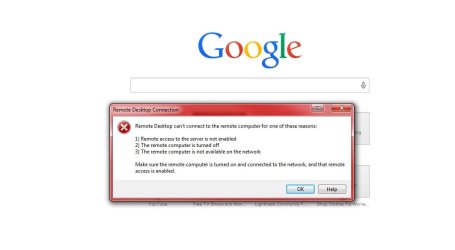
  • Log In.jpg
    Log In.jpg
    32.3 KB · Views: 1

My Computer

Computer type
PC/Desktop
Computer Manufacturer/Model Number
Asus
OS
Windows 7 Home Premium 64bit
Hi and Welcome to SevenForums,

Do you connect to your works VPN first?

How are you connecting, via IP address or Computer Name?

Regards,
Jamie
 

My Computer

Computer type
PC/Desktop
Computer Manufacturer/Model Number
Self Built
OS
Windows 8.1 Pro x64
CPU
Intel Core i5-2500K @ 3.30GHz - S1155
Motherboard
Asus P8P67 LE Rev3, Intel P67, S115
Memory
8GB Corsair DDR3 XMS3, PC3-12800
Graphics Card(s)
NVIDIA GeForce GTX 650
Sound Card
On-Board
Monitor(s) Displays
3 x 24" {Extended Display}
Screen Resolution
1920 x 1080
Hard Drives
300GB Seagate Barracuda 7200
PSU
550W Coolermaster GX550
Case
Silverstone Precision PS04B
Cooling
Stock
Keyboard
Logitech K120
Mouse
World of Warcraft Cataclysm MMO Gaming Mouse
Internet Speed
80 MB
Antivirus
MSE / Windows Defender
Browser
Chrome
Hi and Welcome to SevenForums,

Do you connect to your works VPN first?

How are you connecting, via IP address or Computer Name?

Regards,
Jamie

Honestly, I'm not entirely sure. Work gave us an RDP program or icon to download, and we just download it to our desktop and connect using that.
 

My Computer

Computer type
PC/Desktop
Computer Manufacturer/Model Number
Asus
OS
Windows 7 Home Premium 64bit
This will only really effect anything if you are connecting via name and have a dodgy DNS entry but try the following:

Click Start >> Type CMD >> Press Enter

In the black window that should now have appeared type the following command:
Code:
ipconfig /flushdns

This will flush and reset a client resolver cache.

See if that helps?

Regards,
Jamie
 

My Computer

Computer type
PC/Desktop
Computer Manufacturer/Model Number
Self Built
OS
Windows 8.1 Pro x64
CPU
Intel Core i5-2500K @ 3.30GHz - S1155
Motherboard
Asus P8P67 LE Rev3, Intel P67, S115
Memory
8GB Corsair DDR3 XMS3, PC3-12800
Graphics Card(s)
NVIDIA GeForce GTX 650
Sound Card
On-Board
Monitor(s) Displays
3 x 24" {Extended Display}
Screen Resolution
1920 x 1080
Hard Drives
300GB Seagate Barracuda 7200
PSU
550W Coolermaster GX550
Case
Silverstone Precision PS04B
Cooling
Stock
Keyboard
Logitech K120
Mouse
World of Warcraft Cataclysm MMO Gaming Mouse
Internet Speed
80 MB
Antivirus
MSE / Windows Defender
Browser
Chrome
This will only really effect anything if you are connecting via name and have a dodgy DNS entry but try the following:

Click Start >> Type CMD >> Press Enter

In the black window that should now have appeared type the following command:
Code:
ipconfig /flushdns

This will flush and reset a client resolver cache.

See if that helps?

Regards,
Jamie

Unfortunately same issue -- It just gets stuck on Initiating Connection, then gives me that error message after a while. Still doesn't ask for my credentials.
 

My Computer

Computer type
PC/Desktop
Computer Manufacturer/Model Number
Asus
OS
Windows 7 Home Premium 64bit
Do you use a shortcut like this?

sc.png

If you do then Right Click the shortcut >> Select EDIT
Now look at the connection name (*** Don't post the name here ***)

Is it an IP address :: Example 10.25.100.10 or 192.168.1.20 etc...
Is it a name :: Example mycomputer-pc or servername01
Is it a long address :: Example vp.hostname.com


Remember
*** Don't post the name here ***


Example of what you might be looking at if you use a shortcut like above:
edit.png

Regards,
Jamie
 

My Computer

Computer type
PC/Desktop
Computer Manufacturer/Model Number
Self Built
OS
Windows 8.1 Pro x64
CPU
Intel Core i5-2500K @ 3.30GHz - S1155
Motherboard
Asus P8P67 LE Rev3, Intel P67, S115
Memory
8GB Corsair DDR3 XMS3, PC3-12800
Graphics Card(s)
NVIDIA GeForce GTX 650
Sound Card
On-Board
Monitor(s) Displays
3 x 24" {Extended Display}
Screen Resolution
1920 x 1080
Hard Drives
300GB Seagate Barracuda 7200
PSU
550W Coolermaster GX550
Case
Silverstone Precision PS04B
Cooling
Stock
Keyboard
Logitech K120
Mouse
World of Warcraft Cataclysm MMO Gaming Mouse
Internet Speed
80 MB
Antivirus
MSE / Windows Defender
Browser
Chrome
It's a long address.
 

My Computer

Computer type
PC/Desktop
Computer Manufacturer/Model Number
Asus
OS
Windows 7 Home Premium 64bit
Can you ping it

Click Start >> Type CMD >> Press Enter

In the black command window type
Code:
Ping "Long address here"
Without the quotation marks

Just ping the domain part such as vpn.domain.com, ignore any other bits the address may have at the end

Regards,
Jamie
 

My Computer

Computer type
PC/Desktop
Computer Manufacturer/Model Number
Self Built
OS
Windows 8.1 Pro x64
CPU
Intel Core i5-2500K @ 3.30GHz - S1155
Motherboard
Asus P8P67 LE Rev3, Intel P67, S115
Memory
8GB Corsair DDR3 XMS3, PC3-12800
Graphics Card(s)
NVIDIA GeForce GTX 650
Sound Card
On-Board
Monitor(s) Displays
3 x 24" {Extended Display}
Screen Resolution
1920 x 1080
Hard Drives
300GB Seagate Barracuda 7200
PSU
550W Coolermaster GX550
Case
Silverstone Precision PS04B
Cooling
Stock
Keyboard
Logitech K120
Mouse
World of Warcraft Cataclysm MMO Gaming Mouse
Internet Speed
80 MB
Antivirus
MSE / Windows Defender
Browser
Chrome
Can you ping it

Click Start >> Type CMD >> Press Enter

In the black command window type
Code:
Ping "Long address here"
Without the quotation marks

Just ping the domain part such as vpn.domain.com, ignore any other bits the address may have at the end

Regards,
Jamie

I tried it, the ping didn't work.

Just for kicks, I tried it from one of the computers that CAN connect. It also could not ping, but could still connect fine.
 

My Computer

Computer type
PC/Desktop
Computer Manufacturer/Model Number
Asus
OS
Windows 7 Home Premium 64bit
It maybe worth contacting your IT dept about this as it's hard to know what's going on without knowing the connection setup but i don't want you to post any of those details.

I will ask for some assistance on this thread in the meantime to see if anyone has any ideas.

Regards,
Jamie
 

My Computer

Computer type
PC/Desktop
Computer Manufacturer/Model Number
Self Built
OS
Windows 8.1 Pro x64
CPU
Intel Core i5-2500K @ 3.30GHz - S1155
Motherboard
Asus P8P67 LE Rev3, Intel P67, S115
Memory
8GB Corsair DDR3 XMS3, PC3-12800
Graphics Card(s)
NVIDIA GeForce GTX 650
Sound Card
On-Board
Monitor(s) Displays
3 x 24" {Extended Display}
Screen Resolution
1920 x 1080
Hard Drives
300GB Seagate Barracuda 7200
PSU
550W Coolermaster GX550
Case
Silverstone Precision PS04B
Cooling
Stock
Keyboard
Logitech K120
Mouse
World of Warcraft Cataclysm MMO Gaming Mouse
Internet Speed
80 MB
Antivirus
MSE / Windows Defender
Browser
Chrome
It maybe worth contacting your IT dept about this as it's hard to know what's going on without knowing the connection setup but i don't want you to post any of those details.

I will ask for some assistance on this thread in the meantime to see if anyone has any ideas.

Regards,
Jamie

I've tried contacting my IT department, unfortunately. Their line of reasoning is that since some of my other computers can connect, then the issue is on my end and not theirs and that they cannot assist with personal computers.
 

My Computer

Computer type
PC/Desktop
Computer Manufacturer/Model Number
Asus
OS
Windows 7 Home Premium 64bit
JDobbsy1987 gave some excellent suggestions.

Were going to need more details in my opinion to help you better. How does the connection work? Vpn software? It does not seem like it since you do not mention it. Hows the connection made exactly? What security settings are enabled on your work pc for remote access? Are the other personal pcs running windows 7?

Wouldn't you need a vpn enabled and running to remote desktop into their workplace? It's very unsafe to do this over the internet from home without a vpn. Especially with a static IP. (assuming things are set up like this) Seems like security is not a top priority at your work. :rolleyes: Also turn back on windows firewall, no reason to disable it. What firewall do you have? What settings are on the other personal pcs where it works fine? Are they using the same router connection? Are they using any connection software?
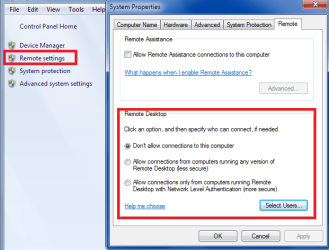
Make sure you have the latest version of remote desktop: (they may be running server 2012 in which case you would need it)

Remote Desktop Protocol (RDP) 8.0 update for Windows 7 and Windows Server 2008 R2


On your work pc, what are you settings here?
 

Attachments

  • remote settings.PNG
    remote settings.PNG
    24.1 KB · Views: 13

My Computer

Computer type
PC/Desktop
Computer Manufacturer/Model Number
Custom Built
OS
Windows 10 Pro
CPU
AMD Ryzen 5 2400G Processor with Radeon RX Vega 11 Graphics
Motherboard
ASRock X470 Master SLI/AC AM4 AMD Promontory X470 SATA 6Gb/s
Memory
G.SKILL Ripjaws V Series 16GB (2 x 8GB) 288-Pin DDR4 SDRAM D
Graphics Card(s)
2047MB NVIDIA GeForce GTX 1060 6GB (EVGA)
Sound Card
Motherboard Built in
Monitor(s) Displays
Acer R240HY bidx 23.8-Inch IPS HDMI DVI VGA (1920 x 1080) Wi
Screen Resolution
1920 x 1080
Hard Drives
1TB Sandisk SSD PLUS (Main drive)
500 GB Seagate 7200 RPM (Games)
500 GB Western Digital 7200 RPM (Virtual Machines)
PSU
CORSAIR TX Series TX650M 650W 80+ Gold Modular Power Supply
Case
CORSAIR CARBIDE SPEC-02 Mid-Tower Gaming Case, Red LED Fan
Cooling
220mm, two 120mm, and four 60mm fans
Keyboard
Wired Dell keyboard
Mouse
Wireless Logitech mouse
Internet Speed
250mb down, 30mb up
Antivirus
Panda Cloud Antivirus
Browser
Chrome-ish x64
Other Info
Your awesome for reading this.
Pretty much what I described in the thread is what I know. It's some kind of executable file that they had us download.

As far as Firewall is concerned, it's the Windows Firewall. All of my other personal PCs are using the same connections as the one in question, and to be honest, I'm not sure what is different between them and the PC I have designated for work.
 

My Computer

Computer type
PC/Desktop
Computer Manufacturer/Model Number
Asus
OS
Windows 7 Home Premium 64bit
I will ask again. Are the other personal pcs running windows 7?

Have you tried the update?

Other than that, since you do not have much information to provide. It is very hard to help.
 

My Computer

Computer type
PC/Desktop
Computer Manufacturer/Model Number
Custom Built
OS
Windows 10 Pro
CPU
AMD Ryzen 5 2400G Processor with Radeon RX Vega 11 Graphics
Motherboard
ASRock X470 Master SLI/AC AM4 AMD Promontory X470 SATA 6Gb/s
Memory
G.SKILL Ripjaws V Series 16GB (2 x 8GB) 288-Pin DDR4 SDRAM D
Graphics Card(s)
2047MB NVIDIA GeForce GTX 1060 6GB (EVGA)
Sound Card
Motherboard Built in
Monitor(s) Displays
Acer R240HY bidx 23.8-Inch IPS HDMI DVI VGA (1920 x 1080) Wi
Screen Resolution
1920 x 1080
Hard Drives
1TB Sandisk SSD PLUS (Main drive)
500 GB Seagate 7200 RPM (Games)
500 GB Western Digital 7200 RPM (Virtual Machines)
PSU
CORSAIR TX Series TX650M 650W 80+ Gold Modular Power Supply
Case
CORSAIR CARBIDE SPEC-02 Mid-Tower Gaming Case, Red LED Fan
Cooling
220mm, two 120mm, and four 60mm fans
Keyboard
Wired Dell keyboard
Mouse
Wireless Logitech mouse
Internet Speed
250mb down, 30mb up
Antivirus
Panda Cloud Antivirus
Browser
Chrome-ish x64
Other Info
Your awesome for reading this.
I will ask again. Are the other personal pcs running windows 7?

Have you tried the update?

Other than that, since you do not have much information to provide. It is very hard to help.

I'll try to get you as much information as I can, if you'll tell me how to do it.

My PC for work and one of my PCs run Windows 7, another runs Windows 8. And what update are you talking about?
 

My Computer

Computer type
PC/Desktop
Computer Manufacturer/Model Number
Asus
OS
Windows 7 Home Premium 64bit
Click the blue words in post 12. I stated do you have the latest update? and I linked the page right below that. Try downloading and installing the latest update for rdp.

Click here and install this update. This is the update I was talking about in post 12.

Is there a different security suite/antivirus on the pcs that do work vs this one?

Which is the one that runs windows 8? The one you are having issues with? Or is windows 8 the one that connects fine but windows 7 doesn't?
 

My Computer

Computer type
PC/Desktop
Computer Manufacturer/Model Number
Custom Built
OS
Windows 10 Pro
CPU
AMD Ryzen 5 2400G Processor with Radeon RX Vega 11 Graphics
Motherboard
ASRock X470 Master SLI/AC AM4 AMD Promontory X470 SATA 6Gb/s
Memory
G.SKILL Ripjaws V Series 16GB (2 x 8GB) 288-Pin DDR4 SDRAM D
Graphics Card(s)
2047MB NVIDIA GeForce GTX 1060 6GB (EVGA)
Sound Card
Motherboard Built in
Monitor(s) Displays
Acer R240HY bidx 23.8-Inch IPS HDMI DVI VGA (1920 x 1080) Wi
Screen Resolution
1920 x 1080
Hard Drives
1TB Sandisk SSD PLUS (Main drive)
500 GB Seagate 7200 RPM (Games)
500 GB Western Digital 7200 RPM (Virtual Machines)
PSU
CORSAIR TX Series TX650M 650W 80+ Gold Modular Power Supply
Case
CORSAIR CARBIDE SPEC-02 Mid-Tower Gaming Case, Red LED Fan
Cooling
220mm, two 120mm, and four 60mm fans
Keyboard
Wired Dell keyboard
Mouse
Wireless Logitech mouse
Internet Speed
250mb down, 30mb up
Antivirus
Panda Cloud Antivirus
Browser
Chrome-ish x64
Other Info
Your awesome for reading this.
Pretty much what I described in the thread is what I know. It's some kind of executable file that they had us download.

What is it called? What is it? Some exe file tells me nothing. Are you even using remote desktop connection to connect?
 

My Computer

Computer type
PC/Desktop
Computer Manufacturer/Model Number
Custom Built
OS
Windows 10 Pro
CPU
AMD Ryzen 5 2400G Processor with Radeon RX Vega 11 Graphics
Motherboard
ASRock X470 Master SLI/AC AM4 AMD Promontory X470 SATA 6Gb/s
Memory
G.SKILL Ripjaws V Series 16GB (2 x 8GB) 288-Pin DDR4 SDRAM D
Graphics Card(s)
2047MB NVIDIA GeForce GTX 1060 6GB (EVGA)
Sound Card
Motherboard Built in
Monitor(s) Displays
Acer R240HY bidx 23.8-Inch IPS HDMI DVI VGA (1920 x 1080) Wi
Screen Resolution
1920 x 1080
Hard Drives
1TB Sandisk SSD PLUS (Main drive)
500 GB Seagate 7200 RPM (Games)
500 GB Western Digital 7200 RPM (Virtual Machines)
PSU
CORSAIR TX Series TX650M 650W 80+ Gold Modular Power Supply
Case
CORSAIR CARBIDE SPEC-02 Mid-Tower Gaming Case, Red LED Fan
Cooling
220mm, two 120mm, and four 60mm fans
Keyboard
Wired Dell keyboard
Mouse
Wireless Logitech mouse
Internet Speed
250mb down, 30mb up
Antivirus
Panda Cloud Antivirus
Browser
Chrome-ish x64
Other Info
Your awesome for reading this.
Click the blue words in post 12. I stated do you have the latest update? and I linked the page right below that. Try downloading and installing the latest update for rdp.

Click here and install this update. This is the update I was talking about in post 12.

Is there a different security suite/antivirus on the pcs that do work vs this one?

Which is the one that runs windows 8? The one you are having issues with? Or is windows 8 the one that connects fine but windows 7 doesn't?

I tried installing them, but the computer said they were already installed.

All PCs involved are running Malwarebytes; I have tried disabling it before attempting the connection but it's still the same result.

Windows 8 and my other Windows 7 laptop are able to connect fine. My PC I've designated for work (which runs Windows 7 as well) is the only one unable to do so.

The file given is a .RDP file. It is opened using Remote Desktop Connection.
 

My Computer

Computer type
PC/Desktop
Computer Manufacturer/Model Number
Asus
OS
Windows 7 Home Premium 64bit
Ok. :) Thank you for the information that is very helpful.

It must be a program then that is causing the issue.

What programs are set to start with your pc?

I just want to verify, are they using the same internet and router connection?
 

My Computer

Computer type
PC/Desktop
Computer Manufacturer/Model Number
Custom Built
OS
Windows 10 Pro
CPU
AMD Ryzen 5 2400G Processor with Radeon RX Vega 11 Graphics
Motherboard
ASRock X470 Master SLI/AC AM4 AMD Promontory X470 SATA 6Gb/s
Memory
G.SKILL Ripjaws V Series 16GB (2 x 8GB) 288-Pin DDR4 SDRAM D
Graphics Card(s)
2047MB NVIDIA GeForce GTX 1060 6GB (EVGA)
Sound Card
Motherboard Built in
Monitor(s) Displays
Acer R240HY bidx 23.8-Inch IPS HDMI DVI VGA (1920 x 1080) Wi
Screen Resolution
1920 x 1080
Hard Drives
1TB Sandisk SSD PLUS (Main drive)
500 GB Seagate 7200 RPM (Games)
500 GB Western Digital 7200 RPM (Virtual Machines)
PSU
CORSAIR TX Series TX650M 650W 80+ Gold Modular Power Supply
Case
CORSAIR CARBIDE SPEC-02 Mid-Tower Gaming Case, Red LED Fan
Cooling
220mm, two 120mm, and four 60mm fans
Keyboard
Wired Dell keyboard
Mouse
Wireless Logitech mouse
Internet Speed
250mb down, 30mb up
Antivirus
Panda Cloud Antivirus
Browser
Chrome-ish x64
Other Info
Your awesome for reading this.
Ok. :) Thank you for the information that is very helpful.

It must be a program then that is causing the issue.

What programs are set to start with your pc?

I just want to verify, are they using the same internet and router connection?

Is there anywhere for me to check what programs are set to activate on startup?

And yes, all 3 computers are using the same internet/router.
 

My Computer

Computer type
PC/Desktop
Computer Manufacturer/Model Number
Asus
OS
Windows 7 Home Premium 64bit
Back
Top