Remote Printer

windowsfree

New member
Local time
12:57 AM
Messages
84
Location
Pennsylvania
Was trying to connect my Windows 7 laptop to a network printer which is on an XP machine and set to share. My Ubuntu 9.04 laptop connects and uses it without a problem. When I attempt to add this printer I get an error message. (see attached screen shot)
Any help will be greatly appreciated. Thanks.
 

Attachments
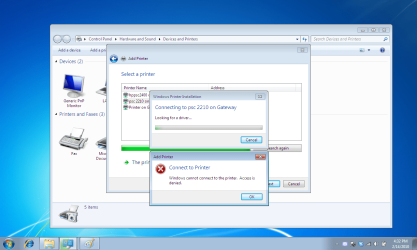
  • printer connection error.png
    printer connection error.png
    104.4 KB · Views: 360

My Computer

Computer Manufacturer/Model Number
Xplorer X6-2900 Notebook
OS
Win7PRo/Ubuntu9.04
CPU
i5-520 Intel
Motherboard
Intel(R) PM55 Chipset Mainboard
Memory
4.0 gig
Graphics Card(s)
Geforce GT330M
Sound Card
BUILT-IN AC 97 SOUND
Screen Resolution
1280X768
Hard Drives
320 gig 7200rpm
Other Info
Built-in 1.3 Mega Pixel Webcam
is this printer connected to another computer or is it by itself.?
Peer to Peer...


if it is connected to another computer and your tapping into the network for a shared printer, you might want to look at the security permissions set between the computer you are on and the computer you are trying to connect too.

right click on your printer and go into the security/sharing permissions and double check it and make sure your passwords/user names add up
 

My Computer

Computer Manufacturer/Model Number
HP Pavilion Elite HPE-410f
OS
Windows 7 Ultimate x64
CPU
AMD Phenom x6 1045t
Motherboard
N/A
Memory
8 GB
Graphics Card(s)
ATI Radeon HD 5570
Sound Card
Realtek Highdefinition Audio / 5.1 Dolby Setup
Monitor(s) Displays
HP w2207h Widescreen
Screen Resolution
1680*1050
Hard Drives
1 TB (fixed), 320 Portable maxtor, Server Hard drives
PSU
350 Watt
Case
HP CASE
Cooling
Bass
Keyboard
Logitech MX 5500
Mouse
Logitech MX 5500
Internet Speed
ROAD RUNNER 16MB D/512 U
You could try this method if nothing else helps.

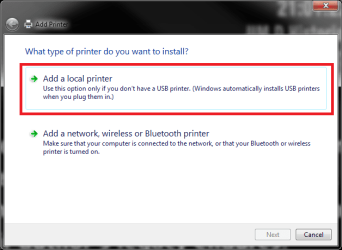
Notice that using this method you have to choose Add a local printer in Add Printer dialog:

OJ4550_2.PNG

Kari
 

My Computer

Computer type
Laptop
Computer Manufacturer/Model Number
HP ENVY 17-1150eg
OS
Windows 10 Pro x64 EN-GB
CPU
1.6 GHz Intel Core i7-720QM Processor
Memory
6 GB
Graphics Card(s)
ATI Mobility Radeon HD 5850 Graphics
Sound Card
Beats sound system with integrated subwoofer
Monitor(s) Displays
17" laptop display, 22" LED and 32" Full HD TV through HDMI
Screen Resolution
1600*900 (1), 1920*1080 (2&3)
Hard Drives
Internal: 2 x 500 GB SATA Hard Disk Drive 7200 rpm
External: 2TB for backups, 3TB USB3 network drive for media
Cooling
As Envy runs a bit warm, I have it on a Cooler Master pad
Keyboard
Logitech diNovo Media Desktop Laser (bluetooth)
Mouse
Logitech Performance Mouse MX
Internet Speed
50/10 Mbps VDSL
Antivirus
Windows Defender 4.3.9431.0
Browser
Maxthon 3.5.2., IE11
It is not a local printer. The printer is connected to an XP computer.

You could try this method if nothing else helps.

Notice that using this method you have to choose Add a local printer in Add Printer dialog:

View attachment 54125

Kari
 

My Computer

Computer Manufacturer/Model Number
Xplorer X6-2900 Notebook
OS
Win7PRo/Ubuntu9.04
CPU
i5-520 Intel
Motherboard
Intel(R) PM55 Chipset Mainboard
Memory
4.0 gig
Graphics Card(s)
Geforce GT330M
Sound Card
BUILT-IN AC 97 SOUND
Screen Resolution
1280X768
Hard Drives
320 gig 7200rpm
Other Info
Built-in 1.3 Mega Pixel Webcam
Windows gets confusing.

I will check that, My network, named HOME has the windows 7 computer, the Windows XP computer that the printers are attached to and a Linux computer. The linux computer can print to these without any problems, I am wondering why Windows gives me this message. I will post back if going over the permissions again helps.
Thanks

is this printer connected to another computer or is it by itself.?
Peer to Peer...


if it is connected to another computer and your tapping into the network for a shared printer, you might want to look at the security permissions set between the computer you are on and the computer you are trying to connect too.

right click on your printer and go into the security/sharing permissions and double check it and make sure your passwords/user names add up
 

My Computer

Computer Manufacturer/Model Number
Xplorer X6-2900 Notebook
OS
Win7PRo/Ubuntu9.04
CPU
i5-520 Intel
Motherboard
Intel(R) PM55 Chipset Mainboard
Memory
4.0 gig
Graphics Card(s)
Geforce GT330M
Sound Card
BUILT-IN AC 97 SOUND
Screen Resolution
1280X768
Hard Drives
320 gig 7200rpm
Other Info
Built-in 1.3 Mega Pixel Webcam
I know. But this method works. It adds a printer connected to another computer as a local printer using said printers network address \\Computer_Name\Printer_Name.

If you want to be sure, read that whole thread.

Kari
 

My Computer

Computer type
Laptop
Computer Manufacturer/Model Number
HP ENVY 17-1150eg
OS
Windows 10 Pro x64 EN-GB
CPU
1.6 GHz Intel Core i7-720QM Processor
Memory
6 GB
Graphics Card(s)
ATI Mobility Radeon HD 5850 Graphics
Sound Card
Beats sound system with integrated subwoofer
Monitor(s) Displays
17" laptop display, 22" LED and 32" Full HD TV through HDMI
Screen Resolution
1600*900 (1), 1920*1080 (2&3)
Hard Drives
Internal: 2 x 500 GB SATA Hard Disk Drive 7200 rpm
External: 2TB for backups, 3TB USB3 network drive for media
Cooling
As Envy runs a bit warm, I have it on a Cooler Master pad
Keyboard
Logitech diNovo Media Desktop Laser (bluetooth)
Mouse
Logitech Performance Mouse MX
Internet Speed
50/10 Mbps VDSL
Antivirus
Windows Defender 4.3.9431.0
Browser
Maxthon 3.5.2., IE11
pardon me

I am sorry I didn't read the entire thread. It just makes no sense why you go through local when my printer is on shared on the Network. Thanks for your input, it took forever to get it installed and for some reason it doesn't print to it. More research I guess. Thanks for ther reply.
Windows seems difficult to configure, not hard, just dificult to find the proper procedure.

I know. But this method works. It adds a printer connected to another computer as a local printer using said printers network address \\Computer_Name\Printer_Name.

If you want to be sure, read that whole thread.

Kari
 

My Computer

Computer Manufacturer/Model Number
Xplorer X6-2900 Notebook
OS
Win7PRo/Ubuntu9.04
CPU
i5-520 Intel
Motherboard
Intel(R) PM55 Chipset Mainboard
Memory
4.0 gig
Graphics Card(s)
Geforce GT330M
Sound Card
BUILT-IN AC 97 SOUND
Screen Resolution
1280X768
Hard Drives
320 gig 7200rpm
Other Info
Built-in 1.3 Mega Pixel Webcam
I've been wondering the same, but it seems that when you add a device connected to another computer using port forwarding, Windows still thinks it is a local device because it is a local device, just on another machine.

No logic there, but at least it works in Windows only networks, when printer is locally connected to one of the networked computers. If printer is connected to a router, you have to connect it as a network printer.

Good luck!

Kari
 

My Computer

Computer type
Laptop
Computer Manufacturer/Model Number
HP ENVY 17-1150eg
OS
Windows 10 Pro x64 EN-GB
CPU
1.6 GHz Intel Core i7-720QM Processor
Memory
6 GB
Graphics Card(s)
ATI Mobility Radeon HD 5850 Graphics
Sound Card
Beats sound system with integrated subwoofer
Monitor(s) Displays
17" laptop display, 22" LED and 32" Full HD TV through HDMI
Screen Resolution
1600*900 (1), 1920*1080 (2&3)
Hard Drives
Internal: 2 x 500 GB SATA Hard Disk Drive 7200 rpm
External: 2TB for backups, 3TB USB3 network drive for media
Cooling
As Envy runs a bit warm, I have it on a Cooler Master pad
Keyboard
Logitech diNovo Media Desktop Laser (bluetooth)
Mouse
Logitech Performance Mouse MX
Internet Speed
50/10 Mbps VDSL
Antivirus
Windows Defender 4.3.9431.0
Browser
Maxthon 3.5.2., IE11
Back
Top