Removable drives

ycwkpp898

New member
Local time
11:46 PM
Messages
25
I have 2 drives showing in my computer which are not my drives, i have
q: local disk (shows as 0 bytes used and 0 bytes free)
and
H: Removable disk (shows as 0 bytes used and 0 bytes free)

How do i remove these, or find out what is using them

ty
:cry:
 

My Computer

OS
windows 7 x64
CPU
Intel I7 920
Motherboard
Gigabyte GA-EX58-UD5
Memory
Triple corsair CM3X2G1600C8 6gb
Graphics Card(s)
ati ASUS 4890 1Gb
Sound Card
Soundblaster Pro fatality
Monitor(s) Displays
22" Viewsonic VG2230wm
Screen Resolution
22"
Hard Drives
raid 10 setup 4 320gb western digital Raid edition 3
1 Non raid 500gb western digital
PSU
TermalTake 900W
Keyboard
Logitech Media
Mouse
Logitech Air max
Internet Speed
50mb download

My Computer

OS
windows 7 x64
CPU
Intel I7 920
Motherboard
Gigabyte GA-EX58-UD5
Memory
Triple corsair CM3X2G1600C8 6gb
Graphics Card(s)
ati ASUS 4890 1Gb
Sound Card
Soundblaster Pro fatality
Monitor(s) Displays
22" Viewsonic VG2230wm
Screen Resolution
22"
Hard Drives
raid 10 setup 4 320gb western digital Raid edition 3
1 Non raid 500gb western digital
PSU
TermalTake 900W
Keyboard
Logitech Media
Mouse
Logitech Air max
Internet Speed
50mb download

The Q: could very well be a virtual drive used by the likes of UltraISO or Magic ISO. Do you have any 3rd party ISO burning software installed?

Also, do you have a built in card reader? The Removable drive is normally assiciated with card readers and will show info if an SD (or similar) card is inserted.

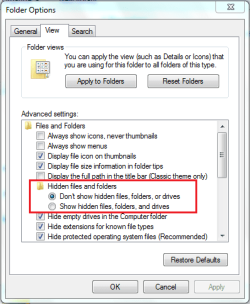
To hide empty drives just do the following...

  • Open Explorer
  • Click Organize then Folder and Search options
  • Under the View tab make sure that Don't show hidden files, folders, or drives is selected
  • If not just select it then click OK
Folder Options.PNG

OS
 

My Computer

Computer Manufacturer/Model Number
Compaq Desktop
OS
Windows 7 Ultimate x64
CPU
AMD Sempron Dual Core
Memory
3GB
Graphics Card(s)
NVIDIA GeForce 6150SE nForce 430
Screen Resolution
1024x768
Hard Drives
150GB Sata
ty for the info. i just removed the drive letter in manage
 

My Computer

OS
windows 7 x64
CPU
Intel I7 920
Motherboard
Gigabyte GA-EX58-UD5
Memory
Triple corsair CM3X2G1600C8 6gb
Graphics Card(s)
ati ASUS 4890 1Gb
Sound Card
Soundblaster Pro fatality
Monitor(s) Displays
22" Viewsonic VG2230wm
Screen Resolution
22"
Hard Drives
raid 10 setup 4 320gb western digital Raid edition 3
1 Non raid 500gb western digital
PSU
TermalTake 900W
Keyboard
Logitech Media
Mouse
Logitech Air max
Internet Speed
50mb download
Back
Top