Removable media (USB) issue

adamisoke

New member
Power User
Local time
7:07 AM
Messages
75
Location
Ada
Hey guys, long time no see.

I'm having this annoying thingy with all the USBs I stick into my PC. Rather I stick it on the front, or back, or even into the keyboard slot, it does not want to open it! INSANE!

It does show in "Universal Serial BUS Controllers" and I tried to uninstall it, but after reboot and fresh USB Mass storage device install...nothing. Still the same..

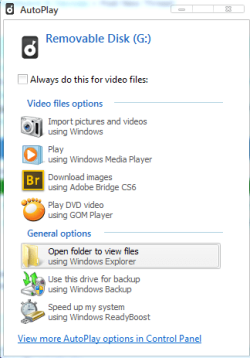
When I click "open folder to view files", a blank explorer window pop-ups, loading for a while and then says it's empty. When I close it, in "My computer" there is no media recognized.
1.png 2.png 3.png

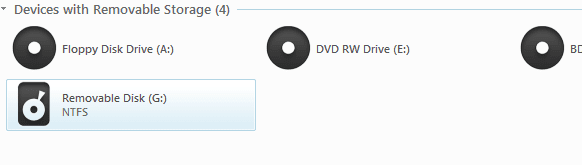
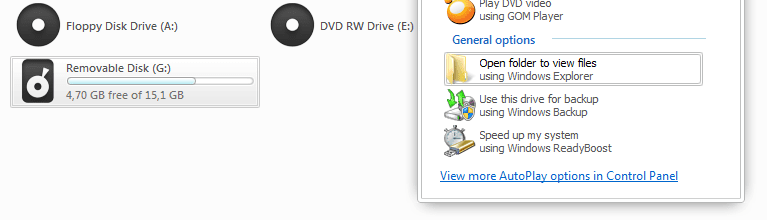
Then I unplug the USB, plug it back without firstly clicking "open folder to view files", it does show as recognized media in "my computer"
4.png


Hope I added enough infos, please help me out here I'm desperate!! Thanks!!
 

My Computer

OS
Windows 7 Ultimate edition x64
CPU
AMD Athlon 64 x2 Dual Core 4600+ 2.39GHz
Memory
4GB
Graphics Card(s)
Nvidia Gforce 9600 GT 512
Sound Card
Realtek HD
Monitor(s) Displays
LG 19`
Screen Resolution
1280X1024
Hard Drives
two HDs 300GB
Internet Speed
1Mb
so many views and none can help? wow!!
 

My Computer

OS
Windows 7 Ultimate edition x64
CPU
AMD Athlon 64 x2 Dual Core 4600+ 2.39GHz
Memory
4GB
Graphics Card(s)
Nvidia Gforce 9600 GT 512
Sound Card
Realtek HD
Monitor(s) Displays
LG 19`
Screen Resolution
1280X1024
Hard Drives
two HDs 300GB
Internet Speed
1Mb
Hi,

You can try this, it might help:

Try Deleting the “Upper filters” from the following key and restart the computer to check functionality
HKEY_LOCAL_MACHINE\SYSTEM\CurrentControlSet\Control\Class\{36FC9E60-C465-11CF-8056-444553540000}

*Be cautious while deleting the Upper Filters.
 

My Computer

OS
Windows 7 Enterprise x64
Hi,

You can try this, it might help:

Try Deleting the “Upper filters” from the following key and restart the computer to check functionality
HKEY_LOCAL_MACHINE\SYSTEM\CurrentControlSet\Control\Class\{36FC9E60-C465-11CF-8056-444553540000}

*Be cautious while deleting the Upper Filters.

Hi! Thanks for your reply.

Deleting upper filters didn't helped. Now, my Audio service is not running? :cry::eek:
 

My Computer

OS
Windows 7 Ultimate edition x64
CPU
AMD Athlon 64 x2 Dual Core 4600+ 2.39GHz
Memory
4GB
Graphics Card(s)
Nvidia Gforce 9600 GT 512
Sound Card
Realtek HD
Monitor(s) Displays
LG 19`
Screen Resolution
1280X1024
Hard Drives
two HDs 300GB
Internet Speed
1Mb
hey,hey, hey, wait...it's ok now, I tried to plug it in another place and it's recognized thanks a bunch!! +1rep on your way..

Now, please tell me how to fix this new audio issue lol
 

My Computer

OS
Windows 7 Ultimate edition x64
CPU
AMD Athlon 64 x2 Dual Core 4600+ 2.39GHz
Memory
4GB
Graphics Card(s)
Nvidia Gforce 9600 GT 512
Sound Card
Realtek HD
Monitor(s) Displays
LG 19`
Screen Resolution
1280X1024
Hard Drives
two HDs 300GB
Internet Speed
1Mb
oh man. my happiness took so shortly lol I could open it, but after I tried to copy content to my desktop it said that there is no media in F drive....shoot!!! I plugged it off and on, still nothing.... :cry:
 

My Computer

OS
Windows 7 Ultimate edition x64
CPU
AMD Athlon 64 x2 Dual Core 4600+ 2.39GHz
Memory
4GB
Graphics Card(s)
Nvidia Gforce 9600 GT 512
Sound Card
Realtek HD
Monitor(s) Displays
LG 19`
Screen Resolution
1280X1024
Hard Drives
two HDs 300GB
Internet Speed
1Mb
It might be a driver problem, if none of your hardware or USB hub had a defect...

I usually encounter this problem when i was using windows xp and during experimentation of running USB devices in windows 98.

You might try what i usually do, uninstall the driver using device manager and reinstall the driver back again. But be sure to have a ready installers for your drivers.

You have not mention that you reinstall your system, so I suspect that your problem is your driver.

Hope this will help...
 

My Computer

Computer Manufacturer/Model Number
Lenovo g470
OS
Windows 7 Ultimate 64bit
CPU
Intel Core i5
Motherboard
Lenovo
Memory
Kingston 8 GB
Graphics Card(s)
Radiion Graphics
Sound Card
Built in
Monitor(s) Displays
HD LED 14 inch wide screen
Hard Drives
Segate 500GB
PSU
Power Adoptor and Battery
Case
Laptop
Cooling
Fan Cooled (Internal)
You might try what i usually do, uninstall the driver using device manager and reinstall the driver back again. But be sure to have a ready installers for your drivers.

Hi and thanks for taking few mins to reply, but I already done that, and the problem remained.
 

My Computer

OS
Windows 7 Ultimate edition x64
CPU
AMD Athlon 64 x2 Dual Core 4600+ 2.39GHz
Memory
4GB
Graphics Card(s)
Nvidia Gforce 9600 GT 512
Sound Card
Realtek HD
Monitor(s) Displays
LG 19`
Screen Resolution
1280X1024
Hard Drives
two HDs 300GB
Internet Speed
1Mb
regarding my sound issue, it's OK now, I fixed it.
 

My Computer

OS
Windows 7 Ultimate edition x64
CPU
AMD Athlon 64 x2 Dual Core 4600+ 2.39GHz
Memory
4GB
Graphics Card(s)
Nvidia Gforce 9600 GT 512
Sound Card
Realtek HD
Monitor(s) Displays
LG 19`
Screen Resolution
1280X1024
Hard Drives
two HDs 300GB
Internet Speed
1Mb
When did this problem started? I mean this did not happened when your PC was new, right?
 

My Computer

Computer Manufacturer/Model Number
Lenovo g470
OS
Windows 7 Ultimate 64bit
CPU
Intel Core i5
Motherboard
Lenovo
Memory
Kingston 8 GB
Graphics Card(s)
Radiion Graphics
Sound Card
Built in
Monitor(s) Displays
HD LED 14 inch wide screen
Hard Drives
Segate 500GB
PSU
Power Adoptor and Battery
Case
Laptop
Cooling
Fan Cooled (Internal)
When did this problem started? I mean this did not happened when your PC was new, right?

Nope. I could use USBs earlier. I don't know when it start to bug me.

USB I'm using is 16GB Transcend

When I plug other USB cable like for the Photo Camera, it works fine tho.
 

My Computer

OS
Windows 7 Ultimate edition x64
CPU
AMD Athlon 64 x2 Dual Core 4600+ 2.39GHz
Memory
4GB
Graphics Card(s)
Nvidia Gforce 9600 GT 512
Sound Card
Realtek HD
Monitor(s) Displays
LG 19`
Screen Resolution
1280X1024
Hard Drives
two HDs 300GB
Internet Speed
1Mb
Hi,

As you mentioned Photo camera works fine but its only the USB Transcend which is not working, then try connecting this USB to another computer and check the functionality.
 

My Computer

OS
Windows 7 Enterprise x64
Hi,

As you mentioned Photo camera works fine but its only the USB Transcend which is not working, then try connecting this USB to another computer and check the functionality.

It's my friend's USB which works fine with his PC, and on my laptop. I had this problem earlier as well with another USB.
 

My Computer

OS
Windows 7 Ultimate edition x64
CPU
AMD Athlon 64 x2 Dual Core 4600+ 2.39GHz
Memory
4GB
Graphics Card(s)
Nvidia Gforce 9600 GT 512
Sound Card
Realtek HD
Monitor(s) Displays
LG 19`
Screen Resolution
1280X1024
Hard Drives
two HDs 300GB
Internet Speed
1Mb
Is the Transcend a USB 3.0 or USB 2.0 device? Some older USB 3.0 devices did not receive enough power when plugged into a usb 2.0 port to work. I got an adapter that plugged into 2 usb 2.0 ports then into my device to give it enough power to work.
 

My Computer

Computer type
PC/Desktop
Computer Manufacturer/Model Number
Custom Build
OS
Windows 7 Home Premium 64 bit SP1
CPU
Intel i7 4790k
Motherboard
MSI Z97-G55 SLI
Memory
16 GB Corsair 2400 MHz DDR3
Graphics Card(s)
Visiontek Radeon R9 285
Sound Card
None
Monitor(s) Displays
Gateway FHX2402L
Screen Resolution
1920 X 1080
Hard Drives
Samsung 840 EVO 500GB
PSU
Corsair 750 TX
Case
Fractal Design
Cooling
Stock fans
Keyboard
Logitech K800
Mouse
Logitech M510
Internet Speed
60.88 Mbps download 10.47 Mbps upload (Speedtest.net)
Antivirus
Norton
Browser
Opera
Other Info
First Computer used: A Commodore Pet of course
Love using Manjaro KDE Linux 64 bit and Windows 7/10 64 bit
Is the Transcend a USB 3.0 or USB 2.0 device? Some older USB 3.0 devices did not receive enough power when plugged into a usb 2.0 port to work. I got an adapter that plugged into 2 usb 2.0 ports then into my device to give it enough power to work.

hm, I have no idea, but I'll check it out. Thanks
 

My Computer

OS
Windows 7 Ultimate edition x64
CPU
AMD Athlon 64 x2 Dual Core 4600+ 2.39GHz
Memory
4GB
Graphics Card(s)
Nvidia Gforce 9600 GT 512
Sound Card
Realtek HD
Monitor(s) Displays
LG 19`
Screen Resolution
1280X1024
Hard Drives
two HDs 300GB
Internet Speed
1Mb
alright my problem solved since I bought myself a new Motherboard....lol
 

My Computer

OS
Windows 7 Ultimate edition x64
CPU
AMD Athlon 64 x2 Dual Core 4600+ 2.39GHz
Memory
4GB
Graphics Card(s)
Nvidia Gforce 9600 GT 512
Sound Card
Realtek HD
Monitor(s) Displays
LG 19`
Screen Resolution
1280X1024
Hard Drives
two HDs 300GB
Internet Speed
1Mb
Back
Top