Removable USB Drive Not Recognized

Ozibot

New member
Local time
7:35 PM
Messages
7
Location
Australia
I know that this is a common issue, and that many people out there on Windows 7 are having the same problem, which is this:

1. User has been using an external USB hard drive (Imation Apollo 250GB in my case, but this problem cuts across many external USB drives) for a long time, on many computers and operating systems

2. User buys a new system with Windows 7

3. User no longer able to get Windows 7 to recognize the external USB drive
--
I know it is possible to get it to be recognized, as I have, at times, been able to view the drive on my Windows 7 machine, but generally speaking (90% of the time) it simply says

1. "USB device not recognized - click here for more"

{click}

2. Device driver software not recognized

3. Further inspection in device settings reveals this error
"Windows has stopped this device because it has reported problems. (Code 43)"

Instead of acting like a fool and trying to somehow figure out how to replicate how I was able to get the machine to recognize the drive, I am wondering if anyone has figured this out?

Possible solutions I have read are:

- reinstalling the USB port
- plug the USB drive in when on power (battery removed)
- beg the manufacturer for a Windows 7 driver


--
I am on Windows 7 Home Premium
Intel Core i5 M430 @ 2.27Ghz
Hitachi HTS 300GB HD
 

My Computer

Computer Manufacturer/Model Number
Acer
OS
Windows 7 (unfortunately)
CPU
Intel Core i5 M430 @ 2.27GHz
Memory
4 GB
Hard Drives
285 GB
Make and model of the external USB is?

Does external USB have a separate power supply?

Have you tried--
1. Everything powered off,
2. connect external drive
3. connect power for external drive if it has its own power supply.
4. Turn on your computer.
5. Log on in normal fashion and wait for Win 7 to find your external drive.

As another suggestion--disconnect everything else from USB ports. Let the external drive be the only USB device connected.

Looking forward to hearing your equipment, if the procedure helped.
 

My Computer

Computer Manufacturer/Model Number
Toshiba Satellite S875D-S7239 laptop
OS
MS Windows 7 Ultimate SP1 64-bit
CPU
AMD A10-4600M
Motherboard
AMD Pumori (Socket FT1)
Memory
6.00 GB Dual-Channel DDR3 @ 798MHz (11-11-12-28)
Graphics Card(s)
AMD Radeon HD 7660G
Sound Card
High Definition Audio Device
Monitor(s) Displays
Generic PnP Monitor (1600x900@60Hz)
Screen Resolution
1600x900@60Hz
Hard Drives
SSD 119GB Corsair CSSD-V128GB2 ATA Device
Keyboard
Standard PS/2 Keyboard
Mouse
HP Wireless Optical Mobile Mouse Model FHA-3410
Internet Speed
What the local pub, local coffee shop offers.
Other Info
Optical Drive:MATSHITA BD-CMB UJ160B ATA Device


Also have an Asus ha1002xp netbook with Win 7 Ultimate installed.
Make and model of the external USB is?

Does external USB have a separate power supply?

Have you tried--
1. Everything powered off,
2. connect external drive
3. connect power for external drive if it has its own power supply.
4. Turn on your computer.
5. Log on in normal fashion and wait for Win 7 to find your external drive.

As another suggestion--disconnect everything else from USB ports. Let the external drive be the only USB device connected.

Looking forward to hearing your equipment, if the procedure helped.

Thanks KarlSnooks-

I have already tried your suggestion - several times in fact.
The same error pops up when I do this.
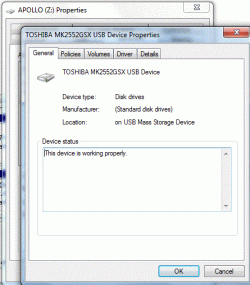
The drive is an Imation Apollo 250GB (Toshiba MK2552GSX)
 

My Computer

Computer Manufacturer/Model Number
Acer
OS
Windows 7 (unfortunately)
CPU
Intel Core i5 M430 @ 2.27GHz
Memory
4 GB
Hard Drives
285 GB
Welcome to the Se7en Forums! Ozibot

The first thing done here with any external usb hard drive or flash drive is reformat the factory crud and Fat 32 volume right off of them and change the file system to NTFS. From there a quick trip into the Disk Management in order to assign a drive letter then makes the drive or device usable and seen in Computer or Windows Explorer from there on.

While 7 nows sees support for Fat 32 and exFat volumes the change to the native file system and assigning a drive letter serves to initialize the drive or device. Even when booting without one plugged in the drive is then detected as a new hardware or drive. With one 32gb flash drive being assigned R for the drive letter and unplugged for a few months even now it would be seen as R when plugged back in from using a high letter towards the end of the alphabet rather then the F,G,H,I, etc Windows will assign by default.
 

My Computers

System One System Two

  • Computer type
    PC/Desktop
    Computer Manufacturer/Model Number
    Custom builds = 2
    OS
    W7 Ultimate x64/W10 Pro x64/W11 Pro Triple Boot - Main PC W7 Remote PC Micro ATX W7 Pro x64/W11 Pro
    CPU
    AMD Phenom II X4 975 Deneb 3.6ghz - 965 2nd remote pc
    Motherboard
    Gigabyte GA-790XTA-UD4-Gigabyte GA-880GM-D2H remote pc
    Memory
    Kingston Hyper X DDR3 1600 1.5v 16gb - Hyper X Fury 8gb 2nd
    Graphics Card(s)
    MSI HD Radeon 5750 1gb - MSI HD Radeon 6450 on mini tower
    Sound Card
    Creative Labs X-Fi Xtreme Audio P - Realtek onooard 2nd case
    Monitor(s) Displays
    ASUS VW199T-P 19" HP 2082a Main-HP 2082a 20" remote pc
    Screen Resolution
    Asus 1440x900 - HP 1600x900
    Hard Drives
    WD Black 1TB HD per OS W7, W10, and pending W11 presently on 500gb OS Drive - Pending Triple 1TB HDs for Spanned Storage/backup volume
    Single 2TB external USB enclosure, single 1TB System 7 Host/Boot drive, Pending 8TB external HD for system image b
    PSU
    Corsair 750TX - primary / Corsair CX600 - second
    Case
    Antec 900-2 - SSD compatible / NZXT Vulcan mini tower
    Cooling
    Zalman CNPS9900A
    Keyboard
    AZIO L70 Backlit Letters Gaming - ONN Cordless/USB
    Mouse
    MSI DS200 Programmable, Logitech Cordless
    Internet Speed
    30mbps upgrade - primary hard wired - mini tower usb WiFi
    Antivirus
    GFI VIPRE Internet Security 2014 on W7 2016 beta on W10,
    Browser
    Cyberfox, WaterFox 64bit FF variants, FireFox x64, Pale Moon
    Other Info
    Accomdata fan cooled usb 2.0 PIDE/Sata II, III external enclosure.
    Sambient usb/eSata PATA/Sata II, III external enclosure.
  • Computer type
    PC/Desktop
    System Manufacturer/Model Number
    CUSTOM ASSEMBLY
    OS
    W7 Pro x64/W11 Pro
    CPU
    AMD Deneb 3.6ghz - 965
    Motherboard
    Gigabyte GA-880GM-D2H remote pc
    Memory
    Kingston Hyper X Fury 8gb
    Graphics Card(s)
    MSI HD Radeon 6450 DVI Output
    Sound Card
    Realtek onooard Creative or Other separate PENDING
    Monitor(s) Displays
    VIZIO 32" LCD TV Separate LCD Pending
    Screen Resolution
    1600x1080
    Hard Drives
    WD 500GB OS Host/Boot WD Green 1TB Storage/Backup
    PSU
    Corsair 600W - THERMALTAKE 600W spare case
    Case
    NZXT Vulcan mini tower
    Cooling
    Twin 120mm Top Fans - 240mm Side Cover
    Keyboard
    ONN Cordless/USB Logitech Cordless
    Mouse
    ONN USB/Cordless - Logitech Cordless
    Internet Speed
    DSL 5G
    Browser
    MS Edge, FireFox, WaterFox x64, FireFox Nightly
    Other Info
    OS Testing-Remote Access to Main TeamViewer
Welcome to the Se7en Forums! Ozibot

The first thing done here with any external usb hard drive or flash drive is reformat the factory crud and Fat 32 volume right off of them and change the file system to NTFS. From there a quick trip into the Disk Management in order to assign a drive letter then makes the drive or device usable and seen in Computer or Windows Explorer from there on.

While 7 nows sees support for Fat 32 and exFat volumes the change to the native file system and assigning a drive letter serves to initialize the drive or device. Even when booting without one plugged in the drive is then detected as a new hardware or drive. With one 32gb flash drive being assigned R for the drive letter and unplugged for a few months even now it would be seen as R when plugged back in from using a high letter towards the end of the alphabet rather then the F,G,H,I, etc Windows will assign by default.

Thank you kindly, NightHawk. My only question would be this - by reformatting the FAT32 USB drive you mean {gulp} erasing all of the current files on it, right?

I am not aware of a method of 'reformatting' without essentially deleting all of the previous files...

Thanks again for your post.
 

My Computer

Computer Manufacturer/Model Number
Acer
OS
Windows 7 (unfortunately)
CPU
Intel Core i5 M430 @ 2.27GHz
Memory
4 GB
Hard Drives
285 GB
I "googled" Toshiba MK2552GSX. Since you said: " The drive is an Imation Apollo 250GB (Toshiba MK2552GSX). "

That is a sata version 2.6 drive. SATA and USB connectors have a completely different connector.
 

My Computer

Computer Manufacturer/Model Number
Toshiba Satellite S875D-S7239 laptop
OS
MS Windows 7 Ultimate SP1 64-bit
CPU
AMD A10-4600M
Motherboard
AMD Pumori (Socket FT1)
Memory
6.00 GB Dual-Channel DDR3 @ 798MHz (11-11-12-28)
Graphics Card(s)
AMD Radeon HD 7660G
Sound Card
High Definition Audio Device
Monitor(s) Displays
Generic PnP Monitor (1600x900@60Hz)
Screen Resolution
1600x900@60Hz
Hard Drives
SSD 119GB Corsair CSSD-V128GB2 ATA Device
Keyboard
Standard PS/2 Keyboard
Mouse
HP Wireless Optical Mobile Mouse Model FHA-3410
Internet Speed
What the local pub, local coffee shop offers.
Other Info
Optical Drive:MATSHITA BD-CMB UJ160B ATA Device


Also have an Asus ha1002xp netbook with Win 7 Ultimate installed.
I "googled" Toshiba MK2552GSX. Since you said: " The drive is an Imation Apollo 250GB (Toshiba MK2552GSX). "

That is a sata version 2.6 drive. SATA and USB connectors have a completely different connector.

Thanks karlsnooks for your post.

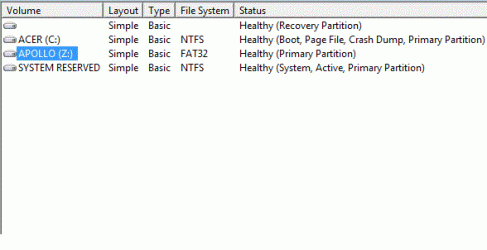
I *think* it is a Toshiba MK2552GSX - these are the screenshots I pulled from when it was plugged into the USB and recognized.....

If I understand your suggestion, you think I should try something other than an USB plug to get the laptop to recognize it??
 

Attachments

  • FAT32.gif
    FAT32.gif
    11.3 KB · Views: 145
  • USB_drive.gif
    USB_drive.gif
    41.5 KB · Views: 87

My Computer

Computer Manufacturer/Model Number
Acer
OS
Windows 7 (unfortunately)
CPU
Intel Core i5 M430 @ 2.27GHz
Memory
4 GB
Hard Drives
285 GB

My Computers

System One System Two

  • Computer type
    PC/Desktop
    Computer Manufacturer/Model Number
    Custom builds = 2
    OS
    W7 Ultimate x64/W10 Pro x64/W11 Pro Triple Boot - Main PC W7 Remote PC Micro ATX W7 Pro x64/W11 Pro
    CPU
    AMD Phenom II X4 975 Deneb 3.6ghz - 965 2nd remote pc
    Motherboard
    Gigabyte GA-790XTA-UD4-Gigabyte GA-880GM-D2H remote pc
    Memory
    Kingston Hyper X DDR3 1600 1.5v 16gb - Hyper X Fury 8gb 2nd
    Graphics Card(s)
    MSI HD Radeon 5750 1gb - MSI HD Radeon 6450 on mini tower
    Sound Card
    Creative Labs X-Fi Xtreme Audio P - Realtek onooard 2nd case
    Monitor(s) Displays
    ASUS VW199T-P 19" HP 2082a Main-HP 2082a 20" remote pc
    Screen Resolution
    Asus 1440x900 - HP 1600x900
    Hard Drives
    WD Black 1TB HD per OS W7, W10, and pending W11 presently on 500gb OS Drive - Pending Triple 1TB HDs for Spanned Storage/backup volume
    Single 2TB external USB enclosure, single 1TB System 7 Host/Boot drive, Pending 8TB external HD for system image b
    PSU
    Corsair 750TX - primary / Corsair CX600 - second
    Case
    Antec 900-2 - SSD compatible / NZXT Vulcan mini tower
    Cooling
    Zalman CNPS9900A
    Keyboard
    AZIO L70 Backlit Letters Gaming - ONN Cordless/USB
    Mouse
    MSI DS200 Programmable, Logitech Cordless
    Internet Speed
    30mbps upgrade - primary hard wired - mini tower usb WiFi
    Antivirus
    GFI VIPRE Internet Security 2014 on W7 2016 beta on W10,
    Browser
    Cyberfox, WaterFox 64bit FF variants, FireFox x64, Pale Moon
    Other Info
    Accomdata fan cooled usb 2.0 PIDE/Sata II, III external enclosure.
    Sambient usb/eSata PATA/Sata II, III external enclosure.
  • Computer type
    PC/Desktop
    System Manufacturer/Model Number
    CUSTOM ASSEMBLY
    OS
    W7 Pro x64/W11 Pro
    CPU
    AMD Deneb 3.6ghz - 965
    Motherboard
    Gigabyte GA-880GM-D2H remote pc
    Memory
    Kingston Hyper X Fury 8gb
    Graphics Card(s)
    MSI HD Radeon 6450 DVI Output
    Sound Card
    Realtek onooard Creative or Other separate PENDING
    Monitor(s) Displays
    VIZIO 32" LCD TV Separate LCD Pending
    Screen Resolution
    1600x1080
    Hard Drives
    WD 500GB OS Host/Boot WD Green 1TB Storage/Backup
    PSU
    Corsair 600W - THERMALTAKE 600W spare case
    Case
    NZXT Vulcan mini tower
    Cooling
    Twin 120mm Top Fans - 240mm Side Cover
    Keyboard
    ONN Cordless/USB Logitech Cordless
    Mouse
    ONN USB/Cordless - Logitech Cordless
    Internet Speed
    DSL 5G
    Browser
    MS Edge, FireFox, WaterFox x64, FireFox Nightly
    Other Info
    OS Testing-Remote Access to Main TeamViewer
I see those in other brands as well. As far as data you would want to backup anything presently on it and then go into the Disk Management tool and right click on the item there to select "format". You will then see the options for Fat 32 or NTFS which you will want.

When first buying any flash drive or external HD before putting any files on I reformat it to the file system it will be used for. For Windows NTFS, for something like writing a bootable iso image for GParted live or ubuntu then I simply let the program write the iso to the Fat volume it comes with.

When reformatting the factory partitions to convert it from Fat to NTFS you can then plug it into an XP machince as well as a Vista or 7 system to still see if readily available for transferring files as well as general acccess by the older versions. NTFS has been the native file system since Windows 2000 making it universal for all Windows machines and portability.
 

My Computers

System One System Two

  • Computer type
    PC/Desktop
    Computer Manufacturer/Model Number
    Custom builds = 2
    OS
    W7 Ultimate x64/W10 Pro x64/W11 Pro Triple Boot - Main PC W7 Remote PC Micro ATX W7 Pro x64/W11 Pro
    CPU
    AMD Phenom II X4 975 Deneb 3.6ghz - 965 2nd remote pc
    Motherboard
    Gigabyte GA-790XTA-UD4-Gigabyte GA-880GM-D2H remote pc
    Memory
    Kingston Hyper X DDR3 1600 1.5v 16gb - Hyper X Fury 8gb 2nd
    Graphics Card(s)
    MSI HD Radeon 5750 1gb - MSI HD Radeon 6450 on mini tower
    Sound Card
    Creative Labs X-Fi Xtreme Audio P - Realtek onooard 2nd case
    Monitor(s) Displays
    ASUS VW199T-P 19" HP 2082a Main-HP 2082a 20" remote pc
    Screen Resolution
    Asus 1440x900 - HP 1600x900
    Hard Drives
    WD Black 1TB HD per OS W7, W10, and pending W11 presently on 500gb OS Drive - Pending Triple 1TB HDs for Spanned Storage/backup volume
    Single 2TB external USB enclosure, single 1TB System 7 Host/Boot drive, Pending 8TB external HD for system image b
    PSU
    Corsair 750TX - primary / Corsair CX600 - second
    Case
    Antec 900-2 - SSD compatible / NZXT Vulcan mini tower
    Cooling
    Zalman CNPS9900A
    Keyboard
    AZIO L70 Backlit Letters Gaming - ONN Cordless/USB
    Mouse
    MSI DS200 Programmable, Logitech Cordless
    Internet Speed
    30mbps upgrade - primary hard wired - mini tower usb WiFi
    Antivirus
    GFI VIPRE Internet Security 2014 on W7 2016 beta on W10,
    Browser
    Cyberfox, WaterFox 64bit FF variants, FireFox x64, Pale Moon
    Other Info
    Accomdata fan cooled usb 2.0 PIDE/Sata II, III external enclosure.
    Sambient usb/eSata PATA/Sata II, III external enclosure.
  • Computer type
    PC/Desktop
    System Manufacturer/Model Number
    CUSTOM ASSEMBLY
    OS
    W7 Pro x64/W11 Pro
    CPU
    AMD Deneb 3.6ghz - 965
    Motherboard
    Gigabyte GA-880GM-D2H remote pc
    Memory
    Kingston Hyper X Fury 8gb
    Graphics Card(s)
    MSI HD Radeon 6450 DVI Output
    Sound Card
    Realtek onooard Creative or Other separate PENDING
    Monitor(s) Displays
    VIZIO 32" LCD TV Separate LCD Pending
    Screen Resolution
    1600x1080
    Hard Drives
    WD 500GB OS Host/Boot WD Green 1TB Storage/Backup
    PSU
    Corsair 600W - THERMALTAKE 600W spare case
    Case
    NZXT Vulcan mini tower
    Cooling
    Twin 120mm Top Fans - 240mm Side Cover
    Keyboard
    ONN Cordless/USB Logitech Cordless
    Mouse
    ONN USB/Cordless - Logitech Cordless
    Internet Speed
    DSL 5G
    Browser
    MS Edge, FireFox, WaterFox x64, FireFox Nightly
    Other Info
    OS Testing-Remote Access to Main TeamViewer
If you want to decrease problems arising from permissions, then copy the file to usb stick formatted in fat32 or fat.

You can see the difference by checking the properties of the file on one of your ntfs-formatted drives and comparing those to the properties of the file on the fat32-formatted drive.

AccessChk.exe which is from the SysInternals' folk might be of interest to you.

I'll attach a file on accesschk.
 

Attachments

My Computer

Computer Manufacturer/Model Number
Toshiba Satellite S875D-S7239 laptop
OS
MS Windows 7 Ultimate SP1 64-bit
CPU
AMD A10-4600M
Motherboard
AMD Pumori (Socket FT1)
Memory
6.00 GB Dual-Channel DDR3 @ 798MHz (11-11-12-28)
Graphics Card(s)
AMD Radeon HD 7660G
Sound Card
High Definition Audio Device
Monitor(s) Displays
Generic PnP Monitor (1600x900@60Hz)
Screen Resolution
1600x900@60Hz
Hard Drives
SSD 119GB Corsair CSSD-V128GB2 ATA Device
Keyboard
Standard PS/2 Keyboard
Mouse
HP Wireless Optical Mobile Mouse Model FHA-3410
Internet Speed
What the local pub, local coffee shop offers.
Other Info
Optical Drive:MATSHITA BD-CMB UJ160B ATA Device


Also have an Asus ha1002xp netbook with Win 7 Ultimate installed.
I see those in other brands as well. As far as data you would want to backup anything presently on it and then go into the Disk Management tool and right click on the item there to select "format". You will then see the options for Fat 32 or NTFS which you will want.

When first buying any flash drive or external HD before putting any files on I reformat it to the file system it will be used for. For Windows NTFS, for something like writing a bootable iso image for GParted live or ubuntu then I simply let the program write the iso to the Fat volume it comes with.

When reformatting the factory partitions to convert it from Fat to NTFS you can then plug it into an XP machince as well as a Vista or 7 system to still see if readily available for transferring files as well as general acccess by the older versions. NTFS has been the native file system since Windows 2000 making it universal for all Windows machines and portability.


Night Hawk - sincere thanks for your help. I wish I would have had the forethought to reformat this drive when I purchased it. I was on Windows Vista at the time, and have used the drive on Vista, XP and other machines quite successfully (I can't ever remember the drive not being "found").

As best I can tell, the best solution would be to buy a new usb drive and then convert it to NTFS. Then I plug the new NTFS drive into an older (Vista) machine, plug the old USB drive into the same machine, and then swap the older files over to the new NTFS USB drive.

This is far more attractive than burning 25 DVDs to backup the drive and then reformatting it.

Thanks again for your help, looking forward to accessing these files again.
 

My Computer

Computer Manufacturer/Model Number
Acer
OS
Windows 7 (unfortunately)
CPU
Intel Core i5 M430 @ 2.27GHz
Memory
4 GB
Hard Drives
285 GB
If you want to decrease problems arising from permissions, then copy the file to usb stick formatted in fat32 or fat.

You can see the difference by checking the properties of the file on one of your ntfs-formatted drives and comparing those to the properties of the file on the fat32-formatted drive.

AccessChk.exe which is from the SysInternals' folk might be of interest to you.

I'll attach a file on accesschk.


Thanks karlsnooks. I ran the accesschk software and it spat out the permissions on folders in C:

I did not see anything about the Z: - which is what I am calling my (FAT32) USB drive (the Toshiba MK2552GSX), this is the drive that is not recognized in Windows 7.
 
Last edited:

My Computer

Computer Manufacturer/Model Number
Acer
OS
Windows 7 (unfortunately)
CPU
Intel Core i5 M430 @ 2.27GHz
Memory
4 GB
Hard Drives
285 GB
Night Hawk - sincere thanks for your help. I wish I would have had the forethought to reformat this drive when I purchased it. I was on Windows Vista at the time, and have used the drive on Vista, XP and other machines quite successfully (I can't ever remember the drive not being "found").

As best I can tell, the best solution would be to buy a new usb drive and then convert it to NTFS. Then I plug the new NTFS drive into an older (Vista) machine, plug the old USB drive into the same machine, and then swap the older files over to the new NTFS USB drive.

This is far more attractive than burning 25 DVDs to backup the drive and then reformatting it.

Thanks again for your help, looking forward to accessing these files again.

You're welcome! :D

I learned that lesson when buying the first external drive here and decided to wipe the factory Fat volume and software off of the drive rather then the need to reinstall the software each time the drive was plugged with the former XP/Vista dual boot. Fortunately I was able to copy everything back onto one of the internal drives at the time to see that done.

As a rule the Fat 32 volumes provided are for compatibility with Mac as well as PC formats. The first thing I advise for Winodws users of course is to simply dump that off of any new drive or device before putting anything on it. That keeps people from running into the exact same problems you saw there.
 

My Computers

System One System Two

  • Computer type
    PC/Desktop
    Computer Manufacturer/Model Number
    Custom builds = 2
    OS
    W7 Ultimate x64/W10 Pro x64/W11 Pro Triple Boot - Main PC W7 Remote PC Micro ATX W7 Pro x64/W11 Pro
    CPU
    AMD Phenom II X4 975 Deneb 3.6ghz - 965 2nd remote pc
    Motherboard
    Gigabyte GA-790XTA-UD4-Gigabyte GA-880GM-D2H remote pc
    Memory
    Kingston Hyper X DDR3 1600 1.5v 16gb - Hyper X Fury 8gb 2nd
    Graphics Card(s)
    MSI HD Radeon 5750 1gb - MSI HD Radeon 6450 on mini tower
    Sound Card
    Creative Labs X-Fi Xtreme Audio P - Realtek onooard 2nd case
    Monitor(s) Displays
    ASUS VW199T-P 19" HP 2082a Main-HP 2082a 20" remote pc
    Screen Resolution
    Asus 1440x900 - HP 1600x900
    Hard Drives
    WD Black 1TB HD per OS W7, W10, and pending W11 presently on 500gb OS Drive - Pending Triple 1TB HDs for Spanned Storage/backup volume
    Single 2TB external USB enclosure, single 1TB System 7 Host/Boot drive, Pending 8TB external HD for system image b
    PSU
    Corsair 750TX - primary / Corsair CX600 - second
    Case
    Antec 900-2 - SSD compatible / NZXT Vulcan mini tower
    Cooling
    Zalman CNPS9900A
    Keyboard
    AZIO L70 Backlit Letters Gaming - ONN Cordless/USB
    Mouse
    MSI DS200 Programmable, Logitech Cordless
    Internet Speed
    30mbps upgrade - primary hard wired - mini tower usb WiFi
    Antivirus
    GFI VIPRE Internet Security 2014 on W7 2016 beta on W10,
    Browser
    Cyberfox, WaterFox 64bit FF variants, FireFox x64, Pale Moon
    Other Info
    Accomdata fan cooled usb 2.0 PIDE/Sata II, III external enclosure.
    Sambient usb/eSata PATA/Sata II, III external enclosure.
  • Computer type
    PC/Desktop
    System Manufacturer/Model Number
    CUSTOM ASSEMBLY
    OS
    W7 Pro x64/W11 Pro
    CPU
    AMD Deneb 3.6ghz - 965
    Motherboard
    Gigabyte GA-880GM-D2H remote pc
    Memory
    Kingston Hyper X Fury 8gb
    Graphics Card(s)
    MSI HD Radeon 6450 DVI Output
    Sound Card
    Realtek onooard Creative or Other separate PENDING
    Monitor(s) Displays
    VIZIO 32" LCD TV Separate LCD Pending
    Screen Resolution
    1600x1080
    Hard Drives
    WD 500GB OS Host/Boot WD Green 1TB Storage/Backup
    PSU
    Corsair 600W - THERMALTAKE 600W spare case
    Case
    NZXT Vulcan mini tower
    Cooling
    Twin 120mm Top Fans - 240mm Side Cover
    Keyboard
    ONN Cordless/USB Logitech Cordless
    Mouse
    ONN USB/Cordless - Logitech Cordless
    Internet Speed
    DSL 5G
    Browser
    MS Edge, FireFox, WaterFox x64, FireFox Nightly
    Other Info
    OS Testing-Remote Access to Main TeamViewer
Back
Top