
You are using an out of date browser. It may not display this or other websites correctly.
You should upgrade or use an alternative browser.
You should upgrade or use an alternative browser.
Remove a saved ad hoc network?
- Thread starter alex21
- Start date

- Local time
- 4:05 PM
- Messages
- 2,698
Should be listed in Network Connections.
My Computer
- Computer Manufacturer/Model Number
- Lenovo ThinkPad T60
- OS
- Windows 7 Ultimate 64Bit
- CPU
- GenuineIntel Intel(R) Core(TM) DuoCore T2400 @ 1.83GHz
- Motherboard
- Intel(R) 82801G (ICH7 Family)
- Memory
- 2.00 GB
- Graphics Card(s)
- Mobile Intel(R) 945 Express Chipset
- Sound Card
- SoundMAX Integrated Digital HD Audio
- Monitor(s) Displays
- ThinkPad Display
- Screen Resolution
- 1400x1050
- Hard Drives
- 100Gb SATA
- Keyboard
- Standard Keyboard
- Mouse
- HID-compliant Mouse
- Internet Speed
- Cable Broadband - 54Mbps
- Other Info
- Intel(R) PRO/1000 PL Network Connection
11a/b/g Wireless LAN Mini PCI Express Adapter
Should be listed in Network Connections.
I can't seem to locate network connections.
How do i get to it?
Thanks.
My Computer
- OS
- Windows 7, Windows XP, Windows Vista

zigzag3143
New member
- Local time
- 2:05 AM
- Messages
- 27,140
Should be listed in Network Connections.
I can't seem to locate network connections.
How do i get to it?
Thanks.
right click wifi icon in system tray
My Computer
- Computer Manufacturer/Model Number
- HP Pavillion dv-7 1005 Tx
- OS
- Win 8 Release candidate 8400
- Memory
- 4 gigs
- Graphics Card(s)
- Nvidia 9600M
- Sound Card
- HD built-in
- Monitor(s) Displays
- 17" Wxga
- Screen Resolution
- 1440x900
- Cooling
- none
- Internet Speed
- 45Mb down 5Mb up
- Local time
- 4:05 PM
- Messages
- 2,698
Start > Control Panel > Network and Sharing Center. Then on left pane window, click Change adapter settings. Should be there. 
My Computer
- Computer Manufacturer/Model Number
- Lenovo ThinkPad T60
- OS
- Windows 7 Ultimate 64Bit
- CPU
- GenuineIntel Intel(R) Core(TM) DuoCore T2400 @ 1.83GHz
- Motherboard
- Intel(R) 82801G (ICH7 Family)
- Memory
- 2.00 GB
- Graphics Card(s)
- Mobile Intel(R) 945 Express Chipset
- Sound Card
- SoundMAX Integrated Digital HD Audio
- Monitor(s) Displays
- ThinkPad Display
- Screen Resolution
- 1400x1050
- Hard Drives
- 100Gb SATA
- Keyboard
- Standard Keyboard
- Mouse
- HID-compliant Mouse
- Internet Speed
- Cable Broadband - 54Mbps
- Other Info
- Intel(R) PRO/1000 PL Network Connection
11a/b/g Wireless LAN Mini PCI Express Adapter
thanks aem i was having the same problem and i did what you said, it worked
My Computer
- Computer Manufacturer/Model Number
- Microsoft
- OS
- Windows 7
- CPU
- Intel E8400
- Motherboard
- GIGABYTE GA-G31M-ES2L
- Memory
- 3GB DDR2 800 Mhz
- Graphics Card(s)
- NVIDIA GeFORCE 9500 GT
- Sound Card
- on board
- Cooling
- EVEREST EPS-1450A
I have the same problem and cannot find/don't see the ad-hoc network that I created. I attempted to delete it but it's still there. I'm running Windows 7 Home Premium x64 and I did save the network, too. The name of it is SETUP, created initially to test if I could print wirelessly to my printer. I can, only now I'd like to either modify it to give it a WEP key or I'd like to delete it then create a new one. Where do I go from here? Here is what I see on a few screens that have been mentioned in this post or on other forums talking about this problem: network and sharing center: http://i35.tinypic.com/25tjfxu.jpg Manage Adapter Settings: http://i34.tinypic.com/2k08m.jpg Manage Wireless Settings: http://i34.tinypic.com/5otta9.jpg
I'm not sure what the "Wireless Network Connection 2" is and I cannot delete either that one or the one next to it.
Any help would be much appreciated! Thanks in advance you can email me at [email protected] if you prefer.
edit: Here's where the network that I am seeing and want to get rid of, I can connect to it: http://i37.tinypic.com/27y1w86.jpg
I'm not sure what the "Wireless Network Connection 2" is and I cannot delete either that one or the one next to it.
Any help would be much appreciated! Thanks in advance
you can email me at [email protected] if you prefer.edit: Here's where the network that I am seeing and want to get rid of, I can connect to it: http://i37.tinypic.com/27y1w86.jpg
Last edited:
My Computer
- Computer Manufacturer/Model Number
- HP
- OS
- Windows 7 Home Premium 64bit
you can go to control panel> network and sharing center.... there in the left pane you will get manage wireless network as second option then click on it to open,,,, select the network you want to manage right click on it and then click on disable...... your work will be done!!!!
please let me if i have helped you
please let me if i have helped you
Attachments
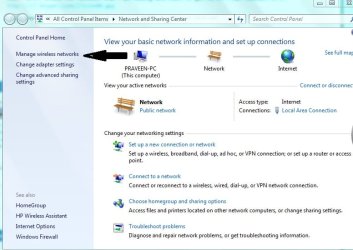
My Computer
- Computer Manufacturer/Model Number
- hp pavilion dv-4 1506TX
- OS
- windows7 home premium
more specification please.... do you have any other problems as with others links not working as you click some where but that specific function doesn't work?????
My Computer
- Computer Manufacturer/Model Number
- hp pavilion dv-4 1506TX
- OS
- windows7 home premium
No, otherwise it works as fine as I'd expect windows to work.
I don't have the bloatware from Samsung installed. I basically wiped the HD, installed from DVD and it already did not allow "Manage Wireless Networks"
Installing the WiFi driver did not help this either.
I don't use Aero layer, instead good old clasic windows that don't waste so much space.
I don't have the bloatware from Samsung installed. I basically wiped the HD, installed from DVD and it already did not allow "Manage Wireless Networks"
Installing the WiFi driver did not help this either.
I don't use Aero layer, instead good old clasic windows that don't waste so much space.
My Computer
- OS
- Windows 7 64 Professional
try using this http://www.sevenforums.com/tutorials/19449-default-file-type-associations-restore.html and restore lnk
My Computer
- Computer Manufacturer/Model Number
- hp pavilion dv-4 1506TX
- OS
- windows7 home premium
try using this http://www.sevenforums.com/tutorials/19449-default-file-type-associations-restore.html and restore lnk
which file-type do you recommend?
My Computer
- OS
- Windows 7 64 Professional