Remove BIOS message (windows boot manager) while start up

subha686

New member
Local time
11:58 PM
Messages
5
I have installed windows 7 professional 64 bit (SP1) using USB pendrive. Though installation was all ok. But now I have another problem. When I start my laptop samsung brand logo occurs and it stalls. Everytime I have to press F10 during start up and select windows boot manager.No flawless start up. Please help me to remove windows boot manager during start up.I would be very grateful :):)
 

My Computer

Computer type
Laptop
Computer Manufacturer/Model Number
samsung
OS
windows 7 professional 64 bit
Yes, I have deleted all the partitions during the installation of windows 7. Actually my model number is SAMSUNG SO8IN-N350V5C and It was windows 8 preinstalled.But my hard disk crashed last week,so I replaced it and installed it with windows 7 and facing the above problem
 

My Computer

Computer type
Laptop
Computer Manufacturer/Model Number
samsung
OS
windows 7 professional 64 bit
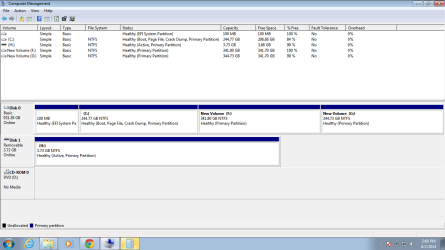
Please post back a screenshot of Disk Management - Post a Screen Capture Image.

Run a few Startup Repairs to see if it finds anything to repair.

In BIOS setup, what are the settings pertaining to Fast Boot, UEFI, CSM, Legacy BIOS, and what is the Boot Priority order. Camera snaps of these expanded settings choices would be helpful.

Did you install to UEFI or Legacy?

Set the hard drive first to boot in BIOS setup.
 
have a look
 

Attachments

  • Capture.PNG
    Capture.PNG
    25.5 KB · Views: 0

My Computer

Computer type
Laptop
Computer Manufacturer/Model Number
samsung
OS
windows 7 professional 64 bit
how to set boot priority order?
I have installed my windows through a pen drive so I cant find recovery option.
 

My Computer

Computer type
Laptop
Computer Manufacturer/Model Number
samsung
OS
windows 7 professional 64 bit
Have you kept the flash stick plugged in? Unplug it to see what happens?

It appears to be a UEFI install so what are the settings choices in BIOS? Do not skip any steps we give without either completing them or asking back how to do so if you're unclear. I won't repeat them again.
 
as you have asked to mention the setting

Fast mode- disabled
ahci mode- enabled

secure boot- disabled
UEFI and legacy bios
 

My Computer

Computer type
Laptop
Computer Manufacturer/Model Number
samsung
OS
windows 7 professional 64 bit
I asked for the settings choices for UEFI, Legacy or CSM. Please expand each to report back what is available to choose, and what you have chosen. If you can take a picture and attach it using the paper clip icon in reply box, it will be helpful.

I also asked you what was the Boot Priority order in BIOS setup. Unless there is response to each question asked, it is not easy to help you. Do not skip any questions, but ask back if you are unsure. Complete thoroughness is required here.

Try enabling Fast Boot.
 
Back
Top