
Solved remove consider replacing your battery windows 7

XXSSSXXX

New member
i'm not sure if this is the right forum to ask this question but today when i turned on my laptop (Acer Aspire S3-951) i keep getting the following message under the power icon..

i know that my battery is 61% degraded but how do i get rid of the extra text that says my battery needs replacement and all... without replacing the power icon..? thanks!
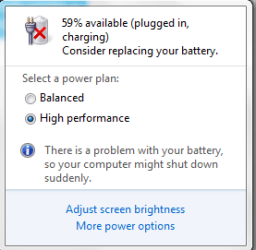
Capture.PNG
 

My Computer

Computer type
Laptop
Computer Manufacturer/Model Number
Acer
OS
Windows 7 Home Premium 64 bit
Hi XXXSSSXXX,

Just replace your battery and it will go away. :)

I don't know of any other way to remove it. :(

-Chuck
 

My Computer

Computer type
PC/Desktop
Computer Manufacturer/Model Number
Self/ Custom Built
OS
Windows 10 Pro 64-bit
CPU
AMD FX-6300
Motherboard
MSI 970A-G43
Memory
Crucial Ballistix Sport 8 GB
Graphics Card(s)
Asus GTX 750ti
Monitor(s) Displays
HP w220
Screen Resolution
1650x1080
Hard Drives
Seagate 3.5" 7200 RPM Hybrid Drive
Crucial M500 240GB 2.5-inch Internal SSD
PSU
EVGA 500 Watt 80+ Certified ATX Power Supply
Case
Fractral Design Define R4
Cooling
Corsair Hydro Series H55 Quiet Edition Liquid CPU Cooler
Keyboard
CM Storm Devastator - Red
Mouse
Logitech Wireless Performance Mouse MX
Internet Speed
Really fast.
Antivirus
AVG
Browser
Firefox
Other Info
Logitech G230 Headset
On my laptop i have an option there to disable notifications about replacing my battery. strange you don't have that.
Maybe check your power options to see if that option is in there somewhere.
Depending on what you do with your laptop, you could consider switching to (x)ubuntu linux or so.
Will save you tons of disk space, since you have only 20GB on your SSD, and easier ways to eliminate small annoyances like this.
Your system will run way faster, but you will have to learn a new operating system.

(I run my file server/xmbc media center on xubuntu from a 16GB SD card on a broken laptop without screen or hdd).
 

My Computer

Computer type
PC/Desktop
Computer Manufacturer/Model Number
custom build
OS
Windows 7 Ultimate x64
CPU
i7 2600k
Motherboard
GA Z68X-UD4-B3
Memory
CMZ16GX3M4A1600C9
Graphics Card(s)
Gainward GeForce GTX 580 1536MB Phantom
Hard Drives
OCZ Agility 3 120GB
Western Digital Caviar Green 2 TB WD20EARS
Antivirus
Norton AV
Browser
Firefox
On my laptop i have an option there to disable notifications about replacing my battery. strange you don't have that.
Maybe check your power options to see if that option is in there somewhere.
Depending on what you do with your laptop, you could consider switching to (x)ubuntu linux or so.
Will save you tons of disk space, since you have only 20GB on your SSD, and easier ways to eliminate small annoyances like this.
Your system will run way faster, but you will have to learn a new operating system.

(I run my file server/xmbc media center on xubuntu from a 16GB SD card on a broken laptop without screen or hdd).

i have already used almost linux distros out there... plus i made my own personalized linux distro from the LFS tutorial...
 

My Computer

Computer type
Laptop
Computer Manufacturer/Model Number
Acer
OS
Windows 7 Home Premium 64 bit
Unplug and discharge the laptop to 20% and below. You will get a checkbox in the notification bar to remove the warning.
 

My Computer

Computer type
Laptop
Computer Manufacturer/Model Number
Dell XPS L502x
OS
Windows 7 Home Premium 64bit
CPU
Intel Core i7 2670QM
Motherboard
Intel HM67 Mobile Express Chipset
Memory
Samsung 8GB 1333Mhz
Graphics Card(s)
nVidia Geforce 540M GT 2GB
Sound Card
Realtek High Definition Audio
Monitor(s) Displays
15.6" Dell Standard RGB-LED Backlit Display
Screen Resolution
1366x768
Hard Drives
Seagate Momentus 2.5" 750GB HDD 5400rpm
Internet Speed
3.1 Mbits/s
Antivirus
AVG Free, Kaspersky
Browser
Google chrome
okay upgraded windows to SP1 and now i get the checkbox... thanks for all your replies..
 

My Computer

Computer type
Laptop
Computer Manufacturer/Model Number
Acer
OS
Windows 7 Home Premium 64 bit
Back
Top