Remove dual boot partition

lenberman

New member
Member
Local time
4:02 PM
Messages
60
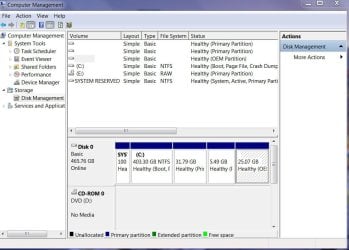
6 months ago I installed Linux Mint as a dual boot with Windows 7. When I installed Mint, I setup 30 GB for it's partition. When I look at what I think might be the Linux volume, it listed it at 33 GB. I want to install Linux Zorin to replace Mint. Hopefully, I can just delete the Mint partition and re-do the whole dual boot set up, then install Zorin. When I look at my hard drive in disk management (see attached) I see a partition (without a drive letter) that is 31.79 GB. Can I just right click, delete and Mint is gone? My concern is that there are other partitions, one that's a 25.7 GB OEM partition.
Len
 

Attachments

  • DskMgmt.jpg
    DskMgmt.jpg
    97.4 KB · Views: 0

My Computer

OS
Windows 7 Home Premium 64 bit
You do know you don`t have to install Linux to run it, right ?

I use Linux mint right off a flash drive.
 

My Computer

Computer type
PC/Desktop
Computer Manufacturer/Model Number
Skylake Special #666
OS
Windows 10 Pro x64
CPU
Intel Core i7 6700K
Motherboard
Asus Sabertooth Z170 Mark 1
Memory
GSkill TridentZ RGB 16GB 3600 16-16-16-36
Graphics Card(s)
EVGA GTX 980 Ti SC x2
Sound Card
Realtek High Definition
Monitor(s) Displays
AOC G2460PG
Screen Resolution
1920 x 1080 144Hz
Hard Drives
Samsung 860 Pro 256GB, Seagate Barracuda 4TB x2
PSU
EVGA 1000 P2, EVGA White Custom Braided Cables
Case
Corsair Vengeance C70 Gunmetal Black
Cooling
Corsair H100i v2, Corsair ML120 x2, Thermal Grizzly Kryonaut
Keyboard
Logitech G910 Orion Spectrum
Mouse
Logitech G700s
Internet Speed
Verizon Fios Quantum Gateway 75/75
Antivirus
Windows Defender, Malwarebytes Free 3.8.3
Browser
Chrome
Other Info
Corsair SP120 x4, LG Blu-ray Drive, Durabrand HT-395 100 Watt Dolby Digital Amp, Corsair H2100 Wireless 7.1 Headset
Can I run a custom installation with my own wallpaper, theme, desktop, browser and documents? If so, please tell me how to do it!

Thanks,
Len
 

My Computer

OS
Windows 7 Home Premium 64 bit
Not off a flash drive, every time you run it from the flash drive it`s just bare Linux.

Why do you need wallpaper, themes etc ?

How often do you actually use Linux ?
 

My Computer

Computer type
PC/Desktop
Computer Manufacturer/Model Number
Skylake Special #666
OS
Windows 10 Pro x64
CPU
Intel Core i7 6700K
Motherboard
Asus Sabertooth Z170 Mark 1
Memory
GSkill TridentZ RGB 16GB 3600 16-16-16-36
Graphics Card(s)
EVGA GTX 980 Ti SC x2
Sound Card
Realtek High Definition
Monitor(s) Displays
AOC G2460PG
Screen Resolution
1920 x 1080 144Hz
Hard Drives
Samsung 860 Pro 256GB, Seagate Barracuda 4TB x2
PSU
EVGA 1000 P2, EVGA White Custom Braided Cables
Case
Corsair Vengeance C70 Gunmetal Black
Cooling
Corsair H100i v2, Corsair ML120 x2, Thermal Grizzly Kryonaut
Keyboard
Logitech G910 Orion Spectrum
Mouse
Logitech G700s
Internet Speed
Verizon Fios Quantum Gateway 75/75
Antivirus
Windows Defender, Malwarebytes Free 3.8.3
Browser
Chrome
Other Info
Corsair SP120 x4, LG Blu-ray Drive, Durabrand HT-395 100 Watt Dolby Digital Amp, Corsair H2100 Wireless 7.1 Headset

My Computer

Computer Manufacturer/Model Number
HP, Dell, Gateway, Toshiba - 4 laptops and 2 desktops
OS
Vista, Windows7, Mint Mate, Zorin, Windows 8
CPU
from 1.6GHz Duo to i7
Monitor(s) Displays
2x HP w2207
Hard Drives
5x HDD, 7x SSD, 12x Externals
Keyboard
with trackball - no mices
Mouse
Trackball mice
Internet Speed
DSL 6000
You have a Dell? That OEM partition at the end houses your Utility partition. If you can boot into F12 and run Diagnostics and Utility partition choices to get the full menu of hardware tests (do it now to see) then it is still worth keeping. Otherwise it's pretty clear the 31gb is the partition you want to replace.

Good resources here for Best Practices for Dual Boot - Windows 7 and Linux - Windows 7 Forums
and Dual boot Ubuntu-Win7
 
I deleted the partition, restarted but it appears I screwed up. Now I get nothing but a black screen displaying: error ; unknown filesystem. grub rescue> I cant seem to get past this. Please help!

Len
 

My Computer

OS
Windows 7 Home Premium 64 bit
I can't get to disk management in Windowsto make the partition active, I can't get past the grub repair screen
 

My Computer

OS
Windows 7 Home Premium 64 bit
Solved: I re installed Linux and got back the grub. Now both Windows and Zorin Linux are both working as they should.
 

My Computer

OS
Windows 7 Home Premium 64 bit
Back
Top