Remove dual boot

DonH

New member
Local time
4:17 PM
Messages
13
A bit of background...
I installed Win 7 on a new drive, booting into the DVD & electing to keep Vista as a dual boot option. Everything worked great until a few months ago. It started taking forever to reboot. I thought I tracked it down to a weak data cable on the Win 7 drive. I replaced it. No improvement. I did a chkdsk on both drives. It found errors and corrected them. Reboot again took almost 30 minutes. Long story short, I finally was able to run startup repair which found errors & corrected them. Again a 30 minute reboot. Changed boot order of drives and ran startup repair 2 times (3rd found no errors). I finally have everything on the C: Win 7 drive. I now want to have a single boot into Win 7. Since things rarely go as expected, I want to bounce the bcdedit command off everyone to make sure I have it right!

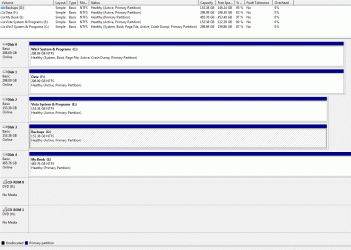
Here's the bcdedit info followed by the disk management info:
C:\Windows\system32>bcdedit
Windows Boot Manager
--------------------
identifier {bootmgr}
device partition=C:
path \bootmgr
description Windows Boot Manager
locale en-US
default {current}
displayorder {current}
{07fd7a02-8551-11df-889a-ee9b7ddaee3d}
timeout 10
Windows Boot Loader
-------------------
identifier {current}
device partition=C:
path \Windows\system32\winload.exe
description Windows 7 Home Premium (recovered)
locale en-US
osdevice partition=C:
systemroot \Windows
resumeobject {7cef2e80-8539-11df-921b-806e6f6e6963}
Windows Boot Loader
-------------------
identifier {07fd7a02-8551-11df-889a-ee9b7ddaee3d}
device partition=E:
path \Windows\system32\winload.exe
description Windows Vista (TM) Business (recovered)
locale en-US
osdevice partition=E:
systemroot \Windows
C:\Windows\system32>

Disk Management
Disk 0
Win7 System & Programs (C:)
298.09 GB NTFS
Healthy (System, Boot, Page File, Active, Crash Dump, Primary Partition)
Disk 1
Data (F:)
298.09 GB NTFS
Healthy (Active, Primary Partition)
Disk 2
Vista System & Programs (E:)
153.38 GB NTFS
Healty (Active, Primary Partition)
Disk 3
Backups (G:)
153.38 GB NTFS
Healthy (Active, Primary Partion)
Disk 4
My Book (I:)
465.76 GB NTFS
Healthy (Primary Partion)

Am I right that running the following command is what I want?
bcdedit /delete {07fd7a02-8551-11df-889a-ee9b7ddaee3d} /cleanup
 

My Computer

Computer Manufacturer/Model Number
Homebrew
OS
Win 7 Home Premium 64bit
CPU
Intel Q6600
Motherboard
Gigabyte GA-EP35-DS3R
Memory
4GB DDR2-1066
Graphics Card(s)
GeForce 8500GT
Sound Card
onboard
Monitor(s) Displays
SyncMaster 912N
Screen Resolution
1280 x 1024
Hard Drives
SATA - non RAID, WD 320GB, WD 320GB, WD 160GB, Hitachi 160GB
PSU
PC P&C Silencer 610
Case
X-Blade II
Cooling
Case Fan
Keyboard
MS Natural
Mouse
TrackMan Wheel
Internet Speed
6gig
Can you please post back a screenshot of your full Disk Mgmt drive map and listings, using Snipping Tool in Start Menu?

Have you already deleted Vista, and what remains of the Dual Boot menu since you don't say?

Do you have the latest BIOS version update, and what is your SATA controller setting in BIOS?

Have you tested your memory with memtest86 for 5-6 passes or overnight, and your HD with maker's diag/repair CD full scan? Hard Drive Diagnostics Tools and Utilities (Storage) - TACKtech Corp.

Once these hardware items are cleared, then we can give you the steps to return to single boot Win7, then troubleshoot possible problems within Win7 OS.
 
The screen shot is attached.

I have not deleted Vista, though I no longer need to boot into it. I'm a little paranoid that I'll need something tucked away in some app data folder. I've been bitten with other OS clean installs. I'll format it as soon as I'm sure I have everything I need. Win 7 is the default, Vista is also listed in the Dual Boot menu.

Yes, the board is a Gigabyte EP35-DS3R with the latest BIOS. I upgraded to a PC Power & Cooling Silencer 610 EPS12V a year ago. I reset the CMOS earlier today and loaded the default settings. There are two controllers on this board. One is a Gigabyte SATA2 chip that supports the IDE devices (my DVD RW) and 2 SATA ports that I don't use. The 4 HDDs are plugged into the Intel ICH9R ports. After a lot of experimenting, the settings that work are for the Gigabyte controller set for SATA/IDE [enabled] and the Ctrl Mode set for [IDE]. The ICH9R controller is set SATA RAID/AHCI Mode [disabled]. That defaults to IDE. If I set it to AHCI, Windows won't see the DVD RW.

I have run the WD short tests on all drives. I ran the long test on the Win 7 drive after it was formatted right before installing Win 7 on it.

I haven't run memtest86 since installing the memory around 18 months ago. I will do that.

I have checked the temps given in BIOS and they are all within the specs. I've also used an Infrared thermometer to check the HD temps, Southbridge, Video card, and CPU. Again, all are well withing the temp range their mfgrs give. We have cats so I thoroughly clean inside the case every quarter.
 

Attachments

  • diskManagement.gif
    diskManagement.gif
    35.1 KB · Views: 62

My Computer

Computer Manufacturer/Model Number
Homebrew
OS
Win 7 Home Premium 64bit
CPU
Intel Q6600
Motherboard
Gigabyte GA-EP35-DS3R
Memory
4GB DDR2-1066
Graphics Card(s)
GeForce 8500GT
Sound Card
onboard
Monitor(s) Displays
SyncMaster 912N
Screen Resolution
1280 x 1024
Hard Drives
SATA - non RAID, WD 320GB, WD 320GB, WD 160GB, Hitachi 160GB
PSU
PC P&C Silencer 610
Case
X-Blade II
Cooling
Case Fan
Keyboard
MS Natural
Mouse
TrackMan Wheel
Internet Speed
6gig
Not sure why Disks 1-3 are marked Active. This could be problematic down the road. I would use DISKPART from Win7 DVD or REpair CD command line to mark them Inactive, or free Partition Wizard bootable CD: http://www.sevenforums.com/tutorials/71432-partition-mark-active.html

Once you do this, you should be free of Vista booting or interfering with WIn7 which is already System Active Boot drive. In the rare case that Win7 should not boot, just boot the WIn7 DVD Repair console or Repair CD, click through to Startup Repair to run up to 3 separate times with reboots until Win7 starts. You can rest assured it will not accidentally mark another HD active since you marked them Inactive.

Remove any remaining Windows Dual Boot menu in msconfig>Boot tab or using EasyBCD Add/Remove tab.
 
Just a quick note. Now I remember why I haven't run memtest86 since I installed Win 7. It won't install on a 64bit OS.
 

My Computer

Computer Manufacturer/Model Number
Homebrew
OS
Win 7 Home Premium 64bit
CPU
Intel Q6600
Motherboard
Gigabyte GA-EP35-DS3R
Memory
4GB DDR2-1066
Graphics Card(s)
GeForce 8500GT
Sound Card
onboard
Monitor(s) Displays
SyncMaster 912N
Screen Resolution
1280 x 1024
Hard Drives
SATA - non RAID, WD 320GB, WD 320GB, WD 160GB, Hitachi 160GB
PSU
PC P&C Silencer 610
Case
X-Blade II
Cooling
Case Fan
Keyboard
MS Natural
Mouse
TrackMan Wheel
Internet Speed
6gig
Then run the WIndows Mem Diagnostics now for it's two passes just to get that out of the way.

Once you deactivate those partitions there may be some changes. But we probably need to really shake out your Win7. Have you run sfc /scannow to see if System Files are damaged, and checked for repeat errors in Event VIewer?
 
Whew. I'm running around 59 minutes from the Windows sound at startup until the logon screen finally appears. The screen is black that whole time. So it is taking forever to get through anything that requires a restart!
I finally used msconfig to delete Vista from the startup. After that It would boot right into Win 7 without giving a multi-boot screen.
I had hopes that getting to that point would clear up the painfully long reboot. It didn't.

Windows memory test turned up no errors.
Sfc/scannow turned up no errors.
Event viewer had no consistent errors...but there are some info entries during the time of the reboots that are interesting.

There are 8 of these in a row during the last reboot:

Log Name: Application
Source: HHCTRL
Date: 7/2/2010 4:35:00 PM
Event ID: 1904
Task Category: None
Level: Information
Keywords: Classic
User: N/A
Computer: Don-Desktop
Description:
The description for Event ID 1904 from source HHCTRL cannot be found. Either the component that raises this event is not installed on your local computer or the installation is corrupted. You can install or repair the component on the local computer.
If the event originated on another computer, the display information had to be saved with the event.
The following information was included with the event:
about:blank
http://go.microsoft.com/fwlink?LinkID=45840
Event Xml:
<Event xmlns="http://schemas.microsoft.com/win/2004/08/events/event">
<System>
<Provider Name="HHCTRL" />
<EventID Qualifiers="0">1904</EventID>
<Level>4</Level>
<Task>0</Task>
<Keywords>0x80000000000000</Keywords>
<TimeCreated SystemTime="2010-07-02T21:35:00.000000000Z" />
<EventRecordID>5131</EventRecordID>
<Channel>Application</Channel>
<Computer>Don-Desktop</Computer>
<Security />
</System>
<EventData>
<Data>about:blank</Data>
<Data>http://go.microsoft.com/fwlink?LinkID=45840</Data>
</EventData>
</Event>

If I follow the links, it refers to some older security updates (not windows 7) that caused issues.

The quick tests from Western Digital didn't turn up any problems. I'll run the extended tests tonight.
 

My Computer

Computer Manufacturer/Model Number
Homebrew
OS
Win 7 Home Premium 64bit
CPU
Intel Q6600
Motherboard
Gigabyte GA-EP35-DS3R
Memory
4GB DDR2-1066
Graphics Card(s)
GeForce 8500GT
Sound Card
onboard
Monitor(s) Displays
SyncMaster 912N
Screen Resolution
1280 x 1024
Hard Drives
SATA - non RAID, WD 320GB, WD 320GB, WD 160GB, Hitachi 160GB
PSU
PC P&C Silencer 610
Case
X-Blade II
Cooling
Case Fan
Keyboard
MS Natural
Mouse
TrackMan Wheel
Internet Speed
6gig
Did you mark all partitions except Win7 inactive?

After full Data Lifeguard CD scan of HD, I would next run a Repair Install to reinstall the OS while keeping all Programs, Files and settings in place. Back up your files first.

The error is not serious.
 
The Win7 drive is the only one marked active.
I completed a full scan of all HD's and all had no problems.
I then did a repair install of win7.
I dug through the event logs and entries during reboots that AKAMAI Netsession service tried to connect, but failed. I tracked that down to an Adobe CS5 trial that I uninstalled. Not needed, I used their uninstall routine.
Rebooting after the uninstall, took from 10:35 to 12:46...argh!! <grin>

I'm uploading the events during that time period in .evtx format.
Two events may provide some insight. The first is the warning at 10:35:52. The second is the information at 10:37:05. In that, duplicate event log entries are being supressed to 86400 seconds! That's 24minutes! Not long afterwards, there are several ESENT events that refer to the database engine inititating recovery steps.

The system runs fine once I've logged on, but, I've never experienced such long restarts!
 

My Computer

Computer Manufacturer/Model Number
Homebrew
OS
Win 7 Home Premium 64bit
CPU
Intel Q6600
Motherboard
Gigabyte GA-EP35-DS3R
Memory
4GB DDR2-1066
Graphics Card(s)
GeForce 8500GT
Sound Card
onboard
Monitor(s) Displays
SyncMaster 912N
Screen Resolution
1280 x 1024
Hard Drives
SATA - non RAID, WD 320GB, WD 320GB, WD 160GB, Hitachi 160GB
PSU
PC P&C Silencer 610
Case
X-Blade II
Cooling
Case Fan
Keyboard
MS Natural
Mouse
TrackMan Wheel
Internet Speed
6gig
This problem happened after you uninstalled Adobe CS5 trial? Had this been mentioned before, I would have advised to System Restore to before you installed that. It can't be done now that you have Repair Installed as it reinstalls the OS. It is likely settings related to that.

If it is correct that you can trace the slow reboot to CS5 uninstall, then what I would do now is reinstall the CS5 to see what changes. Then do a slow methodical uninstall using Revo Uninstaller in Advanced Mode. It will first trigger the Windows Uninstall, but ignore any prompts for restart, click Next for Revo to cue up leftover Registry keys and files, then highlight all of those shown in bold and Delete them. Take your time to be sure you don't miss any, and are doing it correctly. Ask back if you have any questions.

If this fails, unless you can find more revealing repeat errors in Event Viewer>Administrative View or Perfomrance-Diagnostics logs which can be resolved by Googling their text and number, I would clean reinstall after wiping the HD. http://www.sevenforums.com/tutorials/52129-disk-clean-clean-all-diskpart-command.html
http://www.sevenforums.com/tutorials/1649-clean-install-windows-7-a.html

This time save a WIn7 Backup image externally once you have it up and running perfectly so you never have to reinstall again. I will help you get this one perfect if you want.
 
Well, things didn't work as planned, but I'm back to "normal" again. I re-installed all programs that had been installed prior to the reboot errors. I used Revo Uninstaller to uninstall those. I LOVE Revo!! I have dreamed about something like this since the first Windows.

But, I still had 1hr restarts. (talk about a disincentive to try things) I backed up any data on the Vista drive and did a long format. Didn't help. I disconnected all but the Win 7 drive and did a custom install. It didn't seem to help, so I removed all but the win7 and data drives. While I had the case open, I rearranged the drives in the cage, cleaned the front fan and did some cable tidying. Turned the system on and booted to the sign in in a couple seconds and almost instantly to the desktop after signin.

I wasn't completely awake and actually thought I'd have the opportunity to do a clean install. I was surprised to find all of my programs and settings intact. Though I'm certainly not complaining!
 

My Computer

Computer Manufacturer/Model Number
Homebrew
OS
Win 7 Home Premium 64bit
CPU
Intel Q6600
Motherboard
Gigabyte GA-EP35-DS3R
Memory
4GB DDR2-1066
Graphics Card(s)
GeForce 8500GT
Sound Card
onboard
Monitor(s) Displays
SyncMaster 912N
Screen Resolution
1280 x 1024
Hard Drives
SATA - non RAID, WD 320GB, WD 320GB, WD 160GB, Hitachi 160GB
PSU
PC P&C Silencer 610
Case
X-Blade II
Cooling
Case Fan
Keyboard
MS Natural
Mouse
TrackMan Wheel
Internet Speed
6gig
Likely a cable but could have been anything.

Glad you got it working.
 
A further f/u... I continued to experience extremely long reboots with a black screen after the windows startup tone but before the login screen. I ended up replacing the mobo, case, HD's, and did a clean install of Win7. As luck (?) would have it, I had to call Microsoft when Windows wouldn't validate. I had the same long reboot while fixing the validation issue. He had me F8 and start in low res. When the reboot was very fast, he said that it pointed to needing an updated driver for the video card or monitor. Updated the video driver and the problem remained. Replaced the card with no luck. Searched for an updated driver for my Samsung LCD monitor & only found an old one that wouldn't execute in Win 7 64bit. A further search showed numerous people with the same reboot stall using Samsung LCD's. Replaced the monitor with a new Dell that had win7 64 drivers & it worked without having to install the drivers.

In my experience monitors either worked or they didn't. I had no idea that it could work but stall windows boot!!
 

My Computer

Computer Manufacturer/Model Number
Homebrew
OS
Win 7 Home Premium 64bit
CPU
Intel Q6600
Motherboard
Gigabyte GA-EP35-DS3R
Memory
4GB DDR2-1066
Graphics Card(s)
GeForce 8500GT
Sound Card
onboard
Monitor(s) Displays
SyncMaster 912N
Screen Resolution
1280 x 1024
Hard Drives
SATA - non RAID, WD 320GB, WD 320GB, WD 160GB, Hitachi 160GB
PSU
PC P&C Silencer 610
Case
X-Blade II
Cooling
Case Fan
Keyboard
MS Natural
Mouse
TrackMan Wheel
Internet Speed
6gig
Thanks for the info.. ;)
 

My Computer

Computer type
PC/Desktop
Computer Manufacturer/Model Number
LENOVO K450 @3.0GHZ
OS
64-bit Windows 8.1 Pro
CPU
Core(TM) i5 CPU 4330 Haswell @ 3.20GHz
Motherboard
LENOVO
Memory
12.00 GB
Graphics Card(s)
Intel(R) HD Graphics
Sound Card
Intel HD integtrated
Monitor(s) Displays
HP 25' ISP Monitor
Screen Resolution
1900/1020
Hard Drives
(1) ST1000DM003-1CH162 (2) Generic STORAGE DEVICE USB Device (3) Generic STORAGE DEVICE USB Device
Internet Speed
100mb down/10mb up
Back
Top