Remove icon hover highlight

Butters

Member
Member
VIP
Local time
10:07 AM
Messages
195
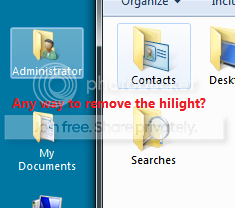
I wanted to know if it was possible to remove the hover\press highlight that appears on the icons on the desktop and in Windows Explorer. Here's a picture to show you what I mean.
465149e4.png


I did some searching and found there is no up front way to do this, as it requires modifying some (system) files. I am familiar with Resource Hacker and such;I just need to know which files to modify. And also, which resources (images and such) would need to be changed. Thanks!
 

My Computer

Computer type
Laptop
Computer Manufacturer/Model Number
Dell Inspiron 15 7000 Series
OS
Windows 7 Professional x64
CPU
Intel Core i7-4510U CPU
Memory
8 GB RAM
Graphics Card(s)
Intel(R) HD Graphics (I so wish I could upgrade this)
Screen Resolution
1920x1080
Keyboard
Laptop keyboard
Mouse
Microsoft Mouse
Internet Speed
Nothing to write home about
Antivirus
Malwarebytes Anti Malware
Browser
Pale Moon (Firefox fork)
Other Info
My primary laptop has Windows 10 on it, and my shared desktop (which is actually a laptop being used as a desktop) has Windows 7 Professional on it. I still use both, but I would say I use my laptop a bit more now.
If you are using the default Aero theme you should not edit it you should create a new custom theme so you do not corrupt the original Aero theme, look at the Post #38 of this thread http://www.sevenforums.com/customization/135985-start-menu-color-change-4.html#post1358071 it will show you how to start a new custom theme and then you can edit it. You will need to do 1 of these 2 ways of Enabling custom themes for it to work.
http://www.sevenforums.com/tutorials/34579-enabling-custom-themes-windows-7-a.html
Or
http://www.sevenforums.com/tutorials/28377-theme-how-apply-custom-themes.html?filter

You will need to edit the Theme.msstyles that you created above the image numbers you will need to edit image # 601, 602, 603, 604, 630, 632, 645, the first four numbers are for the desktop hovers they also remove the hovers in the navigation pane of Explorer the last three numbers remove the hovers from Explorer.
Look at Post #6 of this thread http://www.sevenforums.com/themes-s...ties-window-background-color.html#post2096369 will show you how to use a resource hacker to extract and edit and import images into the Theme.msstyles

If you need more help let me know.
Jerry
 

My Computer

Computer type
Laptop
Computer Manufacturer/Model Number
Sager NP9170
OS
Win 7 Pro x64 / Win 10 Pro
CPU
Intel(R) Core(TM) i7-3630QM CPU @ 2.40GHz
Motherboard
CLEVO P170EM
Memory
12 GB
Graphics Card(s)
(1) Intel(R) HD Graphics 4000 (2) NVIDIA GeForce GTX 675M
Sound Card
(1) Realtek High Definition Audio (2) Intel(R) Display Aud
Monitor(s) Displays
17.3
Screen Resolution
1920x1080
Hard Drives
(1) Samsung 860 EVO 500GB(OS) (1) Samsung 860 EVO 500GB(Data)
Keyboard
Backlite
Antivirus
MSE, Malwarebytes Pro
Browser
Firefox
Other Info
DESKTOP: Custom-built.
OS: Win 10 Pro x64.
CASE: Rosewill R5.
CPU: Intel I5 4670K CPU @ 3.40GHz.
CPU COOLER: Cool Master Hyper 212 EVO.
MOTHERBOARD: Asus Z87-A.
MEMORY: Kingston HyperX 2x4 GB.
GPU: Nvidia Geforce 650 TI.
PSU: Corsair TX750.
DRIVES: (1) Samsung 840 120 GB SSD (2) Western Digital blue 500 GB 7200 RPM.
Thanks Bongo. They're in the .msstyles. There's just one problem, when I replace the images with blank (transparent) ones, I can't tell when I've clicked on something, as there is no indication of it (e.g. the Windows Classic theme shows a solid color when you click on an icon, just like in versions of Windows before Vista.) Is there any way to fix this?
 

My Computer

Computer type
Laptop
Computer Manufacturer/Model Number
Dell Inspiron 15 7000 Series
OS
Windows 7 Professional x64
CPU
Intel Core i7-4510U CPU
Memory
8 GB RAM
Graphics Card(s)
Intel(R) HD Graphics (I so wish I could upgrade this)
Screen Resolution
1920x1080
Keyboard
Laptop keyboard
Mouse
Microsoft Mouse
Internet Speed
Nothing to write home about
Antivirus
Malwarebytes Anti Malware
Browser
Pale Moon (Firefox fork)
Other Info
My primary laptop has Windows 10 on it, and my shared desktop (which is actually a laptop being used as a desktop) has Windows 7 Professional on it. I still use both, but I would say I use my laptop a bit more now.
For the desktop add color to image #601
For Explorer add color to image #632

Jerry
 

My Computer

Computer type
Laptop
Computer Manufacturer/Model Number
Sager NP9170
OS
Win 7 Pro x64 / Win 10 Pro
CPU
Intel(R) Core(TM) i7-3630QM CPU @ 2.40GHz
Motherboard
CLEVO P170EM
Memory
12 GB
Graphics Card(s)
(1) Intel(R) HD Graphics 4000 (2) NVIDIA GeForce GTX 675M
Sound Card
(1) Realtek High Definition Audio (2) Intel(R) Display Aud
Monitor(s) Displays
17.3
Screen Resolution
1920x1080
Hard Drives
(1) Samsung 860 EVO 500GB(OS) (1) Samsung 860 EVO 500GB(Data)
Keyboard
Backlite
Antivirus
MSE, Malwarebytes Pro
Browser
Firefox
Other Info
DESKTOP: Custom-built.
OS: Win 10 Pro x64.
CASE: Rosewill R5.
CPU: Intel I5 4670K CPU @ 3.40GHz.
CPU COOLER: Cool Master Hyper 212 EVO.
MOTHERBOARD: Asus Z87-A.
MEMORY: Kingston HyperX 2x4 GB.
GPU: Nvidia Geforce 650 TI.
PSU: Corsair TX750.
DRIVES: (1) Samsung 840 120 GB SSD (2) Western Digital blue 500 GB 7200 RPM.
windows 8

I've been doing this for windows 7...but i've just upgraded to windows 8..
Is there a way to do this tweak in windows 8?

Thanks so much
 

My Computer

Computer type
PC/Desktop
OS
windows 8 64
I've been doing this for windows 7...but i've just upgraded to windows 8..
Is there a way to do this tweak in windows 8?


Thanks so much
Welcome to the Seven Forums

Windows 8 Forums

Here are the #s for the default aero theme in Windows 8.

Explorer hoover

Hot #599
Selected #598
Hot Selected #600

Desktop hoover

Hot #627
Selected #626
Hot Selected #628

Jerry
 

My Computer

Computer type
Laptop
Computer Manufacturer/Model Number
Sager NP9170
OS
Win 7 Pro x64 / Win 10 Pro
CPU
Intel(R) Core(TM) i7-3630QM CPU @ 2.40GHz
Motherboard
CLEVO P170EM
Memory
12 GB
Graphics Card(s)
(1) Intel(R) HD Graphics 4000 (2) NVIDIA GeForce GTX 675M
Sound Card
(1) Realtek High Definition Audio (2) Intel(R) Display Aud
Monitor(s) Displays
17.3
Screen Resolution
1920x1080
Hard Drives
(1) Samsung 860 EVO 500GB(OS) (1) Samsung 860 EVO 500GB(Data)
Keyboard
Backlite
Antivirus
MSE, Malwarebytes Pro
Browser
Firefox
Other Info
DESKTOP: Custom-built.
OS: Win 10 Pro x64.
CASE: Rosewill R5.
CPU: Intel I5 4670K CPU @ 3.40GHz.
CPU COOLER: Cool Master Hyper 212 EVO.
MOTHERBOARD: Asus Z87-A.
MEMORY: Kingston HyperX 2x4 GB.
GPU: Nvidia Geforce 650 TI.
PSU: Corsair TX750.
DRIVES: (1) Samsung 840 120 GB SSD (2) Western Digital blue 500 GB 7200 RPM.
Thanks so much Jerry! I will go and give this a try :D
 

My Computer

Computer type
PC/Desktop
OS
windows 8 64

My Computer

Computer type
Laptop
Computer Manufacturer/Model Number
Sager NP9170
OS
Win 7 Pro x64 / Win 10 Pro
CPU
Intel(R) Core(TM) i7-3630QM CPU @ 2.40GHz
Motherboard
CLEVO P170EM
Memory
12 GB
Graphics Card(s)
(1) Intel(R) HD Graphics 4000 (2) NVIDIA GeForce GTX 675M
Sound Card
(1) Realtek High Definition Audio (2) Intel(R) Display Aud
Monitor(s) Displays
17.3
Screen Resolution
1920x1080
Hard Drives
(1) Samsung 860 EVO 500GB(OS) (1) Samsung 860 EVO 500GB(Data)
Keyboard
Backlite
Antivirus
MSE, Malwarebytes Pro
Browser
Firefox
Other Info
DESKTOP: Custom-built.
OS: Win 10 Pro x64.
CASE: Rosewill R5.
CPU: Intel I5 4670K CPU @ 3.40GHz.
CPU COOLER: Cool Master Hyper 212 EVO.
MOTHERBOARD: Asus Z87-A.
MEMORY: Kingston HyperX 2x4 GB.
GPU: Nvidia Geforce 650 TI.
PSU: Corsair TX750.
DRIVES: (1) Samsung 840 120 GB SSD (2) Western Digital blue 500 GB 7200 RPM.
Hi everyone.

I've been trying for ages to get rid of the desktop hovers in windows 8. I've created a new theme, and changed the images for 598,599,600, 626, 627, 628 in resource hacker, but whenever I enable the theme, nothing changes. i've double checked the .theme file and everything is correct. The theme shows up with the others and can be selected..but it seems identical to the standard windows theme, despite me changing the images. Can anyone help?

Thanks
 

My Computer

Computer type
PC/Desktop
OS
windows 8 64
Hi everyone.

I've been trying for ages to get rid of the desktop hovers in windows 8. I've created a new theme, and changed the images for 598,599,600, 626, 627, 628 in resource hacker, but whenever I enable the theme, nothing changes. i've double checked the .theme file and everything is correct. The theme shows up with the others and can be selected..but it seems identical to the standard windows theme, despite me changing the images. Can anyone help?

Thanks

How did you create the new theme?

When you are editing the .msstyles are you using that theme or another, you must switch to a different theme log off and then log on then you can edit the new theme.

Jerry
 

My Computer

Computer type
Laptop
Computer Manufacturer/Model Number
Sager NP9170
OS
Win 7 Pro x64 / Win 10 Pro
CPU
Intel(R) Core(TM) i7-3630QM CPU @ 2.40GHz
Motherboard
CLEVO P170EM
Memory
12 GB
Graphics Card(s)
(1) Intel(R) HD Graphics 4000 (2) NVIDIA GeForce GTX 675M
Sound Card
(1) Realtek High Definition Audio (2) Intel(R) Display Aud
Monitor(s) Displays
17.3
Screen Resolution
1920x1080
Hard Drives
(1) Samsung 860 EVO 500GB(OS) (1) Samsung 860 EVO 500GB(Data)
Keyboard
Backlite
Antivirus
MSE, Malwarebytes Pro
Browser
Firefox
Other Info
DESKTOP: Custom-built.
OS: Win 10 Pro x64.
CASE: Rosewill R5.
CPU: Intel I5 4670K CPU @ 3.40GHz.
CPU COOLER: Cool Master Hyper 212 EVO.
MOTHERBOARD: Asus Z87-A.
MEMORY: Kingston HyperX 2x4 GB.
GPU: Nvidia Geforce 650 TI.
PSU: Corsair TX750.
DRIVES: (1) Samsung 840 120 GB SSD (2) Western Digital blue 500 GB 7200 RPM.
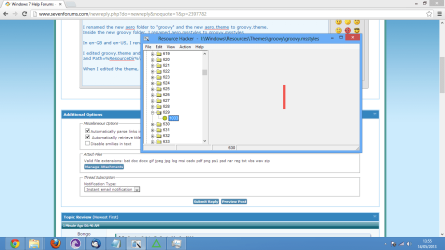
Thanks so much for the quick reply. I created the new theme by making a copy of the aero folder and aero.theme.


I renamed the new aero folder to "groovy" and the new aero.theme to groovy.theme.
Inside the new groovy folder. I renamed aero.msstyles to groovy.msstyles

In en-GB and en-US, I renamed aero.msstyles.mui to groovy.msstyles.mui

I edited groovy.theme and replaced DisplayName=aero to DisplayName=groovy
and Path=%ResourceDir%\Themes\groovy\groovy.msstyles

When I edited the theme, I used the standard aero theme, then rebooted. When I look in resource hacker at the the groovy.msstyles file it shows my new image. I uploaded a screenshot
 

Attachments

  • Untitled.png
    Untitled.png
    101 KB · Views: 8

My Computer

Computer type
PC/Desktop
OS
windows 8 64
Let me do some testing and I will get back to you a little bit.

Jerry
 

My Computer

Computer type
Laptop
Computer Manufacturer/Model Number
Sager NP9170
OS
Win 7 Pro x64 / Win 10 Pro
CPU
Intel(R) Core(TM) i7-3630QM CPU @ 2.40GHz
Motherboard
CLEVO P170EM
Memory
12 GB
Graphics Card(s)
(1) Intel(R) HD Graphics 4000 (2) NVIDIA GeForce GTX 675M
Sound Card
(1) Realtek High Definition Audio (2) Intel(R) Display Aud
Monitor(s) Displays
17.3
Screen Resolution
1920x1080
Hard Drives
(1) Samsung 860 EVO 500GB(OS) (1) Samsung 860 EVO 500GB(Data)
Keyboard
Backlite
Antivirus
MSE, Malwarebytes Pro
Browser
Firefox
Other Info
DESKTOP: Custom-built.
OS: Win 10 Pro x64.
CASE: Rosewill R5.
CPU: Intel I5 4670K CPU @ 3.40GHz.
CPU COOLER: Cool Master Hyper 212 EVO.
MOTHERBOARD: Asus Z87-A.
MEMORY: Kingston HyperX 2x4 GB.
GPU: Nvidia Geforce 650 TI.
PSU: Corsair TX750.
DRIVES: (1) Samsung 840 120 GB SSD (2) Western Digital blue 500 GB 7200 RPM.
I just did some testing and I can confirm them are the correct image numbers.

Zip up the only groovy.msstyles and post it here and I will look at it.

Jerry
 

My Computer

Computer type
Laptop
Computer Manufacturer/Model Number
Sager NP9170
OS
Win 7 Pro x64 / Win 10 Pro
CPU
Intel(R) Core(TM) i7-3630QM CPU @ 2.40GHz
Motherboard
CLEVO P170EM
Memory
12 GB
Graphics Card(s)
(1) Intel(R) HD Graphics 4000 (2) NVIDIA GeForce GTX 675M
Sound Card
(1) Realtek High Definition Audio (2) Intel(R) Display Aud
Monitor(s) Displays
17.3
Screen Resolution
1920x1080
Hard Drives
(1) Samsung 860 EVO 500GB(OS) (1) Samsung 860 EVO 500GB(Data)
Keyboard
Backlite
Antivirus
MSE, Malwarebytes Pro
Browser
Firefox
Other Info
DESKTOP: Custom-built.
OS: Win 10 Pro x64.
CASE: Rosewill R5.
CPU: Intel I5 4670K CPU @ 3.40GHz.
CPU COOLER: Cool Master Hyper 212 EVO.
MOTHERBOARD: Asus Z87-A.
MEMORY: Kingston HyperX 2x4 GB.
GPU: Nvidia Geforce 650 TI.
PSU: Corsair TX750.
DRIVES: (1) Samsung 840 120 GB SSD (2) Western Digital blue 500 GB 7200 RPM.
OK, Heres the zip Jerry. Thanks again!
 

Attachments

My Computer

Computer type
PC/Desktop
OS
windows 8 64
OK, Heres the zip Jerry. Thanks again!

You are going to have to start over the .msstyles is corrupt, the images you imported are .jpg and they need to be .png try that and let me know or post a new .msstyles when done and I will test it.

Jerry
 

My Computer

Computer type
Laptop
Computer Manufacturer/Model Number
Sager NP9170
OS
Win 7 Pro x64 / Win 10 Pro
CPU
Intel(R) Core(TM) i7-3630QM CPU @ 2.40GHz
Motherboard
CLEVO P170EM
Memory
12 GB
Graphics Card(s)
(1) Intel(R) HD Graphics 4000 (2) NVIDIA GeForce GTX 675M
Sound Card
(1) Realtek High Definition Audio (2) Intel(R) Display Aud
Monitor(s) Displays
17.3
Screen Resolution
1920x1080
Hard Drives
(1) Samsung 860 EVO 500GB(OS) (1) Samsung 860 EVO 500GB(Data)
Keyboard
Backlite
Antivirus
MSE, Malwarebytes Pro
Browser
Firefox
Other Info
DESKTOP: Custom-built.
OS: Win 10 Pro x64.
CASE: Rosewill R5.
CPU: Intel I5 4670K CPU @ 3.40GHz.
CPU COOLER: Cool Master Hyper 212 EVO.
MOTHERBOARD: Asus Z87-A.
MEMORY: Kingston HyperX 2x4 GB.
GPU: Nvidia Geforce 650 TI.
PSU: Corsair TX750.
DRIVES: (1) Samsung 840 120 GB SSD (2) Western Digital blue 500 GB 7200 RPM.
oh I didn't realise they had to be .png.. I will try that now and let you know.

Thanks
 

My Computer

Computer type
PC/Desktop
OS
windows 8 64
Hi Jerry,

I've redone the groovy.msstyles file. I used transparent .png files, but it still doesn't seem to be working. I rebooted after making the changes too. Do you know what the problem might be?

Thanks,
Fred
 

Attachments

My Computer

Computer type
PC/Desktop
OS
windows 8 64
I just tested it and the desktop hovers are gone, try making a all new theme with new name then using the groovy.msstyles but give it the new name and try it. Jerry
 

My Computer

Computer type
Laptop
Computer Manufacturer/Model Number
Sager NP9170
OS
Win 7 Pro x64 / Win 10 Pro
CPU
Intel(R) Core(TM) i7-3630QM CPU @ 2.40GHz
Motherboard
CLEVO P170EM
Memory
12 GB
Graphics Card(s)
(1) Intel(R) HD Graphics 4000 (2) NVIDIA GeForce GTX 675M
Sound Card
(1) Realtek High Definition Audio (2) Intel(R) Display Aud
Monitor(s) Displays
17.3
Screen Resolution
1920x1080
Hard Drives
(1) Samsung 860 EVO 500GB(OS) (1) Samsung 860 EVO 500GB(Data)
Keyboard
Backlite
Antivirus
MSE, Malwarebytes Pro
Browser
Firefox
Other Info
DESKTOP: Custom-built.
OS: Win 10 Pro x64.
CASE: Rosewill R5.
CPU: Intel I5 4670K CPU @ 3.40GHz.
CPU COOLER: Cool Master Hyper 212 EVO.
MOTHERBOARD: Asus Z87-A.
MEMORY: Kingston HyperX 2x4 GB.
GPU: Nvidia Geforce 650 TI.
PSU: Corsair TX750.
DRIVES: (1) Samsung 840 120 GB SSD (2) Western Digital blue 500 GB 7200 RPM.
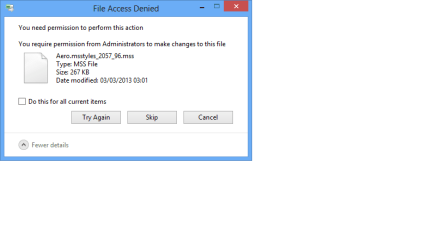
Hi Jerry, Thanks for testing it. I'm glad the .msstyles file is ok now. I've made a whole new theme, but it still doesn't seem to be working. I just realised, when I copy the aero directory 2 files wont copy. The files are Aero.msstyles_2057_96.mss and aerolite.msstyles_2057_96.mss. All the other files copied OK. I get the error in the screenshot. Could this cause a problem?
 

Attachments

  • Untitled.png
    Untitled.png
    12.8 KB · Views: 4

My Computer

Computer type
PC/Desktop
OS
windows 8 64
Back
Top