Solved Remove Icon Shadow Text

jsuares

New member
Local time
7:39 PM
Messages
4
Trying to remove the desktop icon shadow text without success.

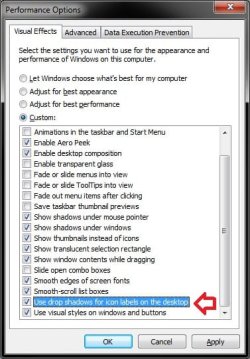
Tried unchecking box in control panel / system / advanced system settings / performance settings / visual effects / use drop shadows for icon labels on the desktop but it did not help.
 

My Computer

OS
W7 RTM
i also want to get rid of that annoying black shadow of desktop icons text, i read some topics but didn't get what i wanted

please get me out of this mess if u can ;)
 

My Computer

Computer type
PC/Desktop
Computer Manufacturer/Model Number
2015 Home Made with Great Performance
OS
Windows 8.1 x64 Enterprise
CPU
i5 4690K
Motherboard
Gigabyte GA-Z87X-UD5H
Memory
Corsair 16 GB DDR3 2000Mhz
Graphics Card(s)
Asus GTX760 2GB 256bit
Sound Card
Realtek OnBoard
Monitor(s) Displays
Samsung SyncMaster SA350 + LG 42LA660S
Screen Resolution
1920x1080 Full HD
Hard Drives
1x 640GB Western Digital SATA
1x 4TB Western Digital Green SATA
3x 2TB Western Digital Caviar Green RS SATA
1x 3TB Western Digital Caviar Green SATA
1x 128GB Corsair Force Red SSD
PSU
Corsair CX 600W
Case
Nexus Prominent 5
Cooling
CPU: Artic Cooler Freezer 13 + 5x120mm Case Fans @ 700RPM
Keyboard
Microsoft Wired Keyboard 600
Mouse
Microsoft Wireless Mobile Mouse 1000
Internet Speed
FO 1 Gbit/s
Antivirus
ESET / Malwarebytes
Browser
Opera / Chrome
Other Info
- Fan Controller Aerocool X-Vision 5
- 1x 1TB Hitachi DeskPlus External USB
- 1x 1TB Western Digital Passport External USB3
Did this ever get resolved??
i like to have a plain white screen but with the black shadow in the teaxt it just looks horrid!!
 

My Computer

Computer Manufacturer/Model Number
Me :P
OS
Windows 7 Home Premium x64 SP1
CPU
Core 2 Quad Q6600
Motherboard
Abit IN9 32X MAX
Memory
8 GB OCZ PC2-6400 nVIDIA SLI-Ready Edition (4X2GB)
Graphics Card(s)
AMP! GeForce GTX 260² 896MB 448-bit GDDR3 (650MHz/2100MHz)
Sound Card
Realtek 7.1 CH HD Audio
Monitor(s) Displays
37" LG 1080p HD LCD TV
Screen Resolution
1280x1024 + 1360x768
Hard Drives
40GB Mushkin SSD
60GB Intel 520 SSD
150GB Raptor HDD
500GB Caviar HDD
PSU
Thermaltake W0133RB 1200W PSU
Case
Antec 900
Cooling
OCZ Vendetta 2 + Antec 900 case fans
Keyboard
Logitech G15 (full layout)
Mouse
R.A.T.9
Internet Speed
Not fast enough!
Hello Rip,

Unchecking the Use drop shadows for icon labels on the desktop Visual Effects option will remove the desktop icon text shadow.

Visual_Effects.jpg

Hope this helps
Shawn
 

My Computer

Computer type
PC/Desktop
Computer Manufacturer/Model Number
Self built custom
OS
64-bit Windows 11 Pro for Workstations
CPU
Intel i7-8700K OC'd to 5 GHz
Motherboard
ASUS ROG Maximus XI Formula Z390
Memory
64 GB (4x16GB) G.SKILL TridentZ RGB DDR4 3600 MHz
Graphics Card(s)
ASUS ROG-STRIX-GTX1080TI-O11G-GAMING
Sound Card
Integrated
Monitor(s) Displays
2 x Samsung Odyssey G7 27"
Screen Resolution
2560x1440
Hard Drives
1TB Samsung 990 PRO M.2,
4TB Samsung 990 PRO PRO M.2,
TerraMaster F8 SSD Plus NAS
PSU
Seasonic Prime Titanium 850W
Case
Thermaltake Core P3
Cooling
Corsair Hydro H115i
Keyboard
Logitech wireless K800
Mouse
Logitech MX Master 4
Internet Speed
2 Gb/s Download and 100 Mb/s Upload
Antivirus
Malwarebyte Anti-Malware Premium
Browser
Google Chrome
Other Info
Logitech Z625 speaker system,
Logitech BRIO 4K Pro webcam,
HP Color LaserJet Pro MFP M477fdn,
APC SMART-UPS RT 1000 XL - SURT1000XLI,
Galaxy S23 Plus phone
Thanks Brink, As always you have come up trumps..... chears :geek:
 

My Computer

Computer Manufacturer/Model Number
Me :P
OS
Windows 7 Home Premium x64 SP1
CPU
Core 2 Quad Q6600
Motherboard
Abit IN9 32X MAX
Memory
8 GB OCZ PC2-6400 nVIDIA SLI-Ready Edition (4X2GB)
Graphics Card(s)
AMP! GeForce GTX 260² 896MB 448-bit GDDR3 (650MHz/2100MHz)
Sound Card
Realtek 7.1 CH HD Audio
Monitor(s) Displays
37" LG 1080p HD LCD TV
Screen Resolution
1280x1024 + 1360x768
Hard Drives
40GB Mushkin SSD
60GB Intel 520 SSD
150GB Raptor HDD
500GB Caviar HDD
PSU
Thermaltake W0133RB 1200W PSU
Case
Antec 900
Cooling
OCZ Vendetta 2 + Antec 900 case fans
Keyboard
Logitech G15 (full layout)
Mouse
R.A.T.9
Internet Speed
Not fast enough!
You're most welcome Rip. :)
 

My Computer

Computer type
PC/Desktop
Computer Manufacturer/Model Number
Self built custom
OS
64-bit Windows 11 Pro for Workstations
CPU
Intel i7-8700K OC'd to 5 GHz
Motherboard
ASUS ROG Maximus XI Formula Z390
Memory
64 GB (4x16GB) G.SKILL TridentZ RGB DDR4 3600 MHz
Graphics Card(s)
ASUS ROG-STRIX-GTX1080TI-O11G-GAMING
Sound Card
Integrated
Monitor(s) Displays
2 x Samsung Odyssey G7 27"
Screen Resolution
2560x1440
Hard Drives
1TB Samsung 990 PRO M.2,
4TB Samsung 990 PRO PRO M.2,
TerraMaster F8 SSD Plus NAS
PSU
Seasonic Prime Titanium 850W
Case
Thermaltake Core P3
Cooling
Corsair Hydro H115i
Keyboard
Logitech wireless K800
Mouse
Logitech MX Master 4
Internet Speed
2 Gb/s Download and 100 Mb/s Upload
Antivirus
Malwarebyte Anti-Malware Premium
Browser
Google Chrome
Other Info
Logitech Z625 speaker system,
Logitech BRIO 4K Pro webcam,
HP Color LaserJet Pro MFP M477fdn,
APC SMART-UPS RT 1000 XL - SURT1000XLI,
Galaxy S23 Plus phone
WoW... what an easy fix, never crossed my mind to try that
i guess that's why you are the admin Brink, nothing gets past you ;)
thanks a lot for the reply ! u made my day !

p.s.- icon text is kinda bright white now, i guess i didn't expect that, is there any way to change the desktop icons text color ?
 

My Computer

Computer type
PC/Desktop
Computer Manufacturer/Model Number
2015 Home Made with Great Performance
OS
Windows 8.1 x64 Enterprise
CPU
i5 4690K
Motherboard
Gigabyte GA-Z87X-UD5H
Memory
Corsair 16 GB DDR3 2000Mhz
Graphics Card(s)
Asus GTX760 2GB 256bit
Sound Card
Realtek OnBoard
Monitor(s) Displays
Samsung SyncMaster SA350 + LG 42LA660S
Screen Resolution
1920x1080 Full HD
Hard Drives
1x 640GB Western Digital SATA
1x 4TB Western Digital Green SATA
3x 2TB Western Digital Caviar Green RS SATA
1x 3TB Western Digital Caviar Green SATA
1x 128GB Corsair Force Red SSD
PSU
Corsair CX 600W
Case
Nexus Prominent 5
Cooling
CPU: Artic Cooler Freezer 13 + 5x120mm Case Fans @ 700RPM
Keyboard
Microsoft Wired Keyboard 600
Mouse
Microsoft Wireless Mobile Mouse 1000
Internet Speed
FO 1 Gbit/s
Antivirus
ESET / Malwarebytes
Browser
Opera / Chrome
Other Info
- Fan Controller Aerocool X-Vision 5
- 1x 1TB Hitachi DeskPlus External USB
- 1x 1TB Western Digital Passport External USB3
Yeah changing icons text color would be most helpful.... it changes automatically dependant on the background color if you use Basic themes so im sure it should be possible
 

My Computer

Computer Manufacturer/Model Number
Me :P
OS
Windows 7 Home Premium x64 SP1
CPU
Core 2 Quad Q6600
Motherboard
Abit IN9 32X MAX
Memory
8 GB OCZ PC2-6400 nVIDIA SLI-Ready Edition (4X2GB)
Graphics Card(s)
AMP! GeForce GTX 260² 896MB 448-bit GDDR3 (650MHz/2100MHz)
Sound Card
Realtek 7.1 CH HD Audio
Monitor(s) Displays
37" LG 1080p HD LCD TV
Screen Resolution
1280x1024 + 1360x768
Hard Drives
40GB Mushkin SSD
60GB Intel 520 SSD
150GB Raptor HDD
500GB Caviar HDD
PSU
Thermaltake W0133RB 1200W PSU
Case
Antec 900
Cooling
OCZ Vendetta 2 + Antec 900 case fans
Keyboard
Logitech G15 (full layout)
Mouse
R.A.T.9
Internet Speed
Not fast enough!
Iconoid worked well in Vista for changing icon text color, but I have not tried it in Windows 7 yet. You might see how it does for you.
 

My Computer

Computer type
PC/Desktop
Computer Manufacturer/Model Number
Self built custom
OS
64-bit Windows 11 Pro for Workstations
CPU
Intel i7-8700K OC'd to 5 GHz
Motherboard
ASUS ROG Maximus XI Formula Z390
Memory
64 GB (4x16GB) G.SKILL TridentZ RGB DDR4 3600 MHz
Graphics Card(s)
ASUS ROG-STRIX-GTX1080TI-O11G-GAMING
Sound Card
Integrated
Monitor(s) Displays
2 x Samsung Odyssey G7 27"
Screen Resolution
2560x1440
Hard Drives
1TB Samsung 990 PRO M.2,
4TB Samsung 990 PRO PRO M.2,
TerraMaster F8 SSD Plus NAS
PSU
Seasonic Prime Titanium 850W
Case
Thermaltake Core P3
Cooling
Corsair Hydro H115i
Keyboard
Logitech wireless K800
Mouse
Logitech MX Master 4
Internet Speed
2 Gb/s Download and 100 Mb/s Upload
Antivirus
Malwarebyte Anti-Malware Premium
Browser
Google Chrome
Other Info
Logitech Z625 speaker system,
Logitech BRIO 4K Pro webcam,
HP Color LaserJet Pro MFP M477fdn,
APC SMART-UPS RT 1000 XL - SURT1000XLI,
Galaxy S23 Plus phone
Uhm don't know if last post was directed to me. If so, I think my post was perfectly clear...
I can quote exactly what the first poster said, if this can be of any help for any of you
 

My Computer

OS
Win 7 x64 Ultimate

My Computer

Computer Manufacturer/Model Number
Home Brew
OS
Windows 7 Ultimate Vista Ultimate x64
CPU
Core 2 Duo E8500 3.16Ghz @ 3.8Ghz
Motherboard
eVGA 750i FTW
Memory
2x2Gigs Patriot PC2-6400 LL
Graphics Card(s)
Inno3D GeForce GTX260 216 SP
Monitor(s) Displays
ASUS VW222U 22" 2ms Response time
Screen Resolution
1680x1050
Hard Drives
SATA 150GB
SATA II 250GB
USB IDE 750GB Ext.
PSU
HYTEC 600W & Thermaltake 650W Toughpower Power Exp
Case
Thermaltake Armor LCS (Liquid Cooling System)
Cooling
Liquid Cooling System
Keyboard
Logitech G15 Gaming Keyboard
Mouse
Logitech G9 Gaming Mouse
And I'm happy that his solution worked for you.
BUT it seems clear to me that the aforementioned solution has some kind of bug. In fact, if you read the FIRST post of this thread you'll see that the poster did the EXACT same thing and had no luck. Please, tell me if I'm getting it wrong here... this is starting to look surreal.
Is it possible NOONE has read the first d**n post? :D
anyway, guys, thanks for any suggestion, and peace!
 

My Computer

OS
Win 7 x64 Ultimate
try with aero disabled / enabled, change your theme to windows default, don't know if this is a good tip, but it worked for me on a friend's laptop
 

My Computer

Computer type
PC/Desktop
Computer Manufacturer/Model Number
2015 Home Made with Great Performance
OS
Windows 8.1 x64 Enterprise
CPU
i5 4690K
Motherboard
Gigabyte GA-Z87X-UD5H
Memory
Corsair 16 GB DDR3 2000Mhz
Graphics Card(s)
Asus GTX760 2GB 256bit
Sound Card
Realtek OnBoard
Monitor(s) Displays
Samsung SyncMaster SA350 + LG 42LA660S
Screen Resolution
1920x1080 Full HD
Hard Drives
1x 640GB Western Digital SATA
1x 4TB Western Digital Green SATA
3x 2TB Western Digital Caviar Green RS SATA
1x 3TB Western Digital Caviar Green SATA
1x 128GB Corsair Force Red SSD
PSU
Corsair CX 600W
Case
Nexus Prominent 5
Cooling
CPU: Artic Cooler Freezer 13 + 5x120mm Case Fans @ 700RPM
Keyboard
Microsoft Wired Keyboard 600
Mouse
Microsoft Wireless Mobile Mouse 1000
Internet Speed
FO 1 Gbit/s
Antivirus
ESET / Malwarebytes
Browser
Opera / Chrome
Other Info
- Fan Controller Aerocool X-Vision 5
- 1x 1TB Hitachi DeskPlus External USB
- 1x 1TB Western Digital Passport External USB3
Yes, disabling Aero works as a workaround. Unfortunately, I like my Aero always ON. You know, "I paid for that feature" and so on.... :D
Anyway, thanks maranello (alè rossa!) for your help
 

My Computer

OS
Win 7 x64 Ultimate
Yeap, actually I have the same problem, and if I remove the shadow of the text, I can only see the icon. The text disappears completely.

Are there any updates on this?

I've been able to disable the crashguard annoyance, but I haven't been able to solve this one yet. It's the only thing standing between me and a perfect desktop...:cry:

Apparently this was fixed in this thread: http://www.sevenforums.com/customization/11169-dreamscene-desktop-icon-text-fix-2.html

With this file: here
 
Last edited by a moderator:

My Computer

Computer Manufacturer/Model Number
Clone
OS
Win 7
CPU
Intel Core 2 Duo E4300
Motherboard
ECS 945GZT-M
Memory
2 GB
Graphics Card(s)
Nvidia 7300 GT 256
Sound Card
Realtek onboard HDA
Monitor(s) Displays
Phillips
Hard Drives
1- SataII 120 GB - 7200 RPM
2- SataII 120 GB - 7200 RPM
3- SataII 250 GB - 7200 RPM
Case
XBlade
Keyboard
Genius KL-0210
Mouse
Logitech G5
Internet Speed
3 MB
Drop Shadow removal in desktop

I've tried everything including regedit (set to "0") and unchecking the shadow box and when I reboot it is fine until the final moments and then the shadows return...going nuts here trying to figure this one out

Changed screen to windows basic and it solved he issue. Must be something connected to Aero.
 
Last edited:

My Computer

Computer Manufacturer/Model Number
ThinkPad x220
OS
Windows 7 Professional
CPU
intel 2.5
Memory
4G
Personalize to a white background. That will give you black text and no shadows. Save changes Then set your personal desktop background and turn on aero . You should still have the black text and no shadows. I've set up four machines like this and it seems to hold....I do use my own photos for the backgrounds. The MS stuff is nice but too slick.
 

My Computer

Computer Manufacturer/Model Number
HB
OS
W7x64 Ult.
CPU
i7 975
Motherboard
P6T7 SC
Memory
12GB Corsair Dom
Graphics Card(s)
Evga GTX285
Sound Card
OB
Monitor(s) Displays
HP LP2475
Screen Resolution
1920x1200
Hard Drives
Velociraptors Raid0 BU
Crucial M4 OS
WD RE4 Data
PSU
PC Power & Cooling 950
Case
Chieftec Bravo
Cooling
Air 6 GentleTyphoon
Keyboard
Logitech Illuminated
Mouse
Logitech MX518
Back
Top