Solved Remove icons from Windows

despuit

New member
Power User
Local time
4:34 PM
Messages
88
Location
Everywhere
Hello all is it possible to disable icons completely from windows?
 
Last edited:

My Computer

Computer type
Laptop
Computer Manufacturer/Model Number
Lenovo
OS
Windows 7 - Home Edition - Build 7601x8086
Memory
Samsung DDR3 4GB
Graphics Card(s)
Intergrated
Sound Card
Intergrated
Screen Resolution
1400 x 1050
Hard Drives
80GB HDD 2.5
PSU
20V adapter
Case
Piece of plastic
Cooling
Copper heatsink
Keyboard
Intergrated PS2
Mouse
TouchPad
Antivirus
Commodo
Browser
K-Melon
You need to describe more fully what you want.
 

My Computer

Computer type
PC/Desktop
Computer Manufacturer/Model Number
HP
OS
Windows 7 Pro 64 bit
CPU
Xeon W3520
Memory
8 GB
Graphics Card(s)
Nvidia Geforce 210
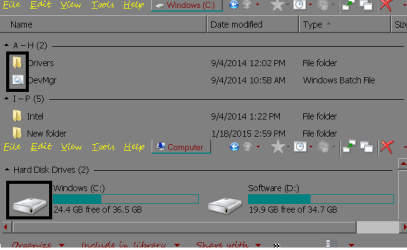
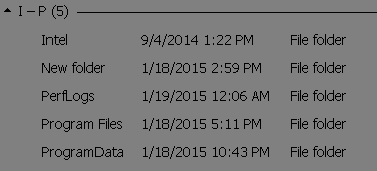
I want to disable the icons from showing, I did a bit of research I don't think you can remove them as the native files are too co-dependant on each other. However I would like to supress them from showing in explorer, and eventually other images that don't act as buttons. Though sticking to icons see below, I'd also want to supress them from context menus.

Now that you bring it up these would be the only places I'd like to supress them, initially I had wanted to remove all icons all together. However they're unobtrusive on the top right of programs, alt-tab they're actually useful if anything be gone with the text, and since I have been using the MyComputer location as my shell on start as a launch board with the Network Location folder. Icons would work really well there as well without text as highlighting shows locations. Though that is another issue for another day.
 

Attachments

  • Ecplo.png
    Ecplo.png
    10.8 KB · Views: 10

My Computer

Computer type
Laptop
Computer Manufacturer/Model Number
Lenovo
OS
Windows 7 - Home Edition - Build 7601x8086
Memory
Samsung DDR3 4GB
Graphics Card(s)
Intergrated
Sound Card
Intergrated
Screen Resolution
1400 x 1050
Hard Drives
80GB HDD 2.5
PSU
20V adapter
Case
Piece of plastic
Cooling
Copper heatsink
Keyboard
Intergrated PS2
Mouse
TouchPad
Antivirus
Commodo
Browser
K-Melon
The real question is why would you want to do that??

Doubt that one can completely remove icons, but alternatively you can create a custom icon that is just white space and use it wherever you want.
 

My Computer

Computer type
PC/Desktop
OS
Windows 7 Pro

My Computer

Computer Manufacturer/Model Number
HP, Dell, Gateway, Toshiba - 4 laptops and 2 desktops
OS
Vista, Windows7, Mint Mate, Zorin, Windows 8
CPU
from 1.6GHz Duo to i7
Monitor(s) Displays
2x HP w2207
Hard Drives
5x HDD, 7x SSD, 12x Externals
Keyboard
with trackball - no mices
Mouse
Trackball mice
Internet Speed
DSL 6000
@doc this is a good solution, though the space would be left there and it would take awhile. @whs thanks for the reply, I was thinking of going this route but wasn't sure if it would work or not had I spent the time deleting all the icons from the files. Would this take out the spacing for explorer? And would this cause any issues for the stability of the OS? (Eg. just delete the image files, or could I delete the main folders [ICON/ICON GROUP] without sh** hitting the fan)
 

My Computer

Computer type
Laptop
Computer Manufacturer/Model Number
Lenovo
OS
Windows 7 - Home Edition - Build 7601x8086
Memory
Samsung DDR3 4GB
Graphics Card(s)
Intergrated
Sound Card
Intergrated
Screen Resolution
1400 x 1050
Hard Drives
80GB HDD 2.5
PSU
20V adapter
Case
Piece of plastic
Cooling
Copper heatsink
Keyboard
Intergrated PS2
Mouse
TouchPad
Antivirus
Commodo
Browser
K-Melon
Here you are on your own. I have never done that and I do not know what the ramifications are. I am a vanilla guy for things like that. No point in wasting my time on such a 'tune-up', LOL.
 

My Computer

Computer Manufacturer/Model Number
HP, Dell, Gateway, Toshiba - 4 laptops and 2 desktops
OS
Vista, Windows7, Mint Mate, Zorin, Windows 8
CPU
from 1.6GHz Duo to i7
Monitor(s) Displays
2x HP w2207
Hard Drives
5x HDD, 7x SSD, 12x Externals
Keyboard
with trackball - no mices
Mouse
Trackball mice
Internet Speed
DSL 6000
lol no problem, I fixate. I am guessing if the icons are deleted the dependencies will just develop error, they're images so I doubt it is any crucial. Will give it a shot. Thanks every one for the help
 

My Computer

Computer type
Laptop
Computer Manufacturer/Model Number
Lenovo
OS
Windows 7 - Home Edition - Build 7601x8086
Memory
Samsung DDR3 4GB
Graphics Card(s)
Intergrated
Sound Card
Intergrated
Screen Resolution
1400 x 1050
Hard Drives
80GB HDD 2.5
PSU
20V adapter
Case
Piece of plastic
Cooling
Copper heatsink
Keyboard
Intergrated PS2
Mouse
TouchPad
Antivirus
Commodo
Browser
K-Melon
UPDATE: No do not delete the icons/icons groups blindly. I deleted them out of IMAGERES as a starting point and it removed my login boxes. Fascinating yes, however that was it for the computer. Safe mode was completely rendered useless for some reason as well. Was able to copy the file back. But thought I'd let you know. Am going to use both your ideas.
 

My Computer

Computer type
Laptop
Computer Manufacturer/Model Number
Lenovo
OS
Windows 7 - Home Edition - Build 7601x8086
Memory
Samsung DDR3 4GB
Graphics Card(s)
Intergrated
Sound Card
Intergrated
Screen Resolution
1400 x 1050
Hard Drives
80GB HDD 2.5
PSU
20V adapter
Case
Piece of plastic
Cooling
Copper heatsink
Keyboard
Intergrated PS2
Mouse
TouchPad
Antivirus
Commodo
Browser
K-Melon
Would this take out the spacing for explorer?

Except for a few rare cases, no.

And would this cause any issues for the stability of the OS?

It is highly probable that it would.

Applications and Windows components have every right to expect that these icons will be there and will almost universally assume that they are. Some applications at least will react very badly if they are not. Results will be unpredictable.

You are attempting some pretty radical changes to Windows and you must expect the worst.

Edit: Do not assume that Safe more will help in restoring operation. "Safe" is only relative. When you start ripping out portions of Windows nothing is safe.
 

My Computer

Computer type
PC/Desktop
Computer Manufacturer/Model Number
HP
OS
Windows 7 Pro 64 bit
CPU
Xeon W3520
Memory
8 GB
Graphics Card(s)
Nvidia Geforce 210
Absolutely agree lol, lost all safe mode and logon functionality the last time. Had to use the ram disk to restore operations. Is all fixed now using the library refrences from WHS and the transparency concept from Doc.
 

Attachments

  • check 1.png
    check 1.png
    1.2 KB · Views: 7
Last edited:

My Computer

Computer type
Laptop
Computer Manufacturer/Model Number
Lenovo
OS
Windows 7 - Home Edition - Build 7601x8086
Memory
Samsung DDR3 4GB
Graphics Card(s)
Intergrated
Sound Card
Intergrated
Screen Resolution
1400 x 1050
Hard Drives
80GB HDD 2.5
PSU
20V adapter
Case
Piece of plastic
Cooling
Copper heatsink
Keyboard
Intergrated PS2
Mouse
TouchPad
Antivirus
Commodo
Browser
K-Melon
Thank you for being the guinea pig - know we know that we can't just remove the icons. Cheers!
 

My Computer

Computer type
PC/Desktop
OS
Windows 7 Pro
No problem I think it's also worth a mention that during this process that I received an error message that an unauthorized change occurred to the operating sytem and that Microsoft validation would no longer be available. I now receive error on explorer, and any Microsoft program lost of functionality will occur soon, as windows is not genuine. This is now greyed out from properties menu and slui will not run. Parameter 3 runs though returns an error code. Have to call them for resolve. So yeah I would refrain from trying that. In the personlization interface there are ways to make them as small as a character, find that dependency and I am sure you can reduce to the point of looking like a dot or completely without modifying files to that extent attempted.
 
Last edited:

My Computer

Computer type
Laptop
Computer Manufacturer/Model Number
Lenovo
OS
Windows 7 - Home Edition - Build 7601x8086
Memory
Samsung DDR3 4GB
Graphics Card(s)
Intergrated
Sound Card
Intergrated
Screen Resolution
1400 x 1050
Hard Drives
80GB HDD 2.5
PSU
20V adapter
Case
Piece of plastic
Cooling
Copper heatsink
Keyboard
Intergrated PS2
Mouse
TouchPad
Antivirus
Commodo
Browser
K-Melon
Back
Top