Remove Java from Startup

pageyboy

New member
Member
Local time
12:39 AM
Messages
55
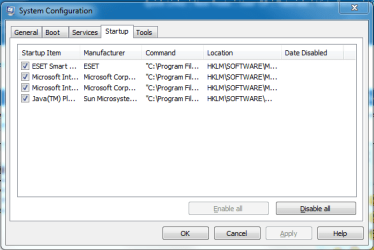
Does anyone know how to remove java from startup. I know I can untick it in msconfig but I would rather see if i can disable it first. If not then I will do this as a last resort. Any help appreciated.
 

Attachments

  • Capture.PNG
    Capture.PNG
    13.9 KB · Views: 135

My Computer

OS
Windows 7 Ultimate x64
CPU
i7 CORE 2 QUAD 920 (2.66GHZ, 8MB L2 CACHE, 1066MHZ FSB)
Motherboard
GIGABYTE GA-EX58-UD3R MOTHERBOARD
Memory
3 x CORSAIR 2GB PC12800 DDR3 1600MHZ RAM
Graphics Card(s)
XFX NVIDIA GTS 250 512MB PCI-E GRAPHICS CARD
Sound Card
X-Fi Titanium Fatal1ty Pro 7.1 Soundcard - PCI-Express
Monitor(s) Displays
Samsung SM2343BW 23"
Screen Resolution
2048x1152
Hard Drives
2 x 500GB S-ATA 7200RPM Hard Drive
PSU
NorthQ 850W Dual Rail PSU
Case
Coolermaster Elite 330
Cooling
Noctua CPU Heatsink and Cooler
Keyboard
Microsoft Wireless Laser Keyboard 5000
Mouse
Microsoft Wireless Laser Mouse 5000
Try this,
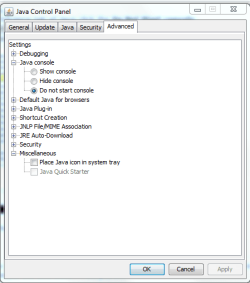
In the Advance tab of Java click the Do Not Start console..
CaptureJava.JPG

Hope this Helps..
 

My Computer

Computer Manufacturer/Model Number
HP Pavilion dv5 Notebook PC
OS
Windows Seven x64
CPU
2.2 GHz Dual Core
Motherboard
Quanta 3600
Memory
4GB
Graphics Card(s)
ATI Mobility RADEON HD 3470
Sound Card
ATI
Monitor(s) Displays
Laptop
Hard Drives
ATA Hitachi HTS543215 (5400RPM)
Case
Laptop
Cooling
Fan
Internet Speed
Basic DSL 1.5 up and Down
If Ryan's tip doesn't stop it, check the settings in the Update Tab of his screen shot.

That entry in MSconfig could also be just the updater and from memory, it ignores what you change in MSconfig anyway.
 

My Computer

Computer type
PC/Desktop
Computer Manufacturer/Model Number
Systems by SmartEyeball
OS
8 Pro x64
CPU
i7 3770K 4.6GHz
Motherboard
ASUS P8Z77 WS
Memory
16GB G.Skill Trident X 2666mhz
Graphics Card(s)
x2 EVGA 780 Ti Superclocked SLI
Sound Card
SB X-FI Surround 5.1 PRO USB / ATH-AD900 Headphones
Monitor(s) Displays
x3 Dell U2410 / 58" Samsung
Screen Resolution
5760*1200/ 1920*1200
Hard Drives
2x Intel 520 240GB (RAID 0) * 2x WD Caviar Blacks 2TB (RAID 0) * 2TB WD Caviar Black * Sony Optirac DVD
PSU
Silverstone Strider Evolution 1200W
Case
Thermaltake Level 10 GT Snow Edition
Cooling
Noctua NH-D14
Keyboard
Topre Realforce // Ducky Shine MX Black // Filco Ninja TKL
Mouse
Thermaltake Theron (Highly Recommended) + Razer Imperator
Antivirus
MSE
Browser
IE, FF, WaterFox
Other Info
GT Extreme V2 Sim Racing Cockpit + 40" LCD and K/B Mouse stand ▼
Fanatec CSR Elite Wheel + Clubsport V1 Pedals + CSR shifter/7G-H ▼Saitek X52 Pro ▼ TrackIR 5 Pro
Buttkicker v2 Seat Rumbler with Dedicated 5.1 and Sub Woofer attached to frame ▼
=
Bloody Big Grin
I use ccleaner for all my cleanup and disable needs. Its free and cool because startup programs can be disabled instead of just deleting then if you ever need it, it can be re enabled. The registery cleaner works good too, I've never had an issue with it. I've used it in windows xp, vista 32/64, and 7 32/64.

CCleaner - Home

Almost direct link:

Download CCleaner 2.25.1025 - Download - FileHippo.com
 

My Computer

Computer Manufacturer/Model Number
Toshiba L355D-7901
OS
Windows 7 X64
CPU
AMD Turion™ X2 Dual-Core Mobile Processor RM-72
Motherboard
AMD M780G chipset
Memory
4GB PC6400 DDR2 SDRAM
Graphics Card(s)
ATI Radeon™ 3100 Graphics
Sound Card
Realtek High Definition Audio
Monitor(s) Displays
17.0” diagonal widescreen TruBrite® TFT LCD
Screen Resolution
1440x900
Hard Drives
250GB (5400 RPM) Serial ATA
Mouse
Microsoft Bluetooth Notebook Mouse 5000
First of all thanks for the help. I have tried what you have both suggested and still the same. Any other suggestions.
 

Attachments

  • Capture.PNG
    Capture.PNG
    11.7 KB · Views: 22

My Computer

OS
Windows 7 Ultimate x64
CPU
i7 CORE 2 QUAD 920 (2.66GHZ, 8MB L2 CACHE, 1066MHZ FSB)
Motherboard
GIGABYTE GA-EX58-UD3R MOTHERBOARD
Memory
3 x CORSAIR 2GB PC12800 DDR3 1600MHZ RAM
Graphics Card(s)
XFX NVIDIA GTS 250 512MB PCI-E GRAPHICS CARD
Sound Card
X-Fi Titanium Fatal1ty Pro 7.1 Soundcard - PCI-Express
Monitor(s) Displays
Samsung SM2343BW 23"
Screen Resolution
2048x1152
Hard Drives
2 x 500GB S-ATA 7200RPM Hard Drive
PSU
NorthQ 850W Dual Rail PSU
Case
Coolermaster Elite 330
Cooling
Noctua CPU Heatsink and Cooler
Keyboard
Microsoft Wireless Laser Keyboard 5000
Mouse
Microsoft Wireless Laser Mouse 5000
I use ccleaner for all my cleanup and disable needs. Its free and cool because startup programs can be disabled instead of just deleting then if you ever need it, it can be re enabled. The registery cleaner works good too, I've never had an issue with it. I've used it in windows xp, vista 32/64, and 7 32/64.

CCleaner - Home

Almost direct link:

Download CCleaner 2.25.1025 - Download - FileHippo.com

Thanks for the response. I will maybe try that as a last resort.
 

My Computer

OS
Windows 7 Ultimate x64
CPU
i7 CORE 2 QUAD 920 (2.66GHZ, 8MB L2 CACHE, 1066MHZ FSB)
Motherboard
GIGABYTE GA-EX58-UD3R MOTHERBOARD
Memory
3 x CORSAIR 2GB PC12800 DDR3 1600MHZ RAM
Graphics Card(s)
XFX NVIDIA GTS 250 512MB PCI-E GRAPHICS CARD
Sound Card
X-Fi Titanium Fatal1ty Pro 7.1 Soundcard - PCI-Express
Monitor(s) Displays
Samsung SM2343BW 23"
Screen Resolution
2048x1152
Hard Drives
2 x 500GB S-ATA 7200RPM Hard Drive
PSU
NorthQ 850W Dual Rail PSU
Case
Coolermaster Elite 330
Cooling
Noctua CPU Heatsink and Cooler
Keyboard
Microsoft Wireless Laser Keyboard 5000
Mouse
Microsoft Wireless Laser Mouse 5000
I use ccleaner for all my cleanup and disable needs. Its free and cool because startup programs can be disabled instead of just deleting then if you ever need it, it can be re enabled. The registery cleaner works good too, I've never had an issue with it. I've used it in windows xp, vista 32/64, and 7 32/64.

CCleaner - Home

Almost direct link:

Download CCleaner 2.25.1025 - Download - FileHippo.com

Thanks for the response. I will maybe try that as a last resort.

Why is it a last resort its a great program? I use it all the time to clean up my system. Try it you'll like it (I hope).
 

My Computer

Computer Manufacturer/Model Number
Toshiba L355D-7901
OS
Windows 7 X64
CPU
AMD Turion™ X2 Dual-Core Mobile Processor RM-72
Motherboard
AMD M780G chipset
Memory
4GB PC6400 DDR2 SDRAM
Graphics Card(s)
ATI Radeon™ 3100 Graphics
Sound Card
Realtek High Definition Audio
Monitor(s) Displays
17.0” diagonal widescreen TruBrite® TFT LCD
Screen Resolution
1440x900
Hard Drives
250GB (5400 RPM) Serial ATA
Mouse
Microsoft Bluetooth Notebook Mouse 5000
Why is it a last resort its a great program? I use it all the time to clean up my system. Try it you'll like it (I hope).

Yes it is, but it's not necessary as the first option.
 

My Computer

Computer type
PC/Desktop
Computer Manufacturer/Model Number
Systems by SmartEyeball
OS
8 Pro x64
CPU
i7 3770K 4.6GHz
Motherboard
ASUS P8Z77 WS
Memory
16GB G.Skill Trident X 2666mhz
Graphics Card(s)
x2 EVGA 780 Ti Superclocked SLI
Sound Card
SB X-FI Surround 5.1 PRO USB / ATH-AD900 Headphones
Monitor(s) Displays
x3 Dell U2410 / 58" Samsung
Screen Resolution
5760*1200/ 1920*1200
Hard Drives
2x Intel 520 240GB (RAID 0) * 2x WD Caviar Blacks 2TB (RAID 0) * 2TB WD Caviar Black * Sony Optirac DVD
PSU
Silverstone Strider Evolution 1200W
Case
Thermaltake Level 10 GT Snow Edition
Cooling
Noctua NH-D14
Keyboard
Topre Realforce // Ducky Shine MX Black // Filco Ninja TKL
Mouse
Thermaltake Theron (Highly Recommended) + Razer Imperator
Antivirus
MSE
Browser
IE, FF, WaterFox
Other Info
GT Extreme V2 Sim Racing Cockpit + 40" LCD and K/B Mouse stand ▼
Fanatec CSR Elite Wheel + Clubsport V1 Pedals + CSR shifter/7G-H ▼Saitek X52 Pro ▼ TrackIR 5 Pro
Buttkicker v2 Seat Rumbler with Dedicated 5.1 and Sub Woofer attached to frame ▼
=
Bloody Big Grin
Why is it a last resort its a great program? I use it all the time to clean up my system. Try it you'll like it (I hope).

Yes it is, but it's not necessary as the first option.

Ok well enjoy java then. By the way I don't have it in my msconfig because I deleted it with ccleaner.
 

My Computer

Computer Manufacturer/Model Number
Toshiba L355D-7901
OS
Windows 7 X64
CPU
AMD Turion™ X2 Dual-Core Mobile Processor RM-72
Motherboard
AMD M780G chipset
Memory
4GB PC6400 DDR2 SDRAM
Graphics Card(s)
ATI Radeon™ 3100 Graphics
Sound Card
Realtek High Definition Audio
Monitor(s) Displays
17.0” diagonal widescreen TruBrite® TFT LCD
Screen Resolution
1440x900
Hard Drives
250GB (5400 RPM) Serial ATA
Mouse
Microsoft Bluetooth Notebook Mouse 5000
You can remove it using Regedit. This is the "proper" way instead of msconfig.

It's at

HKEY_LOCAL_MACHINE\SOFTWARE\Microsoft\Windows\CurrentVersion\Run
 

My Computer

Computer Manufacturer/Model Number
self built
OS
7600.20510 x86
CPU
P4 550 3.4 GHz HT running at 3.5 GHz
Motherboard
MSI PM8M3-V (MS-7211 v1.x) Micro-ATX mainboard
Memory
OCZ 2 GB(2x1GB) DDR400mHz running @ 414 mHz
Graphics Card(s)
HIS Radeon HD 3850 IceQ 3 Turbo HDMI Dual DL-DVI AGP
Sound Card
MOTU Traveler firewire studio interface 192 kHz 24 bit
Monitor(s) Displays
22" widescreen Acer X223W LCD, 17" Compaq P75 CRT
Screen Resolution
1680x1050 and 1280x1024
Hard Drives
SATA I x2 WD, 400 GB and 120 GB, SATA 2 WD Caviar Black 1 TB
PSU
350W generic
Case
Cybertronpc, it glows blue
Cooling
stock cpu fan, Ice-Q 3 gpu and system, many case fans
Keyboard
Logitch Classical Keyboard 200
Mouse
Logitech Mediaplay cordless
Internet Speed
1792/448 kbits/sec
Other Info
SATA II PCI fake RAID adapter, 1 GB Readyboost, original ATI Remote Wonder (even works with WMC perfectly), Logitech Rumblepad 2 game controller x2
I use ccleaner for all my cleanup and disable needs. Its free and cool because startup programs can be disabled instead of just deleting then if you ever need it, it can be re enabled. The registery cleaner works good too, I've never had an issue with it. I've used it in windows xp, vista 32/64, and 7 32/64.

CCleaner - Home

Almost direct link:

Download CCleaner 2.25.1025 - Download - FileHippo.com

Thanks for the response. I will maybe try that as a last resort.

Why is it a last resort its a great program? I use it all the time to clean up my system. Try it you'll like it (I hope).

I have never used CCleaner. I was hoping to find some way of disabling it through some change of settings. I have heard a lot of good things about CCleaner.
 

My Computer

OS
Windows 7 Ultimate x64
CPU
i7 CORE 2 QUAD 920 (2.66GHZ, 8MB L2 CACHE, 1066MHZ FSB)
Motherboard
GIGABYTE GA-EX58-UD3R MOTHERBOARD
Memory
3 x CORSAIR 2GB PC12800 DDR3 1600MHZ RAM
Graphics Card(s)
XFX NVIDIA GTS 250 512MB PCI-E GRAPHICS CARD
Sound Card
X-Fi Titanium Fatal1ty Pro 7.1 Soundcard - PCI-Express
Monitor(s) Displays
Samsung SM2343BW 23"
Screen Resolution
2048x1152
Hard Drives
2 x 500GB S-ATA 7200RPM Hard Drive
PSU
NorthQ 850W Dual Rail PSU
Case
Coolermaster Elite 330
Cooling
Noctua CPU Heatsink and Cooler
Keyboard
Microsoft Wireless Laser Keyboard 5000
Mouse
Microsoft Wireless Laser Mouse 5000
What you may be seeing is Java update. Right click on the icon in the control panel, then click on update .... uncheck it to see if that's what's in the start up.
 

My Computer

Computer type
PC/Desktop
Computer Manufacturer/Model Number
Bruce ... somewhere in his 40's
OS
Windows 7 Ultimate 32bit SP1
CPU
Intel(R) Core(TM)2 Quad CPU @ 2.40GHz, 2400 MHz
Motherboard
INTEL/D975XBX2
Memory
4 GB
Graphics Card(s)
ATI Radeon HD 2600 Pro
Monitor(s) Displays
Samsung SyncMaster 914v
Screen Resolution
1280 x 1024
Hard Drives
2/500GB each ... ST3500630AS ATA Device.
One is not connected
PSU
Rocketfish 700 W
Case
G.Skill Gigabyte Chassis
Keyboard
Standard PS/2 Keyboard
Mouse
Microsoft PS/2 Mouse
Internet Speed
DSL
Antivirus
Avira Internet Security
Browser
IE 11
Other Info
ATI HDMI Audio
You can remove it using Regedit. This is the "proper" way instead of msconfig.

It's at

HKEY_LOCAL_MACHINE\SOFTWARE\Microsoft\Windows\CurrentVersion\Run

Thanks for that. I forgot all about this I looked in the above and it wasn't there. SO I went back into msconfig - startup and scrolled along to see where it was. It was in a similar location to the above except it was in the wow6432 folder. Thanks all for your help.
 

My Computer

OS
Windows 7 Ultimate x64
CPU
i7 CORE 2 QUAD 920 (2.66GHZ, 8MB L2 CACHE, 1066MHZ FSB)
Motherboard
GIGABYTE GA-EX58-UD3R MOTHERBOARD
Memory
3 x CORSAIR 2GB PC12800 DDR3 1600MHZ RAM
Graphics Card(s)
XFX NVIDIA GTS 250 512MB PCI-E GRAPHICS CARD
Sound Card
X-Fi Titanium Fatal1ty Pro 7.1 Soundcard - PCI-Express
Monitor(s) Displays
Samsung SM2343BW 23"
Screen Resolution
2048x1152
Hard Drives
2 x 500GB S-ATA 7200RPM Hard Drive
PSU
NorthQ 850W Dual Rail PSU
Case
Coolermaster Elite 330
Cooling
Noctua CPU Heatsink and Cooler
Keyboard
Microsoft Wireless Laser Keyboard 5000
Mouse
Microsoft Wireless Laser Mouse 5000
At the risk of being pedantic :), it's not Java...it's a series of sun-provided Windows utilities for the JRE...including one that just checks for JRE/plugin updates. You are not running a JVM in the background unless you are trying to run a Java-based application or an applet.

In general, you shouldn't need all that stuff running...even if you want to use Java-based programs. I write client-side Java-based programs for folks for a range of functions...and all that they need is to have a JRE installed on their hard disk somewhere. When they execute a Java-based application, the JVM starts up...and when they exit, it shuts down.

Granted, most Java is now server-side code that provides the back end for Enterprise systems and large web-based systems...and not much client-side code...but there are still a large number of Java-based client apps (e.g., Eclipse and IntelliJ are two that I use every day)...as well as a handful of sites that still use applets. Many Java-based client apps actually come bundled with a JRE. I prefer to distribute without one to keep the size of my install package small. In fact, I don't even need an install package for my apps if the JRE is installed...you can just unzip and run.

Frankly, it's not much different than old school Win 32 MFC or new school .Net-based programs. You need quite a bit installed on your PC for programs created using the frameworks to run...you just tend to already have it with the OS since they are MS technologies. :)

Of course, being a professional Java developer, perhaps I am being a bit sensitive as well as pedantic. ;)
 

My Computer

Computer Manufacturer/Model Number
Shuttle (SFF) / SP35P2 Pro
OS
Win 7 Pro 64 Bit
CPU
Q6600
Motherboard
Shuttle
Memory
4GB
Graphics Card(s)
8800GT
Sound Card
On Board
Monitor(s) Displays
Samsung 22"
Screen Resolution
1680x1050
Hard Drives
WD 640 Boot
WD 640 Data
WD 500 external backup
PSU
Shuttle 450 Watt
Case
Shuttle
Cooling
Fans...lots of them
Keyboard
Creative Fatal1ty
Mouse
Logitech MX518
Internet Speed
Wicked Fast
Other Info
Capricorn

My Computer

Computer Manufacturer/Model Number
Custom Built
OS
Windows 7 Pro 64-bit
CPU
AMD Phenom II X2 550 BE
Motherboard
ASUS M4A79XTD EVO
Memory
A-Data DDR3 1600 4gb
Graphics Card(s)
HIS Radeon HD 4670
Sound Card
VIA VT1708S (8 channel onboard)
Monitor(s) Displays
Dell 23" S2309W
Screen Resolution
1920 x 1080
Hard Drives
WD 320,750gb, Seagate 500gb External Backup
PSU
Rosewill Green Series 430W
Case
Coolermaster
Cooling
Scythe SCKTN-3000

My Computer

OS
Windows 7 Ultimate x64
CPU
i7 CORE 2 QUAD 920 (2.66GHZ, 8MB L2 CACHE, 1066MHZ FSB)
Motherboard
GIGABYTE GA-EX58-UD3R MOTHERBOARD
Memory
3 x CORSAIR 2GB PC12800 DDR3 1600MHZ RAM
Graphics Card(s)
XFX NVIDIA GTS 250 512MB PCI-E GRAPHICS CARD
Sound Card
X-Fi Titanium Fatal1ty Pro 7.1 Soundcard - PCI-Express
Monitor(s) Displays
Samsung SM2343BW 23"
Screen Resolution
2048x1152
Hard Drives
2 x 500GB S-ATA 7200RPM Hard Drive
PSU
NorthQ 850W Dual Rail PSU
Case
Coolermaster Elite 330
Cooling
Noctua CPU Heatsink and Cooler
Keyboard
Microsoft Wireless Laser Keyboard 5000
Mouse
Microsoft Wireless Laser Mouse 5000
Back
Top