Remove OEM XP install and upgrade to Win 7 ?

trinaz

New member
Member
VIP
Local time
3:27 AM
Messages
477
Location
Phoenix
I have another computer with XP Media Center installed by HP. I want to wipe this drive and install Win 7 Pro from the upgrade disk.

The existing C: drive has both the XP installation and a hidden "recovery/restore partition. Here's my plan:

1) Via Acronis or DiskWizard...I will delete both partitions on the existing C: drive.
2) Reinstall a sperate licensed copy of Window XP Home Edition or W2000 Pro.
3) install W7 Pro from my new W7 Pro upgrade DVD onto the C: drive
4) reinstall all necessary programs and run my back up of WET from external drive

Any problems here ?

Thanks, Tim
 

My Computer My Computer

At a glance

Windows 7 Pro 64bit SP1AMD FX-6100 Six-Core Processor2ea Corsair-1333MHz-PC3-10666-240-pin-CMX4GX3...NVIDIA GeForce GT 630 - 1023MB (EVGA)
Computer type
PC/Desktop
Computer Manufacturer/Model Number
Self built
OS
Windows 7 Pro 64bit SP1
CPU
AMD FX-6100 Six-Core Processor
Motherboard
M5A78L-M LX PLUS
Memory
2ea Corsair-1333MHz-PC3-10666-240-pin-CMX4GX3M1A1333C9
Graphics Card(s)
NVIDIA GeForce GT 630 - 1023MB (EVGA)
Sound Card
OnBoard Via High Def Audio
Monitor(s) Displays
Samsung 204B main - ASUS VS228 secondary
Screen Resolution
1920x1080 main - 1920x1080 secondary
Hard Drives
Samsung SSD 840 128GB Win7 Pro 64bit - Western Digital WDC 465GB - Seagate 640GB Sata B/U - Maxtor 500GB Sata B/U - Maxtor 200GB Sata
PSU
Antec 650 watt
Cooling
Multiple case fans
Keyboard
MS USB dual Wireless Keyboard - IntelliType Pro
Mouse
MS USB dual Wireless Mouse - IntelliPoint
Internet Speed
Cox Cable
Antivirus
Bitdefender IS 2014
Browser
FireFox Primary - IE 11
Other Info
Hauppaguge Win TV HVR-1250 (Model 22xxx, Hybrid ATSC/QAM)
Samsung HD103SI USB 1TB Desktop Drive - Backup & Disk Image storage
I have another computer with XP Media Center installed by HP. I want to wipe this drive and install Win 7 Pro from the upgrade disk.

The existing C: drive has both the XP installation and a hidden "recovery/restore partition. Here's my plan:

1) Via Acronis or DiskWizard...I will delete both partitions on the existing C: drive.
2) Reinstall a sperate licensed copy of Window XP Home Edition or W2000 Pro.
3) install W7 Pro from my new W7 Pro upgrade DVD onto the C: drive
4) reinstall all necessary programs and run my back up of WET from external drive

Any problems here ?

Thanks, Tim
http://www.sevenforums.com/tutorials/31402-clean-install-upgrade-windows-7-version.html
You can do a clean install via the upgrade disc.
When you delete the partitons with disc wizard,make sure you format them as NTFS/Primary and Active.
 

My Computer My Computer

At a glance

Windows 7 Ultimate 64bitAMD Phenom II 555 Black Edition Quad Core OC'...G Skill RipJaw 1333MHz 4GBATI raideon 4250 HD/XFX ATI Radeon 1GB HD4650
Computer Manufacturer/Model Number
Blue Shards 1.0
OS
Windows 7 Ultimate 64bit
CPU
AMD Phenom II 555 Black Edition Quad Core OC'd to 4.0GHz
Motherboard
ASUS M4A88T-M
Memory
G Skill RipJaw 1333MHz 4GB
Graphics Card(s)
ATI raideon 4250 HD/XFX ATI Radeon 1GB HD4650
Sound Card
Realteck HD Audio
Monitor(s) Displays
2x 22" Widescreen HD Monitors
Hard Drives
500GB Sata 7500RPM
80GB IDE
PSU
850W OCUK Modular
Case
Antec Dark Fleet DF-30
Cooling
Titan Fenrir Pro (CPU)
Keyboard
Logitech Wireless
Mouse
Logitech Wireless
Internet Speed
24Meg
Other Info
Getting soon-
2TB 7200RPM HDD
+8GB RAM
30GB SSD
HD6950/70
It isn't necessary to reinstall XP to use the Upgrade version.

Boot the Win7 DVD, select Custom Drive Tools, delete all partitions, create New as you wish, then format before installing Win7 to first partition.

The DVD will scan the HD at bootup, see XP and allow use of the Upgrade key.
 
Should I not detach the original OEM XP drive at some point in the installation ? What's the right time after the old xp is detected and upgrade key OK'd ?
 

My Computer My Computer

At a glance

Windows 7 Pro 64bit SP1AMD FX-6100 Six-Core Processor2ea Corsair-1333MHz-PC3-10666-240-pin-CMX4GX3...NVIDIA GeForce GT 630 - 1023MB (EVGA)
Computer type
PC/Desktop
Computer Manufacturer/Model Number
Self built
OS
Windows 7 Pro 64bit SP1
CPU
AMD FX-6100 Six-Core Processor
Motherboard
M5A78L-M LX PLUS
Memory
2ea Corsair-1333MHz-PC3-10666-240-pin-CMX4GX3M1A1333C9
Graphics Card(s)
NVIDIA GeForce GT 630 - 1023MB (EVGA)
Sound Card
OnBoard Via High Def Audio
Monitor(s) Displays
Samsung 204B main - ASUS VS228 secondary
Screen Resolution
1920x1080 main - 1920x1080 secondary
Hard Drives
Samsung SSD 840 128GB Win7 Pro 64bit - Western Digital WDC 465GB - Seagate 640GB Sata B/U - Maxtor 500GB Sata B/U - Maxtor 200GB Sata
PSU
Antec 650 watt
Cooling
Multiple case fans
Keyboard
MS USB dual Wireless Keyboard - IntelliType Pro
Mouse
MS USB dual Wireless Mouse - IntelliPoint
Internet Speed
Cox Cable
Antivirus
Bitdefender IS 2014
Browser
FireFox Primary - IE 11
Other Info
Hauppaguge Win TV HVR-1250 (Model 22xxx, Hybrid ATSC/QAM)
Samsung HD103SI USB 1TB Desktop Drive - Backup & Disk Image storage
You only refer to one C: drive in your OP. You said that is where your XP is installed along with a recovery partition you would also like to replace with Win7.

To do this, you boot the Win7 DVD, select Custom install and use Advanced drive tools to delete all partitions, create New as you wish, then format before installing Win7 to first partition.

If there is some other HD you failed to mention, please post back a screenshot of your full Disk Mgmt map or adequately describe the additional HD's you think might need to be detached.
 
opps...sorry...to many projects going at once. There are 2 other drives in the box besides the current C: drive with the HP OEM XP installation drive and the HP restore/repair partition (E:) also that's on the C: drive.

2nd drive is newer drive...cleaned...set up as primary partition and NTFS file system. This is the destination drive for the W7 upgrade installation. The other (3rd) drive is another original HP drive that came with system ( HP Media Center PC ) and has music/movies/pics, etc back up files...no programs installed. These will be rearranged after W7 installation is complete/successful.

After W7 installation the original C: drive operating now will be wiped and also used as storage/back up drive in box.

Will take a little bit to send screen shot...box is operating but open. Will get screen shot off that computer...on to this one and post back.

Thanks, Tim
 

My Computer My Computer

At a glance

Windows 7 Pro 64bit SP1AMD FX-6100 Six-Core Processor2ea Corsair-1333MHz-PC3-10666-240-pin-CMX4GX3...NVIDIA GeForce GT 630 - 1023MB (EVGA)
Computer type
PC/Desktop
Computer Manufacturer/Model Number
Self built
OS
Windows 7 Pro 64bit SP1
CPU
AMD FX-6100 Six-Core Processor
Motherboard
M5A78L-M LX PLUS
Memory
2ea Corsair-1333MHz-PC3-10666-240-pin-CMX4GX3M1A1333C9
Graphics Card(s)
NVIDIA GeForce GT 630 - 1023MB (EVGA)
Sound Card
OnBoard Via High Def Audio
Monitor(s) Displays
Samsung 204B main - ASUS VS228 secondary
Screen Resolution
1920x1080 main - 1920x1080 secondary
Hard Drives
Samsung SSD 840 128GB Win7 Pro 64bit - Western Digital WDC 465GB - Seagate 640GB Sata B/U - Maxtor 500GB Sata B/U - Maxtor 200GB Sata
PSU
Antec 650 watt
Cooling
Multiple case fans
Keyboard
MS USB dual Wireless Keyboard - IntelliType Pro
Mouse
MS USB dual Wireless Mouse - IntelliPoint
Internet Speed
Cox Cable
Antivirus
Bitdefender IS 2014
Browser
FireFox Primary - IE 11
Other Info
Hauppaguge Win TV HVR-1250 (Model 22xxx, Hybrid ATSC/QAM)
Samsung HD103SI USB 1TB Desktop Drive - Backup & Disk Image storage

My Computer My Computer

At a glance

Windows 7 Pro 64bit SP1AMD FX-6100 Six-Core Processor2ea Corsair-1333MHz-PC3-10666-240-pin-CMX4GX3...NVIDIA GeForce GT 630 - 1023MB (EVGA)
Computer type
PC/Desktop
Computer Manufacturer/Model Number
Self built
OS
Windows 7 Pro 64bit SP1
CPU
AMD FX-6100 Six-Core Processor
Motherboard
M5A78L-M LX PLUS
Memory
2ea Corsair-1333MHz-PC3-10666-240-pin-CMX4GX3M1A1333C9
Graphics Card(s)
NVIDIA GeForce GT 630 - 1023MB (EVGA)
Sound Card
OnBoard Via High Def Audio
Monitor(s) Displays
Samsung 204B main - ASUS VS228 secondary
Screen Resolution
1920x1080 main - 1920x1080 secondary
Hard Drives
Samsung SSD 840 128GB Win7 Pro 64bit - Western Digital WDC 465GB - Seagate 640GB Sata B/U - Maxtor 500GB Sata B/U - Maxtor 200GB Sata
PSU
Antec 650 watt
Cooling
Multiple case fans
Keyboard
MS USB dual Wireless Keyboard - IntelliType Pro
Mouse
MS USB dual Wireless Mouse - IntelliPoint
Internet Speed
Cox Cable
Antivirus
Bitdefender IS 2014
Browser
FireFox Primary - IE 11
Other Info
Hauppaguge Win TV HVR-1250 (Model 22xxx, Hybrid ATSC/QAM)
Samsung HD103SI USB 1TB Desktop Drive - Backup & Disk Image storage
I would swap the cables on Win7 and XP drives, since Win7 needs to be first HD to boot in BIOS boot order anyway. Having Win7 on DISK0 also assures the MBR can't be derailed to any partitions ahead of it.

You can leave XP drive plugged to delete it during Win7 install; the installer will see XP when it scans the HD's and allow use of Upgrade key
.
I would also remove the drive letter from Win7 partition so that it can claim C: once XP is deleted. If you want the 100mb System Reserved partition (which puts the Repair console available on Advanced Boot Options accessed by tapping F8 at bootup) then delete the formatting you have made for Win7 and redo it using installer.

Next boot the Win7 DVD, select Custom install, then Drive Tools (Advanced), delete the XP and Recovery partitions, then make sure you highlight the Win7 partition (or delete, create and reformat it if you want the 100mb Sys Reserved partition) before installing.
 
Thanks so much...I was under the impression that sata drives didn't much care which one was on 1, 2, or 3 etc. Good to know for sure !

Just to be sure:

1) Remove Drive letter "L" from drive labeled Win 7 Drive ( newest/fasted drive empty now )

2) Switch cables on MB between Disk '0' - current C: drive - and disk 2 - current empty Win 7 destination drive.

3) Remove/delete current partition on Win 7 Drive (now disk'0')

4) Insert Win 7 DVD in DVD drive

5) Reboot and set DVD as primary boot device in bios prior to Win 7 DVD startup

6) From 'Custom Install' in Win 7 DVD...partition/format NTSF and create second 100 gb partition for Win 7 Recover Partition

7) During this same operation...Win 7 has already ok'd the upgrade key from the old C: XP/Restore drive...and I can delete all partitions from the original C: drive during initial Win 7 setup under "Custom Install - Disk Tools (Advanced) " BEFORE the actual install of Win 7 on the 'new' C: drive ?

The steps above will have validated the Win 7 upgrade key and DELETE the old C: drive XP/Restore partitions BEFORE the new Win 7 install begins...the upgrade key was validated and will proceed even after the old C: wipe (XP/Restore)?

Thanks so much...will tackle this after lunch today !!

Previous post Computer Management shot: http://members.cox.net/trinaz/drives.jpg

Tim
 

My Computer My Computer

At a glance

Windows 7 Pro 64bit SP1AMD FX-6100 Six-Core Processor2ea Corsair-1333MHz-PC3-10666-240-pin-CMX4GX3...NVIDIA GeForce GT 630 - 1023MB (EVGA)
Computer type
PC/Desktop
Computer Manufacturer/Model Number
Self built
OS
Windows 7 Pro 64bit SP1
CPU
AMD FX-6100 Six-Core Processor
Motherboard
M5A78L-M LX PLUS
Memory
2ea Corsair-1333MHz-PC3-10666-240-pin-CMX4GX3M1A1333C9
Graphics Card(s)
NVIDIA GeForce GT 630 - 1023MB (EVGA)
Sound Card
OnBoard Via High Def Audio
Monitor(s) Displays
Samsung 204B main - ASUS VS228 secondary
Screen Resolution
1920x1080 main - 1920x1080 secondary
Hard Drives
Samsung SSD 840 128GB Win7 Pro 64bit - Western Digital WDC 465GB - Seagate 640GB Sata B/U - Maxtor 500GB Sata B/U - Maxtor 200GB Sata
PSU
Antec 650 watt
Cooling
Multiple case fans
Keyboard
MS USB dual Wireless Keyboard - IntelliType Pro
Mouse
MS USB dual Wireless Mouse - IntelliPoint
Internet Speed
Cox Cable
Antivirus
Bitdefender IS 2014
Browser
FireFox Primary - IE 11
Other Info
Hauppaguge Win TV HVR-1250 (Model 22xxx, Hybrid ATSC/QAM)
Samsung HD103SI USB 1TB Desktop Drive - Backup & Disk Image storage
Correct. When you boot the Win7 DVD, it scans the HD's to see XP and allow use of the Upgrade key so you don't need to use the workaround for clean installing with upgrade version.

I would use Custom>Drive Tools to delete XP first, so that your focus can then remain on Win7 drive: delete, create New partition (accepting 100mb SysReserved partition), then format both before installing to new partition.
 
SUCCESS !! Whole thing went smooth with no hiccups !!

Did make one mistake/omission tho...from Custom Install/Drive Tools/Advanced I deleted the Win 7 drive partition..re-created partition with Disk Tools including the system Recovery partition...but...I did not format...roommate came home and when I returned to PC...forgot to click the "format" button ?

But...the installer must have formatted the drive automatically because everything is fine...its formatted NTSF...and Rescue/Restore partition is there ?

Thanks again for all your help (and other posters too)

Hope my other XP upgrade goes as well...new motherboard/cpu combo here and trying to keep old XP installation (with new MB/CPU ) as bootable drive via bios. Have all previous upgrade threads and feel much more confident now !!!

Thanks,
Tim
 

My Computer My Computer

At a glance

Windows 7 Pro 64bit SP1AMD FX-6100 Six-Core Processor2ea Corsair-1333MHz-PC3-10666-240-pin-CMX4GX3...NVIDIA GeForce GT 630 - 1023MB (EVGA)
Computer type
PC/Desktop
Computer Manufacturer/Model Number
Self built
OS
Windows 7 Pro 64bit SP1
CPU
AMD FX-6100 Six-Core Processor
Motherboard
M5A78L-M LX PLUS
Memory
2ea Corsair-1333MHz-PC3-10666-240-pin-CMX4GX3M1A1333C9
Graphics Card(s)
NVIDIA GeForce GT 630 - 1023MB (EVGA)
Sound Card
OnBoard Via High Def Audio
Monitor(s) Displays
Samsung 204B main - ASUS VS228 secondary
Screen Resolution
1920x1080 main - 1920x1080 secondary
Hard Drives
Samsung SSD 840 128GB Win7 Pro 64bit - Western Digital WDC 465GB - Seagate 640GB Sata B/U - Maxtor 500GB Sata B/U - Maxtor 200GB Sata
PSU
Antec 650 watt
Cooling
Multiple case fans
Keyboard
MS USB dual Wireless Keyboard - IntelliType Pro
Mouse
MS USB dual Wireless Mouse - IntelliPoint
Internet Speed
Cox Cable
Antivirus
Bitdefender IS 2014
Browser
FireFox Primary - IE 11
Other Info
Hauppaguge Win TV HVR-1250 (Model 22xxx, Hybrid ATSC/QAM)
Samsung HD103SI USB 1TB Desktop Drive - Backup & Disk Image storage
SUCCESS !! Whole thing went smooth with no hiccups !!

Did make one mistake/omission tho...from Custom Install/Drive Tools/Advanced I deleted the Win 7 drive partition..re-created partition with Disk Tools including the system Recovery partition...but...I did not format...roommate came home and when I returned to PC...forgot to click the "format" button ?

But...the installer must have formatted the drive automatically because everything is fine...its formatted NTSF...and Rescue/Restore partition is there ?

Thanks again for all your help (and other posters too)

Hope my other XP upgrade goes as well...new motherboard/cpu combo here and trying to keep old XP installation (with new MB/CPU ) as bootable drive via bios. Have all previous upgrade threads and feel much more confident now !!!

Thanks,
Tim
Always good to hear back with a success:)
But...the installer must have formatted the drive automatically because everything is fine...its formatted NTSF...and Rescue/Restore partition is there ?

More than likely this was a seperate partition that already existed before your install.
So you would have had a disc management like this before you touched it:
Disk 0 : C Drive|___________| ?Drive |___________|
You pointed Win7 to the newly formated C Volume so it didnt touch ?Drive

Hope that explains
Dan
 

My Computer My Computer

At a glance

Windows 7 Ultimate 64bitAMD Phenom II 555 Black Edition Quad Core OC'...G Skill RipJaw 1333MHz 4GBATI raideon 4250 HD/XFX ATI Radeon 1GB HD4650
Computer Manufacturer/Model Number
Blue Shards 1.0
OS
Windows 7 Ultimate 64bit
CPU
AMD Phenom II 555 Black Edition Quad Core OC'd to 4.0GHz
Motherboard
ASUS M4A88T-M
Memory
G Skill RipJaw 1333MHz 4GB
Graphics Card(s)
ATI raideon 4250 HD/XFX ATI Radeon 1GB HD4650
Sound Card
Realteck HD Audio
Monitor(s) Displays
2x 22" Widescreen HD Monitors
Hard Drives
500GB Sata 7500RPM
80GB IDE
PSU
850W OCUK Modular
Case
Antec Dark Fleet DF-30
Cooling
Titan Fenrir Pro (CPU)
Keyboard
Logitech Wireless
Mouse
Logitech Wireless
Internet Speed
24Meg
Other Info
Getting soon-
2TB 7200RPM HDD
+8GB RAM
30GB SSD
HD6950/70
If you want to post back a screenshot of your full Disk Management drive map, we can take a look to see if there are any remaining potential problems.

The easiest way is to use the Snipping Tool in Start menu, attaching file using paper clip in reply box.
 
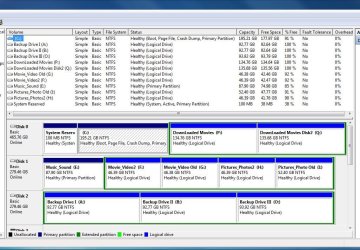
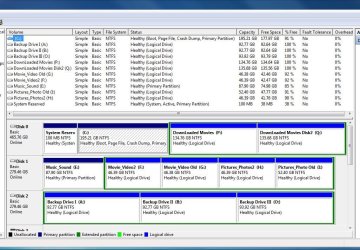
Thanks...looks OK to me...I know I didn't format prior to install...but thanks for checking this out !!

Tim
 

Attachments

  • Capture.JPG
    Capture.JPG
    141.2 KB · Views: 30

My Computer My Computer

At a glance

Windows 7 Pro 64bit SP1AMD FX-6100 Six-Core Processor2ea Corsair-1333MHz-PC3-10666-240-pin-CMX4GX3...NVIDIA GeForce GT 630 - 1023MB (EVGA)
Computer type
PC/Desktop
Computer Manufacturer/Model Number
Self built
OS
Windows 7 Pro 64bit SP1
CPU
AMD FX-6100 Six-Core Processor
Motherboard
M5A78L-M LX PLUS
Memory
2ea Corsair-1333MHz-PC3-10666-240-pin-CMX4GX3M1A1333C9
Graphics Card(s)
NVIDIA GeForce GT 630 - 1023MB (EVGA)
Sound Card
OnBoard Via High Def Audio
Monitor(s) Displays
Samsung 204B main - ASUS VS228 secondary
Screen Resolution
1920x1080 main - 1920x1080 secondary
Hard Drives
Samsung SSD 840 128GB Win7 Pro 64bit - Western Digital WDC 465GB - Seagate 640GB Sata B/U - Maxtor 500GB Sata B/U - Maxtor 200GB Sata
PSU
Antec 650 watt
Cooling
Multiple case fans
Keyboard
MS USB dual Wireless Keyboard - IntelliType Pro
Mouse
MS USB dual Wireless Mouse - IntelliPoint
Internet Speed
Cox Cable
Antivirus
Bitdefender IS 2014
Browser
FireFox Primary - IE 11
Other Info
Hauppaguge Win TV HVR-1250 (Model 22xxx, Hybrid ATSC/QAM)
Samsung HD103SI USB 1TB Desktop Drive - Backup & Disk Image storage
Thanks...looks OK to me...I know I didn't format prior to install...but thanks for checking this out !!

Tim
Do you mean the system reserved partition on the left?
If so that has bit locker encryption (and the F8 Repair options at boot i think) ,it comes with the higher versions of Win7.
 

My Computer My Computer

At a glance

Windows 7 Ultimate 64bitAMD Phenom II 555 Black Edition Quad Core OC'...G Skill RipJaw 1333MHz 4GBATI raideon 4250 HD/XFX ATI Radeon 1GB HD4650
Computer Manufacturer/Model Number
Blue Shards 1.0
OS
Windows 7 Ultimate 64bit
CPU
AMD Phenom II 555 Black Edition Quad Core OC'd to 4.0GHz
Motherboard
ASUS M4A88T-M
Memory
G Skill RipJaw 1333MHz 4GB
Graphics Card(s)
ATI raideon 4250 HD/XFX ATI Radeon 1GB HD4650
Sound Card
Realteck HD Audio
Monitor(s) Displays
2x 22" Widescreen HD Monitors
Hard Drives
500GB Sata 7500RPM
80GB IDE
PSU
850W OCUK Modular
Case
Antec Dark Fleet DF-30
Cooling
Titan Fenrir Pro (CPU)
Keyboard
Logitech Wireless
Mouse
Logitech Wireless
Internet Speed
24Meg
Other Info
Getting soon-
2TB 7200RPM HDD
+8GB RAM
30GB SSD
HD6950/70
Thanks...issue is ( I think ) that I did NOT format the C: drive partitions created during Windows 7 - Custom Install-Disk Tools-Advanced operation. I did create the C: drive partition, the 2 'Movie' partitions (P & Q), and ok'd Windows default Secure/Reserve 100 gb partition...but did not click on the format button for any of them after creating the partitions prior to proceeding with the actual installation ?

The drive in it's entirety was previous formatted NTFS, 4096 cluster size, but that was all deleted (I think ) via upon Win 7 setup/install via Custom Install-Disk Tools-Advanced operation.

However everything seems to be working fine despite the Tutorials, posts, and Microsoft install tutorials regarding the need to format after partition creation during installation ?

I appreciate GregRocker's ( and all's ) followup on this. Please let me know if you spot anything I need to take care of before I get to far into re-building my programs/setup...etc.

Tim
 

Attachments

  • Capture.JPG
    Capture.JPG
    141.2 KB · Views: 10

My Computer My Computer

At a glance

Windows 7 Pro 64bit SP1AMD FX-6100 Six-Core Processor2ea Corsair-1333MHz-PC3-10666-240-pin-CMX4GX3...NVIDIA GeForce GT 630 - 1023MB (EVGA)
Computer type
PC/Desktop
Computer Manufacturer/Model Number
Self built
OS
Windows 7 Pro 64bit SP1
CPU
AMD FX-6100 Six-Core Processor
Motherboard
M5A78L-M LX PLUS
Memory
2ea Corsair-1333MHz-PC3-10666-240-pin-CMX4GX3M1A1333C9
Graphics Card(s)
NVIDIA GeForce GT 630 - 1023MB (EVGA)
Sound Card
OnBoard Via High Def Audio
Monitor(s) Displays
Samsung 204B main - ASUS VS228 secondary
Screen Resolution
1920x1080 main - 1920x1080 secondary
Hard Drives
Samsung SSD 840 128GB Win7 Pro 64bit - Western Digital WDC 465GB - Seagate 640GB Sata B/U - Maxtor 500GB Sata B/U - Maxtor 200GB Sata
PSU
Antec 650 watt
Cooling
Multiple case fans
Keyboard
MS USB dual Wireless Keyboard - IntelliType Pro
Mouse
MS USB dual Wireless Mouse - IntelliPoint
Internet Speed
Cox Cable
Antivirus
Bitdefender IS 2014
Browser
FireFox Primary - IE 11
Other Info
Hauppaguge Win TV HVR-1250 (Model 22xxx, Hybrid ATSC/QAM)
Samsung HD103SI USB 1TB Desktop Drive - Backup & Disk Image storage
You did a fine job. It looks perfect.

Don't worry about the formatting, as the installer applies it itself during the Copying Files phase if user forgets.

Be sure to save a Win7 backup image to another drive so that you never have to reinstall, just reimage using the booted Win7 DVD Repair console>Recover Using an Image which will autodetect the stored backup image if it is in a primary formatted partition.
 
Thanks...issue is ( I think ) that I did NOT format the C: drive partitions created during Windows 7 - Custom Install-Disk Tools-Advanced operation. I did create the C: drive partition, the 2 'Movie' partitions (P & Q), and ok'd Windows default Secure/Reserve 100 gb partition...but did not click on the format button for any of them after creating the partitions prior to proceeding with the actual installation ?

The drive in it's entirety was previous formatted NTFS, 4096 cluster size, but that was all deleted (I think ) via upon Win 7 setup/install via Custom Install-Disk Tools-Advanced operation.

However everything seems to be working fine despite the Tutorials, posts, and Microsoft install tutorials regarding the need to format after partition creation during installation ?

I appreciate GregRocker's ( and all's ) followup on this. Please let me know if you spot anything I need to take care of before I get to far into re-building my programs/setup...etc.

Tim
I think you took it up the wrong way.
You say you had created the 3 volumes (C,P,Q) prior to the installation and seeing as you pointed Windows7 to install on partition C it left your other volumes and drives untouched. The only thing Win7 made was the 100mb Volume.

If,and if i can understand what you mean you did, create the C partition and had it formated to NTFS and primary before installing Win7 then there is no need to re-format C as it already meets the requirments.

If i read it wrong and you were asking something different i apologize,but i think thats what you meant.

And your last question,the disk screenshot looks perfect,no problems there.

You must have a lot of movies:)
 

My Computer My Computer

At a glance

Windows 7 Ultimate 64bitAMD Phenom II 555 Black Edition Quad Core OC'...G Skill RipJaw 1333MHz 4GBATI raideon 4250 HD/XFX ATI Radeon 1GB HD4650
Computer Manufacturer/Model Number
Blue Shards 1.0
OS
Windows 7 Ultimate 64bit
CPU
AMD Phenom II 555 Black Edition Quad Core OC'd to 4.0GHz
Motherboard
ASUS M4A88T-M
Memory
G Skill RipJaw 1333MHz 4GB
Graphics Card(s)
ATI raideon 4250 HD/XFX ATI Radeon 1GB HD4650
Sound Card
Realteck HD Audio
Monitor(s) Displays
2x 22" Widescreen HD Monitors
Hard Drives
500GB Sata 7500RPM
80GB IDE
PSU
850W OCUK Modular
Case
Antec Dark Fleet DF-30
Cooling
Titan Fenrir Pro (CPU)
Keyboard
Logitech Wireless
Mouse
Logitech Wireless
Internet Speed
24Meg
Other Info
Getting soon-
2TB 7200RPM HDD
+8GB RAM
30GB SSD
HD6950/70
Back
Top