rEMOVE OPERATING SYSTEM ON DUAL BOOT

paulpies84

New member
Local time
1:00 PM
Messages
17
I am giving my old system to my daughter but it is set up to dual boot between Vista and 7.

How do I delete Vista and leave the system with just windows 7 installed?
 

My Computer

Computer type
PC/Desktop
Computer Manufacturer/Model Number
custom built
OS
Windows 7 ultimate x64
CPU
AMD fx 8120
Motherboard
ASUS M5A78l-M usb3
Memory
16 GB
Graphics Card(s)
nvidia GEforce GTX 560Ti
Hard Drives
2 TB seagate
Antivirus
Avast anti virus free
Browser
Chrome

My Computer

OS
ME/XP/Vista/Win7
I agree, wipe the entire drive and re install windows 7.
 

My Computer

Computer type
PC/Desktop
Computer Manufacturer/Model Number
Skylake Special #666
OS
Windows 10 Pro x64
CPU
Intel Core i7 6700K
Motherboard
Asus Sabertooth Z170 Mark 1
Memory
GSkill TridentZ RGB 16GB 3600 16-16-16-36
Graphics Card(s)
EVGA GTX 980 Ti SC x2
Sound Card
Realtek High Definition
Monitor(s) Displays
AOC G2460PG
Screen Resolution
1920 x 1080 144Hz
Hard Drives
Samsung 860 Pro 256GB, Seagate Barracuda 4TB x2
PSU
EVGA 1000 P2, EVGA White Custom Braided Cables
Case
Corsair Vengeance C70 Gunmetal Black
Cooling
Corsair H100i v2, Corsair ML120 x2, Thermal Grizzly Kryonaut
Keyboard
Logitech G910 Orion Spectrum
Mouse
Logitech G700s
Internet Speed
Verizon Fios Quantum Gateway 75/75
Antivirus
Windows Defender, Malwarebytes Free 3.8.3
Browser
Chrome
Other Info
Corsair SP120 x4, LG Blu-ray Drive, Durabrand HT-395 100 Watt Dolby Digital Amp, Corsair H2100 Wireless 7.1 Headset
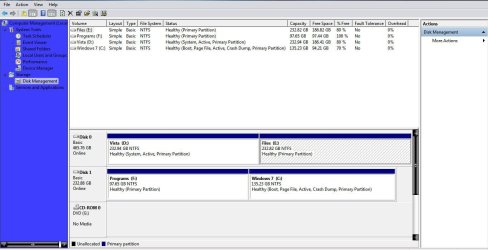
If you have a Win7 install that you like that's fast and never hangs, we can help you remove Vista and merge its disk space with Win7. Post back a screenshot of Disk Management - Post a Screen Capture Image.

However if this is preinstalled Win7 that came with the PC and was never given a Clean Reinstall - Factory OEM Windows 7 to lose the bloatware and duplicate utilties which interfere with better versions built into Win7, I would use this opportunity with our help to wipe the HD and do a perfect install.

If it's somewhere in between where it needs to have some kinks ironed out or you'd prefer just to Clean Up Factory Bloatware then we can help you with that too. Just read the blue links and decide which you prefer.
 
Disk Management.jpg
 

My Computer

Computer type
PC/Desktop
Computer Manufacturer/Model Number
custom built
OS
Windows 7 ultimate x64
CPU
AMD fx 8120
Motherboard
ASUS M5A78l-M usb3
Memory
16 GB
Graphics Card(s)
nvidia GEforce GTX 560Ti
Hard Drives
2 TB seagate
Antivirus
Avast anti virus free
Browser
Chrome

My Computer

Computer Manufacturer/Model Number
HP, Dell, Gateway, Toshiba - 4 laptops and 2 desktops
OS
Vista, Windows7, Mint Mate, Zorin, Windows 8
CPU
from 1.6GHz Duo to i7
Monitor(s) Displays
2x HP w2207
Hard Drives
5x HDD, 7x SSD, 12x Externals
Keyboard
with trackball - no mices
Mouse
Trackball mice
Internet Speed
DSL 6000
Power down to unplug the Vista HD, swap its cable to Win7 HD so it becomes Disk0.

Then from the booted Win7 disk or System Repair Disk run Startup Repair - Run up to 3 Separate Times until Win7 boots and holds the System flag.

You can then plug back in the other HD, mark it Inactive to delete it in Disk Mgmt, repartition as desired.

I dont' know what the F Programs partition but if it is your installed Win7 programs this is not recommended and is besides sitting in the preferred lower HD address where WIn7 can benefit from faster read and write speeds. So I would reinstall any programs wrongly installed outside of C, delete F and resize C into the space using Partition Wizard CD to Resize Partition - Video Help.
 
Back
Top