
Solved remove other user boot straight to windows

April Raine

New member
Member
Local time
12:49 PM
Messages
78
Windows Home Premium 7 64 bit

I used to boot up with no username or password to click, Now i have to click my admin user even though there is no password. In trying to fix it, i am not sure how, but i made an account with other user. I now have to choose between my admin and the other user and click the admin arrow even though it needs no password. I cancelled password in the bios but still get prompt.

Guest user is disabled. UpdatusUser refers to nvidia .I want it so there is just one user and it does not ask for the non existing password

I want rid of the other user and to boot straight to windows. I do not want to do system restore as last point is a week ago
 

Attachments
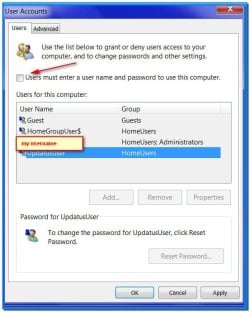
  • usernames.jpg
    usernames.jpg
    51.7 KB · Views: 8

My Computer My Computer

Computer type
PC/Desktop
Computer Manufacturer/Model Number
Medion
OS
win 7 home premium 64 bit
Motherboard
ms 7616
Memory
16GB
Hard Drives
Two 1 TB
Password in BIOS is completely other story than Windows Password.

Log in on your account.
Go to Control Panel\All Control Panel Items\User Accounts\Manage Accounts - Manage another - select account you want to delete and delete account and files till you only have your account and Guess turned off.

Report if you can boot strait as some MS services require to have a password.
 

My Computers My Computers

System One System Two

  • Computer type
    PC/Desktop
    Computer Manufacturer/Model Number
    custom build
    OS
    Windows 7 HP 64
    CPU
    i5 6600K - 800MHz to 4200MHz
    Motherboard
    GA-Z170-HD3P
    Memory
    4+4G GSkill DDR4 3000
    Graphics Card(s)
    IG - Intel 530
    Monitor(s) Displays
    Samsung 226BW
    Screen Resolution
    1680x1050
    Hard Drives
    (1) -1 SM951 – 128GB M.2 AHCI PCIe SSD drive for Windows 7 and Lubuntu
    (2) -1 WD SATA 3 - 1T for Data
    (3) -1 WD SATA 3 - 1T for backup
    PSU
    Thermaltake 450W TR2 gold
    Keyboard
    Old and good Chicony mechanical keyboard
    Mouse
    Logitech mX performance - 9 buttons (had to disable some)
    Internet Speed
    500Mb/s
    Browser
    Firefox 64
    Other Info
    TinyWall firewall
  • Computer type
    Laptop
    System Manufacturer/Model Number
    Asus Q550LF
    OS
    Windows 7 Pro
    CPU
    i7-4500U 800MHz to 3.0GHz
    Motherboard
    Asus Q550LF
    Memory
    (4+4)G DDR3 1600
    Graphics Card(s)
    IG intel 4400 + NVIDIA GeForce GT 745M
    Sound Card
    Realtek
    Monitor(s) Displays
    LG Display LP156WF4-SPH1
    Screen Resolution
    1920 x 1080
    Hard Drives
    BX500 120G SSD for Windows and programs +
    1T HDD for data
    Internet Speed
    500 Mb/s
    Browser
    Firefox
    Other Info
    TinyWall firewall
Password in BIOS is completely other story than Windows Password
OK what is BIOS password for

There is only guest under manage another

Thanks
 

My Computer My Computer

Computer type
PC/Desktop
Computer Manufacturer/Model Number
Medion
OS
win 7 home premium 64 bit
Motherboard
ms 7616
Memory
16GB
Hard Drives
Two 1 TB
I fixed it. First I went to start netplwiz and opened user accounts. i ticked "users must enter username and password to use this computer". I highlighted my username and went to control alt delete to create a new password which i left blank. That got rid of the other user but i still had a prompt for my username at logon

Then i went back to user accounts,highlighted my account and unticked "users must enter username and password to use this computer" and clicked apply- or maybe OK- A box opened with my username and i just clicked OK without entering any password.

Now I boot straight to windows with no prompt
 

My Computer My Computer

Computer type
PC/Desktop
Computer Manufacturer/Model Number
Medion
OS
win 7 home premium 64 bit
Motherboard
ms 7616
Memory
16GB
Hard Drives
Two 1 TB
Back
Top