Remove "pin this program to taskbar" from right click menu in taskbar

happycat

New member
Local time
3:18 AM
Messages
23
Remove "pin this program to taskbar" from right click menu in taskbar

When I right click programs in the taskbar I have the option to "pin them to the tasbar". Is it possible to remove this option from the right click menu?
 

My Computer My Computer

Computer type
PC/Desktop
OS
Windows 7 64 bit
Here's a discussion that makes it seem possible, but I would say it's too much work to make it worth it:

How to Remove "Pin this program to taskbar" (Network Steve Forum)

This isn't a guide, but it's a question that was posted asking the same question you're asking.

Also, the discussion is a little bit hard for me to follow because it's a thread but the responses to previous posts begin immediately following the last character of the post they're responding to.

To skip to down to the part that might work for some of your programs, perform a Ctrl+F search for "got". This is the first word of the post that suggests a possible solution for some programs that might allow it. Read the replies that this post received.
 

My Computer My Computer

Computer type
PC/Desktop
Last edited:

My Computer My Computer

Computer type
PC/Desktop
Computer Manufacturer/Model Number
Self built custom
OS
64-bit Windows 11 Pro for Workstations
CPU
Intel i7-8700K OC'd to 5 GHz
Motherboard
ASUS ROG Maximus XI Formula Z390
Memory
64 GB (4x16GB) G.SKILL TridentZ RGB DDR4 3600 MHz
Graphics Card(s)
ASUS ROG-STRIX-GTX1080TI-O11G-GAMING
Sound Card
Integrated
Monitor(s) Displays
2 x Samsung Odyssey G7 27"
Screen Resolution
2560x1440
Hard Drives
1TB Samsung 990 PRO M.2,
4TB Samsung 990 PRO PRO M.2,
TerraMaster F8 SSD Plus NAS
PSU
Seasonic Prime Titanium 850W
Case
Thermaltake Core P3
Cooling
Corsair Hydro H115i
Keyboard
Logitech wireless K800
Mouse
Logitech MX Master 4
Internet Speed
2 Gb/s Download and 100 Mb/s Upload
Antivirus
Malwarebyte Anti-Malware Premium
Browser
Google Chrome
Other Info
Logitech Z625 speaker system,
Logitech BRIO 4K Pro webcam,
HP Color LaserJet Pro MFP M477fdn,
APC SMART-UPS RT 1000 XL - SURT1000XLI,
Galaxy S23 Plus phone
He's talking about "Pin this program to taskbar" when right-clicking an open program on the Taskbar. This option has caused me to accidentally pin a program or two to the Taskbar, and I admit that I wished it wasn't there for those times.

However, over time, I have adjusted and I no longer accidentally click it - but I also live at my computer, so that's a large amount of time that I spent getting used to it so much that it's no longer a problem.
 

My Computer My Computer

Computer type
PC/Desktop
I use this feature allot .
 

My Computer My Computer

Computer type
PC/Desktop
Computer Manufacturer/Model Number
Custom Build
OS
Win 10 Pro 64
CPU
Intel Core i7 960 @3.20 GHz
Motherboard
MSI MS7522
Memory
24.0 GB DDR3
Graphics Card(s)
EVGA GTX 750Ti
Monitor(s) Displays
LG E2341 23 Inch
Screen Resolution
1920x1080
Hard Drives
1TB Western Dgital 1002FAEX-00Y9A0
1TB Hitachi HDS721010CLA322
PSU
700 Watt
Case
Haf 912
Cooling
Fans
Keyboard
Logitech MK710
Mouse
Logitech M705
Internet Speed
Cable
Antivirus
AIS 2015 .10.0.2225
Browser
Firefox 49
Other Info
MalwareBytes Anti-Rootkit utility
Hi Gary, I appreciate that but I don't use it at all as I use the quick launch bar instead of pinning, and have accidently pinned programs a few times now.
 

My Computer My Computer

Computer type
PC/Desktop
OS
Windows 7 64 bit
When I right click programs in the taskbar I have the option to "pin them to the tasbar". Is it possible to remove this option from the right click menu?

Why would you want to remove it ?

It`s a rhetorical question.
 

My Computer My Computer

Computer type
PC/Desktop
Computer Manufacturer/Model Number
Skylake Special #666
OS
Windows 10 Pro x64
CPU
Intel Core i7 6700K
Motherboard
Asus Sabertooth Z170 Mark 1
Memory
GSkill TridentZ RGB 16GB 3600 16-16-16-36
Graphics Card(s)
EVGA GTX 980 Ti SC x2
Sound Card
Realtek High Definition
Monitor(s) Displays
AOC G2460PG
Screen Resolution
1920 x 1080 144Hz
Hard Drives
Samsung 860 Pro 256GB, Seagate Barracuda 4TB x2
PSU
EVGA 1000 P2, EVGA White Custom Braided Cables
Case
Corsair Vengeance C70 Gunmetal Black
Cooling
Corsair H100i v2, Corsair ML120 x2, Thermal Grizzly Kryonaut
Keyboard
Logitech G910 Orion Spectrum
Mouse
Logitech G700s
Internet Speed
Verizon Fios Quantum Gateway 75/75
Antivirus
Windows Defender, Malwarebytes Free 3.8.3
Browser
Chrome
Other Info
Corsair SP120 x4, LG Blu-ray Drive, Durabrand HT-395 100 Watt Dolby Digital Amp, Corsair H2100 Wireless 7.1 Headset
Hi Gary, I appreciate that but I don't use it at all as I use the quick launch bar instead of pinning, and have accidently pinned programs a few times now.

My favorite advantage of pinned items is being able to open them using the following keyboard shortcuts: Windows Key + 1, Windows Key + 2, Windows Key +3, etc. etc. all the way through Windows Key + 9 and finally Windows Key + 0. These correspond to each pinned item starting from the left, and Windows Key + 0 opens the 10th pinned item from the left. This turns the top row of numbers into buttons that correspond to each of your pinned items, just as long as you press one of them while holding down the Windows Key!

Not only that, but there are other advantages to pinned items that I'd like you to discover on your own (it's more fun that way). The Quick Launch toolbar is really only useful for getting things stuck to the Taskbar that can't be pinned (since you can put pretty much anything in the Quick Launch folder).

Seriously: don't shoot yourself in the foot by never taking advantage of being able to pin items to the Taskbar. It's not as lame as pinning items to the Start Menu which is an old trick. Pinning items to the Taskbar means you not only get these keyboard shortcuts, but you get other nice advantages. Experiment. ;)

...and here I thought that you had everything pinned to the Taskbar that you wanted pinned and now this option was just getting in your way from time to time.
 

My Computer My Computer

Computer type
PC/Desktop
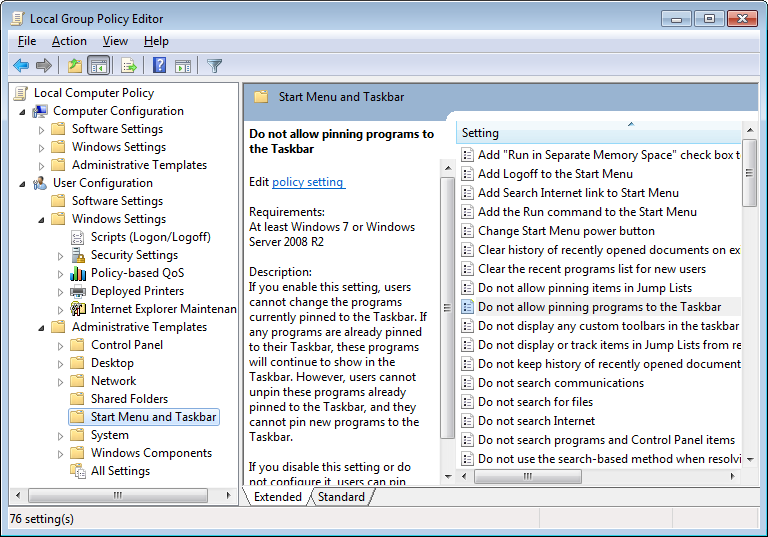
start>edit group policy (control panel), or run gpedit.msc

PlaxuDB.png
 

My Computer My Computer

Computer type
Laptop
Computer Manufacturer/Model Number
Dell
OS
Windows 7 Ultimate 64bit
CPU
2.2
Memory
8Gb
Graphics Card(s)
NVIDIA
Screen Resolution
1280/762
Mouse
built in pad || iphone || MS wireless
Internet Speed
100MB
Antivirus
Avast
Browser
Chrome, Chrome portable
Back
Top