Hi
For the record I'm using Windows 7
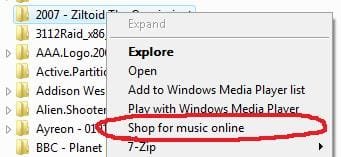
To simply put it, I would like to remove the "Shop For Music Online" context menu.
Just as the image shows, how would I go about removing the "Shop For Music Online" context menu ?
Whenever I click a media file, such as a Music Folder or Picture file, I get those stupid annoying context menus.
I find it rather annoying, as much as Windows Media Player has improved over the years, it would be nice If MS wouldn't put unnecessary crap within the menus.
I tried using ShexView and ShellXView however I can't seem to find them within the program.
Anyone know of anywhere in the Registry where this little bugger might be hiding ?
Thanks
Jordan
For the record I'm using Windows 7
To simply put it, I would like to remove the "Shop For Music Online" context menu.
Just as the image shows, how would I go about removing the "Shop For Music Online" context menu ?
Whenever I click a media file, such as a Music Folder or Picture file, I get those stupid annoying context menus.
I find it rather annoying, as much as Windows Media Player has improved over the years, it would be nice If MS wouldn't put unnecessary crap within the menus.
I tried using ShexView and ShellXView however I can't seem to find them within the program.
Anyone know of anywhere in the Registry where this little bugger might be hiding ?
Thanks
Jordan
Attachments
My Computer
At a glance
Windows 7 baby ! : DIntel Core i7 720QM @ 1.60GHz6.0GB Dual-Channel DDR3 @ 662MHzATI Mobility Radeon HD 5650
- Computer Manufacturer/Model Number
- HP Envy 17 4054ca
- OS
- Windows 7 baby ! : D
- CPU
- Intel Core i7 720QM @ 1.60GHz
- Motherboard
- Hewlett-Packard 1449 (CPU)
- Memory
- 6.0GB Dual-Channel DDR3 @ 662MHz
- Graphics Card(s)
- ATI Mobility Radeon HD 5650
- Sound Card
- IDT High Definition Audio CODEC
- Monitor(s) Displays
- Generic PnP Monitor @ 1600x900
- Screen Resolution
- 1600X900
- Hard Drives
- 78.15GB INTEL SSDSA2M080G2GC ATA Device (IDE)