Remove stubborn Action Center warning registry?

Action nag can be removed completely, permanently and safely.

This post may trigger "warnings" spam from "experts", believe me these "experts" haven't tested this therefore their warnings are pure speculation(they are afraid of any non-ms approved modifications) just ignore them and enjoy nag free windows 7.
It's tragic what passes for "expert" these days.

-----=====THE SOLUTION=====-----

Get "Take Ownership" from here - http://www.sevenforums.com/tutorials/1911-take-ownership-shortcut.html

right click and take ownership of c:\windows\system32\ActionCenter.DLL and c:\windows\system32\ActionCenterCPL.DLL

rename those files .bak and reboot.

The real tragedy comes from solutions such as this. The Action Center is designed to notify you of discrepencies in system stability and security that could cause problems down the road. You way well think that these warnings are nagging, and interfere with your computing experience, but they are there for a reason.

Instead of removing the warnings that your antivirus or firewall are turned off, or of maintenance issues such as backup, is it perhaps not a better idea to eliminate the need for those warnings? Such as keeping your anti-virus active and updated? Or performing reguslar backups?

I'm not saying your method does not work. What I am saying is that getting rid of Action Center entirely reminds me a little bit of driving a car without seat-belts. You may think you're a good driver and don't need them, but the day will come when you'd which you lisened.

We'll see you in a while complaing about some crazy error on your system that you can't fix, and think Windows is stupid because it never should have been allowed to happen. Except the problem would be PEBCAK, because you previously disabled the one Windows feature that may have been able to alert you of a possible problem before it happened.

Have fun re-installing Windows...
 

My Computer My Computer

At a glance

Windows 7 Professional 32-bit SP1AMD A4/A63.00GB EDOVMware SVGA 3D
Computer type
PC/Desktop
Computer Manufacturer/Model Number
Virtual Machine
OS
Windows 7 Professional 32-bit SP1
CPU
AMD A4/A6
Motherboard
Intel Corporation 440BX Desktop Reference Platform
Memory
3.00GB EDO
Graphics Card(s)
VMware SVGA 3D
Sound Card
High Definition Audio Device
Monitor(s) Displays
Generic Non-PnP Monitor on VMware SVGA 3D
Screen Resolution
1440x900
Hard Drives
1 x 60GB VMware Virtual SATA Hard Drive ATA Device
Antivirus
Kaspersky Total Security
In turn, I would comment that, whilst I am not denying your philosophy, many of the security measures which Microsoft have incorporated since XP, are warnings, not cures. I would hazard a guess that these have been bbrought about by the many complaints over the years, from users, regarding security "leaks" in the OSs.
These complaints are often based on private comparison with, mainly, linux products or, in some cases Mac. Every hacker in the world regards Microsoft products as a challenge to security. Who would wish to hack an open source product?
I would not recommend ripprasternode's method to anyone but an experienced user, as it can have fatal consequences. It is, in any case, cracking a nut with a sledgehammer!
Adapt one of the gui methods - for example as proposed in my post and another poster - that is how the GUI interface is meant to be used. Make sure you have good ant virus installed and a firwall running. From there on mere warnings mean nothing and can be turned off without fear of the consequences..
 

My Computer My Computer

At a glance

Vista and now 7 in 32 and 64 bit.
Computer Manufacturer/Model Number
Three desktops and one laptop with good specs..
OS
Vista and now 7 in 32 and 64 bit.
Action nag can be removed completely, permanently and safely.

This post may trigger "warnings" spam from "experts", believe me these "experts" haven't tested this therefore their warnings are pure speculation(they are afraid of any non-ms approved modifications) just ignore them and enjoy nag free windows 7.
It's tragic what passes for "expert" these days.

-----=====THE SOLUTION=====-----

Get "Take Ownership" from here - http://www.sevenforums.com/tutorials/1911-take-ownership-shortcut.html


right click and take ownership of c:\windows\system32\ActionCenter.DLL and c:\windows\system32\ActionCenterCPL.DLL

rename those files .bak and reboot.

This reads like a hacker trying to mass disable a last line of defense warning if infection turns off your AV or Firewall.

Do not listen to anti-"experts" with 2 posts who post hacks to disable your security features. Win7 is the safest yet because of these features. It is also fully interactive with Problem solutions (including driver and app fixes) cued in Action center.

I post this from a Security seminar being held on MS campus by the head of MS security, and will bring this up as an example of the kind of reckless nonsense which can send users astray.

Hacking or tweaking Win7 is counterproductive because it is already optimized as lean as can be. From two years experience we can tell you that it will always come back to bite you.
 
Action nag can be removed completely, permanently and safely.

This post may trigger "warnings" spam from "experts", believe me these "experts" haven't tested this therefore their warnings are pure speculation(they are afraid of any non-ms approved modifications) just ignore them and enjoy nag free windows 7.
It's tragic what passes for "expert" these days.

-----=====THE SOLUTION=====-----

Get "Take Ownership" from here - http://www.sevenforums.com/tutorials/1911-take-ownership-shortcut.html


right click and take ownership of c:\windows\system32\ActionCenter.DLL and c:\windows\system32\ActionCenterCPL.DLL

rename those files .bak and reboot.

A perfect example of 'Social Engineering'.

James
 

My Computer My Computer

At a glance

Win7U 64 RTMQ95508GB GskillASUS|EAH4850/HTDI/1GD3/A
OS
Win7U 64 RTM
CPU
Q9550
Motherboard
GA-EP45-UD3R
Memory
8GB Gskill
Graphics Card(s)
ASUS|EAH4850/HTDI/1GD3/A
Sound Card
xfi Plat
Monitor(s) Displays
Dell 2405fpw
Screen Resolution
1920x1200
Hard Drives
Seagate & WD sata Drives
PSU
Antec
Case
Antec
Keyboard
MS Natural Ergonomic 4000
Mouse
Logitech MX610 USB Cordless
Hacking or tweaking Win7 is counterproductive because it is already optimized as lean as can be. From two years experience we can tell you that it will always come back to bite you.
Greg, I agree that hacking, as in removing or patching DLL's is a bad approach, particularly in this thread where all the original poster wanted was a way to 'get rid of the nag,' not the detection.

2 proper solutions were proposed, either fix the issue, or remove the action center from the bar (using menu bar properties, this is not not a hack/crack/patch/tweak).

But the: "already optimized as lean as can be"
- now that's fiction, it's hype, in a word: false.

There are documented measurements of speed/response improvements from tweeks thougout the net. (I'm assuming readers here are smart enough to google for this themselves.)
But again I'll add the caveat: very few people, [beyond benchmarks] will notice any improvements from tweaking, just like tweaking your car to go 250mph when you would never go more than say 20mph over the speed limit anyway.
(And I agree that for many less proficient users such hacking can "come back to bite you." is apt, and from 25 years experience I can tell you not "always." 'Too much' or 'a lot' - yes, but not 'always.')
 

My Computer My Computer

At a glance

7x64u
OS
7x64u
rename c:\windows\system32\ActionCenter.DLL and c:\windows\system32\ActionCenterCPL.DLL

Thanks! Renaming it to "original.dll.bogus" works too! (I use ".bogus" because it's easy to find later).

The real tragedy comes from solutions such as this. The Action Center is designed to notify you of discrepencies in system stability and security that could cause problems down the road. You way well think that these warnings are nagging, and interfere with your computing experience, but they are there for a reason.

No, the real tragedy is that MS thinks their customers are as stupid as their programmers. I have far better security SW than MS provides, but their crappy actioncenter doesn't recognize it and apparently can't be told what it is, and so it constantly and misleadingly complains about something that's definitely not a problem (which just shows that you shouldn't trust what the actioncenter says, so you might as well turn it off). And we're reduced to renaming system files to fix the obnoxious MS software that gives wrong answers.
I sure wish Linux had better video apps...
 

My Computer My Computer

At a glance

Windows 7 UltimatePentium Dual-Core CPU E5400 @ 2.70GHz4096MnVidia 8400GS
Computer Manufacturer/Model Number
eMachines ET1831-7
OS
Windows 7 Ultimate
CPU
Pentium Dual-Core CPU E5400 @ 2.70GHz
Motherboard
EMCP73VT-PM
Memory
4096M
Graphics Card(s)
nVidia 8400GS
Sound Card
built-in Realtek
Monitor(s) Displays
Acer 20"
Screen Resolution
1680x1050
Hard Drives
Seagate ST3750528AS ATA 500G
Other Info
Dual-boot with Linux.
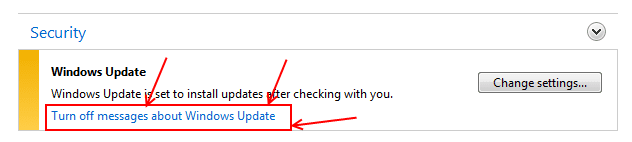
Actually it is a matter on interpretation and knowing what to do rather than blaming MS. If there's a message I don't need to see Agni I click the link in the box and voilà!
stupid action center.PNG
 

My Computer My Computer

At a glance

Windows 7 Ultimate X64 SP1Intel i5-2550K, Differing ~4.4-4.8GHz No buil...16GB G.Skill Sniper 1866MHz @ 2133MHz 2x8GBASUS GTX650TIB-DC2OC-2GD5, (650TI Boost)
Computer type
PC/Desktop
Computer Manufacturer/Model Number
Home Built Desktop By DataTech
OS
Windows 7 Ultimate X64 SP1
CPU
Intel i5-2550K, Differing ~4.4-4.8GHz No built in GPU
Motherboard
ASUS P8Z68-V PRO/GEN3
Memory
16GB G.Skill Sniper 1866MHz @ 2133MHz 2x8GB
Graphics Card(s)
ASUS GTX650TIB-DC2OC-2GD5, (650TI Boost)
Sound Card
Onboard Realtek 5-1
Monitor(s) Displays
Samsung P2570HD
Screen Resolution
1920x1080
Hard Drives
Samsung 840 Pro 256GB SSD for OS, 500GB Seagate Constellation (Enterprise drive) for Data
PSU
Corsair HX650W
Case
Inwin Dragon Rider
Cooling
Hyper 212 EVO w/two Noctua fans, push-pull, @1300 RPM
Keyboard
E-Z Eyes, bright yellow keys with large characters
Mouse
steelseries SENSEI Laser Pro Gaming
Internet Speed
48-51Mbs Mbs down, 11 Mbs up Xfinity Cable
Antivirus
Norton Internet Security 2013
Browser
IE 10, Opera, Pale Moon if needed
Other Info
4 case fans, LG BluRay-RE, ASUS DVD-RW, Mr. Fusion power supply, 1.21 gigawatts.
Actually it is a matter on interpretation and knowing what to do rather than blaming MS. If there's a message I don't need to see Agni I click the link in the box and voilà!

Nope, the messages continue, depending on what it's complaining about, whereas renaming the DLL actually stops it from continuing to give misleading warnings.
 

My Computer My Computer

At a glance

Windows 7 UltimatePentium Dual-Core CPU E5400 @ 2.70GHz4096MnVidia 8400GS
Computer Manufacturer/Model Number
eMachines ET1831-7
OS
Windows 7 Ultimate
CPU
Pentium Dual-Core CPU E5400 @ 2.70GHz
Motherboard
EMCP73VT-PM
Memory
4096M
Graphics Card(s)
nVidia 8400GS
Sound Card
built-in Realtek
Monitor(s) Displays
Acer 20"
Screen Resolution
1680x1050
Hard Drives
Seagate ST3750528AS ATA 500G
Other Info
Dual-boot with Linux.

My Computer My Computer

At a glance

Windows 7 Ultimate X64 SP1Intel i5-2550K, Differing ~4.4-4.8GHz No buil...16GB G.Skill Sniper 1866MHz @ 2133MHz 2x8GBASUS GTX650TIB-DC2OC-2GD5, (650TI Boost)
Computer type
PC/Desktop
Computer Manufacturer/Model Number
Home Built Desktop By DataTech
OS
Windows 7 Ultimate X64 SP1
CPU
Intel i5-2550K, Differing ~4.4-4.8GHz No built in GPU
Motherboard
ASUS P8Z68-V PRO/GEN3
Memory
16GB G.Skill Sniper 1866MHz @ 2133MHz 2x8GB
Graphics Card(s)
ASUS GTX650TIB-DC2OC-2GD5, (650TI Boost)
Sound Card
Onboard Realtek 5-1
Monitor(s) Displays
Samsung P2570HD
Screen Resolution
1920x1080
Hard Drives
Samsung 840 Pro 256GB SSD for OS, 500GB Seagate Constellation (Enterprise drive) for Data
PSU
Corsair HX650W
Case
Inwin Dragon Rider
Cooling
Hyper 212 EVO w/two Noctua fans, push-pull, @1300 RPM
Keyboard
E-Z Eyes, bright yellow keys with large characters
Mouse
steelseries SENSEI Laser Pro Gaming
Internet Speed
48-51Mbs Mbs down, 11 Mbs up Xfinity Cable
Antivirus
Norton Internet Security 2013
Browser
IE 10, Opera, Pale Moon if needed
Other Info
4 case fans, LG BluRay-RE, ASUS DVD-RW, Mr. Fusion power supply, 1.21 gigawatts.
Seems we always have one thread where we're entertained with new ways to ruin your OS.

It's especially hilarious when the OP is insistent about it as though we're just not getting his wisdom, even after helping birth Win7 from beta. :haha:
 
Back
Top