
Hi everyone,
I have 2 hard drives in my computer, a 160GB and a 500GB. I wanted to transfer my windows install from the 160GB to the new 500GB drive, but I wanted to start fresh anyways, so I backed up all my important stuff, and did a clean install on to the 500GB hard drive, and set that as the primary boot device in my BIOS.
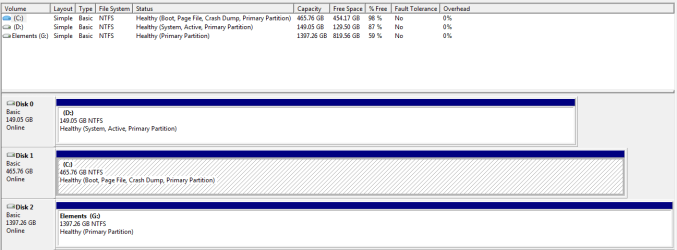
Now what I would like to do is format the other drive with the old install, so I can use it for backup/storage. The problem is Disk Management won't let me delete it because it is listed as "System, Active, Primary Partition". I figured this was because it is active, so I tried deleting it by booting from a GParted live cd, and deleted the partition. This was bad, as it seemed to mess up my MBR (perhaps for obvious reasons?).
So basically, I would like to know the best and safest method for doing this, preferably without any paid software.
Thanks!
I have 2 hard drives in my computer, a 160GB and a 500GB. I wanted to transfer my windows install from the 160GB to the new 500GB drive, but I wanted to start fresh anyways, so I backed up all my important stuff, and did a clean install on to the 500GB hard drive, and set that as the primary boot device in my BIOS.
Now what I would like to do is format the other drive with the old install, so I can use it for backup/storage. The problem is Disk Management won't let me delete it because it is listed as "System, Active, Primary Partition". I figured this was because it is active, so I tried deleting it by booting from a GParted live cd, and deleted the partition. This was bad, as it seemed to mess up my MBR (perhaps for obvious reasons?).
So basically, I would like to know the best and safest method for doing this, preferably without any paid software.
Thanks!
My Computer
- OS
- Windows 7 Ultimate x86
- CPU
- AMD Athlon 64 X2 4600+
- Motherboard
- MSI MS-7260
- Memory
- 4GB
- Graphics Card(s)
- ATI Radeon HD 4670
- PSU
- Aspire ATX-AS500W

 )
)