
Solved Remove the 'organize, include in library, new folder' bar in windows 7

DarkSecretLove

New member
Local time
8:47 PM
Messages
2
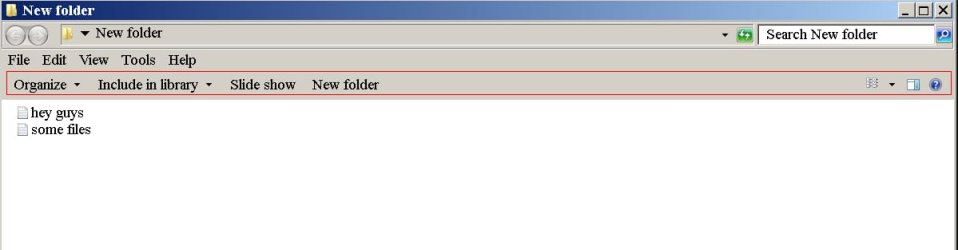
Hey guys. I've always wondered, is it possible to remove the 'organize, include in library, new folder' bar that is present on all windows explorer windows? I have attached a screenshot jpg of what it looks like in windows 7 under the classic view scheme. I have highlighted the problem bar in a red outline.

I find this bar very annoying because it was never present in windows xp, and I would rather have more viewable space in the window than have this useless bar there at all times. All of the options that it presents are available somewhere else so no functionality is lost.
 

Attachments
  • a.jpg
    a.jpg
    23.8 KB · Views: 3

My Computer My Computer

At a glance

windows 7
Computer type
PC/Desktop
OS
windows 7

My Computer My Computer

At a glance

64-bit Windows 11 Pro for WorkstationsIntel i7-8700K OC'd to 5 GHz64 GB (4x16GB) G.SKILL TridentZ RGB DDR4 3600...ASUS ROG-STRIX-GTX1080TI-O11G-GAMING
Computer type
PC/Desktop
Computer Manufacturer/Model Number
Self built custom
OS
64-bit Windows 11 Pro for Workstations
CPU
Intel i7-8700K OC'd to 5 GHz
Motherboard
ASUS ROG Maximus XI Formula Z390
Memory
64 GB (4x16GB) G.SKILL TridentZ RGB DDR4 3600 MHz
Graphics Card(s)
ASUS ROG-STRIX-GTX1080TI-O11G-GAMING
Sound Card
Integrated
Monitor(s) Displays
2 x Samsung Odyssey G7 27"
Screen Resolution
2560x1440
Hard Drives
1TB Samsung 990 PRO M.2,
4TB Samsung 990 PRO PRO M.2,
TerraMaster F8 SSD Plus NAS
PSU
Seasonic Prime Titanium 850W
Case
Thermaltake Core P3
Cooling
Corsair Hydro H115i
Keyboard
Logitech wireless K800
Mouse
Logitech MX Master 4
Internet Speed
2 Gb/s Download and 100 Mb/s Upload
Antivirus
Malwarebyte Anti-Malware Premium
Browser
Google Chrome
Other Info
Logitech Z625 speaker system,
Logitech BRIO 4K Pro webcam,
HP Color LaserJet Pro MFP M477fdn,
APC SMART-UPS RT 1000 XL - SURT1000XLI,
Galaxy S23 Plus phone
Include In Library - Remove

Well it can be done but but there's no harm in leaving it as it is! Messing about removing it might not be such a good idea so you really need a system image backup before going ahead.

If you really want to remove it it will involve editing the registry and taking ownership of certain keys, deleting stuff and restoring ownership afterwards. If you're comfortable with that and have a backup then go ahead.


EDIT: Forget that. The tutorial is a lot easier to follow!
 
Last edited:

My Computer My Computer

At a glance

Microsoft Windows 7 Home Premium 64-bit 7601 ...AMD C-60 APU with Radeon(tm) HD Graphics4.00 GBAMD Radeon HD 6290 Graphics
Computer type
Laptop
Computer Manufacturer/Model Number
ASUS
OS
Microsoft Windows 7 Home Premium 64-bit 7601 Multiprocessor Free Service Pack 1
CPU
AMD C-60 APU with Radeon(tm) HD Graphics
Motherboard
ASUSTeK COMPUTER INC. X501U
Memory
4.00 GB
Graphics Card(s)
AMD Radeon HD 6290 Graphics
Sound Card
(1) AMD High Definition Audio Device (2) Realtek High Defi
Screen Resolution
1366 x 768 x 32 bits (4294967296 colors) @ 60 Hz
Hard Drives
Hitachi HTS545050A7E380 SATA Disk Device
Antivirus
Comodo CIS & FW, SecureAplus App Whitelisting, Threatfire
Browser
Cyberfox 64bit, Opera 64bit, Airfox
Other Info
Spy-The-Spy, HitmanPro.Alert, Norton Connect Safe, MJRegWatcher, BitDefender TrafficLight, Voodoo Shield, Zemana AntiMalware
Huzzah! I got something almost as good as removing it to work. I used a program called 'Resource Hacker' to modify shellstyle.dll found in the system 32 folder. I added the following line which I put after the existing line and re-compiled the .dll file. Restarted computer and it worked, it basically hides the command bar text completely and almost hides the actual bar itself except for a very small amount of space where you can still hover your mouse over the buttons to get a pop-up description of them.
 

My Computer My Computer

At a glance

windows 7
Computer type
PC/Desktop
OS
windows 7
Hey Dark Secret. Will you please post a screen shot of the Command Bar as you modified AND a shot of what happens when you hover your mouse over it. Thanks.....
 

My Computer My Computer

At a glance

Windows 7 Home Premium 64bit3rd Gen Intel Core i5-3340 (6M Cache, up to 3...8 GBIntel HD Integrated Graphics
Computer type
PC/Desktop
Computer Manufacturer/Model Number
Dell
OS
Windows 7 Home Premium 64bit
CPU
3rd Gen Intel Core i5-3340 (6M Cache, up to 3.3 GHz)
Memory
8 GB
Graphics Card(s)
Intel HD Integrated Graphics
Hard Drives
C: 1TB, 3.5", 7200rpm,SATA
Antivirus
Norton 360
Browser
IE and Firefox
Back
Top