Solved Remove Vista from a dual-boot w/win 7

I assume Bill means you , Greg .

Have you given up?
 

My Computers My Computers

  • At a glance

    7 X64i5 84002x8gb 3200mhz
    Computer type
    PC/Desktop
    OS
    7 X64
    CPU
    i5 8400
    Motherboard
    gigabyte b365m ds3h
    Memory
    2x8gb 3200mhz
    Hard Drives
    various
    PSU
    pure power 11 400w cm
    Case
    Coolermaster
    Cooling
    cryorig m9i
  • At a glance

    7x64g54008gb ddr4 2400
    Computer type
    PC/Desktop
    OS
    7x64
    CPU
    g5400
    Motherboard
    ga b365m ds3h
    Memory
    8gb ddr4 2400
    PSU
    xfx pro 450w
To whoever gets this.

Greg started with me, I was trying to work with him as best I could. We got disconnected and I can't get back.

I would still like to get rid of Vista Ultimate and do away with the Dual Boot!!!!!!!!!!

The problem is my not knowing. I have problems with this messaging system.

BillP
 

My Computer My Computer

At a glance

Dual Boot, Windows 7 64, Vista Ultimate 645i8
Computer Manufacturer/Model Number
Magic Micro
OS
Dual Boot, Windows 7 64, Vista Ultimate 64
CPU
5i
Memory
8
Monitor(s) Displays
Samsung 27
Hard Drives
2 @ 500 G
I have been busy setting up some computers here all day.

Bill, I replied yesterday to your PM encouraging you to follow SIW2's advice in Post 38.

As I said, he is our teacher here and his advice is rock solid and to be trusted.
 
SIW2,

Looked back over this thread and found a post from Greg 19 hours ago indicating that I should go with you since you were his teacher. I would like to do this if it's agreeable with you.

BillP
 

My Computer My Computer

At a glance

Dual Boot, Windows 7 64, Vista Ultimate 645i8
Computer Manufacturer/Model Number
Magic Micro
OS
Dual Boot, Windows 7 64, Vista Ultimate 64
CPU
5i
Memory
8
Monitor(s) Displays
Samsung 27
Hard Drives
2 @ 500 G

My Computer My Computer

At a glance

Vista, Windows7, Mint Mate, Zorin, Windows 8from 1.6GHz Duo to i7
Computer Manufacturer/Model Number
HP, Dell, Gateway, Toshiba - 4 laptops and 2 desktops
OS
Vista, Windows7, Mint Mate, Zorin, Windows 8
CPU
from 1.6GHz Duo to i7
Monitor(s) Displays
2x HP w2207
Hard Drives
5x HDD, 7x SSD, 12x Externals
Keyboard
with trackball - no mices
Mouse
Trackball mice
Internet Speed
DSL 6000
whs,

Thanks, made a copy of this tutorial. Am waiting to hear from SIW2 as advised by Greg.

BillP
 

My Computer My Computer

At a glance

Dual Boot, Windows 7 64, Vista Ultimate 645i8
Computer Manufacturer/Model Number
Magic Micro
OS
Dual Boot, Windows 7 64, Vista Ultimate 64
CPU
5i
Memory
8
Monitor(s) Displays
Samsung 27
Hard Drives
2 @ 500 G
Read the tut. It should give you all the info you need. If not, I did a bad job. LOL. You are my guinea pig because I only made it this afternoon.
 

My Computer My Computer

At a glance

Vista, Windows7, Mint Mate, Zorin, Windows 8from 1.6GHz Duo to i7
Computer Manufacturer/Model Number
HP, Dell, Gateway, Toshiba - 4 laptops and 2 desktops
OS
Vista, Windows7, Mint Mate, Zorin, Windows 8
CPU
from 1.6GHz Duo to i7
Monitor(s) Displays
2x HP w2207
Hard Drives
5x HDD, 7x SSD, 12x Externals
Keyboard
with trackball - no mices
Mouse
Trackball mice
Internet Speed
DSL 6000
Bill - Do you have questions about what SIW2 wrote here?

If you don't mind keeping win7 os letter as E ( and there is no reason not to - I am currently posting from X drive )

You can rt click Vista drive ( C) in disk mgmt - select quick format.

Then type msconfig in start search box - click it when it pops up - select the BOOT tab , highlight Vista entry and remove.

If you desperately want win 7 os letter to be C ( Lord knows why), you will have to reinstall it - by booting the dvd is easiest for you.

If keeping Win7 on E isn't what you want or you have other questions, ask back and we'll help you.
 
Last edited:
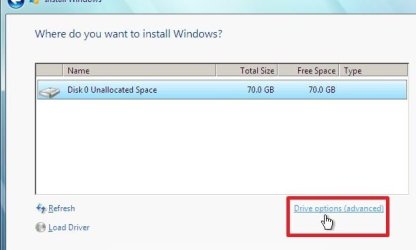
If you want Windows 7 to have drive letter C - like most folk, then you need to reinstall by "booting" the dvd.

The installer will allow you to format all partitions and install win 7 onto disk 0 (or anywhere you like )

You do that by selecting Drive Options (advanced) - see this tutorial:

http://www.sevenforums.com/tutorials/1649-clean-install-windows-7-a.html

2012-01-27_211702.jpg


After 20 mins or so, you will have a fresh install of win 7 - calling itself C - and no other o/s in sight.
 

My Computers My Computers

  • At a glance

    7 X64i5 84002x8gb 3200mhz
    Computer type
    PC/Desktop
    OS
    7 X64
    CPU
    i5 8400
    Motherboard
    gigabyte b365m ds3h
    Memory
    2x8gb 3200mhz
    Hard Drives
    various
    PSU
    pure power 11 400w cm
    Case
    Coolermaster
    Cooling
    cryorig m9i
  • At a glance

    7x64g54008gb ddr4 2400
    Computer type
    PC/Desktop
    OS
    7x64
    CPU
    g5400
    Motherboard
    ga b365m ds3h
    Memory
    8gb ddr4 2400
    PSU
    xfx pro 450w
SIW2,

My computer is operating well right now. The only thing I'm missing are my contacts in Email. So I do not want to do anything that will change this. You were right on your first post, that it doesn't make any difference what you call them just so they do the work.
Should I go back to your first post and get rid of Vista first? That way I still have mail to keep in contact.

BillP
 

My Computer My Computer

At a glance

Dual Boot, Windows 7 64, Vista Ultimate 645i8
Computer Manufacturer/Model Number
Magic Micro
OS
Dual Boot, Windows 7 64, Vista Ultimate 64
CPU
5i
Memory
8
Monitor(s) Displays
Samsung 27
Hard Drives
2 @ 500 G
Bill we provide help as a team here so you needn't wait for one of us to answer when another has the answer for you. Sometimes SIW2 isn't around for awhile.

If you are missing your email contacts in Win7, then you'll need to export them from Vista to a file and then import them from that file into Win7. Your email provider should have this information in their Help or you can Google it. If not tell us who provides your email and we will help you do this.

Once you're sure you've gotten everything you need from Vista then follow SIW2's steps in Post #38 to format Vista in Disk Management and remove the Vista listing from msconfig>Boot. There is no hurry to do this if you're at all uncertain you've gotten everything out of Vista you need.
 
Greg,

Did not find Email contacts in Vista boot. Can this be done from Win 7? I serched for .wab files the other day with My Book open and it listed 150 something files.

BillP
 

My Computer My Computer

At a glance

Dual Boot, Windows 7 64, Vista Ultimate 645i8
Computer Manufacturer/Model Number
Magic Micro
OS
Dual Boot, Windows 7 64, Vista Ultimate 64
CPU
5i
Memory
8
Monitor(s) Displays
Samsung 27
Hard Drives
2 @ 500 G
Have installed Windows Mail form Windows Ess 2011. Searched Outlook on comp, came up mt. Looking at 575 to see if I can find contacts.
Should I be using Post Reply or Post Quick Reply?
BillP
 

My Computer My Computer

At a glance

Dual Boot, Windows 7 64, Vista Ultimate 645i8
Computer Manufacturer/Model Number
Magic Micro
OS
Dual Boot, Windows 7 64, Vista Ultimate 64
CPU
5i
Memory
8
Monitor(s) Displays
Samsung 27
Hard Drives
2 @ 500 G
Greg,

My contacts in Mail will rebuild its self in time. Lets go ahead with getting rid of Vista and the Dual Boot. Have looked at steps suggested by 38. Do I do them in the Vista Boot Side?

BillP
 

My Computer My Computer

At a glance

Dual Boot, Windows 7 64, Vista Ultimate 645i8
Computer Manufacturer/Model Number
Magic Micro
OS
Dual Boot, Windows 7 64, Vista Ultimate 64
CPU
5i
Memory
8
Monitor(s) Displays
Samsung 27
Hard Drives
2 @ 500 G
No you cannot Format or Delete Vista from the Vista OS. Only the Roadrunner can erase himself.

Boot into Win7 and open Disk mgmt, rightclick on Vista partition to either Format Vista if you want the same partitioning on it's disk, or Delete it if you want to create new partitioning.

Then in msconfig>Boot tab, highlight and delete the Vista listing.

Go through your normal routine in Win7 with a few restarts and report back how it's running.
 
LOL - Greg beat me to it.
 

My Computers My Computers

  • At a glance

    7 X64i5 84002x8gb 3200mhz
    Computer type
    PC/Desktop
    OS
    7 X64
    CPU
    i5 8400
    Motherboard
    gigabyte b365m ds3h
    Memory
    2x8gb 3200mhz
    Hard Drives
    various
    PSU
    pure power 11 400w cm
    Case
    Coolermaster
    Cooling
    cryorig m9i
  • At a glance

    7x64g54008gb ddr4 2400
    Computer type
    PC/Desktop
    OS
    7x64
    CPU
    g5400
    Motherboard
    ga b365m ds3h
    Memory
    8gb ddr4 2400
    PSU
    xfx pro 450w
OK you two, quit laughing and tell me which is the Vista partition.

BillP
 

My Computer My Computer

At a glance

Dual Boot, Windows 7 64, Vista Ultimate 645i8
Computer Manufacturer/Model Number
Magic Micro
OS
Dual Boot, Windows 7 64, Vista Ultimate 64
CPU
5i
Memory
8
Monitor(s) Displays
Samsung 27
Hard Drives
2 @ 500 G
Looks to be C drive however to be certain boot into VIsta and look at Disk Management to see which partition says Boot - that will confirm which is the Vista partition.
 
Greg,

In the Vista side it indicates that New Volume C is Healthy (Boot, Page File, Active,Crash Dump, Primary Patition

Is says it's on Disk 1

BillP
 

My Computer My Computer

At a glance

Dual Boot, Windows 7 64, Vista Ultimate 645i8
Computer Manufacturer/Model Number
Magic Micro
OS
Dual Boot, Windows 7 64, Vista Ultimate 64
CPU
5i
Memory
8
Monitor(s) Displays
Samsung 27
Hard Drives
2 @ 500 G
Back
Top