Remove Windows Media Player from Winows 7

izghitu

New member
Local time
2:52 AM
Messages
13
Hi,

I have Windows 7 64bit.

After I installed it, everything was fine except the part where I wanted to configure Mplayer(www.mplayerhq.hu) to be used for all movie extensions.

I right-clicked a .avi movie, Open With, Choose Default Program, Browse, selected the Mplayer executable and checked the checkbox that says to use Mplayer always to open this kind of files.

Normally(in WindowsXP and Windows Vista) next time I just double-click any .avi file and it opens with Mplayer. Instead in Windows 7 when double-clicked an .avi file, it automatically opened Windows Media Player. After this each time I right-click, Open With, Browse, select Mplayer, the checkbox that says "Use this program to always..." is simply grayed out. I tried to add the NoFileAssociation registry thing but it does not help. No matter what I do, Windows 7 forces me to use Windows Media Player by default.

I got mad, rebooted and started WindowsXP from a liveCD, changed ownership of the two(program files 32bit and 64bit) wmplayer.exe executables and removed them. Then I copied mplayer in the Windows Media Player directory and renamed it to wmplayer.exe. After rebooting to Windows 7, when I double click a movie I can see that it tries to open using the renamed wmplayer.exe mplayer but it does not work because most likely it passes some parameters to the command line which mplayer does not understand.

Situations like this one when the stupid Microsoft forces you to use the stupid Windows Media Player makes me throw the Windows CD out of the window.

Please tell me how do I remove Windows Media Player completely out of my new Windows 7 and how do I make my .avi movies open using Mplayer when I double-click them.

Please help.

Many thanks in advance.
 

My Computer My Computer

At a glance

Linux
OS
Linux
Welcome izghitu :)
To uninstall WMP, open the control panel;
Control Panel > Programs > Tun Windows features on or off > expand the media features folder, and uncheck WMP, reboot. :)
Hope this helps.
 

My Computer My Computer

At a glance

Windows 7 Ultimate x64AMD Turion(tm) 64 X2 Mobile Technology TL-563GB Nanya PC2-6400 DDR2-SDRAM SO-DIM (400MHz)NVIDIA GeForce Go 7600 256MB GDDR3 SDRAM
Computer Manufacturer/Model Number
HP Touchsmart IQ771.uk
OS
Windows 7 Ultimate x64
CPU
AMD Turion(tm) 64 X2 Mobile Technology TL-56
Motherboard
ASUS Pheonix
Memory
3GB Nanya PC2-6400 DDR2-SDRAM SO-DIM (400MHz)
Graphics Card(s)
NVIDIA GeForce Go 7600 256MB GDDR3 SDRAM
Sound Card
High Definition Intergrated NVIDIA MCP51
Monitor(s) Displays
46" Sony Bravia HDTV
Screen Resolution
1600x1200
Hard Drives
1.5TB Samsug
320GB Seagate ST3320820AS - SATA 3Gb/s 8MB
500GB Maxtor Basics STM305003EHD301-RK
Internet Speed
↓6.32 Mb/s ↑0.35 Mb/s ↔26ms
Other Info
BIOS - American Megatrends Inc. 5.07
Ethernet Port - NVIDIA nForce 10/100/1000 Mbps
DVD Drive - TSSTcorp DVDR/RW TS-T632L
Ok, Finally I removed WMP. Thanks for your reply.

But I have another problem now. The checkbox that says to use mplayer always for this kind of files is grayed out and I can't make mplayer the default program for .avi files.

Please help.
 

My Computer My Computer

At a glance

Linux
OS
Linux
What happens if you just double click on the .avi file?
It should prompt you to making a decision on the default program that opens it.
Can you open the .avi from within mplayer?
 

My Computer My Computer

At a glance

Windows 7 Ultimate x64AMD Turion(tm) 64 X2 Mobile Technology TL-563GB Nanya PC2-6400 DDR2-SDRAM SO-DIM (400MHz)NVIDIA GeForce Go 7600 256MB GDDR3 SDRAM
Computer Manufacturer/Model Number
HP Touchsmart IQ771.uk
OS
Windows 7 Ultimate x64
CPU
AMD Turion(tm) 64 X2 Mobile Technology TL-56
Motherboard
ASUS Pheonix
Memory
3GB Nanya PC2-6400 DDR2-SDRAM SO-DIM (400MHz)
Graphics Card(s)
NVIDIA GeForce Go 7600 256MB GDDR3 SDRAM
Sound Card
High Definition Intergrated NVIDIA MCP51
Monitor(s) Displays
46" Sony Bravia HDTV
Screen Resolution
1600x1200
Hard Drives
1.5TB Samsug
320GB Seagate ST3320820AS - SATA 3Gb/s 8MB
500GB Maxtor Basics STM305003EHD301-RK
Internet Speed
↓6.32 Mb/s ↑0.35 Mb/s ↔26ms
Other Info
BIOS - American Megatrends Inc. 5.07
Ethernet Port - NVIDIA nForce 10/100/1000 Mbps
DVD Drive - TSSTcorp DVDR/RW TS-T632L
all .avi files now have no icon
when I double click them, I get prompted to choose a program.
The always use... checkbox is grayed out so I need to browse for mplayer each time I double click an avi file.

How do I ungray that checkbox?

Looking at control panel - default programs - extensions and protocols I can see that mplayer is the default for .avi but that does not help.
 

My Computer My Computer

At a glance

Linux
OS
Linux
In the start search box, type regedit and hit enter;
navigate to;
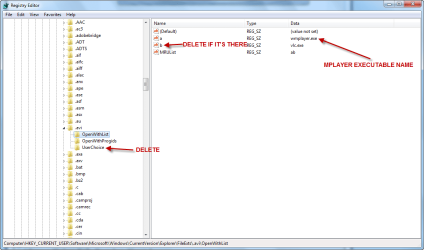
HKEY_CURRENT_USER\Software\Microsoft\Windows\CurrentVersion\Explorer\FileExts\.avi

Expand the .avi key and click on OpenWithList, make sure there is only "a" with a .exe (if there's "b", delete it, MRUList is OK too), double click on "a" in the right hand pane and enter the executable name of mplayer.
Then, delete the userchoice key.

1.png

Exit regedit, reboot and report :)
 

My Computer My Computer

At a glance

Windows 7 Ultimate x64AMD Turion(tm) 64 X2 Mobile Technology TL-563GB Nanya PC2-6400 DDR2-SDRAM SO-DIM (400MHz)NVIDIA GeForce Go 7600 256MB GDDR3 SDRAM
Computer Manufacturer/Model Number
HP Touchsmart IQ771.uk
OS
Windows 7 Ultimate x64
CPU
AMD Turion(tm) 64 X2 Mobile Technology TL-56
Motherboard
ASUS Pheonix
Memory
3GB Nanya PC2-6400 DDR2-SDRAM SO-DIM (400MHz)
Graphics Card(s)
NVIDIA GeForce Go 7600 256MB GDDR3 SDRAM
Sound Card
High Definition Intergrated NVIDIA MCP51
Monitor(s) Displays
46" Sony Bravia HDTV
Screen Resolution
1600x1200
Hard Drives
1.5TB Samsug
320GB Seagate ST3320820AS - SATA 3Gb/s 8MB
500GB Maxtor Basics STM305003EHD301-RK
Internet Speed
↓6.32 Mb/s ↑0.35 Mb/s ↔26ms
Other Info
BIOS - American Megatrends Inc. 5.07
Ethernet Port - NVIDIA nForce 10/100/1000 Mbps
DVD Drive - TSSTcorp DVDR/RW TS-T632L
In the OpenWithList I had nothing. I added a string called a with the value mplayer.exe

After removing the userchoice key the "always use..." checkbox got ungrayed and I can finaly use mplayer as the default player

Thanks a lot for your help.
 

My Computer My Computer

At a glance

Linux
OS
Linux
You're welcome, i'm glad it's sorted :)
 

My Computer My Computer

At a glance

Windows 7 Ultimate x64AMD Turion(tm) 64 X2 Mobile Technology TL-563GB Nanya PC2-6400 DDR2-SDRAM SO-DIM (400MHz)NVIDIA GeForce Go 7600 256MB GDDR3 SDRAM
Computer Manufacturer/Model Number
HP Touchsmart IQ771.uk
OS
Windows 7 Ultimate x64
CPU
AMD Turion(tm) 64 X2 Mobile Technology TL-56
Motherboard
ASUS Pheonix
Memory
3GB Nanya PC2-6400 DDR2-SDRAM SO-DIM (400MHz)
Graphics Card(s)
NVIDIA GeForce Go 7600 256MB GDDR3 SDRAM
Sound Card
High Definition Intergrated NVIDIA MCP51
Monitor(s) Displays
46" Sony Bravia HDTV
Screen Resolution
1600x1200
Hard Drives
1.5TB Samsug
320GB Seagate ST3320820AS - SATA 3Gb/s 8MB
500GB Maxtor Basics STM305003EHD301-RK
Internet Speed
↓6.32 Mb/s ↑0.35 Mb/s ↔26ms
Other Info
BIOS - American Megatrends Inc. 5.07
Ethernet Port - NVIDIA nForce 10/100/1000 Mbps
DVD Drive - TSSTcorp DVDR/RW TS-T632L
How do I change the name of the thread to Solved?
 

My Computer My Computer

At a glance

Linux
OS
Linux
How do I change the name of the thread to Solved?

I've just done it, but for future reference, click the warning sign on the post you want marked, type solved and fire it off the the mod team ;)
 

My Computer My Computer

At a glance

Windows 7 Ultimate x64AMD Turion(tm) 64 X2 Mobile Technology TL-563GB Nanya PC2-6400 DDR2-SDRAM SO-DIM (400MHz)NVIDIA GeForce Go 7600 256MB GDDR3 SDRAM
Computer Manufacturer/Model Number
HP Touchsmart IQ771.uk
OS
Windows 7 Ultimate x64
CPU
AMD Turion(tm) 64 X2 Mobile Technology TL-56
Motherboard
ASUS Pheonix
Memory
3GB Nanya PC2-6400 DDR2-SDRAM SO-DIM (400MHz)
Graphics Card(s)
NVIDIA GeForce Go 7600 256MB GDDR3 SDRAM
Sound Card
High Definition Intergrated NVIDIA MCP51
Monitor(s) Displays
46" Sony Bravia HDTV
Screen Resolution
1600x1200
Hard Drives
1.5TB Samsug
320GB Seagate ST3320820AS - SATA 3Gb/s 8MB
500GB Maxtor Basics STM305003EHD301-RK
Internet Speed
↓6.32 Mb/s ↑0.35 Mb/s ↔26ms
Other Info
BIOS - American Megatrends Inc. 5.07
Ethernet Port - NVIDIA nForce 10/100/1000 Mbps
DVD Drive - TSSTcorp DVDR/RW TS-T632L
Back
Top