Solved Remove Windows Vista from Dual Boot with Windows 7

Vokerain

New member
Local time
9:38 PM
Messages
16
Hello,
I am trying to remove Windows Vista which is my active and main OS that came with my laptop and I had my uncle install Windows 7 for me. He had installed it onto my Recovery Drive so I had to shrink my C: (Windows Vista) and add some space to D: ( Windows 7). Now that I have the space and have been using Windows 7 for a few weeks I would like to get rid of Windows Vista but after reading some things online I do not know how to get rid of Windows Vista because of the boot files that are on them? Is it possible to remove windows Vista and then expand D: with the space that was used for Windows Vista and how would I go about doing this? I am not very technical about computers so please do give clear steps that I can follow by please.
P.S. I created another partition RECOVERY A: because Windows 7 gave me a notification that I should backup my files, but that partition is too small. So how much space should I leave for Recovery? I can not free up any more space from C: (Windows Vista) but I can free some up from my D: (windows 7)

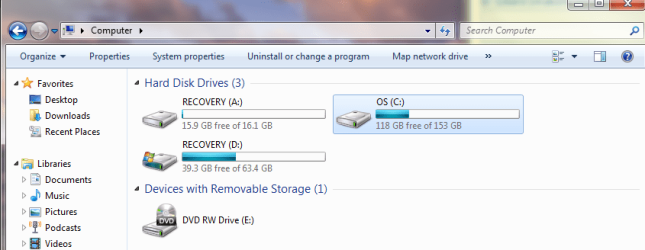
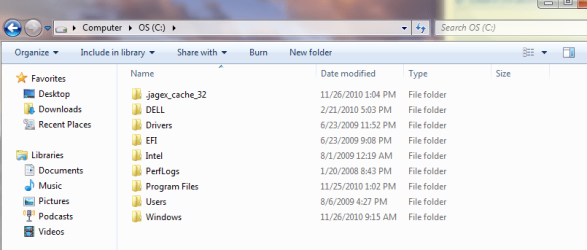
Here are some of the images of the partitions and etc.
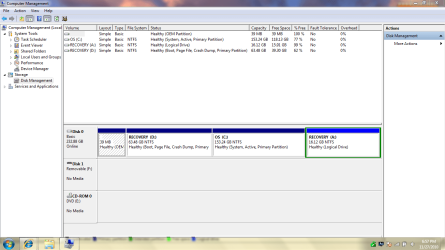
Partitions.PNG

Drives.PNG

C Drive.PNG

D Drive.PNG
 

My Computer My Computer

At a glance

Windows 7 Ultimate 32 bit and Windows Vista
OS
Windows 7 Ultimate 32 bit and Windows Vista
Also I am trying to get this done tonight so my replies will be almost as right away after you reply unless I'm following your instructions on doing something.
 

My Computer My Computer

At a glance

Windows 7 Ultimate 32 bit and Windows Vista
OS
Windows 7 Ultimate 32 bit and Windows Vista
Hello Vokerain, welcome to Seven Forums!


First things first, let's make it so you can remove Vista.


The first thing to do is mark the D: partition (Windows 7 right?) as "Active" so Windows will know where to create the new boot files needed to start Windows 7; after that you will need to run 3 separate startup repairs with a system restart between each repair to create the files to the Windows 7 partition; it's really easier than it sounds.

All the info needed to do this is in this tutorial at the link below and be sure to post back with any further questions you may have and to keep us informed.


Startup Repair - Run 3 Separate Times
 

My Computer My Computer

At a glance

W 7 64-bit UltimateIntel Q9550 Yorkfield8GB Dominator 8500C5DATI : XFX 5870
Computer Manufacturer/Model Number
* BFK Customs *
OS
W 7 64-bit Ultimate
CPU
Intel Q9550 Yorkfield
Motherboard
ASUS P5Q Pro
Memory
8GB Dominator 8500C5D
Graphics Card(s)
ATI : XFX 5870
Sound Card
Realtek HD Audio 7-1
Monitor(s) Displays
1x 47" LCD HDMI & 3x 26" LCD HDMI
Screen Resolution
1920x1080P & 1920x1200
Hard Drives
1x 80GB Intel X25-M G2 SSD : 1x 500GB & 1x 640GB WD Caviar Black(s)
PSU
Corsair 620HX
Case
Cooler Master RC-690
Cooling
Tuniq Tower 120, 2x 140mm and 3x 120mm case fans
Keyboard
Microsoft 500
Mouse
Razer Diamondback 3G
Internet Speed
14 Mb/s
Other Info
1x Koutech 3Gb/s SATA HDD Hot Swap Rack
Is having two partition Active mess anything up? I thought I read something similiar to this question somewhere but could not recall it.
 

My Computer My Computer

At a glance

Windows 7 Ultimate 32 bit and Windows Vista
OS
Windows 7 Ultimate 32 bit and Windows Vista
When you mark a partition active (on the same HDD) it removes the "active" from the first partition.
 

My Computer My Computer

At a glance

W 7 64-bit UltimateIntel Q9550 Yorkfield8GB Dominator 8500C5DATI : XFX 5870
Computer Manufacturer/Model Number
* BFK Customs *
OS
W 7 64-bit Ultimate
CPU
Intel Q9550 Yorkfield
Motherboard
ASUS P5Q Pro
Memory
8GB Dominator 8500C5D
Graphics Card(s)
ATI : XFX 5870
Sound Card
Realtek HD Audio 7-1
Monitor(s) Displays
1x 47" LCD HDMI & 3x 26" LCD HDMI
Screen Resolution
1920x1080P & 1920x1200
Hard Drives
1x 80GB Intel X25-M G2 SSD : 1x 500GB & 1x 640GB WD Caviar Black(s)
PSU
Corsair 620HX
Case
Cooler Master RC-690
Cooling
Tuniq Tower 120, 2x 140mm and 3x 120mm case fans
Keyboard
Microsoft 500
Mouse
Razer Diamondback 3G
Internet Speed
14 Mb/s
Other Info
1x Koutech 3Gb/s SATA HDD Hot Swap Rack
I do not have the Boot Disks or anything to do the repairs with. What should I do? Can I continue with your guide?
 

My Computer My Computer

At a glance

Windows 7 Ultimate 32 bit and Windows Vista
OS
Windows 7 Ultimate 32 bit and Windows Vista

My Computer My Computer

At a glance

W 7 64-bit UltimateIntel Q9550 Yorkfield8GB Dominator 8500C5DATI : XFX 5870
Computer Manufacturer/Model Number
* BFK Customs *
OS
W 7 64-bit Ultimate
CPU
Intel Q9550 Yorkfield
Motherboard
ASUS P5Q Pro
Memory
8GB Dominator 8500C5D
Graphics Card(s)
ATI : XFX 5870
Sound Card
Realtek HD Audio 7-1
Monitor(s) Displays
1x 47" LCD HDMI & 3x 26" LCD HDMI
Screen Resolution
1920x1080P & 1920x1200
Hard Drives
1x 80GB Intel X25-M G2 SSD : 1x 500GB & 1x 640GB WD Caviar Black(s)
PSU
Corsair 620HX
Case
Cooler Master RC-690
Cooling
Tuniq Tower 120, 2x 140mm and 3x 120mm case fans
Keyboard
Microsoft 500
Mouse
Razer Diamondback 3G
Internet Speed
14 Mb/s
Other Info
1x Koutech 3Gb/s SATA HDD Hot Swap Rack
Oh okay. I am sorry for the stupid questions I will ask.
 

My Computer My Computer

At a glance

Windows 7 Ultimate 32 bit and Windows Vista
OS
Windows 7 Ultimate 32 bit and Windows Vista
okay I am still working on getting the repair disk. I downloaded the .torrent file of it but now I can't do anything with. do I just copy and paste it onto my flash drive?
 

My Computer My Computer

At a glance

Windows 7 Ultimate 32 bit and Windows Vista
OS
Windows 7 Ultimate 32 bit and Windows Vista

My Computer My Computer

At a glance

W 7 64-bit UltimateIntel Q9550 Yorkfield8GB Dominator 8500C5DATI : XFX 5870
Computer Manufacturer/Model Number
* BFK Customs *
OS
W 7 64-bit Ultimate
CPU
Intel Q9550 Yorkfield
Motherboard
ASUS P5Q Pro
Memory
8GB Dominator 8500C5D
Graphics Card(s)
ATI : XFX 5870
Sound Card
Realtek HD Audio 7-1
Monitor(s) Displays
1x 47" LCD HDMI & 3x 26" LCD HDMI
Screen Resolution
1920x1080P & 1920x1200
Hard Drives
1x 80GB Intel X25-M G2 SSD : 1x 500GB & 1x 640GB WD Caviar Black(s)
PSU
Corsair 620HX
Case
Cooler Master RC-690
Cooling
Tuniq Tower 120, 2x 140mm and 3x 120mm case fans
Keyboard
Microsoft 500
Mouse
Razer Diamondback 3G
Internet Speed
14 Mb/s
Other Info
1x Koutech 3Gb/s SATA HDD Hot Swap Rack
Okay after I got done reading through all the links a couple of times I still can not get this done.
 

My Computer My Computer

At a glance

Windows 7 Ultimate 32 bit and Windows Vista
OS
Windows 7 Ultimate 32 bit and Windows Vista
I downloaded the .torrent file made it into an iso with some final torrent thing I downloaded a few minutes ago. than I use Windows 7 USB DVD Download Tool and on Step one it says invalid iso file.
On the other options when it pulls up the thing and I dont have to download it it only shows my Disc drive not my usb drive.
 

My Computer My Computer

At a glance

Windows 7 Ultimate 32 bit and Windows Vista
OS
Windows 7 Ultimate 32 bit and Windows Vista
Are you still booting into Windows 7
Then from the Backup & Restore Page on the the left there is the option
"Create a System Repair Disk"

This exists also with many OEM Window 7s (always has with mine).

I assume none of the above applied & that's why you are downloading an iso version?

Otherwise just make one!
 

My Computer My Computer

At a glance

Windows 7x64 Home Premium SP1Intel i7 2600kG.Skill Ripjaws (DDR3-1600) 2x4GBNvidia GeForce GTS 450; Intel HD Graphics 300...
Computer type
PC/Desktop
Computer Manufacturer/Model Number
Own build
OS
Windows 7x64 Home Premium SP1
CPU
Intel i7 2600k
Motherboard
ASUS P8Z68 Deluxe
Memory
G.Skill Ripjaws (DDR3-1600) 2x4GB
Graphics Card(s)
Nvidia GeForce GTS 450; Intel HD Graphics 3000(GT2+)
Monitor(s) Displays
Dell Ultrasharp IPS panel U2311H, Samsung SyncMaster P2350
Screen Resolution
1920x1080
Hard Drives
Samsung 850 Pro SSD 256GB, Samsung SSD 840 120GB, Seagates 1TB Barracuda ST31000528AS x2
PSU
Seasonic M12II 520W
Case
Lian Li Lancool PC-K60
Cooling
Case: 1x120mm, 3x140mm CPU: Hyper 212+
Keyboard
Logitech MK520 (wireless)
Mouse
Logitech MK520
Internet Speed
6-7 Mbps
Antivirus
Norton Security Premium, Malwarebytes on 2 (MSE on 3rd PC)
Browser
FireFox
Other Info
Audio: Logitech Z523 2.1
I've been communicating with Vokerain by PM and he was able to burn a repair disk and get the PC booting.
 

My Computer My Computer

At a glance

W 7 64-bit UltimateIntel Q9550 Yorkfield8GB Dominator 8500C5DATI : XFX 5870
Computer Manufacturer/Model Number
* BFK Customs *
OS
W 7 64-bit Ultimate
CPU
Intel Q9550 Yorkfield
Motherboard
ASUS P5Q Pro
Memory
8GB Dominator 8500C5D
Graphics Card(s)
ATI : XFX 5870
Sound Card
Realtek HD Audio 7-1
Monitor(s) Displays
1x 47" LCD HDMI & 3x 26" LCD HDMI
Screen Resolution
1920x1080P & 1920x1200
Hard Drives
1x 80GB Intel X25-M G2 SSD : 1x 500GB & 1x 640GB WD Caviar Black(s)
PSU
Corsair 620HX
Case
Cooler Master RC-690
Cooling
Tuniq Tower 120, 2x 140mm and 3x 120mm case fans
Keyboard
Microsoft 500
Mouse
Razer Diamondback 3G
Internet Speed
14 Mb/s
Other Info
1x Koutech 3Gb/s SATA HDD Hot Swap Rack
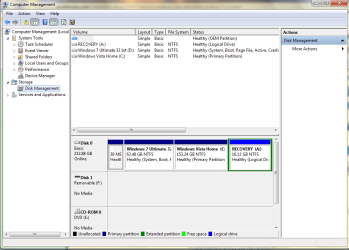
Thanks everyone for the help I got it to work this is how it looks now.
Final Drive.PNG

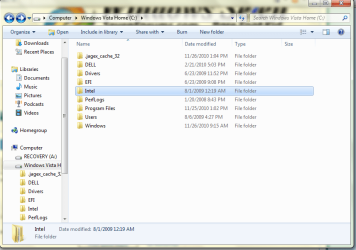
Will I need to keep any folders like DELL, Intel, EFI, Drivers, or Perf logs? I do not know if its part of the computer drivers and components or not.

C Folder.PNG
 

My Computer My Computer

At a glance

Windows 7 Ultimate 32 bit and Windows Vista
OS
Windows 7 Ultimate 32 bit and Windows Vista
Vokerain,

Since you said that you only wanted Windows 7 and would like to remove Vista, then you could boot into Windows 7 and delete/format what you like on the Windows Vista Home partition.

Hope this helps,
Shawn
 

My Computer My Computer

At a glance

64-bit Windows 11 Pro for WorkstationsIntel i7-8700K OC'd to 5 GHz64 GB (4x16GB) G.SKILL TridentZ RGB DDR4 3600...ASUS ROG-STRIX-GTX1080TI-O11G-GAMING
Computer type
PC/Desktop
Computer Manufacturer/Model Number
Self built custom
OS
64-bit Windows 11 Pro for Workstations
CPU
Intel i7-8700K OC'd to 5 GHz
Motherboard
ASUS ROG Maximus XI Formula Z390
Memory
64 GB (4x16GB) G.SKILL TridentZ RGB DDR4 3600 MHz
Graphics Card(s)
ASUS ROG-STRIX-GTX1080TI-O11G-GAMING
Sound Card
Integrated
Monitor(s) Displays
2 x Samsung Odyssey G7 27"
Screen Resolution
2560x1440
Hard Drives
1TB Samsung 990 PRO M.2,
4TB Samsung 990 PRO PRO M.2,
TerraMaster F8 SSD Plus NAS
PSU
Seasonic Prime Titanium 850W
Case
Thermaltake Core P3
Cooling
Corsair Hydro H115i
Keyboard
Logitech wireless K800
Mouse
Logitech MX Master 4
Internet Speed
2 Gb/s Download and 100 Mb/s Upload
Antivirus
Malwarebyte Anti-Malware Premium
Browser
Google Chrome
Other Info
Logitech Z625 speaker system,
Logitech BRIO 4K Pro webcam,
HP Color LaserJet Pro MFP M477fdn,
APC SMART-UPS RT 1000 XL - SURT1000XLI,
Galaxy S23 Plus phone
Hello again, I'm glad to see you got it runnnig and thanks for posting back.


To me, the best way to go forward is to do a partition specific wipe (secure erase) to the old Vista partition; if you have all the data you need from the partition, there is nothing there that can't be removed/over-written.

This will over-write all the data on the partition and leave the partition intact to be reformatted to be used as needed for future data storage if need be.


Download and install the free Partition Wizard software from the link below.

Partition Wizard Home Edition


Then have a look at Option Three of this tutorial for an out-line of the wipe process.

Partition Wizard : Use the Bootable CD
 

My Computer My Computer

At a glance

W 7 64-bit UltimateIntel Q9550 Yorkfield8GB Dominator 8500C5DATI : XFX 5870
Computer Manufacturer/Model Number
* BFK Customs *
OS
W 7 64-bit Ultimate
CPU
Intel Q9550 Yorkfield
Motherboard
ASUS P5Q Pro
Memory
8GB Dominator 8500C5D
Graphics Card(s)
ATI : XFX 5870
Sound Card
Realtek HD Audio 7-1
Monitor(s) Displays
1x 47" LCD HDMI & 3x 26" LCD HDMI
Screen Resolution
1920x1080P & 1920x1200
Hard Drives
1x 80GB Intel X25-M G2 SSD : 1x 500GB & 1x 640GB WD Caviar Black(s)
PSU
Corsair 620HX
Case
Cooler Master RC-690
Cooling
Tuniq Tower 120, 2x 140mm and 3x 120mm case fans
Keyboard
Microsoft 500
Mouse
Razer Diamondback 3G
Internet Speed
14 Mb/s
Other Info
1x Koutech 3Gb/s SATA HDD Hot Swap Rack
Must I make the bootable CD for PW? or may I just run the partition wizard while on windows 7? I ask this because I do not have access to a computer that can burn discs right now.
 

My Computer My Computer

At a glance

Windows 7 Ultimate 32 bit and Windows Vista
OS
Windows 7 Ultimate 32 bit and Windows Vista
Back
Top