Remove Windows XP from Dual Boot

Stigy

New member
Local time
3:10 PM
Messages
3
I have a dual boot setup with Windows XP and Windows 7 and would like to remove the Windows XP partition to free up space for Windows 7 storage as well as me not using (OR ever booting into) Windows XP anymore.

Below is a screenshot of my Disk Management screen. Your help is greatly appreciated!


374638e95a374f9f95f59ab.png
 

My Computer

OS
Windows 7
Warning: Make sure you backup your Data first.
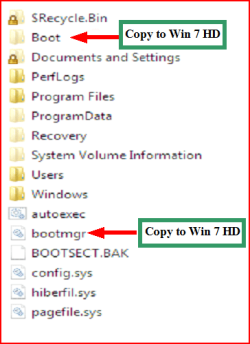
You may need to copy boot files from XP drive to your Win7 drive, before deleting the XP drive.
1) Make sure you have these files on the Windows 7 partition.
Capture3.PNG

2) Mark the Windows 7 partition ACTIVE,
http://www.sevenforums.com/tutorials/71432-partition-mark-active.html?ltr=P
3) Boot to DVD,& open a Command Prompt,
Boot DVD, & Press Shift+F10 (for command prompt)
or
Boot DVD, & http://www.sevenforums.com/tutorials/682-command-prompt-startup.html
(for command prompt)
4) Delete Win XP partition,
http://www.sevenforums.com/tutorials/2668-partition-volume-delete.html?ltr=P
5) Than do a startup repair.
http://www.sevenforums.com/tutorials/681-startup-repair.html?ltr=S
Note: You may need to do startup repair 3 to 4 times.

Your OS should be on Disk 0, but it is not.
 

My Computer

OS
ME/XP/Vista/Win7
Would I be able to shrink the XP volume down by ~100GB to just make room on the Windows 7 partition for now?

Or will shrinking the partition mess things up?
 

My Computer

OS
Windows 7
You can only extend C: to the right.:ar: not to the left.
 

My Computer

OS
ME/XP/Vista/Win7
Argh, go figure.

Okay now I need to find my Windows 7 DVD -- thanks again!
 

My Computer

OS
Windows 7
To recover XP disk space and System MBR into Win7, first back up all files and a Win7 Backup Image externally.

Use free Partition Wizard bootable CD, boot PW, select 1 for screen resolution.

Right click XP partition>Delete, OK.

Right click Win7 partition>Modify>Set to Active, OK.

Right click Win7 partition>Resize, drag left grey border all the way to the left over deleted XP space, Resize right border if desired, OK. Apply all steps.

Now boot into Win7 DVD Repair console or Repair CD, click through to Recovery Tools list to run Startup Repair up to 3 separate times with reboots until Win7 starts up.

http://www.sevenforums.com/tutorials/2083-system-repair-disc-create.html
http://www.sevenforums.com/tutorials/93322-partition-wizard-use-bootable-cd.html
 
Back
Top