remove xp and leave w7

j3rk0

New member
Local time
3:36 AM
Messages
12
this is first time I have a dual boot component and currently i do not want to experiment.
I have installed XP on the active partition and Win7 on the primary and i have two more, too.
how to remove xp now and its partition share to the other 2 partitions? Will win7 partition automatically become the active partition or i have to
adjust it by myself?
thanks
 

My Computer

Computer Manufacturer/Model Number
Toshiba
OS
Windows 7 x64
CPU
Intel(R) Core(TM)2 Duo CPU T7100 @ 1.80GHz (2 CPUs)
Motherboard
Toshiba A200
Memory
3GB 667Mhz
Graphics Card(s)
ATI MOBILITY RADEON HD 2600
Sound Card
Realtek HD Audio output
Monitor(s) Displays
LG Philips LP154WX4-TLD2
Hard Drives
WD Scorpio Black 320 GB 7200rpm
you need to use the bcdboot command-line utility in Windows7 to create the boot files on the Windows 7 partition. Then set that partition as "active" so that the system will boot from it.
 

My Computer

Computer Manufacturer/Model Number
Too many to list.
OS
XP, Seven, 2008R2
CPU
AMD, Intel, VIA
Motherboard
Various
Memory
Corsair, Kingston, etc.
Graphics Card(s)
ATI, NVIDIA
Monitor(s) Displays
Samsung
Hard Drives
Maxtor, Western Digital
Keyboard
qwerty
Internet Speed
22 Mb/s @ home, 1 Gb/s @ server
Other Info
All of my systems still run fastest on XP 32-bit for the most part. Win7 is fun to play with, but I still prefer XP for raw speed, security, and functionality.
I type in start menu bcdboot and try to open, but it's disappear. Do I something wrong?
Can you please explain me how to do this?
 

My Computer

Computer Manufacturer/Model Number
Toshiba
OS
Windows 7 x64
CPU
Intel(R) Core(TM)2 Duo CPU T7100 @ 1.80GHz (2 CPUs)
Motherboard
Toshiba A200
Memory
3GB 667Mhz
Graphics Card(s)
ATI MOBILITY RADEON HD 2600
Sound Card
Realtek HD Audio output
Monitor(s) Displays
LG Philips LP154WX4-TLD2
Hard Drives
WD Scorpio Black 320 GB 7200rpm
Type in "cmd" (no quotes). This will get you a small box. Then type in "bcdboot" and away you go.

NOTE: You may have to run it as an administrator. If this is the case, go to "All Programs", "Accessories", "Command Prompt", right click, select "Run as Administrator" to get the command box.

I'd also recommend looking at the excellent tutorial on using BCDEDIT
http://www.sevenforums.com/tutorials/2676-bcdedit-how-use.html
 

My Computer

Computer Manufacturer/Model Number
Gateway, Toshiba Laptop, and Home Brew
OS
Windows 7 x64 HP, Windows 7 HP, Windows 7 Ult
CPU
Intel I3, Cerelon, Pentium 4 @ 3Ghz
Motherboard
Intel, Intel, Asus
Memory
8G, 3G, 3G
Graphics Card(s)
On-board Intel, On-board nVidia, nVIDIA card
Sound Card
on-board, on-board, SoundBlaster
Monitor(s) Displays
Hannspree HF237, Toshiba, SyncMaster 931B
Screen Resolution
default (all)
Hard Drives
1T internal, 320G internal, 160G internal, 1T networked
PSU
300w, unk, 650w
Case
black, black, grey
Cooling
air (all)
Keyboard
standard wired (all)
Mouse
standard wired (all)
Internet Speed
6M down, 768K up
Other Info
Home LAN through Linksys hub to 4 port and wireless switch/router. Networked HP 2600n. Wife's computer running Windows 7, and spare laptop running Ubuntu "Karmic Kola" (9.10).
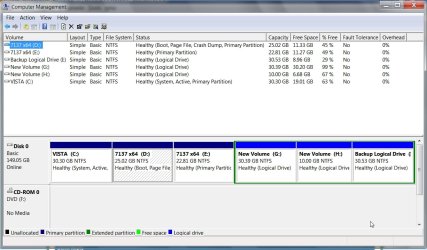
I did it. I format the partitions of XP and now I wont to give this free space to partition from w7 and data. But it doesn't allow me to chose extend volume. What should I do now?
thanks for your help

edit: can anybody confirm a software thats works on W7 x64, maybe Acronis Disk Directory?
 

My Computer

Computer Manufacturer/Model Number
Toshiba
OS
Windows 7 x64
CPU
Intel(R) Core(TM)2 Duo CPU T7100 @ 1.80GHz (2 CPUs)
Motherboard
Toshiba A200
Memory
3GB 667Mhz
Graphics Card(s)
ATI MOBILITY RADEON HD 2600
Sound Card
Realtek HD Audio output
Monitor(s) Displays
LG Philips LP154WX4-TLD2
Hard Drives
WD Scorpio Black 320 GB 7200rpm
you must delete (not format) the partition that XP was on using disk management, and then you can extend the size of the Win7 partition

if you would like to attach a screenshot of Disk Management, it might help us help you.
 

My Computer

Computer Manufacturer/Model Number
Too many to list.
OS
XP, Seven, 2008R2
CPU
AMD, Intel, VIA
Motherboard
Various
Memory
Corsair, Kingston, etc.
Graphics Card(s)
ATI, NVIDIA
Monitor(s) Displays
Samsung
Hard Drives
Maxtor, Western Digital
Keyboard
qwerty
Internet Speed
22 Mb/s @ home, 1 Gb/s @ server
Other Info
All of my systems still run fastest on XP 32-bit for the most part. Win7 is fun to play with, but I still prefer XP for raw speed, security, and functionality.
edit: can anybody confirm a software thats works on W7 x64, maybe Acronis Disk Directory?

I don't remember trying it. But you can download the trial version and see. It will probably work in 64-bit. If it doesn't, make the bootable USB device and it will run under its own power.
 

My Computer

Computer Manufacturer/Model Number
Too many to list.
OS
XP, Seven, 2008R2
CPU
AMD, Intel, VIA
Motherboard
Various
Memory
Corsair, Kingston, etc.
Graphics Card(s)
ATI, NVIDIA
Monitor(s) Displays
Samsung
Hard Drives
Maxtor, Western Digital
Keyboard
qwerty
Internet Speed
22 Mb/s @ home, 1 Gb/s @ server
Other Info
All of my systems still run fastest on XP 32-bit for the most part. Win7 is fun to play with, but I still prefer XP for raw speed, security, and functionality.

My Computers

System One System Two

  • Computer type
    PC/Desktop
    OS
    7 X64
    CPU
    i5 8400
    Motherboard
    gigabyte b365m ds3h
    Memory
    2x8gb 3200mhz
    Hard Drives
    various
    PSU
    pure power 11 400w cm
    Case
    Coolermaster
    Cooling
    cryorig m9i
  • Computer type
    PC/Desktop
    OS
    7x64
    CPU
    g5400
    Motherboard
    ga b365m ds3h
    Memory
    8gb ddr4 2400
    PSU
    xfx pro 450w
That's all good.

Just so you know, Acronis comes with its own bootable environment so it will work independent of what operating system is installed on the computer.

Edit - Oh wait, it probably does need to be installed first in order to create the boot media. My goof!
 

My Computer

Computer Manufacturer/Model Number
Too many to list.
OS
XP, Seven, 2008R2
CPU
AMD, Intel, VIA
Motherboard
Various
Memory
Corsair, Kingston, etc.
Graphics Card(s)
ATI, NVIDIA
Monitor(s) Displays
Samsung
Hard Drives
Maxtor, Western Digital
Keyboard
qwerty
Internet Speed
22 Mb/s @ home, 1 Gb/s @ server
Other Info
All of my systems still run fastest on XP 32-bit for the most part. Win7 is fun to play with, but I still prefer XP for raw speed, security, and functionality.

i found this post -> link i need to found something alse. do you have any suggestions?
 

My Computer

Computer Manufacturer/Model Number
Toshiba
OS
Windows 7 x64
CPU
Intel(R) Core(TM)2 Duo CPU T7100 @ 1.80GHz (2 CPUs)
Motherboard
Toshiba A200
Memory
3GB 667Mhz
Graphics Card(s)
ATI MOBILITY RADEON HD 2600
Sound Card
Realtek HD Audio output
Monitor(s) Displays
LG Philips LP154WX4-TLD2
Hard Drives
WD Scorpio Black 320 GB 7200rpm
I am afraid there are lots of posts about Acronis Disk Director similar to that.

If you bother to read my earlier post on this thread - you will see I have suggested something there.

My own preference is for the Paragon PM Pro - but the free Partition Wizard I linked to earlier seems to work well enough - and also has a bootable disc.
 

My Computers

System One System Two

  • Computer type
    PC/Desktop
    OS
    7 X64
    CPU
    i5 8400
    Motherboard
    gigabyte b365m ds3h
    Memory
    2x8gb 3200mhz
    Hard Drives
    various
    PSU
    pure power 11 400w cm
    Case
    Coolermaster
    Cooling
    cryorig m9i
  • Computer type
    PC/Desktop
    OS
    7x64
    CPU
    g5400
    Motherboard
    ga b365m ds3h
    Memory
    8gb ddr4 2400
    PSU
    xfx pro 450w
I've read your post and I'm just tryin to fix that. It allows me to extend the data partition, but not the win7 one. I'm gonna get paragon pm pro now and I'll see what can i do.
 

My Computer

Computer Manufacturer/Model Number
Toshiba
OS
Windows 7 x64
CPU
Intel(R) Core(TM)2 Duo CPU T7100 @ 1.80GHz (2 CPUs)
Motherboard
Toshiba A200
Memory
3GB 667Mhz
Graphics Card(s)
ATI MOBILITY RADEON HD 2600
Sound Card
Realtek HD Audio output
Monitor(s) Displays
LG Philips LP154WX4-TLD2
Hard Drives
WD Scorpio Black 320 GB 7200rpm
Hold on - the PM pro trial is just a demo - it won't let you do much.:(

How do you mean Partition Wizard won't let you extend your 7 partition?

Post a screenshot of the Disk Management window, like this :

DISKMANAGEMENET-2009-09-20_134201.jpg

(To get a nice clear view of the window, click the View Tab>Customize>Untick Console Tree and Action Pane)
 

My Computers

System One System Two

  • Computer type
    PC/Desktop
    OS
    7 X64
    CPU
    i5 8400
    Motherboard
    gigabyte b365m ds3h
    Memory
    2x8gb 3200mhz
    Hard Drives
    various
    PSU
    pure power 11 400w cm
    Case
    Coolermaster
    Cooling
    cryorig m9i
  • Computer type
    PC/Desktop
    OS
    7x64
    CPU
    g5400
    Motherboard
    ga b365m ds3h
    Memory
    8gb ddr4 2400
    PSU
    xfx pro 450w
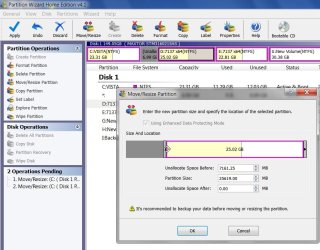
Was xp the first partition?

Do you now have Unallocated space on the LEFT of the 7 partition?

In this shot - the Unallocated space is the grey bit on the left.

PW - RESIZE-2009-09-20_141652.jpg

Drag the edge of the partition to the left to incorporate that space - click OK , click Apply.

It may take a while - all the data on the existing partition will be moved to the left.

When extending the System or Boot partition to the left - you are better using the boot disc.

You will alter the partition offset by doing that and will need to correct the bcd entries as a result.

Startup repair on the 7 dvd will do that for you.
 
Last edited:

My Computers

System One System Two

  • Computer type
    PC/Desktop
    OS
    7 X64
    CPU
    i5 8400
    Motherboard
    gigabyte b365m ds3h
    Memory
    2x8gb 3200mhz
    Hard Drives
    various
    PSU
    pure power 11 400w cm
    Case
    Coolermaster
    Cooling
    cryorig m9i
  • Computer type
    PC/Desktop
    OS
    7x64
    CPU
    g5400
    Motherboard
    ga b365m ds3h
    Memory
    8gb ddr4 2400
    PSU
    xfx pro 450w
i23714_diskmanagement.jpg

i'm downloading now paragon partition manager v10, not demo, server edition.
the first partition was xp. i try to extend the data partition and because it was in use, I have to reboot. In reboot it shows up and just skiped to win7 and nothing was done.

edit: link fixed
 
Last edited:

My Computer

Computer Manufacturer/Model Number
Toshiba
OS
Windows 7 x64
CPU
Intel(R) Core(TM)2 Duo CPU T7100 @ 1.80GHz (2 CPUs)
Motherboard
Toshiba A200
Memory
3GB 667Mhz
Graphics Card(s)
ATI MOBILITY RADEON HD 2600
Sound Card
Realtek HD Audio output
Monitor(s) Displays
LG Philips LP154WX4-TLD2
Hard Drives
WD Scorpio Black 320 GB 7200rpm

My Computers

System One System Two

  • Computer type
    PC/Desktop
    OS
    7 X64
    CPU
    i5 8400
    Motherboard
    gigabyte b365m ds3h
    Memory
    2x8gb 3200mhz
    Hard Drives
    various
    PSU
    pure power 11 400w cm
    Case
    Coolermaster
    Cooling
    cryorig m9i
  • Computer type
    PC/Desktop
    OS
    7x64
    CPU
    g5400
    Motherboard
    ga b365m ds3h
    Memory
    8gb ddr4 2400
    PSU
    xfx pro 450w
i23714_diskmanagement.jpg
 

My Computer

Computer Manufacturer/Model Number
Toshiba
OS
Windows 7 x64
CPU
Intel(R) Core(TM)2 Duo CPU T7100 @ 1.80GHz (2 CPUs)
Motherboard
Toshiba A200
Memory
3GB 667Mhz
Graphics Card(s)
ATI MOBILITY RADEON HD 2600
Sound Card
Realtek HD Audio output
Monitor(s) Displays
LG Philips LP154WX4-TLD2
Hard Drives
WD Scorpio Black 320 GB 7200rpm
Is it your Data partition you wish to increase in size?

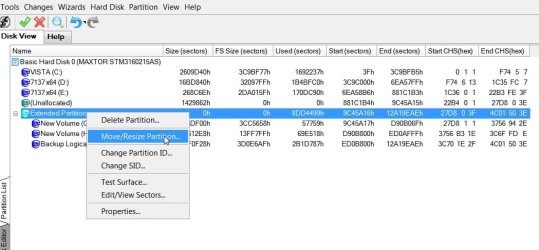
To add the Unallocated space to your data partition with Paragon:

Rt click where it says Extended Partition and select Move/Resize.

par-extended -resize-2009-09-20_182748.jpg

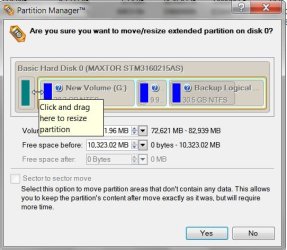
In the new window, drag the edge of the Extended Partition to the LEFT to incorporate the Unallocated space.

par-extended-resize-2009-09-20_182915.jpg

Click Yes. Click Apply. It may take a while with all that data. Better let it do it's thing without interruption.
 

My Computers

System One System Two

  • Computer type
    PC/Desktop
    OS
    7 X64
    CPU
    i5 8400
    Motherboard
    gigabyte b365m ds3h
    Memory
    2x8gb 3200mhz
    Hard Drives
    various
    PSU
    pure power 11 400w cm
    Case
    Coolermaster
    Cooling
    cryorig m9i
  • Computer type
    PC/Desktop
    OS
    7x64
    CPU
    g5400
    Motherboard
    ga b365m ds3h
    Memory
    8gb ddr4 2400
    PSU
    xfx pro 450w
i did it with parition wizard boot cd. at first i merged unaloocated partition with data and i added healthy partition to the win7 one. these two partitions are one next to another,one part of the free space from data i just added to win 7 partition. thx for your help. i haven't even used paragon. thanks all for you help
 

My Computer

Computer Manufacturer/Model Number
Toshiba
OS
Windows 7 x64
CPU
Intel(R) Core(TM)2 Duo CPU T7100 @ 1.80GHz (2 CPUs)
Motherboard
Toshiba A200
Memory
3GB 667Mhz
Graphics Card(s)
ATI MOBILITY RADEON HD 2600
Sound Card
Realtek HD Audio output
Monitor(s) Displays
LG Philips LP154WX4-TLD2
Hard Drives
WD Scorpio Black 320 GB 7200rpm
OK - good - glad you sorted it out. :D
 

My Computers

System One System Two

  • Computer type
    PC/Desktop
    OS
    7 X64
    CPU
    i5 8400
    Motherboard
    gigabyte b365m ds3h
    Memory
    2x8gb 3200mhz
    Hard Drives
    various
    PSU
    pure power 11 400w cm
    Case
    Coolermaster
    Cooling
    cryorig m9i
  • Computer type
    PC/Desktop
    OS
    7x64
    CPU
    g5400
    Motherboard
    ga b365m ds3h
    Memory
    8gb ddr4 2400
    PSU
    xfx pro 450w
Back
Top