Bobthebass
New member
Hi there,
A while back I joined the wonderful world of Win7 by installing it in a dual boot with my existing XP.
Since then I have used XP about 5 times in three months so I think it's finally time to get rid of it.
What I would like to do is replace the XP with Linux (Mint or Ubuntu) as I would like to learn more about Linux and have reached the extent of what I can do booting into a LiveCD.
So the job is remove XP and install Linux. But I'm sure it's not going to be quite as simple as that, so I thought I would ask for input here.
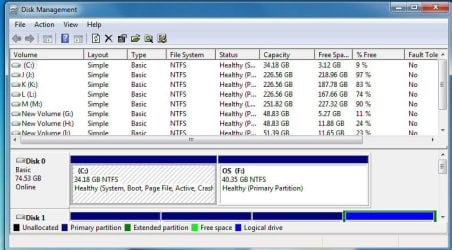
Win7 and XP are installed on two partitions of the same disk, 7 on C: and XP on F: (see attached)
Any guidance is much appreciated.
Thanks,
Bob
A while back I joined the wonderful world of Win7 by installing it in a dual boot with my existing XP.
Since then I have used XP about 5 times in three months so I think it's finally time to get rid of it.
What I would like to do is replace the XP with Linux (Mint or Ubuntu) as I would like to learn more about Linux and have reached the extent of what I can do booting into a LiveCD.
So the job is remove XP and install Linux. But I'm sure it's not going to be quite as simple as that, so I thought I would ask for input here.
Win7 and XP are installed on two partitions of the same disk, 7 on C: and XP on F: (see attached)
Any guidance is much appreciated.
Thanks,
Bob
Attachments
My Computer
- OS
- Win XP Home SP3 / Win7 Ultimate dual boot
- CPU
- INTEL CORE 2 DUO E6300
- Motherboard
- ASUS SKT-775 P5B-E PLUS
- Memory
- 2GB DDR2 PC-5400
- Graphics Card(s)
- XpertVision 256MB GeF 7300GT
- Sound Card
- MOBO
- Monitor(s) Displays
- Benq V2220 21.5 LCD Monitor
- Hard Drives
- 80 GB SATA HDD UDMA 300 7200 8MB
160 GB SATA HDD UDMA 300 7200 8MB
1Tb SATA HDD
500 Gb Western Digital MyBook Essential
- Case
- ThermalTake CASE MAMBO