Partition Wizard will not fail at moving or copying a partition - it will simply start over and try to do the Resize again. This is unless you unchecked the Data P{rotection feature which is built in
What has most likely happened is that Resizing completed correctly but moving on the boot sector has messed up the MBR. To repair it boot Partition Wizard bootable CD, rightclick Win7 partition to Modify>Set to Active, OK, Apply.
Next boot the Win7 DVD Repair console, accept any offererd repair. If Win7 doesnt' start on reboot, boot back into the DVD Repair console, click through to Recovery Tools list to run Startup Repair up to 3 separate times with reboots until Win7 starts.
If the DVD or Repair CD Repair console still doesn't see an installation to Repair, try to force it by clicking through to Recovery Tools list to open a Command Line, type:
bootrec.exe /fixboot
bootrec.exe /fixmbr
Then try Startup Repair x3 again.
While in PW you can also rightclick Win7 partition to Explore your files to see if they're there, and try to Recover Partition. Let it scan for partition and choose Recover. It's likely the partition is intact if you see it in PW and It is the MBR which needs fixing..
If this fails, you can also try to recover your partition AND copy out your files using free Paragon Rescue CD. You can also use your Win7 DVD to copy out files at the Load Drivers link on "Where do you want to Install Windows" screen.
I am in the DFW airport and will be back on line by 9pm EST to help you further. Hopefully someone else can answer your questions and help you along before then. I've asked two of the top experts in Install forum to help you further.

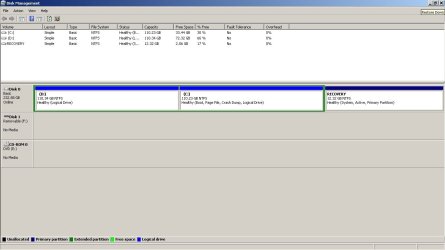


 ). Anyway booted up to a dualboot like screen to pick from the 2 win 7 installs. i picked the first one (there was a quick prompt saying PW couldnt continue cause hard drive config had been changed and it went away) then booted into windows 7, user files still there, my other drive is virtually identical. So now im guessing i just format the other drive with windows 7 on it and that should get rid of the choose OS or will i have to use Easy BCD or something to get rid of dual boot?

