
- Local time
- 5:02 AM
- Messages
- 705
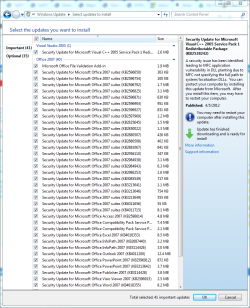
It was just on the PC for 1 day temporary. yesterday updates installed 39 updates for word 2007, and now I see 41 more important word2007 updates sitting there today, and there is no word 2007 on the PC at all.
How can I stop this ?
I had earlier tried roll back to a restore point before word 2007 was put on the PC, but it did not remove any word 2007 updates. And with the latest update for word it mentions I can only legally install the supplement for word 2007 on the PC, so I am stuck right now.
Just hit decline?? But if updates is going to keep insisting on them, why not just get it over with and install them all?
Is there anyway to easily uninstall a massive tranche of updates all related to like word 2007?
How can I stop this ?
I had earlier tried roll back to a restore point before word 2007 was put on the PC, but it did not remove any word 2007 updates. And with the latest update for word it mentions I can only legally install the supplement for word 2007 on the PC, so I am stuck right now.
Just hit decline?? But if updates is going to keep insisting on them, why not just get it over with and install them all?
Is there anyway to easily uninstall a massive tranche of updates all related to like word 2007?
Attachments

My Computer
At a glance
Windows 7 Ultimate x64
- OS
- Windows 7 Ultimate x64