
Solved Removing a PC from the network?

Gornot

Professional Slacker
Guru
Gold Member
VIP
Local time
11:25 PM
Messages
2,288
Location
Belgrade, Serbia
I have finally decided to ask for help here, despite the fact that I haven't had any problems.
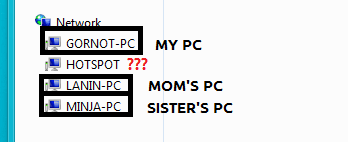
Here's the thing: my home has 3 PCs. One is mine, one is my sister's, and the third one is my mom's. Both of them are connecting to my home network via Wireless (I connect to my router via cable-LAN), but recently I have realized there is a 4th PC connected to it.
Network.png

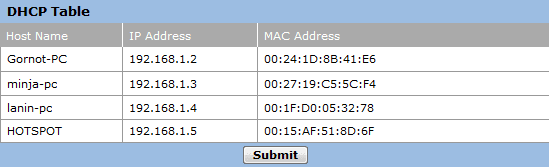
I looked in my router's settings, and the DHCP table looks like this:
dhcp.PNG

There is only one folder shared with this "HOTSPOT" PC, including tons of cracks, patches, and other illegal goodies, so I'm concerned about the safety of my own PC.
So I was wondering if there is a way to (forcefully if needed) remove this PC from my home network and what are the neccesary steps I need to perform to prevent the owner of this PC to join again.

P.S: I am sure that the PC actually has a connection and is not an earlier connected PC which doesn't have access anymore; I found the latest version of Open.SUSE in one of the folders and tried transfering it to my PC... It was a success, so that's that.

/noob mode on
OMGZ pls halp I getz teh er00rZ!
/noob mode off
 

My Computer

Computer type
Laptop
Computer Manufacturer/Model Number
Custom
OS
Windows 7 Home Premium x64
CPU
Intel Core i5 2500K
Motherboard
MSI MS-7750
Memory
8GB DDR3
Graphics Card(s)
nVidia GeForce GTX650 Ti BOOST
Sound Card
Realtek
Monitor(s) Displays
21' Philips
Screen Resolution
Full HD
Hard Drives
1TB
PSU
500W
The first thing I would look at is are you running any type of security on your router or is it open?
If its an open net work then it could be any one out there using your wifi.
I would change the default password on the router make it a password protected wifi then see if it dissappers.
 

My Computer

Computer Manufacturer/Model Number
Custom Build
OS
Windows 7 Ultimate x64 SP1
CPU
AMD Phenom II 1090 3.2 six core
Motherboard
MSI 890FXA-GD65
Memory
16 gig DDR3
Graphics Card(s)
MSI R6950 2gig
Sound Card
on board
Monitor(s) Displays
Acer 23inch led
Screen Resolution
1900x1080 widescreen
Hard Drives
Seagate 1tb SATA6
2x 1tb HITACHI Deskstar
PSU
CORSAIR Enthusiast Series TX750 V2 750W
Case
CoolMaster HAF 922
Cooling
Box AMD Heatsink/Fan
Internet Speed
Cable 12Mbps/3Mbps
Under your Administrator Tab in your Router... It will divide by Router / LAN / Wireless

Does the HotSpot come from LAN or Wireless

If it is Wireless... I really suggest that you change your password and put on MAC filtering.

Hotspot is definitely a hardware device since it has its own MAC address.

The first 6 digits of the MAC address is the VENDER... I checked on it.. Anywhere in your house do you have this:

0015AF AzureWave Technologies, Inc.
 

My Computer

Computer Manufacturer/Model Number
HP Pavilion Elite HPE-410f
OS
Windows 7 Ultimate x64
CPU
AMD Phenom x6 1045t
Motherboard
N/A
Memory
8 GB
Graphics Card(s)
ATI Radeon HD 5570
Sound Card
Realtek Highdefinition Audio / 5.1 Dolby Setup
Monitor(s) Displays
HP w2207h Widescreen
Screen Resolution
1680*1050
Hard Drives
1 TB (fixed), 320 Portable maxtor, Server Hard drives
PSU
350 Watt
Case
HP CASE
Cooling
Bass
Keyboard
Logitech MX 5500
Mouse
Logitech MX 5500
Internet Speed
ROAD RUNNER 16MB D/512 U
Both my sister and my mom use Wireless LAN (all three PCs are regular desktops) and need to join the network by providing a password, so I'm pretty sure the network should be secured.

If I change the network password (and perhaps the name itself) out of the blue what will happen? Will all PC's (except mine, I guess) lose the connection? Can I expect the same from the "alien" PC? And would it only be a matter of discovering the new-named network and providing a different password?

EDIT: The HOSTPOT PC can only connect via Wireless, I am sure of that. Only I connect through cable.
Anywhere in your house do you have this:

0015AF AzureWave Technologies, Inc.
Nope, I don't think so.

I keep editing this, lol... so Wireless MAC Address Filter is disabled
 

My Computer

Computer type
Laptop
Computer Manufacturer/Model Number
Custom
OS
Windows 7 Home Premium x64
CPU
Intel Core i5 2500K
Motherboard
MSI MS-7750
Memory
8GB DDR3
Graphics Card(s)
nVidia GeForce GTX650 Ti BOOST
Sound Card
Realtek
Monitor(s) Displays
21' Philips
Screen Resolution
Full HD
Hard Drives
1TB
PSU
500W
Well that is true.. If you change the password then they will be kicked off until they change the password for the wireless also it would be a good ID to put the MAC Filtering on so that only your sister and mom's computer will be able to use the router.. no other MAC address can access it.
 

My Computer

Computer Manufacturer/Model Number
HP Pavilion Elite HPE-410f
OS
Windows 7 Ultimate x64
CPU
AMD Phenom x6 1045t
Motherboard
N/A
Memory
8 GB
Graphics Card(s)
ATI Radeon HD 5570
Sound Card
Realtek Highdefinition Audio / 5.1 Dolby Setup
Monitor(s) Displays
HP w2207h Widescreen
Screen Resolution
1680*1050
Hard Drives
1 TB (fixed), 320 Portable maxtor, Server Hard drives
PSU
350 Watt
Case
HP CASE
Cooling
Bass
Keyboard
Logitech MX 5500
Mouse
Logitech MX 5500
Internet Speed
ROAD RUNNER 16MB D/512 U
Alright then... To bad I don't have time to change all that now, I'm late for a date lol
But I will definitely try it out first thing in the morning and keep you posted. Thanks for the help :D
 

My Computer

Computer type
Laptop
Computer Manufacturer/Model Number
Custom
OS
Windows 7 Home Premium x64
CPU
Intel Core i5 2500K
Motherboard
MSI MS-7750
Memory
8GB DDR3
Graphics Card(s)
nVidia GeForce GTX650 Ti BOOST
Sound Card
Realtek
Monitor(s) Displays
21' Philips
Screen Resolution
Full HD
Hard Drives
1TB
PSU
500W
No problem... Remember.. Dates come and go... computers will always be there for you.
 

My Computer

Computer Manufacturer/Model Number
HP Pavilion Elite HPE-410f
OS
Windows 7 Ultimate x64
CPU
AMD Phenom x6 1045t
Motherboard
N/A
Memory
8 GB
Graphics Card(s)
ATI Radeon HD 5570
Sound Card
Realtek Highdefinition Audio / 5.1 Dolby Setup
Monitor(s) Displays
HP w2207h Widescreen
Screen Resolution
1680*1050
Hard Drives
1 TB (fixed), 320 Portable maxtor, Server Hard drives
PSU
350 Watt
Case
HP CASE
Cooling
Bass
Keyboard
Logitech MX 5500
Mouse
Logitech MX 5500
Internet Speed
ROAD RUNNER 16MB D/512 U
Forget MAC filtering, it is hackable.

From what it looks like you have not setup Wireless security in the form of WPA or WPA2.
If you have any wireless security protocol at all setup it's probably WEP. WEP is very hackable. WPA or WPA2 is not.

When you say "All PCs need to supply a password to join the network" are you talking about sharing files between the computers? Because the wired desktop, yours, does not need to supply anything to go out to the internet or access the router. There is no password authentication for wired computers. So if that is the case you do not have any security setup on the wireless side. You need to do that NOW not later.
 

My Computer

Computer Manufacturer/Model Number
Built be Me
OS
Windows 7 Pro x64
CPU
i5 760
Motherboard
Asus P7P55D-E Pro
Memory
16GB
Graphics Card(s)
Nvidia GTS450
Sound Card
On board
Monitor(s) Displays
Dell 2007WFP Dell 1800FP
Screen Resolution
1680x1050 1280x1024
Hard Drives
Seagate 250GB & 750GB
WD 1TB
PSU
Antec 750
Case
In Win
Cooling
Cooler Master Hyper 212+
Keyboard
IBM
Mouse
MS
I was thinking of combining them both... I wouldn't know why anyone would ever use WEP anymore. I think they should just take that out of Routers now and days.

I am always hardwired with my gear... I don't trust wireless. I trust it as much as I trust time warner helping me with my networking solutions.
 

My Computer

Computer Manufacturer/Model Number
HP Pavilion Elite HPE-410f
OS
Windows 7 Ultimate x64
CPU
AMD Phenom x6 1045t
Motherboard
N/A
Memory
8 GB
Graphics Card(s)
ATI Radeon HD 5570
Sound Card
Realtek Highdefinition Audio / 5.1 Dolby Setup
Monitor(s) Displays
HP w2207h Widescreen
Screen Resolution
1680*1050
Hard Drives
1 TB (fixed), 320 Portable maxtor, Server Hard drives
PSU
350 Watt
Case
HP CASE
Cooling
Bass
Keyboard
Logitech MX 5500
Mouse
Logitech MX 5500
Internet Speed
ROAD RUNNER 16MB D/512 U
I was thinking of combining them both... I wouldn't know why anyone would ever use WEP anymore. I think they should just take that out of Routers now and days.

I am always hardwired with my gear... I don't trust wireless. I trust it as much as I trust time warner helping me with my networking solutions.

Wireless is fine and secure if set up correctly. If you own and use a notebook wireless is the only way to go. Who wants to be tied to a cord/wire when you have everything else portable.
I've had a wireless network setup in my home for the last 8-9 years and have never been hacked.
I personally only use it if I'm using one on my notebooks around the house, which isn't that often. And if I need to transfer files to one of my notebooks I do plug in a ether net cable.
 

My Computer

Computer Manufacturer/Model Number
Built be Me
OS
Windows 7 Pro x64
CPU
i5 760
Motherboard
Asus P7P55D-E Pro
Memory
16GB
Graphics Card(s)
Nvidia GTS450
Sound Card
On board
Monitor(s) Displays
Dell 2007WFP Dell 1800FP
Screen Resolution
1680x1050 1280x1024
Hard Drives
Seagate 250GB & 750GB
WD 1TB
PSU
Antec 750
Case
In Win
Cooling
Cooler Master Hyper 212+
Keyboard
IBM
Mouse
MS
Same here... I have a netbook i'll be selling soon and then my HTC Evo i have on it and that's it... rest of the computers are hard wired.


I keep the wireless on a different subnet so others can't try to hack the 2nd router and access the network shared folders... people around me are not really that smart...but it is still good to be safe.
 

My Computer

Computer Manufacturer/Model Number
HP Pavilion Elite HPE-410f
OS
Windows 7 Ultimate x64
CPU
AMD Phenom x6 1045t
Motherboard
N/A
Memory
8 GB
Graphics Card(s)
ATI Radeon HD 5570
Sound Card
Realtek Highdefinition Audio / 5.1 Dolby Setup
Monitor(s) Displays
HP w2207h Widescreen
Screen Resolution
1680*1050
Hard Drives
1 TB (fixed), 320 Portable maxtor, Server Hard drives
PSU
350 Watt
Case
HP CASE
Cooling
Bass
Keyboard
Logitech MX 5500
Mouse
Logitech MX 5500
Internet Speed
ROAD RUNNER 16MB D/512 U
Hi there
You could also limit the number of IP addresses the DHCP server serves out on the router -- in fact if you were to assign the 3 PC's specific IP addresses and limit in the Router control panel the IP ranges by switching of DHCP server functionality you could easily prevent an outside source from logging in to your network.

Your Router Log (99% of them even cheap ones) have a log giving details of what computer connected and when so you should be able to trace the rogue computer.

If you've been playing with Virtual Machines or booted up other computers in the mean time you might well get in Network discovery the names of these machines even though they aren't actually connected.

Cheers
jimbo
 

My Computer

Computer type
PC/Desktop
Computer Manufacturer/Model Number
Custom built, several laptops HP/ASUS
OS
Linux CENTOS 7 / various Windows OS'es and servers
CPU
Intel i7 Intel i5
Memory
8GB, 16GB
Graphics Card(s)
On Motherboard
Sound Card
Realtek HD audio
Monitor(s) Displays
Apple Cinema display, Samsung LCD
Screen Resolution
1920 X 1080
Hard Drives
4 X 1TB SATA
Mouse
Toshiba wireless laser
Internet Speed
> 20MB up
Thanks for all the comments.
jimbo, that sounds a bit too advanced even for me. I don't like to tinker hardware that's not completely mine (this equipment is actually "rented" by contract, lol), that's why I feel more comfortable to just change the security.

Speaking of, you guys were right. The security is as basic as it gets. WEP64Bits with a 5-letter password, lol, so I'm gonna try out turning on MAC filtering AND changing the network name/password, enhacing it to WPA/WPA2 (is there a difference?)

EDIT-jimbo, is this supposed to be what I need to limit the number of IPs?

DHCP.PNG
 
Last edited:

My Computer

Computer type
Laptop
Computer Manufacturer/Model Number
Custom
OS
Windows 7 Home Premium x64
CPU
Intel Core i5 2500K
Motherboard
MSI MS-7750
Memory
8GB DDR3
Graphics Card(s)
nVidia GeForce GTX650 Ti BOOST
Sound Card
Realtek
Monitor(s) Displays
21' Philips
Screen Resolution
Full HD
Hard Drives
1TB
PSU
500W
Hi there
You could also limit the number of IP addresses the DHCP server serves out on the router -- in fact if you were to assign the 3 PC's specific IP addresses and limit in the Router control panel the IP ranges by switching of DHCP server functionality you could easily prevent an outside source from logging in to your network.

Your Router Log (99% of them even cheap ones) have a log giving details of what computer connected and when so you should be able to trace the rogue computer.

If you've been playing with Virtual Machines or booted up other computers in the mean time you might well get in Network discovery the names of these machines even though they aren't actually connected.

Cheers
jimbo

Not really any more secure by limiting the number of IPs the router hands out.
All that anyone has to do is assign a static IP to there PCs Ethernet card, whether wired or wireless, in the same range as the routers IP address and they could connect.

To be honest if you have a good router, wired only or including wireless, no one can brake into your LAN from the outside, internet side, and have the proper wireless security with strong password from the wireless side of your LAN. This has been proven.
Then again what you need on each PC is a strong username password on each PC users account so even it someone was to connect by wire to your LAN they can not access your shared files/folders/drives without knowing your user name and the password for that username.
 

My Computer

Computer Manufacturer/Model Number
Built be Me
OS
Windows 7 Pro x64
CPU
i5 760
Motherboard
Asus P7P55D-E Pro
Memory
16GB
Graphics Card(s)
Nvidia GTS450
Sound Card
On board
Monitor(s) Displays
Dell 2007WFP Dell 1800FP
Screen Resolution
1680x1050 1280x1024
Hard Drives
Seagate 250GB & 750GB
WD 1TB
PSU
Antec 750
Case
In Win
Cooling
Cooler Master Hyper 212+
Keyboard
IBM
Mouse
MS
Thanks for all the comments.
jimbo, that sounds a bit too advanced even for me. I don't like to tinker hardware that's not completely mine (this equipment is actually "rented" by contract, lol), that's why I feel more comfortable to just change the security.

Speaking of, you guys were right. The security is as basic as it gets. WEP64Bits with a 5-letter password, lol, so I'm gonna try out turning on MAC filtering AND changing the network name/password, enhacing it to WPA/WPA2 (is there a difference?)

EDIT-jimbo, is this supposed to be what I need to limit the number of IPs?

View attachment 147663

Yes there is a BIG difference between WEP and WPA/WPA2. WEP is easily hackable.
WPA/WPA2 with a random long passphrase is not. And if you use WPA/WPA2 with a long random passphrase all other types of so called security is useless/not needed/does nothing to secure your wireless side.
 

My Computer

Computer Manufacturer/Model Number
Built be Me
OS
Windows 7 Pro x64
CPU
i5 760
Motherboard
Asus P7P55D-E Pro
Memory
16GB
Graphics Card(s)
Nvidia GTS450
Sound Card
On board
Monitor(s) Displays
Dell 2007WFP Dell 1800FP
Screen Resolution
1680x1050 1280x1024
Hard Drives
Seagate 250GB & 750GB
WD 1TB
PSU
Antec 750
Case
In Win
Cooling
Cooler Master Hyper 212+
Keyboard
IBM
Mouse
MS
Alright, then, thanks :)

I switched to WPA2 and used a mid-complicated password, being paranoid as I can get and thinking that if something like this happens again, I can edit the password and make it even more complicated hehe

Will mark this as solved :)
 

My Computer

Computer type
Laptop
Computer Manufacturer/Model Number
Custom
OS
Windows 7 Home Premium x64
CPU
Intel Core i5 2500K
Motherboard
MSI MS-7750
Memory
8GB DDR3
Graphics Card(s)
nVidia GeForce GTX650 Ti BOOST
Sound Card
Realtek
Monitor(s) Displays
21' Philips
Screen Resolution
Full HD
Hard Drives
1TB
PSU
500W
Back
Top
