Removing/Delaying Tooltips

devftw

New member
Local time
11:18 PM
Messages
6
Is there anyway to remove or delay these annoying tooltips when hovering over anything in windows 7?


They are seriously annoying and useless. I remember i had the same problem in win xp and never found a way to disable all of them. I was hoping this would change in win7 but seems like it didn't.:rolleyes:
 

My Computer

OS
Windows 7 64bit Home Premium
I'm having the same problem here. Home premium I have... And it's poop! x
 

My Computer

Computer Manufacturer/Model Number
MSI Wind U135
OS
Windows 7 Ultimate Ubuntu 10.04
CPU
Atom N450 @ 1.66GHz

My Computer

Computer Manufacturer/Model Number
HP Pavillion dv5t (generation 1)
OS
Vista 64 bit and 32 bit (SP2)
CPU
Intel(R) Core(TM)2 Duo Processor T9400 (2.53 GHz
Memory
4GB DDR2 System Memory (2 Dimm)
Graphics Card(s)
512 MB NVIDIA GeForce 9600M GT
Monitor(s) Displays
15.4" diagonal WSXGA+ High-Definition HP BrightView Widescre
Screen Resolution
1680 x 1050
Hard Drives
320GB 5400RPM SATA Hard Drive with HP ProtectSmart Hard Drive Protection
Keyboard
Built-in HP
Mouse
Built in - Synaptics TouchPad V6.5 on PS/2 Port
Internet Speed
Max
Other Info
~ Intel Next-Gen Wireless-N Mini-card w/Bluetooth ~ Blu-Ray ROM DVD+/-R/RW ~ Integ. HDTV Hybrid Tuner ~ 12 Cell Battery ~ MS Office (Home Premium) 2007 ~
Thanks for the registry hack here but I am not altogether sure if I want all the balloon tips disabled such as those ESET or Acronis throw up advising of an update or completed task. Or indeed the hover tips telling me what Virus signature version I have , or version of say, AnyDVD that appear when a mouse is held over the icon. Which ones does this hack disable, the programme balloon tips or the rollover tooltips, or both? Has anyone tried it?

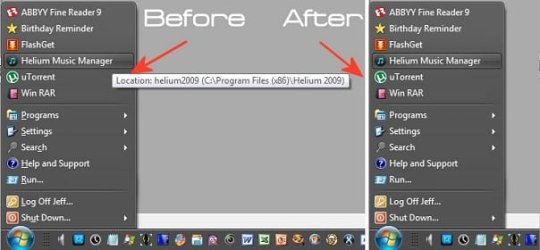
I've also never been able to find a way to rid myself of these awful rollover tooltips on the Start menu from within Windows either. The start menu ones are even more annoying than the taskbar ones and can be really long as should you decide to delete the comment in the properties box (for those apps that have one there) then the tooltip will simply replace it text with the file location information. I've managed to get rid of them from the start menu though with the aid of something else called 'Classic Start Menu' (part of the Classic Shell app).

Now please understand although I have removed these tooltips from my start menu, the start menu isn't actually the standard Windows 7 one. IMHO Microsoft made a mistake when they got rid of the 'standard' start menu from Windows 7 so by putting in something called 'Classic Start Menu' in, I killed about ten birds with one stone. Not only getting rid of the tooltips but a lot of other nasty stuff as well. As I understand it though this app can also show two-paned start menus in XP and Vista style so it might be worth a try.

Anyway, for those interested in trying this to get rid off the tooltips on the start menu at least simply select 'All Settings' when Classic Start Menu is first installed, then go to 'general Behaviour' tab and set the value for the 'Infotip Delay' to 0,0. The effect will be immediate.

 

Attachments

  • ex.jpg
    ex.jpg
    24.9 KB · Views: 19

My Computer

Computer type
PC/Desktop
Computer Manufacturer/Model Number
Custom Built
OS
Windows 7 Professional 64 bit
CPU
Intel Core i7 3820 @ 3.60GHz
Motherboard
ASUSTeK Computer INC. SABERTOOTH X79 (LGA2011)
Memory
32GB Kingston (KHX1600C9D3/4GB x 4) DDR3-1600 CL9 SDRAM
Graphics Card(s)
G247HYL (1920x1080@60Hz) 3071MB NVIDIA GeForce GTX 780 (NVID
Sound Card
Sound Blaster X-Fi Xtreme
Monitor(s) Displays
ACER S236HL LED
Screen Resolution
1920x1080@60Hz
Hard Drives
C Drive (OS) - 120GB Samsung SSD 850 EVO 120GB (SATA SSD)
D Drive (Internal Storage) - 2GB Western Digital WDC WD20EARX-00PASB0 (SATA )
E Drive (Internal Media) - 6GB Seagate ST6000DM003 (SATA )
Z Drive (External Backup/sync & Media) - 6GB Seagate
PSU
Corsair GS700 (80+ Bronze)
Case
Fractal Design Focus -G
Cooling
Corsair Hydro Series H80
Keyboard
Mocrosoft Soft Touch Standard
Mouse
Technet Basic 3-button
Internet Speed
52.2MB/s Down (no superfast in this area)
Antivirus
ESET Internet Security
Browser
Chrome/Waterfox
Back
Top