Removing dual boot Vista and 7

allwhoseek

New member
Local time
10:36 AM
Messages
10
Location
WNC
Okay, so i have spent the past two days researching how to fix my particular problem and can't get a (consistent, good) answer. I am on a HP Pavilion laptop dv6000, which came with Vista (32 bit). I have since added Linux/Ubuntu on a different partition on the same disk (as a primary). Lastly i added Windows 7 Pro ... so i have a tri-boot i guess you could say. For some reason, the 7 was added as/on a logical drive. However it happened, i've decided to stick with 7 and remove Vista (I'm also considering removing Ubuntu as well, but issues with removing grub and dealing with the boot record etc have changed my mind on that). Problem is, i when i try to format the Vista part, i get the "Windows was unable to complete the part" message.

From what i've read in my googling, i'm assuming my MBR and bootsect and all that good stuff is on the Vista part. I'm also assuming my Grub and linux boot files are on the Vista part too. So, first i guess i need to convert the 7 partition from a logical drive to an active primary, which despite what people recommend, Paragon cannot do (option is greyed out). Then i need to somehow move the MBR over to 7? I'm googled out and frustrated, any suggestions? I've attached a screenshot of my disk manager ...

moz-screenshot.png
 

Attachments

  • disk manager screenshot.png
    disk manager screenshot.png
    50.7 KB · Views: 45

My Computer My Computer

Computer Manufacturer/Model Number
HP Pavilion Laptop
OS
Windows 7 Pro, Vista, & Ubuntu (what is that ... a tri-boot?) :)
CPU
AMD Turion 64X2
Memory
4 GB DDR2
Hard Drives
500 GB (laptop)
500 GB Passport
500 GB My Book
Instead of messing with all of this, I recommend you create a system image of your seven system and reformat your entire hard drive. Once you've done that you can format it the way you like and then place the image back onto the appropriate partition.

Granted you may still have to move the MBR and such but it'll allow you to keep all of your files and wipe everything out.
 

My Computer My Computer

Computer Manufacturer/Model Number
Apple Macbook Pro (April 2009)
OS
W7 Ult. x64 | OS X
CPU
Intel Mobile Core 2 Duo 2.93Ghz [T9800 Penryn]
Motherboard
NVIDIA nForce 730i Rev. B1 [Mac-F2268EC8 (U2E1)]
Memory
4096MB Samsung DDR3 Dual Channel [PC3-8500F 1066Mhz]
Graphics Card(s)
NVIDIA GeForce 9600M GT 512MB [G96M Rev. C1]
Sound Card
SB X-Fi Surround 5.1 USB | Onboard Realtek (Disabled)
Monitor(s) Displays
Acer x223wbd 22" | Apple Anti-Glare 17" (Disabled)
Screen Resolution
{Current} 1440x900 {Acer} 1680x1050 {Apple} 1920x1200
Hard Drives
{Internal}
Seagate Momentus 320GB 2.5" 7200RPM [ST9320421AS]

{Externals}
LaCie 320GB USB 2.0 HDD [301284UR]
LaCie 750GB USB 2.0 FW400 eSATA HDD [301314U]
LaCie 1TB USB 2.0 HDD [301304UR]
PSU
Magsafe
Case
Aluminum/Unibody (MBP52)
Cooling
2 x 6000 RPM Fans
Keyboard
Logitech G-15v2 [PN 920-000379]
Mouse
Logitech G-9 [PN 910-000338]
Internet Speed
12Mbps/2.5Mbps w/ 24Mbps Speed Boost [Comcast]
Other Info
Logitech X-540 Speakers [PN 970223-0122]
Sennheiser PC-151 Headset
i would like to avoid reformatting the 7 part, i've finally got it set up the way i like and there are some apps i'm not sure i could re-install. With an image, that does not keep all my data, apps, and settings the same, or does it? If it would be the same, then that might be a logical option. As for the moving the MBR, what is the best method for that? In my ideal situation, i would like to completely remove/delete Vista and Ubuntu (while leaving 7 intact), and then format their old partitions into some unallocated space that i could expand 7 into. All Vistas bags are packed (backed up) but he seems to be refusing to leave :)
 

My Computer My Computer

Computer Manufacturer/Model Number
HP Pavilion Laptop
OS
Windows 7 Pro, Vista, & Ubuntu (what is that ... a tri-boot?) :)
CPU
AMD Turion 64X2
Memory
4 GB DDR2
Hard Drives
500 GB (laptop)
500 GB Passport
500 GB My Book
Use free Partition Wizard bootable CD which is the best partition manager for Win7, and has never failed in hundreds of operations we've helped with here.

Back up your files and a Win7 system image externally. Use Macrium Reflect if you want to exclude Vista system drive from image.

Boot PW, allow files to load, select 1 for screen res, rightclick Vista partition, select Wipe Partition, choose deepest clean to get out the GRUB corruption which will continue to cripple Win7 if not deep cleaned off HD, OK.

Next rightclick Win7 partition>Modify>Convert to Primary, OK. Now apply previous steps so they don't bunch up.

Boot back into PW as before, rightclick Win7>Modify>Set to Active, OK

Now rightclick Win7 partition>Resize>drag left grey border to the left over all of Vista deleted space, OK, again Apply steps.

if possible, I would boot back into PW to now rightclick Ubuntu and Wipe Partition to get deepest possible clean as it may interfere if any GRUB is on that partition, OK, Apply all steps.

Win7 will not now boot until MBR is recovered into it. To accomplish this boot Win7 DVD Repair console or Repair CD, click through to Recovery Tools list to run Startup Repair up to 3 separate times with reboots to write MBR to Win7. This should work if Win7 has been converted to Primary allowing it to be marked Active.

Keep in mind that the only sure method to repair Win7 MBR is to deep clean the HD of all GRUB which we are trying to accomplish in pieces here. If it won't work, then your best bet is to deep clean the HD then attempt to reimage Win7 to HD, convert to Primary, mark Active and run Startup Repair from DVD/CD to write MBR to 7.
 
thank you for the detailed advice! As for the 7 image, is that necessary to the steps, or just as an added precaution in case things go bad. I have backed up all the data from the Vista part (which is where i kept most of my data, just pointed to it from 7). I have Acronis if i do need to do the 7 image, tho i haven't used it yet will it do the same thing as Macrium?

I am a little confused by this step "Next rightclick Windows 7 partition>Modify>Convert to Primary, OK. Now apply previous steps so they don't bunch up." What am i repeating or applying? Also, should i wipe the Ubuntu partition before i convert the 7 partition to primary/active?

Is this the Free Partition Wizard you are referring to ... BEST FREE Partition Manager Software for Windows supports all 32-bit & 64 bit Windows No-server OS.

Thanks again!
 

My Computer My Computer

Computer Manufacturer/Model Number
HP Pavilion Laptop
OS
Windows 7 Pro, Vista, & Ubuntu (what is that ... a tri-boot?) :)
CPU
AMD Turion 64X2
Memory
4 GB DDR2
Hard Drives
500 GB (laptop)
500 GB Passport
500 GB My Book
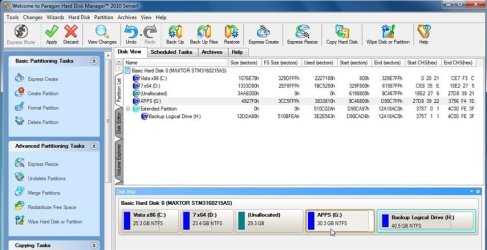
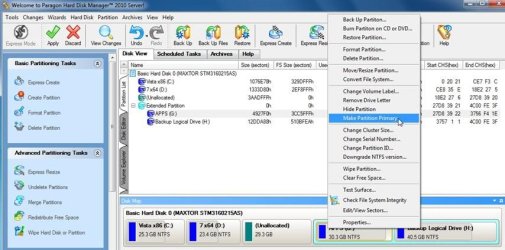
Paragon does it fine for me

MAKEPRIMARY-2010-04-29_221058 (Small).jpg


MAKE-PRIMARY-2-2010-04-29_221207 (Small).jpg

I don't think that function is in the free version - if that's what you are using.
 

My Computers My Computers

System One System Two

  • Computer type
    PC/Desktop
    OS
    7 X64
    CPU
    i5 8400
    Motherboard
    gigabyte b365m ds3h
    Memory
    2x8gb 3200mhz
    Hard Drives
    various
    PSU
    pure power 11 400w cm
    Case
    Coolermaster
    Cooling
    cryorig m9i
  • Computer type
    PC/Desktop
    OS
    7x64
    CPU
    g5400
    Motherboard
    ga b365m ds3h
    Memory
    8gb ddr4 2400
    PSU
    xfx pro 450w
There is another way - d/l the free Macrium Reflect FREE Edition - Information and download it, s very small and fast.

Install it on 7 - run of the LINUX based boot cd - boot it up make sure it sees all your drives.

Boot back into 7. Open an elevated command prompt, type:

bcdboot c:\windows /s c:

then press enter.

close cmd prompt.

Make an image of the 7 partition - store it on the Linux partition - just noticed you don't have space on the Linux partition - store it on an external drive..

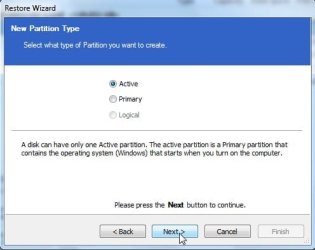
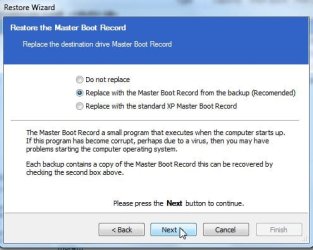
Boot the macrium cd you just made and restore the image to the first partition ( it will overwrite the Vista partition completely). Before it starts the restore - , dot Active- makes it Primary, dot Replace with standard XP mbr.

That's it.

EDIT: Added a couple of screenies to next post
 
Last edited:

My Computers My Computers

System One System Two

  • Computer type
    PC/Desktop
    OS
    7 X64
    CPU
    i5 8400
    Motherboard
    gigabyte b365m ds3h
    Memory
    2x8gb 3200mhz
    Hard Drives
    various
    PSU
    pure power 11 400w cm
    Case
    Coolermaster
    Cooling
    cryorig m9i
  • Computer type
    PC/Desktop
    OS
    7x64
    CPU
    g5400
    Motherboard
    ga b365m ds3h
    Memory
    8gb ddr4 2400
    PSU
    xfx pro 450w
thank you for the detailed advice! As for the 7 image, is that necessary to the steps, or just as an added precaution in case things go bad. I have backed up all the data from the Vista part (which is where i kept most of my data, just pointed to it from 7). I have Acronis if i do need to do the 7 image, tho i haven't used it yet will it do the same thing as Macrium?

I am a little confused by this step "Next rightclick Windows 7 partition>Modify>Convert to Primary, OK. Now apply previous steps so they don't bunch up." What am i repeating or applying? Also, should i wipe the Ubuntu partition before i convert the 7 partition to primary/active?

Is this the Free Partition Wizard you are referring to ... BEST FREE Partition Manager Software for Windows supports all 32-bit & 64 bit Windows No-server OS.

Thanks again!

It's just the Partition Wizard CD allows you to cue up each of the operations before applying them, so if you have a number of operations to apply it is best to split them in two groups. That's all.

having the backup image is your choice as a way to start over if necessary. SIW2 gives you an alternative using Macrium boot CD that might be easier to accomplish what you want by reimaging, which apparently will convert to Primary at the same time.
 
I don't know if Acronis will do it - the handy thing about macrium is it will do it all during the restore.

If you dot Active that automatically restores as a primary.

You get the option to restore the mbr it backed up while making the image - if you want to keep using the Linux partition , it's probably easier to dot that option rather than the standard XP mbr replacement.

MACREST-1-2010-04-30_004428.jpg

MACREST-2-2010-04-30_004517.jpg
 

My Computers My Computers

System One System Two

  • Computer type
    PC/Desktop
    OS
    7 X64
    CPU
    i5 8400
    Motherboard
    gigabyte b365m ds3h
    Memory
    2x8gb 3200mhz
    Hard Drives
    various
    PSU
    pure power 11 400w cm
    Case
    Coolermaster
    Cooling
    cryorig m9i
  • Computer type
    PC/Desktop
    OS
    7x64
    CPU
    g5400
    Motherboard
    ga b365m ds3h
    Memory
    8gb ddr4 2400
    PSU
    xfx pro 450w
thanks guys, i think i'm gonna use @gregrockers approach, it seems like it's within my knowledge range :)

as a side note, i just had an idea but not sure if it's feasible ... my laptop is 64 bit capable, yet i have 32 bit OS's installed. If i were to wipe the Vista (and Ubuntu?) i wonder if i could install the WIndows 7 Pro 64 bit OS i have but haven't decided what to do with yet? Is it possible to dual boot a 7 Pro 32bit and a 7 Pro 64bit at the same time? I just wanted to see if switching to a 64 bit OS will be that big a change (granted, I'll get to use all 4 GB of my RAM so that's a plus) ... and how much of an issue it will be with any of my apps and/or drivers. Just a thought ... Thanks again :)
 

My Computer My Computer

Computer Manufacturer/Model Number
HP Pavilion Laptop
OS
Windows 7 Pro, Vista, & Ubuntu (what is that ... a tri-boot?) :)
CPU
AMD Turion 64X2
Memory
4 GB DDR2
Hard Drives
500 GB (laptop)
500 GB Passport
500 GB My Book

Attachments

  • Capture5.JPG
    Capture5.JPG
    45.3 KB · Views: 1

My Computer My Computer

OS
ME/XP/Vista/Win7
A clean install is surely the best idea here, so now would be a great time to clean install 64 bit to see how you like it.

Do you have the 64 bit DVD? You are entitled to use either 64 bit or 32 bit Win7 with each license, but only one at a time. You could dual boot for the 30 day grace period before activation, but having a clean install now if you want to get rid of Ubuntu would be best.

Be sure to Wipe HD using Partition Wizard CD or the DISKPART commands theog gives above which can be run from DVD Repair console
 
i actually have valid licenses for both the 7 pro 64 bit and another for a 7 pro 32 bit ... that being said, will there still be an issue running both at the same time? hopefully i'll be able to get to this tomorrow or by this weekend, fingers crossed it will all work as planned :)
 

My Computer My Computer

Computer Manufacturer/Model Number
HP Pavilion Laptop
OS
Windows 7 Pro, Vista, & Ubuntu (what is that ... a tri-boot?) :)
CPU
AMD Turion 64X2
Memory
4 GB DDR2
Hard Drives
500 GB (laptop)
500 GB Passport
500 GB My Book
i actually have valid licenses for both the 7 pro 64 bit and another for a 7 pro 32 bit ... that being said, will there still be an issue running both at the same time? hopefully i'll be able to get to this tomorrow or by this weekend, fingers crossed it will all work as planned :)

Just a dual boot,with 2 HD or partitions.
 

My Computer My Computer

OS
ME/XP/Vista/Win7
Back
Top