Removing Ext Hard Drive

Buzz Norton

New member
Local time
12:29 AM
Messages
7
I am new to Windows 7.
In former windows O/S I am accustomed to right clicking the external volume and clicking "Safely Remove" or "Eject" In 7 there does not appear to be the same menu items?
I have simply removed the connection to my ext. HD. Now I am having trouble backing up my data to the same HD?
While on that subject I assumed that after a successful windows back up any subsequent back-ups would be incremental. Is this correct and do I need to do anything more than simply connect the Ext HD when the backup settings are automatic?
Thanks,
Buzz
 

My Computer

OS
Windows 7 Hoe Premium 7
Hi Buzz Norton. :)
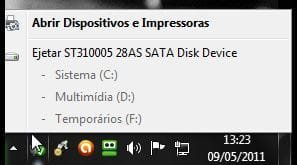
External hard drives must be configured as SATA (AHCI) to enable the use of hot-swap option. This is typically done through the BIOS. On my system works, as you can see below.
 

Attachments

  • Capturar.JPG
    Capturar.JPG
    16.1 KB · Views: 108

My Computer

Computer Manufacturer/Model Number
WALLONN7 / LIN BLACK SERIES II
OS
Windows 7 Ultimate x64 SP1
CPU
AMD PHENOM II X6 1090T 3.2GHz
Motherboard
GIGABYTE GA-890FXA-UD7
Memory
8GB G.SKILL RIPJAWS - F3-10666CL7D
Graphics Card(s)
SAPPHIRE ATI RADEON HD 5870 VAPOR X OC
Sound Card
REALTEK DOLBY HOME THEATER
Monitor(s) Displays
LED LG W2486L
Screen Resolution
1080p
Hard Drives
SEAGATE 1TB -ST31000528AS - AHCI MODE - AS SATA
PSU
ZALMAN ZM1000-HP 1000W
Case
THERMALTAKE XASER VI VG4000SWA
Cooling
140MM x3 / 120MM x1 AIR COOLING - THERMALTAKE
Keyboard
MICROSOFT DIGITAL MEDIA KEYBOARD 3000 - USB
Mouse
MICROSOFT BASIC OPTICAL MOUSE 2.0 - USB
Internet Speed
600KBPS
Other Info
MICROSOFT XBOX 360 CONTROLLER
Dear Wallonn7
Thanks for the suggestion to solve the problem
Buzz
 

My Computer

OS
Windows 7 Hoe Premium 7
Safely Remove Hardware is in the System tray, not rightclick context menu.

If it was damaged in some way by unsafely removing I would run Disk Check on it, then if necessary move the data off to reformat.
 

My Computer

Computer Manufacturer/Model Number
WALLONN7 / LIN BLACK SERIES II
OS
Windows 7 Ultimate x64 SP1
CPU
AMD PHENOM II X6 1090T 3.2GHz
Motherboard
GIGABYTE GA-890FXA-UD7
Memory
8GB G.SKILL RIPJAWS - F3-10666CL7D
Graphics Card(s)
SAPPHIRE ATI RADEON HD 5870 VAPOR X OC
Sound Card
REALTEK DOLBY HOME THEATER
Monitor(s) Displays
LED LG W2486L
Screen Resolution
1080p
Hard Drives
SEAGATE 1TB -ST31000528AS - AHCI MODE - AS SATA
PSU
ZALMAN ZM1000-HP 1000W
Case
THERMALTAKE XASER VI VG4000SWA
Cooling
140MM x3 / 120MM x1 AIR COOLING - THERMALTAKE
Keyboard
MICROSOFT DIGITAL MEDIA KEYBOARD 3000 - USB
Mouse
MICROSOFT BASIC OPTICAL MOUSE 2.0 - USB
Internet Speed
600KBPS
Other Info
MICROSOFT XBOX 360 CONTROLLER
I am new to Windows 7.
In former windows O/S I am accustomed to right clicking the external volume and clicking "Safely Remove" or "Eject" In 7 there does not appear to be the same menu items?
I have simply removed the connection to my ext. HD. Now I am having trouble backing up my data to the same HD?
While on that subject I assumed that after a successful windows back up any subsequent back-ups would be incremental. Is this correct and do I need to do anything more than simply connect the Ext HD when the backup settings are automatic?
Thanks,
Buzz

What type of connection to the external hard drive? USB, eSATA, Firewire?
 

My Computer

Computer type
PC/Desktop
Computer Manufacturer/Model Number
Home built (GeneO industries)/Model 4
OS
Windows 10 Pro. EFI boot partition, full EFI boot
CPU
i7 4770k 4.4GHz (44-44-43-43 turbo) @ 1.248V
Motherboard
ASUS Maximus VI Hero
Memory
16GB (8GBx2) @2200 MHz G.skill Sniper 10-11-10-30-1, 1.6V
Graphics Card(s)
MSI GTX 970 Gaming 4G
Sound Card
Onboard SupremeFX Audio
Monitor(s) Displays
NEC Spectraview 2490WUXi-SV
Screen Resolution
1920 x 1200
Hard Drives
Samsung 850 Pro 256GB (OS), Samsung 2x 128GB 840 Pro SSD in RAID0, 3x WD Blue 6Gb/s 1TB RAID0, WD 2TB Black external USB 3.0, 2TB WD20EARS Green external USB 3.0, 2x 500GB Seagate and 1 750 GB external USB, 1x 350GB external USB3
PSU
Seasonic X-850 (2012 KM3 model)
Case
Fractal Design Define R4
Cooling
NH-D14, NF-F12, NF-A15; NF-P14, NF-P12,NF-A14, S12A PWM
Keyboard
Cooler Master Storm Quickfire Rapid - Brown
Mouse
Logitech G602
Internet Speed
126.4 Mb/s down, 24.3 Mb/s up
Other Info
USB 3.0 x8 , SATA III x8, eSATA, USB 2.0 x6. Samsung DVD R/W drive.

WEI: CPU 7.8, Memory 7.9, Graphics 7.9, Disk 7.9
Back
Top