Removing Font Groups in Windows 7

defwad7

New member
Local time
8:07 AM
Messages
2
Hello,

I am wondering if there is a way to ungroup families of Fonts in Windows 7.
I have some font styles that were not grouped in XP, and now in Windows 7 these styles (wide, wide oblique) are now grouped with another variant of the font and are unselectable or unusable in Windows 7. I know it is an issue with the software manufacturer, but I'm wondering if there's a workaround to separate these different styles to see if they can be salvaged.
I checked the Font Manager, but no option exists for separating styles.
Thanks!
 

My Computer

OS
Windows 7
Hiya Pal, and welcome to the Seven Forums.

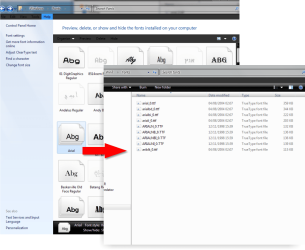
You can ungroup the families by copying the font group from the "Windows Font Folder" into a new folder, this then breaks them up and allows you to install each font variant individually. ;)
 

Attachments

  • fonts.png
    fonts.png
    82.5 KB · Views: 129
Last edited:

My Computer

Computer type
PC/Desktop
Computer Manufacturer/Model Number
Self Built
OS
Windows 7 Ultimate 64bit
CPU
AMD Phenom Quad core 9950 black edition
Motherboard
Gigabyte
Memory
16Gb
Graphics Card(s)
2x XFX Radeon 5850
Sound Card
PCI Express X-Fi Titanium / Logitech G35
Monitor(s) Displays
2x HP 2410i
Screen Resolution
1920x1080
Hard Drives
2x 500Gb Seagate
1x 300Gb Seagate
1x 1Tb Seagate
2x 1Tb Hitatchi
PSU
Jean Tech Storm 700W
Case
Cooler Master COSMOS S
Cooling
Akasa Evo Blue Pro
Keyboard
Logitech G15
Mouse
Mad Catz M.M.O. 7
Internet Speed
12mb
It sounds like I have the exact same problem as defwad7, but I tried the above method, to no avail.

PooMan UK, could you please be more specific about your solution? Where does one create the new folder? I created a new folder on the desktop, copied my font group there, then tried reinstalling them, but they still showed up as a group in the Font folder. From what I can tell, Windows 7 does not allow for the creation of an additional folder within the main font folder, if that's what you were suggesting. A specific step-by-step/for dummies edition of a fix for this problem would be greatly appreciated!

Thank you!
 

My Computer

OS
Windows 7
Hello,

I am wondering if there is a way to ungroup families of Fonts in Windows 7.
I have some font styles that were not grouped in XP, and now in Windows 7 these styles (wide, wide oblique) are now grouped with another variant of the font and are unselectable or unusable in Windows 7. I know it is an issue with the software manufacturer, but I'm wondering if there's a workaround to separate these different styles to see if they can be salvaged.
I checked the Font Manager, but no option exists for separating styles.
Thanks!

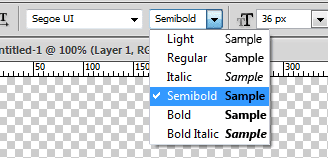
It sounds like your problem is something completely different...the grouping the fonts is just a visual occurrence. It would not make fonts unusable or unselectable. Normally what you would do with a family is select "Bold", "Italic" from the options and the system would pull the correct variation. For example in Photoshop selecting a font family, next to the drop down is another with a list of variations of that font.
 

Attachments

  • Untitled-1.png
    Untitled-1.png
    4.3 KB · Views: 4

My Computer

Computer type
PC/Desktop
Computer Manufacturer/Model Number
Alienware Aurora ALX R4
OS
Windows 10 Pro (x64)
CPU
Intel Core i7-3930K (3.2GHz - 4.5GHz)
Motherboard
Alienware Aurora-R4 x79
Memory
4x Samsung 4GB PC3-12800 DDR3 (16GB 1600MHz)
Graphics Card(s)
Nvidia Geforce GTX 690
Sound Card
SteelSeries Siberia Elite
Monitor(s) Displays
Dell UltraSharp U3011
Screen Resolution
2560x1600
Hard Drives
Samsung 850 Pro 256 GB, Seagate 1TB Desktop Hybrid HDD, 2x Western Digital 4TB Green HDD
PSU
875W Some Dell PSU <.<
Case
Alienware Aurora ALX
Cooling
Custom Liquid Cooling (EK CPU & GPU blocks) dual EK 480RAD
Keyboard
Logitech G710+ Mechanical
Mouse
Logitech G700s
Internet Speed
Verizon Fios (50 mbps average)
Other Info
Server: Intel NUC D54250WYK: i5-4250U, 16GB, 256 GB mSATA, Windows Server 2012 R2
I think the font groupings might be more than just a visual occurrence (read on), although my specific problem lies within a very specific program, namely Finale 2010 (music notation). I am already in contact with their support team, and will hopefully hear from them again tomorrow. If anybody has this specific program and problem, please let me know! Finale's tech support hadn't heard of this problem:

In some of Finale's font selection menus, there is no difficulty selecting fonts that are listed individually, in a drop-down list like the one in the screenshot above. However, most of the font selection menus in the program are different for some reason (different menus for different tools, etc.), and group similar fonts together, distinguishing between particular variants of that font only in the "style" pane of the dialog box--e.g., "bold," "italic," and the like. The most common styles like bold and italic work fine, but there are many fonts (including the main music fonts) with less common variants, such as "book italic" or "wide."

Here's my problem: when I select those less common styles, the font preview in the dialog box displays the correct font, but once I exit out of the dialog box only the main "default" font of that font group displays.

Thus, about half my fonts are useless in Finale 2010. My guess is that this is mostly a bug within Finale 2010 (which I hope their tech support will be able to fix soon!), but it seems like the Windows 7 font groupings have something to do with it in some way, since there was never any problem like this in XP.

FYI, fonts seem to work normally in Word, Photoshop, etc.

Any thoughts?
 

My Computer

OS
Windows 7
My guess is that this is mostly a bug within Finale 2010...

Mostly? A bug of just Finale I must say. Font families have always been grouped, even in Windows XP. The only difference now is Windows 7 has a bit more power in font management, and in its presentation. There are several variations of Arial but they all show up as "Arial" (aside from a few special versions.)

So you must pester the makers of Finale 2010 for a fix, there software is what is broken here.
 

My Computer

Computer type
PC/Desktop
Computer Manufacturer/Model Number
Alienware Aurora ALX R4
OS
Windows 10 Pro (x64)
CPU
Intel Core i7-3930K (3.2GHz - 4.5GHz)
Motherboard
Alienware Aurora-R4 x79
Memory
4x Samsung 4GB PC3-12800 DDR3 (16GB 1600MHz)
Graphics Card(s)
Nvidia Geforce GTX 690
Sound Card
SteelSeries Siberia Elite
Monitor(s) Displays
Dell UltraSharp U3011
Screen Resolution
2560x1600
Hard Drives
Samsung 850 Pro 256 GB, Seagate 1TB Desktop Hybrid HDD, 2x Western Digital 4TB Green HDD
PSU
875W Some Dell PSU <.<
Case
Alienware Aurora ALX
Cooling
Custom Liquid Cooling (EK CPU & GPU blocks) dual EK 480RAD
Keyboard
Logitech G710+ Mechanical
Mouse
Logitech G700s
Internet Speed
Verizon Fios (50 mbps average)
Other Info
Server: Intel NUC D54250WYK: i5-4250U, 16GB, 256 GB mSATA, Windows Server 2012 R2
Thanks for the replies.
Yes, the issue would be within the 3rd party software, but I was just looking for a workaround. In XP, certain styles such as wide or wide oblique actually showed up as separte fonts in the program (not grouped in with styles like bold, etc) and were selectable this way.
I thought if I could separate these styles in Windows 7 they would re-appear as they did in XP and function as they did there as well.
Thanks again!
 

My Computer

OS
Windows 7
Back
Top